
Why MBA Presentations Take So Long
Business school demands a relentless pace of presentations. Between case study analyses, strategy frameworks, financial modeling reviews, and group project deliverables, MBA students and professors often spend more time formatting slides than developing insights.
A typical MBA course might require a SWOT analysis on Monday, a Porter's Five Forces breakdown on Wednesday, and a full competitive strategy deck by Friday. Each one needs professional formatting, clear data visualization, and a logical flow that demonstrates analytical rigor.
The challenge is not a lack of content — it is the gap between having strong business analysis and turning it into a presentation that communicates that analysis effectively.
What Makes an Effective MBA Presentation
Strong MBA presentations share several characteristics that set them apart from generic slide decks:
Structured analytical frameworks. Business school audiences expect to see recognized frameworks — SWOT, PESTEL, BCG Matrix, Porter's Five Forces, Value Chain Analysis — presented in their standard format. A slide that dumps four bullet points under "Strengths" misses the visual clarity that a proper quadrant layout provides.
Data-driven arguments. Claims need supporting evidence. Whether it is market size figures, financial ratios, or competitive benchmarks, the data should be visible on the slide, not buried in speaker notes.
Clear strategic recommendations. Every MBA presentation builds toward a recommendation. The slide structure should guide the audience from situation analysis through alternatives to a justified conclusion.
Professional but not flashy design. Business school presentations should look polished without being distracting. Clean typography, consistent color schemes, and readable charts matter more than animations or decorative elements.
Creating MBA Slides with ChatSlide
ChatSlide understands business education contexts. When you specify a topic like "SWOT Analysis for Market Entry Strategy" with an academic audience, the AI structures slides around the frameworks your audience expects to see.
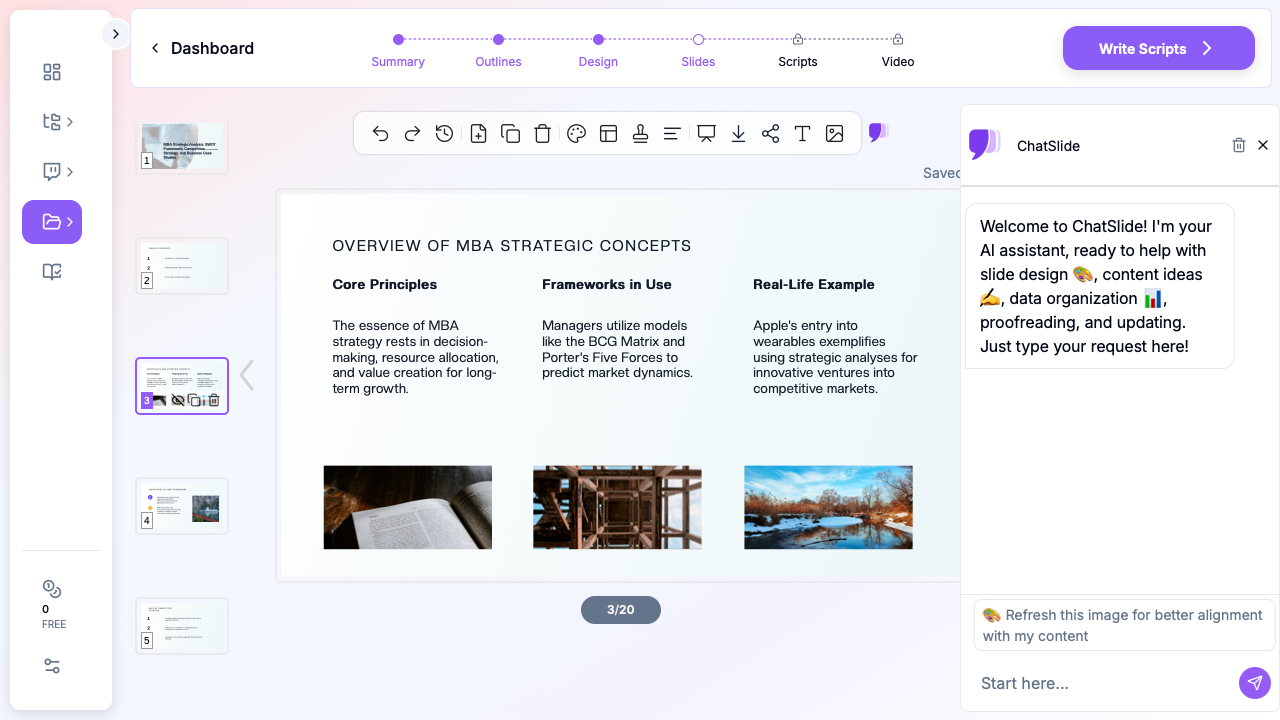

Here is how to build an MBA presentation from a topic or uploaded document:
Step 1: Define your topic and scenario. Enter your presentation topic — whether it is a case study analysis, strategy framework lecture, or group project deliverable. Select "Education" as the scenario type to get academic-appropriate formatting.
Step 2: Review and refine the outline. ChatSlide generates a structured outline based on your topic. For an MBA presentation, you will typically see sections covering background, framework application, analysis, findings, and recommendations. Edit the outline to match your specific requirements — add a section for financial projections or remove one that does not apply to your case.
Step 3: Generate slides with appropriate depth. The generated slides include content at a level appropriate for business school audiences. Framework slides use proper layouts rather than plain bullet lists. Data-heavy sections include placeholders for charts and figures.
Step 4: Upload supporting documents. If you have a case study PDF, market research report, or financial spreadsheet, upload it directly. ChatSlide extracts relevant data points and incorporates them into your slides, saving you from manually copying figures between documents.
Step 5: Customize with the AI assistant. Use the built-in chat to refine specific slides. Ask it to "add a competitor comparison table" or "restructure this slide as a 2x2 matrix" and the AI modifies the content in place.
Common MBA Presentation Types
Case Study Analysis
Case study presentations follow a predictable structure: company background, problem identification, analysis using one or more frameworks, alternative solutions, recommendation, and implementation plan. ChatSlide generates this structure automatically when given a case study topic, producing slides that match the format professors expect.
Strategy Framework Lectures
If you are teaching or presenting on strategic frameworks, the challenge is making abstract concepts concrete. ChatSlide pairs framework definitions with real-world application examples, creating slides that show both the theory and its practical use.
Financial Review Presentations
Quarterly results, investment analyses, and financial modeling presentations need clean data layouts. Upload your Excel file or PDF report and let ChatSlide structure the financial data into readable slides with appropriate chart types.
Group Project Deliverables
MBA group projects often suffer from inconsistent slide formatting when different team members contribute sections. Starting from a ChatSlide-generated template ensures visual consistency across the entire deck, even when multiple people add content.
Tips for MBA Presentations
Lead with the recommendation. In business contexts, audiences expect the conclusion upfront. Structure your deck so the key takeaway appears early, with supporting analysis following.
Use the "so what" test. For every slide, ask whether the audience can immediately understand why this information matters. If a slide presents data without interpretation, add a one-line insight that connects the data to your argument.
Keep framework slides visual. A SWOT analysis should look like a quadrant, not a bulleted list. A BCG Matrix should be a proper 2x2 grid with plotted positions. ChatSlide generates these visual layouts automatically, but verify they match the standard format your professor expects.
Limit text per slide. Business school audiences read ahead. If your slides contain paragraphs, people will read instead of listening. Aim for key phrases and data points on slides, with detailed explanations in your delivery.
Practice with speaker notes. ChatSlide can generate speaker notes for each slide using the Scripts feature. This is particularly useful for group presentations where different members need to know what to say for their assigned sections.
From Analysis to Presentation in Minutes
The hours MBA students spend on slide formatting are hours not spent on analysis, networking, or sleep. ChatSlide compresses the formatting step so you can focus on what business school actually evaluates — your strategic thinking.
Whether you are preparing a case study for class, building a consulting-style deliverable for a group project, or creating lecture slides for a business course, ChatSlide produces MBA-appropriate presentations that start from your content rather than a blank template.
Try ChatSlide for your next MBA presentation — upload a case study, enter a framework topic, or describe your analysis, and have presentation-ready slides in minutes.