
Quick Answer: A strong case study presentation follows a 7-section arc: (1) Company & industry context, (2) Strategic problem, (3) Framework analysis (Porter's Five Forces, SWOT, or PESTEL), (4) Data visualization of key metrics, (5) Strategic alternatives, (6) Recommendation with rationale, (7) Implementation & risks. Aim for 12–18 slides for a 15-minute case (Harvard format). ChatSlide takes your case write-up or research doc and produces this structure automatically, with auto-generated SWOT/Porter diagrams from the source content.
The Case Study Presentation Problem
Case study presentations sit at the intersection of analysis and storytelling. You need to distill complex business situations — market dynamics, competitive forces, financial data, strategic decisions — into a narrative that an audience can follow and learn from.
Whether you're a business student preparing a Harvard Business School case analysis, a consultant presenting findings to a client, or a professor building lecture materials around real-world examples, the challenge is the same: turning dense analytical work into clear, visual slides takes far longer than the analysis itself.
A typical case study presentation requires company background, industry context, problem identification, framework application (Porter's Five Forces, SWOT, PESTEL), data visualization, strategic alternatives, and a recommendation. Building this manually means hours of formatting tables, creating charts, sourcing images, and arranging content — time that should go toward the analysis, not the slides.
What Makes a Strong Case Study Presentation
The best case study presentations share several qualities that generic slide decks lack:
Narrative structure that mirrors analytical thinking. A case study isn't a report — it's a story with a setup (company and industry context), a conflict (the strategic challenge), a turning point (analysis and alternatives), and a resolution (recommendation). Your slides need to follow this arc.

Data density without clutter. Case studies live and die by the numbers — market size, growth rates, competitive share, financial ratios. But cramming a spreadsheet onto a slide doesn't communicate anything. The best presentations extract the three or four data points that matter and present them visually.
Framework visualization. SWOT matrices, Porter's Five Forces diagrams, value chain analyses, and BCG matrices are the vocabulary of case study analysis. They need to look professional and be immediately readable.
Clear recommendation with supporting logic. The audience should be able to follow your reasoning from problem to solution without mental gymnastics.
Step-by-Step: Building a Case Study Deck with ChatSlide
1. Define Your Case Scope
Start with specificity. Instead of "Company X Case Study," describe the analytical focus:
- For MBA coursework: "Market Entry Strategy Analysis: [Industry] Platform — Business Model, Competitive Landscape, and Growth Strategy for [Region]"
- For consulting presentations: "Strategic Review: [Client] Digital Transformation — Current State Assessment, Gap Analysis, and Implementation Roadmap"
- For teaching materials: "Case Discussion: [Company] — How First-Mover Advantage Shaped Market Dominance in [Industry]"
In ChatSlide, enter your topic with enough detail that the AI understands the analytical framework you're using. Specifying your audience — MBA students, senior executives, board members — shapes the depth and vocabulary of the generated content.
2. Choose the Right Scenario Type
For case study presentations, the Education > Lecture scenario works well for academic case analyses. For consulting-style case presentations, General works better since it allows more flexible structuring.
Set your section count to 6-8 sections for a comprehensive case analysis:
- Company/industry overview
- Problem statement or strategic question
- External environment analysis
- Internal capabilities assessment
- Strategic alternatives
- Recommendation and implementation
3. Refine the Generated Structure
The AI produces an outline with sections and subpoints. For a market entry case study, you might see sections covering market overview, competitive dynamics, business model analysis, SWOT assessment, growth strategies, and recommendations.
Review the outline for analytical completeness. Does it cover both external and internal factors? Does it move from descriptive (what happened) to analytical (why it matters) to prescriptive (what should be done)?
4. Add Visual Depth with Images
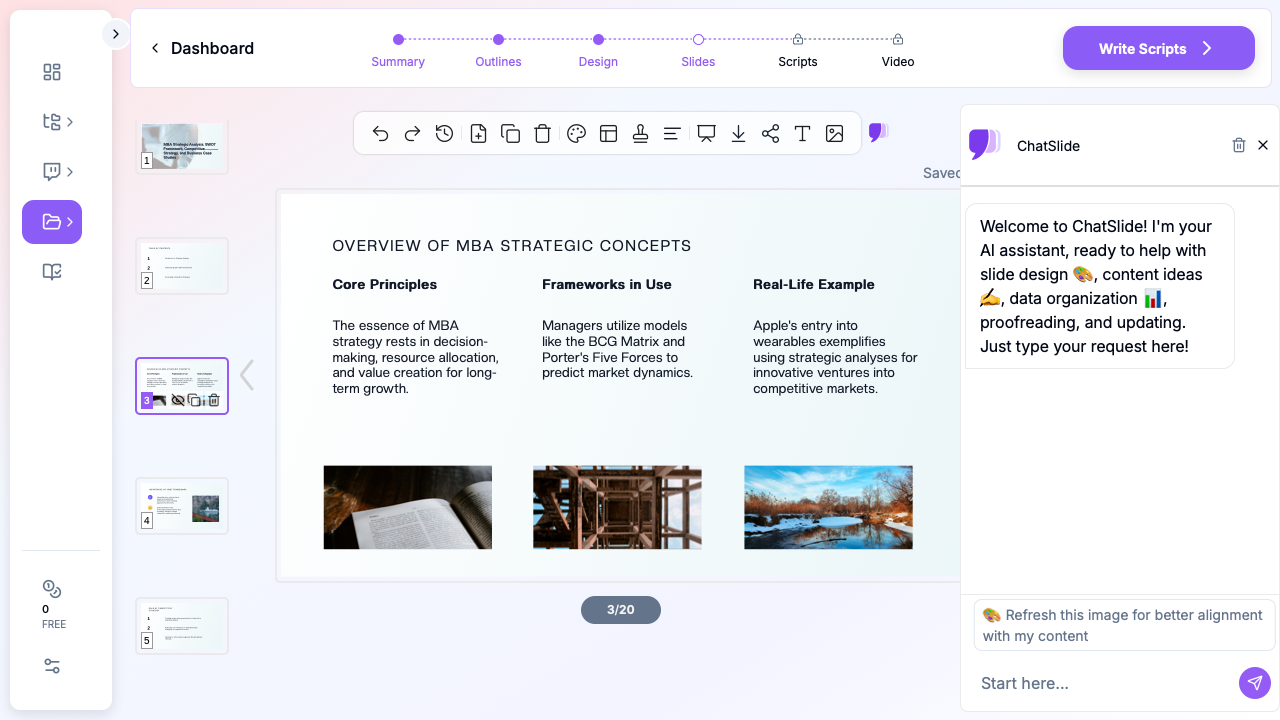
Case study slides benefit from contextual imagery — industry photos, product screenshots, market maps, and conceptual visuals. ChatSlide's image integration pulls relevant stock photography that adds visual context without the generic clip-art feel.
For data-heavy slides, the AI generates structured layouts that accommodate bullet points, key metrics, and comparison tables without overwhelming the viewer.
5. Customize for Your Audience
A case study presentation for a professor evaluating your analytical rigor needs different emphasis than one for a client who wants actionable recommendations:
- Academic audience: Emphasize framework application, cite specific models by name, show your analytical methodology
- Executive audience: Lead with the recommendation, support with key data points, minimize theoretical framework discussion
- Peer audience (study group, team): Balance depth with engagement, include discussion prompts, highlight debate-worthy assumptions
Common Case Study Presentation Formats
The Harvard Case Method Format
This classic format follows the structure most MBA programs use:
- Situation summary (1-2 slides) — Company, industry, and the decision point
- Key issues identification (1 slide) — The 2-3 core strategic questions
- Analysis (3-5 slides) — Framework application with supporting data
- Alternatives (2-3 slides) — Each option with pros, cons, and feasibility
- Recommendation (1-2 slides) — Your pick, with implementation steps and risk mitigation
The Consulting Case Format
Consulting presentations follow the pyramid principle — conclusion first, supporting logic underneath:
- Executive summary (1 slide) — Recommendation and expected impact
- Situation assessment (2-3 slides) — Current state with key metrics
- Analysis deep-dive (3-5 slides) — Evidence supporting the recommendation
- Implementation roadmap (2-3 slides) — Timeline, resources, milestones
- Risk and mitigation (1 slide) — What could go wrong and how to handle it
The Competitive Analysis Format
For case studies focused on market positioning and competitive dynamics:
- Market overview (1-2 slides) — Size, growth, key segments
- Competitive landscape (2-3 slides) — Major players, market share, positioning maps
- Company deep-dive (2-3 slides) — Business model, value proposition, revenue streams
- Competitive advantages (2 slides) — What differentiates the subject company
- Strategic outlook (1-2 slides) — Threats, opportunities, recommended moves
Tips for Stronger Case Study Presentations
Start with the "so what." Before building slides, write one sentence that captures your core insight. If you can't articulate it in one sentence, your analysis isn't focused enough yet. Every slide should connect back to this central argument.
Use the 3-slide rule for data. If you have ten data points supporting a claim, don't show all ten. Pick the three most compelling ones, visualize them clearly, and mention the rest verbally. Slides are for evidence highlights, not evidence dumps.
Name your frameworks explicitly. When you apply Porter's Five Forces or a PESTEL analysis, label it. This signals analytical sophistication and helps the audience follow your methodology.
Build comparison tables, not comparison paragraphs. Strategic alternatives are easier to evaluate side by side than in sequential text. ChatSlide's structured layouts handle comparison formats well.
End with actionable next steps. A recommendation without implementation steps is an opinion. Include timeline, resource requirements, and success metrics.
Common Mistakes in Case Study Presentations
Even strong analysts produce weak case study presentations when they fall into these patterns:
The data dump. Copying every table from your analysis into the slides. Your audience doesn't need to see every market sizing assumption — they need to see the conclusion and the two or three data points that make it credible.
Missing the "compared to what" context. A market growing at 12% sounds impressive until the audience learns the industry average is 18%. Always provide benchmarks, comparisons, or context that helps the audience calibrate significance.
Burying the recommendation. Some presenters save their recommendation for the final slide, forcing the audience to sit through 15 minutes of analysis without knowing where the argument is heading. The consulting pyramid principle exists for a reason — state your conclusion early, then support it.
Ignoring implementation feasibility. A theoretically optimal strategy that requires capabilities the company doesn't have isn't a useful recommendation. Address implementation constraints — budget, timeline, organizational readiness — even if your audience hasn't asked.
Generic SWOT analysis. Every company has strengths and weaknesses. A useful SWOT goes beyond generic observations ("strong brand" as a strength, "competition" as a threat) and identifies specific, actionable factors that drive the recommendation.
Who Uses Case Study Presentations
Case study presentations span industries and roles:
- MBA and business students analyzing real companies for coursework and competitions
- Management consultants presenting strategic recommendations to clients
- Corporate strategists reviewing competitive moves and market entry opportunities
- Professors and instructors building teaching cases for classroom discussion
- Sales teams using customer success stories as case studies for prospects
- Product managers analyzing competitor product launches and market responses
Each audience benefits from the same core structure — situation, analysis, recommendation — but with different emphasis and depth.
Get Started
Building a case study presentation doesn't have to mean hours of formatting. ChatSlide turns your analytical framework and topic into a structured, professional deck with relevant imagery — so you can spend your time on the analysis that matters, not the slides that present it.
Try it at chatslide.ai — describe your case study topic, specify your audience, and generate a complete presentation in minutes. Then refine, add your specific data points, and present with confidence.