
Quick Answer: ChatSlide is an AI carousel post maker that turns a topic, a document, or an article into a full multi-slide swipe post in under two minutes. It has a dedicated Social Post mode with a portrait canvas, three carousel styles (Casual Topic, Serious Subject, Quote Sharing), automatic stock imagery, and one-tap export as a numbered PNG set for Instagram or a single PDF for a LinkedIn document post. Free to start, no card required.
The Carousel Problem
Carousels are the highest-effort format in social. A single swipe post is eight to ten individually designed frames that have to share one visual system, carry a hook on frame one, break a single idea across the middle frames, and land a call to action at the end. Written well it outperforms almost everything else in the feed. Written on a Tuesday night in a generic design tool, it takes two hours you did not have.
The friction is not the writing. It is that the writing and the design are two separate jobs, and most tools only help with one. A design tool gives you a blank portrait frame and no words. A writing tool gives you words and no frames. So the actual work — chunking one idea into eight slides that each stand alone while pulling the reader to the next — falls entirely on you, every single post, for as long as you publish.
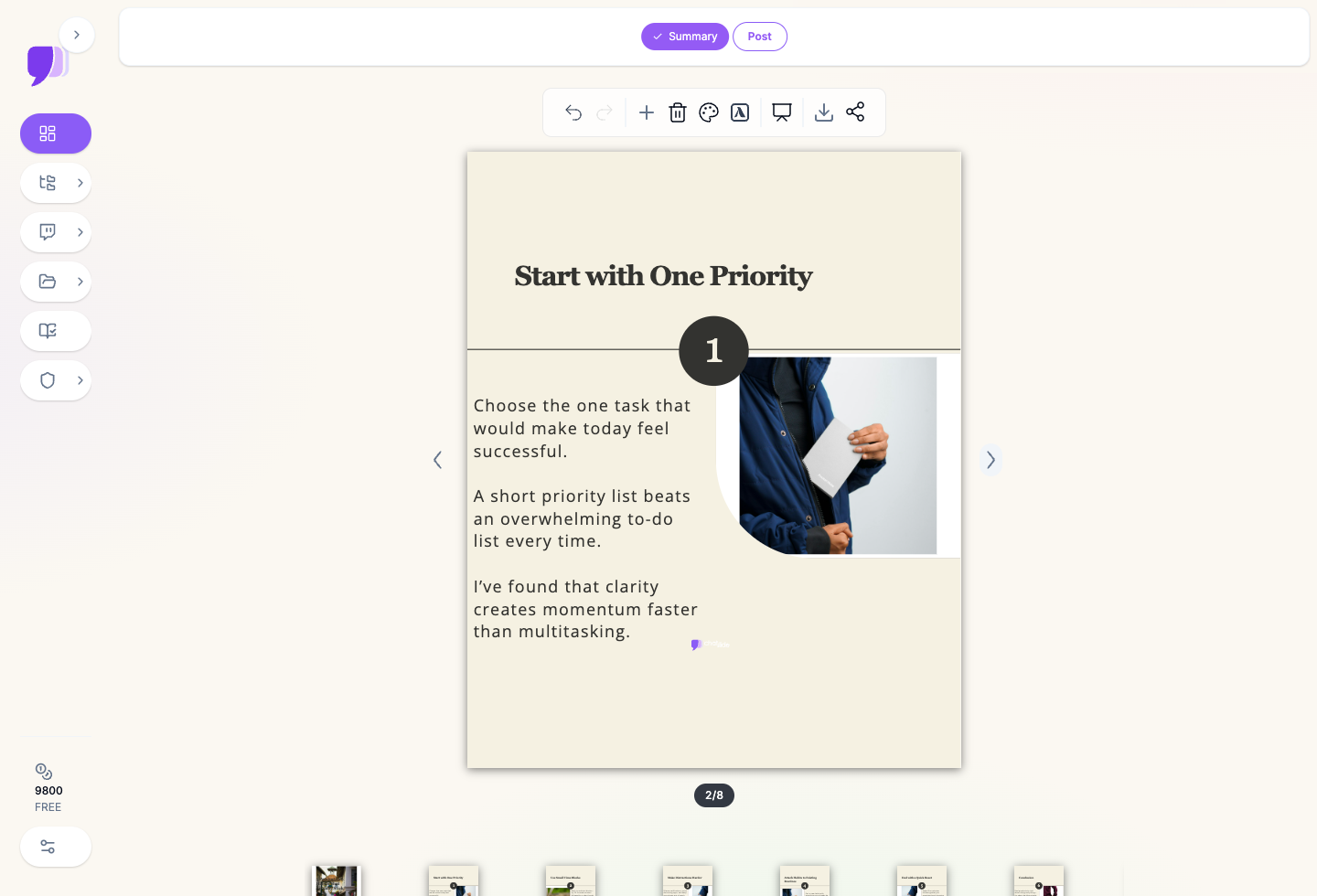
What Makes ChatSlide Powerful for Carousels
A Real Portrait Canvas, Not a Cropped Slide
Social Post mode is a separate workflow from presentations, built on a portrait canvas sized for the feed rather than a 16:9 slide squeezed into a square. Layouts, type scale, and image crops are all designed for a phone screen held vertically.
Three Carousel Styles
Pick the register before a word is written:
- Casual Topic — image-forward, conversational, the everyday educational swipe post.
- Serious Subject — text-dense and restrained, for analysis, research summaries, and industry commentary.
- Quote Sharing — pull-quote frames for book notes, talk takeaways, and client testimonials.
One Idea, Automatically Chunked
Give it a topic line — "5 productivity habits that actually stick" — and the AI does the part that actually takes the time: splitting one idea into numbered frames, each with a standalone headline and two or three short lines of body copy, in a sequence that reads as a build rather than a list of fragments.
Turn Long Content Into a Carousel
Upload a PDF, a blog draft, a report, a transcript, or a set of meeting notes and the AI reads the source and compresses it into swipeable frames. This is the highest-leverage use of the feature: one long-form asset you already published becomes a week of social posts instead of a link nobody clicks. Text extraction handles scanned documents too, so an older PDF still works as a source.
Automatic Imagery and Themes
Each frame is paired with relevant stock photography and an illustration set, on a theme with coordinated cover, border, and accent colors. Change the theme once and every frame in the carousel follows.
Editable Everywhere
Every headline, body line, image, and number is editable in place. The AI draft is a starting point, not a locked template — rewrite a hook, swap a photo, drop a frame, reorder the sequence.
Export That Matches How Each Platform Ingests Carousels
- Instagram, TikTok, X — download the whole carousel as a ZIP of numbered PNG files,
page-1.pngthroughpage-n.png, in swipe order. Upload the folder, keep the order, done. - LinkedIn — download a single multi-page PDF at the same portrait dimensions and attach it as a document post, which is exactly the format LinkedIn's native carousel expects.
How ChatSlide Builds Your Carousel
- Pick a style — Casual Topic, Serious Subject, or Quote Sharing.
- Give it a source — type a topic line, or upload the PDF, doc, or article you want repurposed.
- Generate — the AI writes and lays out the full swipe sequence, cover through closing frame, with images already placed.
- Edit and export — adjust copy and theme, then download the PNG set or the PDF.
Use Cases
The creator repurposing long-form. You publish a newsletter or a video every week and know you should be cutting it into carousels, and never do. Upload the transcript or the draft, pick Serious Subject, get eight frames. The bottleneck was never the ideas.
The founder posting on LinkedIn. Text-only posts plateau. A PDF carousel with your actual framework in it earns saves and shares that a paragraph does not. Type the framework as a topic line, export the PDF, attach it.
The educator building study content. Teachers, tutors, and course creators use the Quote Sharing and Serious Subject styles to turn a lesson or an exam topic into a study carousel students actually swipe through, then reuse the same source to generate a full presentation for class.
The podcaster promoting an episode. One episode transcript becomes a teaser carousel: the hook question on frame one, the three best points in the middle, the listen-here call to action on the last frame.
Carousels for marketing teams. Social calendars are volume work — many posts, many people, one brand. Teams run the same source library through shared themes so every carousel a different person publishes still reads as the same brand, instead of eight slightly different interpretations of the brand guidelines.
Carousel Tools Compared (2026)
| ChatSlide | Canva | Gamma | Manual design | |
|---|---|---|---|---|
Writes the copy for you | Yes, chunked into frames | No, templates only | Partially, deck-oriented | No |
Dedicated portrait social mode | Yes | Yes | No, 16:9 deck | n/a |
Long document → carousel | Yes, PDF/doc/transcript upload | No | Partially | No |
PNG set export in swipe order | Yes, numbered ZIP | Manual, per frame | No | Manual |
Single PDF for LinkedIn | Yes | Yes | Yes | Yes |
Free tier | Yes | Yes | Yes | n/a |
Time Comparison: Manual vs. AI-Assisted
| Task | Manual | With ChatSlide |
|---|---|---|
Deciding the frame-by-frame structure | 20–30 min | Automatic |
Writing eight frames of copy | 30–45 min | Automatic |
Sourcing and cropping images | 20–30 min | Automatic |
Applying a consistent visual theme | 15–20 min | One click |
Editing and refining | 15 min | 10–15 min |
Exporting in the right format | 10 min | One click |
Total | ~2 hours | ~15 minutes |
What a Strong Carousel Actually Contains
The tool handles the layout. These are the things that decide whether the post works:
- A frame-one hook that creates an open loop. A question with a non-obvious answer, a claim that contradicts the default belief, or a number specific enough to be credible. "Most people get this wrong" is a hook. "Tips for productivity" is a label.
- One idea per frame. If a frame needs two headlines, it is two frames. The format's whole advantage is that each swipe is a single beat.
- Numbers on the frames. Readers use the counter to decide whether to commit. A visible "1", "2", "3" measurably increases the odds someone reaches the end.
- Standalone headlines. Someone will screenshot frame five and share it with no context. It should still make sense.
- Short body copy. Two to three lines. A carousel frame is read in about a second and a half; a paragraph does not survive that.
- A last frame that asks for exactly one thing. Save, follow, comment, or click — not all four.
- A consistent visual system. Same type scale, same accent color, same image treatment across every frame. Inconsistency reads as low effort even when the writing is good.
Best Practices
Do:
- Write the hook yourself even when the AI drafts everything else. It is the one frame that decides the reach of all the others.
- Aim for 7 to 10 frames. Shorter reads thin, longer loses people mid-swipe.
- Repurpose one strong long-form asset rather than inventing a new topic each week.
- Read the whole carousel on a phone before posting. Type that looks fine on a laptop can be unreadable in the feed.
Don't:
- Post the AI draft unedited. It is a structure and a first pass at the words, not your voice.
- Put the call to action on every frame. It reads as a pitch and people stop swiping.
- Reuse the same cover image across a series — the feed shows frame one, and a repeated cover looks like a repeated post.
- Crop a 16:9 presentation into a square and call it a carousel. The layouts do not survive it, which is why Social Post mode exists as a separate canvas.
Carousels for Teams and Organizations
If several people publish under one brand — a marketing team, an agency running client accounts, a university department, a multi-location business — Enterprise adds SSO, centralized team billing, shared brand templates, and team collaboration on a shared source library, so a carousel published by any team member carries the same visual system. Contact us to talk through team setup. Individuals stay on the free tier.
Frequently Asked Questions
What size are the carousel frames? Portrait, 3:4. That posts cleanly as an Instagram carousel and is well within LinkedIn's document-post range. If you need an exact 4:5 or 1:1 crop for a specific placement, export the PNG set and crop it.
How do I post the result on LinkedIn? Download the PDF export and attach it to a LinkedIn post as a document. LinkedIn renders multi-page PDFs as a native swipeable carousel — no separate tool needed.
How do I post it on Instagram? Download the PNG export. You get a ZIP of numbered images in swipe order; select them all in the Instagram composer and they upload as a multi-image carousel.
Can it turn my blog post or PDF into a carousel? Yes, and this is the fastest path to a good one. Upload the file as a source and the AI reads it and compresses it into frames rather than writing from scratch. Documents, PDFs, transcripts, and notes all work.
Can I edit the AI's copy? Every headline, body line, and image is editable in place, and you can reorder, add, or delete frames.
Do the frames have to be in English? No. Set the language before generating and the carousel is written in it.
Is it free? Yes, there is a free tier with no card required. Paid plans add higher generation limits and the more capable AI models.
Can I make a full presentation from the same material? Yes. The same uploaded sources can generate a standard 16:9 presentation, so a lesson or a report can become both a carousel and a deck without re-uploading anything.
Get Started
Pick a piece of long-form content you already published — a post, a report, a transcript — and turn it into a carousel instead of writing a new one. Choose a style, upload the file, and export the PNG set or the PDF.
Make your carousel with ChatSlide — free to start, no credit card required.