Quick Answer: A solid EMS training deck covers 6 modules: (1) Scene safety + BSI/PPE, (2) Patient assessment — primary survey (ABCDE) + secondary survey, (3) Protocol focus (cardiac arrest, stroke, OB, pediatric, or trauma — pick one), (4) Skill station / hands-on drill, (5) Documentation standards (PCR fields, NEMSIS v3.5 elements), (6) Case review + debrief. Target 12–18 slides for a 60-minute session. ChatSlide imports your agency protocol PDF or NEMSIS data and produces the module structure with auto-generated decision trees and ECG placeholders.
Emergency medical services professionals face a unique training challenge. Protocols update frequently, field documentation standards evolve, and every training session needs to be clear enough that critical procedures are followed under pressure. Building effective EMS training presentations from scratch takes hours — time that could be spent on actual patient care or field training.
Whether you're an EMS instructor developing documentation training modules, a fire department training officer preparing recertification materials, or a paramedic program director building curriculum decks, AI-powered presentation tools can transform how you create training content for first responders.
Why EMS Training Presentations Are Different
EMS training presentations aren't like corporate slide decks. They need to communicate life-or-death protocols with absolute clarity. A slide about patient assessment documentation can't be vague — field responders need step-by-step procedures they can internalize and recall during high-stress calls.
Common EMS training presentation challenges include:
- Protocol complexity: NREMT standards, state-specific regulations, and local medical direction all need to be accurately represented
- Visual clarity: Flowcharts for triage decisions, patient assessment sequences, and documentation workflows must be instantly readable
- Audience diversity: Training materials serve new EMT-Basic students, experienced paramedics pursuing continuing education, and volunteer firefighters with varying medical backgrounds
- Update frequency: Protocol changes from organizations like NAEMSP or AHA mean training decks need regular revision
Traditional approach? Open a blank PowerPoint, spend three hours formatting slides, realize the patient assessment flowchart doesn't fit, start over. AI changes this equation entirely.
What Makes Effective EMS Training Slides
Before diving into creation, understanding what separates good EMS training presentations from ineffective ones helps you get better results:
Structured protocol presentation: Each slide should cover one concept or one step in a procedure. For field documentation training, this means separating "Scene Size-Up Documentation" from "Patient Assessment Findings" from "Treatment Documentation" into distinct, focused slides.
Real-world scenario framing: Abstract concepts don't stick. Effective EMS training ties every documentation requirement to field scenarios — "You arrive on scene to a two-vehicle MVC with three patients" is more memorable than "Document scene details upon arrival."
Progressive complexity: Start with foundational concepts (why accurate documentation matters for patient continuity of care and legal protection), then build toward complex scenarios (multi-patient incidents, refusal of care documentation, inter-facility transfer reports).
Visual hierarchy for critical information: Must-do items need to stand out from nice-to-have details. Color coding, numbered sequences, and clear headers help responders quickly identify what's essential during training review.
Step-by-Step: Creating EMS Training Slides with AI
Here's how to build a comprehensive EMS training presentation using ChatSlide:
1. Define Your Training Scope
Start by clearly identifying your training module. Instead of a broad topic like "EMS Documentation," narrow it down:
- "Field Report Writing for PCR Compliance" (documentation-focused)
- "Patient Assessment Documentation: Medical vs. Trauma Calls" (clinical documentation)
- "HIPAA Compliance in EMS Field Documentation" (regulatory)
- "Quality Improvement: Common Documentation Errors and Fixes" (remedial training)
The more specific your topic, the more targeted and useful your AI-generated content will be.
2. Specify Your Audience
EMS training audiences vary significantly. Tell the AI exactly who you're training:
- EMT-Basic students in their initial certification course
- Paramedic students learning advanced assessment documentation
- Experienced field crews needing continuing education credits
- Volunteer department members with mixed experience levels
- QA/QI officers who need to train others on documentation standards
3. Generate and Refine Your Outline
ChatSlide generates a structured outline based on your topic and audience. For an EMS documentation training module, you might get sections covering:
- The importance of accurate field reports (legal, medical, billing)
- Patient Care Report (PCR) structure and required elements
- Narrative writing techniques for field documentation
- Common documentation pitfalls and how to avoid them
- Electronic PCR systems and best practices
- Scenario-based documentation exercises
Review the outline and adjust — you know your department's specific pain points better than any AI. If your crews consistently struggle with refusal-of-care documentation, bump that section up in priority.
4. Generate Slides with Relevant Imagery
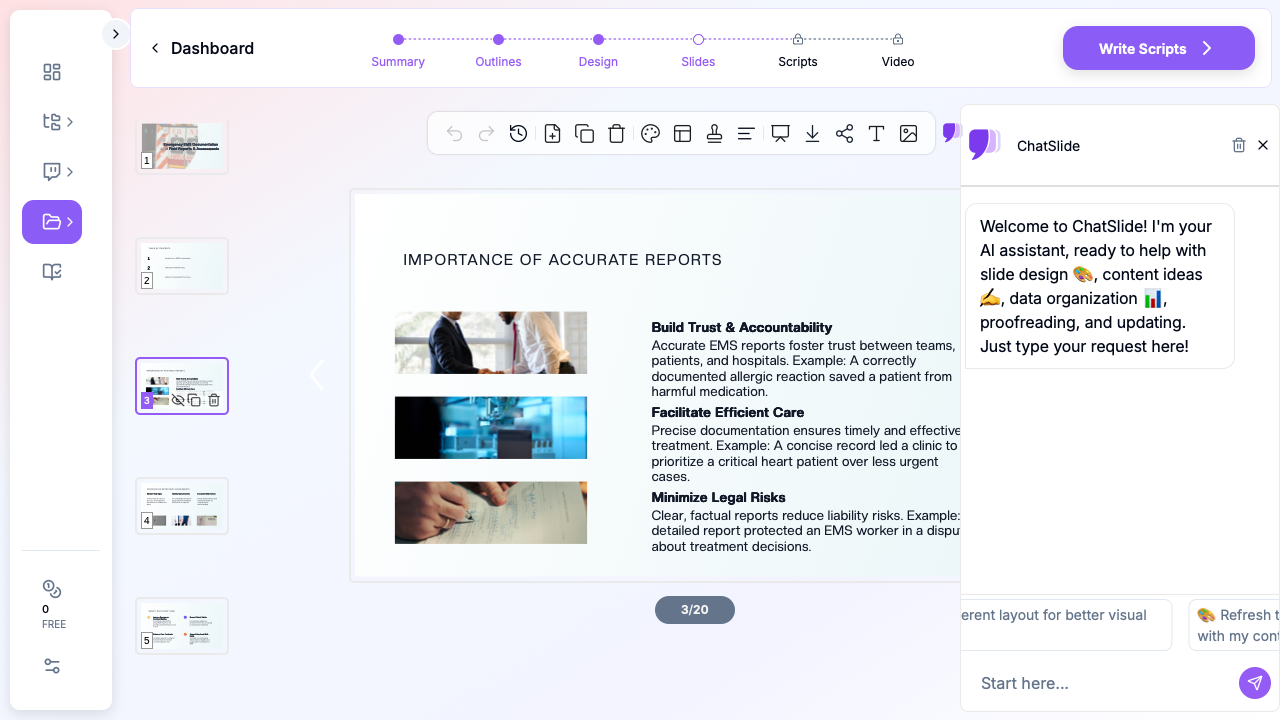
Once your outline is solid, generate the full slide deck. ChatSlide populates each section with detailed content and finds relevant images — medical equipment, ambulance scenes, documentation examples — that reinforce your training points without using generic stock photography.
5. Customize for Your Department
After generation, tailor the content to your specific organization:
- Add your department's logo and branding
- Insert references to your specific PCR software (ImageTrend, ESO, Zoll)
- Include your medical director's protocols where applicable
- Add local examples or case studies from your department's QI reviews
Training Module Ideas for EMS Educators
If you're looking for specific training topics to develop, here are proven modules that EMS professionals are building with AI:
New Hire Orientation Decks: Cover department SOPs, radio procedures, documentation expectations, and equipment familiarization in a structured onboarding presentation.
Skill Station Rotations: Create focused slide sets for each skill station — IV access documentation, airway management records, cardiac monitoring interpretation logs — that instructors can reference during hands-on training.
Continuing Education Modules: Build CE-eligible presentations on topics like stroke assessment updates, pediatric dosing documentation, or new cardiac arrest protocols from the latest AHA guidelines.
Quality Improvement Reviews: Present anonymized documentation examples (good and bad) to help crews understand what QI reviewers look for and how to improve their field reports.
Inter-Agency Training: When working with fire departments, police, or hospital partners, create presentations that bridge communication gaps and establish shared documentation terminology.
Research Database Integration for Evidence-Based Training
For EMS educators who want to ground their training in current evidence, ChatSlide includes built-in access to PubMed, Google Scholar, and ClinicalTrials.gov (NCT) through its Research tab. Search for the latest studies on cardiac arrest outcomes, prehospital airway management, or trauma triage protocols, and import them directly as source material for your training slides.

This is especially valuable when building continuing education modules that need to reference current literature, or when updating training decks to align with new AHA or NAEMSP guidelines.
Direct Research Database Access
ChatSlide's Research tab connects to the databases physicians use daily:
- PubMed: Search by keyword, PMID, or DOI. Find the landmark trials, recent publications, and clinical guidelines relevant to your case. The AI reads abstracts and incorporates key findings into your slides with citations.
- Google Scholar: When your topic spans disciplines — say, the intersection of genetics and oncology — Scholar captures the broader academic literature that PubMed alone might miss.
- Clinical Trials (NCT): Presenting on a treatment where pivotal trials are ongoing? Search by NCT number or condition to pull trial design, endpoints, and status into your slides.
Tips for Better EMS Training Presentations
Keep slides scannable: Field responders are used to quick reference guides, not dense paragraphs. Use bullet points, numbered steps, and clear headers. If a slide has more than six lines of text, split it.
Include "Why It Matters" context: Documentation training is often seen as administrative burden. Tie every requirement to a real outcome — patient safety, legal protection, billing accuracy, or quality improvement data.
Build in knowledge checks: After every major section, add a scenario-based question. "You respond to a fall at a nursing facility. The patient refuses transport. What must your PCR include?" Active recall beats passive reading.
Use consistent formatting for protocols: If you're presenting a step-by-step procedure (like a patient assessment algorithm), use the same visual format every time — numbered lists, consistent colors, same layout. Repetition builds recognition.
Version your training decks: EMS protocols change. Date your presentations clearly and note which protocol version they reference. When you update a deck with ChatSlide, the AI helps you restructure content around new guidelines while keeping your proven training flow intact.
From Hours to Minutes
An EMS training officer recently described their old workflow: pull up last year's slides, manually update protocol references, reformat everything that broke, search for new images, and spend a full shift day building one training module.
With AI-powered tools, that same training officer describes a new workflow: enter the training topic, specify the audience, review and customize the generated deck, and move on to preparing hands-on scenarios — all within an hour.
The presentation is the starting point, not the end product. What matters is the training itself — the scenarios, the skills practice, the questions from crews. AI handles the slide creation so you can focus on what actually saves lives: preparing your people for the field.
Get Started
Ready to build your next EMS training module? Visit ChatSlide to create professional training presentations in minutes. Enter your topic — whether it's PCR documentation, patient assessment protocols, or quality improvement training — and let AI handle the slide design while you focus on developing your crew's skills.
For departments running regular training sessions, AI-generated presentations mean consistent quality across every module, easy updates when protocols change, and more time for the hands-on training that makes the real difference in patient outcomes.
A note on patient data and HIPAA. ChatSlide's standard plans are not a HIPAA-covered service — keep PHI out of slide content, prompts, and uploads. For hospital systems, group practices, and clinics that need a Business Associate Agreement, our Enterprise plan offers HIPAA-compliant deployment options — contact us to discuss BAA terms, SSO, and private-cloud or on-prem hosting.