The Challenge: Building CPR & AED Slides That Actually Save Lives
CPR and AED training is one of the most consequential teaching jobs in any organization. The student who pays attention in your class is the person who, six months from now, kneels beside a coworker on a warehouse floor, a swimmer at a community pool, or a parent at a school pickup line — and decides whether to start compressions in the first ninety seconds. Slides aren't decoration; they're the scaffolding that determines whether a layperson actually retains the chain of survival.
But building those slides is brutally repetitive. Every time guidelines update — compression depth, hand placement on infants, AED pad positioning, opioid-overdose response — every instructor in every workplace, school, daycare, lifeguard program, and Sunday-school class has to rebuild the same modules. Most CPR instructors we talk to are running through 4–6 modules per course (Adult, Child, Infant, Choking, AED, Bleeding/Shock) and the slide rebuild eats an entire weekend before each new cohort.
ChatSlide changes that. Drop in your existing module outlines, your AHA or Red Cross-aligned curriculum notes, or just the topic — "Adult First Aid CPR and AED Mod 2" — and the AI generates a full instructor-ready deck with imagery, scenario panels, and knowledge-check slides in under five minutes per module. Below is exactly how first aid trainers, BLS instructors, and workplace safety teams are using it.
What Makes a Strong CPR & AED Training Deck
Before the workflow, it helps to agree on what "good" looks like. A first aid training deck has stricter requirements than a typical corporate slide:
Action-anchored, not theory-anchored. Students don't need to memorize the cellular biology of cardiac arrest — they need to know that when a person collapses, you check responsiveness, call for help and an AED, and start chest compressions at 100–120 per minute. Every slide should drive toward a specific physical action.
Sequence-driven. First aid is a sequence: Scene safety → Check responsiveness → Call 911 / send for AED → Open airway → Begin compressions → Apply AED. Slides need to mirror that sequence visually so the student can later replay it under stress.
Visually unambiguous. Lay rescuers look at slides on classroom screens, tablets in break rooms, and printed handouts on a clipboard. Hand position, pad placement, recovery position, and choking maneuvers all need to be shown — diagrams and photos beat paragraphs every time.
Standards-aligned. If your course follows AHA, ARC (American Red Cross), ECC, ERC, or a state EMS-office curriculum, the slides need to reflect the current guidelines (compression depth, ratio, ventilation rate, pediatric variations, AED pad placement). Out-of-date content is worse than no content.
Modular. Most first aid courses break into modules — Adult CPR, Child & Infant, Choking, AED, Bleeding & Shock, Opioid Emergencies. Each module needs to stand alone for refresher students and combine cleanly for full certification courses.
Refreshable. Guidelines change every 5 years (the latest AHA Focused Updates touched compressions, ventilation, and post-arrest care), and equipment changes too — new AED brands, naloxone formulations, tourniquet styles. Instructors need to re-spin decks fast.
A generic AI slide builder usually misses the action-anchoring and standards-alignment layers; it produces aesthetically clean but pedagogically thin decks. ChatSlide's training-mode flow is built for the instructor case.
Who Builds CPR / AED Training Decks (and What They Need)
First aid training isn't one job — it's a half-dozen distinct audiences with different needs:
- Corporate workplace safety trainers running OSHA-required first aid certification for warehouse, manufacturing, and office teams. They need 4-hour or 8-hour courses with documentation suitable for compliance files.
- Independent CPR instructors certified through AHA, ARC, or ASHI who teach community courses out of fire stations, churches, and community centers. They need polished decks they can reuse cohort to cohort.
- Lifeguard and aquatics trainers running American Red Cross Lifeguarding programs that combine CPR, AED, and water rescue content into multi-day courses.
- School nurses and athletic trainers teaching staff and student CPR — including the AED location and use within the school's emergency action plan.
- Healthcare BLS / ACLS course coordinators running provider-level courses for nurses, EMTs, and physicians who need refreshers every two years.
- Daycare and youth-program staff trainers focusing on pediatric and infant CPR, choking response, and common childhood emergencies.
- Industrial site safety leads running pre-shift toolbox talks on first aid topics, often in remote locations (oil & gas pads, construction sites, mining) where EMS response is delayed.
Every one of these instructors faces the same time pressure: they are trying to build training that has to be perfectly accurate (lives depend on it), perfectly clear (the audience is laypeople or first responders under stress), and constantly updated. AI is genuinely the right tool for this job.
Step-by-Step: Build an Adult CPR & AED Module in 10 Minutes
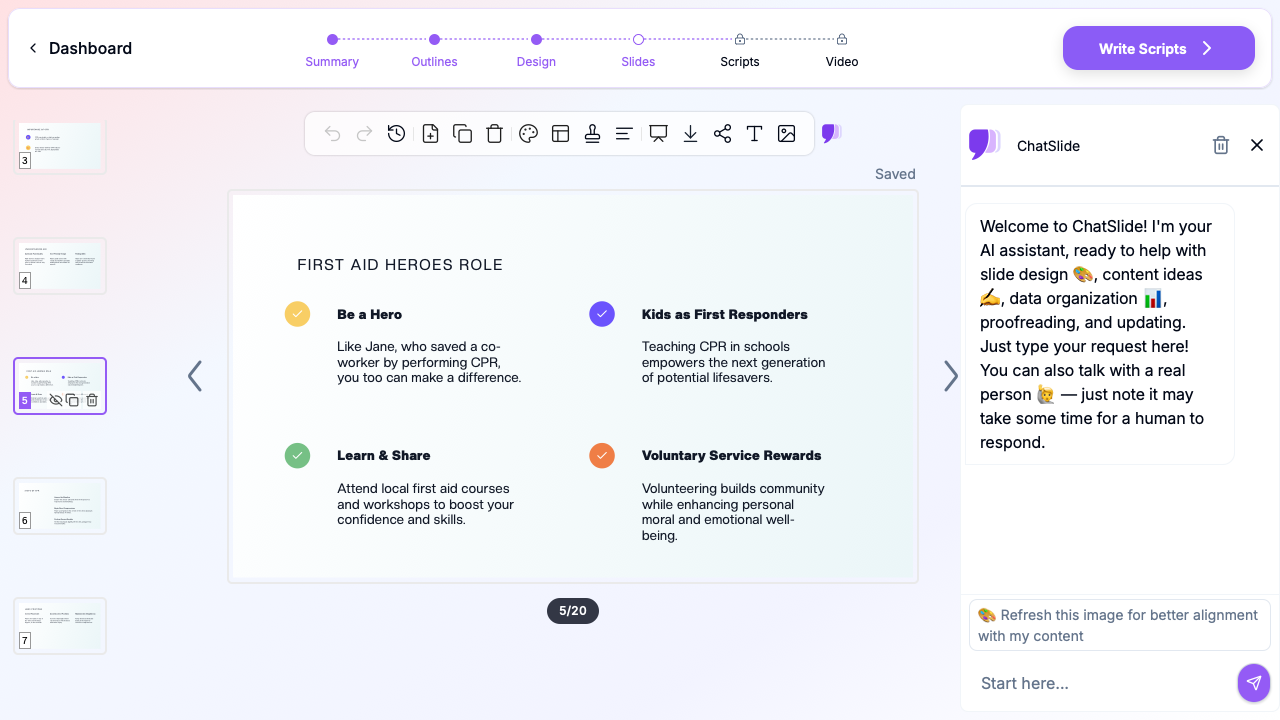
Here's the concrete walkthrough for a single training module — the same workflow that produced the "First Aid Heroes Role" slide shown above.
Step 1: Start with your source material (or just the module title)
Open ChatSlide and create a new project. Three entry points work well for first aid content:
- Upload your existing instructor materials — your AHA or ARC instructor guide, a previous PPTX from last year's class, or your written curriculum notes. ChatSlide extracts the structure and produces a clean outline.
- Paste a URL — if your course follows a published curriculum (AHA Heartsaver, Red Cross Adult CPR/AED), paste the public course-overview page and let the AI use it as scaffolding.
- Start from a topic — type the module name directly. "Adult First Aid CPR and AED Module 2: Compressions, Rescue Breaths, AED" works well.
For the demo deck above, we started from the topic "CPR and AED Training for Adult First Aid Responders" with audience "Workplace first aid teams, school staff, lifeguards, and community CPR instructors."
Step 2: Refine the outline against your standard
ChatSlide generates a 6–8 section outline with 2–3 subpoints each. For an adult CPR/AED module, a strong outline looks like:
- The chain of survival and the rescuer's role
- Scene safety, BSI, and primary assessment
- Recognizing cardiac arrest (responsiveness, breathing, pulse for trained providers)
- Activating EMS and getting an AED on scene
- High-quality chest compressions: hand position, depth, rate, recoil
- Rescue breaths: airway, seal, ventilation rate, compression-to-breath ratio
- AED operation: pad placement, shockable rhythms, CPR cycles around shocks
- Special situations: pregnancy, hairy chest, wet patient, implanted pacemaker
- Hand-off to EMS and post-arrest care
- Knowledge check / scenario practice
Drag, rename, add, or delete sections to match your specific certification standard. Check every depth/rate/ratio against your governing standard before generating slides — the AI uses widely accepted defaults but your course owns the final word.
Step 3: Generate slides with imagery
Click generate. ChatSlide produces a 20–30 slide deck with section dividers, content slides, and clean layouts.
The image step matters enormously here. Photographs of correct hand placement, AED pad positioning, recovery position, and the Heimlich maneuver let students mentally rehearse the physical motions. ChatSlide pulls relevant licensed stock imagery automatically — the demo above pulled an AED defibrillator photo for the definitions slide and clean visual blocks for the responder roles.
Step 4: Customize for your standard, equipment, and audience
A few common customizations for first aid trainers:
- Update guidelines numbers. Open any slide showing compression depth (2.0–2.4 in for adults), rate (100–120/min), or ratio (30:2 for single rescuer) and confirm against your current standard. Edit any number that needs to match the latest Focused Update.
- Insert your specific equipment. If your workplace uses a particular AED model (Philips HeartStart, ZOLL AED Plus, LIFEPAK CR2, Defibtech Lifeline), drop in product imagery and pad-placement specifics from that device's quick-reference guide.
- Add your site-specific content. Workplace courses should include the location of the nearest AED, the emergency action plan, who calls 911, and where to meet EMS. Add a "Our Site" slide near the front.
- Localize for multilingual workforces. Many warehouses, agricultural operations, and hospitality teams have Spanish, Vietnamese, Tagalog, or Mandarin first-language workers. Generate the deck once, then regenerate slide text in the target language — visuals and layout stay consistent so the instructor can teach from the same flow.
- Brand it. Add your training company's logo, your sponsoring employer's branding, or your fire department / EMS agency's seal so the certificate paperwork and the slide deck look like one product.
- Add scenario panels. Drop a "Scenario: Coworker collapses in the break room — what do you do?" slide between each major section. Scenario practice is the single biggest predictor of skill retention.
Step 5: Build the rest of the curriculum quickly
The real time savings show up across the full course. Once Module 1 is dialed in, build Modules 2, 3, and 4 (Child & Infant CPR, Choking & Airway Obstruction, Bleeding & Shock) the same way. A full Heartsaver-equivalent or workplace first aid course that used to take a weekend now takes an afternoon.
Reuse common slides (chain of survival, scene safety, hand-off to EMS) across modules — ChatSlide lets you copy slides between projects so the look stays consistent.
Step 6: Export and deliver
Export to PPTX for in-person classroom delivery, PDF for student handouts, or share the live ChatSlide link for hybrid and remote-learning students. You can also record a voiceover walkthrough directly in the app — useful for asynchronous workplace certification where employees complete the module on their own time and then attend a hands-on skills check.
Direct Research Database Access
ChatSlide's Research tab connects to the databases physicians use daily:
- PubMed: Search by keyword, PMID, or DOI. Find the landmark trials, recent publications, and clinical guidelines relevant to your case. The AI reads abstracts and incorporates key findings into your slides with citations.
- Google Scholar: When your topic spans disciplines — say, the intersection of genetics and oncology — Scholar captures the broader academic literature that PubMed alone might miss.
- Clinical Trials (NCT): Presenting on a treatment where pivotal trials are ongoing? Search by NCT number or condition to pull trial design, endpoints, and status into your slides.

Tips for High-Impact First Aid Training Slides
A few patterns from watching effective CPR and AED instructors build these decks:
Show the hand. Always. A photo of correct hand placement on the lower half of the sternum communicates more in two seconds than a paragraph of description. Every compressions slide should show the hand position from the rescuer's POV.
Use the 7-second rule. Every slide should communicate its main point in 7 seconds when glanced at from the back of a training room. If the title and image don't convey the idea, the slide is too wordy. CPR slides especially: students will be glancing up while practicing on a manikin.
One number per slide. Compression depth (2.0–2.4 in), rate (100–120/min), and ratio (30:2) are all critical numbers — but don't put them on the same slide. Give each number its own visual, its own color, its own moment. Students remember things in isolation, not in lists.
Pair the right and the wrong. Show a "correct hand position" slide right next to a "common mistakes" slide. The brain encodes the right behavior more reliably when it has the wrong one to compare against.
End every module with a scenario. Don't end on "Any questions?" End on "It's a Tuesday afternoon. A coworker grabs their chest and collapses in the cafeteria. Walk me through your first 60 seconds." That's the test that matters; the slides should set it up.
Document the equipment refresh date. AED pads expire. Naloxone expires. Bandages expire. End every workplace deck with an "Equipment Check" slide that lists what to inspect and how often. This earns the deck a permanent place in the safety binder.
Update the moment guidelines change. When AHA or ERC publishes a Focused Update, push the change into the deck within a week — and re-circulate. ChatSlide makes the regenerate-and-reissue cycle cost almost nothing.
Common Use Cases Where This Workflow Shines
Concrete examples we see:
- Multi-module workplace first aid courses. Build Adult CPR/AED, Child & Infant CPR, Choking, and Bleeding & Shock as four parallel modules that share a consistent visual language.
- Lifeguard pre-season recertification. Generate a refresher deck pulling from the prior season's incident reports plus the current Red Cross Lifeguarding update — focused, current, and specific to your facility.
- School staff annual CPR/AED refresher. Build a 60-minute deck that includes the school's actual AED location map, emergency action plan, and the names of the trained staff responders.
- Toolbox talks on first aid topics for industrial sites. 10-minute decks on heat illness, eye injuries, struck-by injuries, or hand lacerations — short, specific, and printed for posting in the safety board.
- Community CPR classes at fire stations or churches. Polished 90-minute decks for neighborhood adult CPR/AED classes — built once, reused across cohorts with minor branding swaps.
- Healthcare BLS and ACLS provider courses. Provider-level decks with clinical terminology, EKG strips, and pharmacology where appropriate, generated in the same flow as layperson decks.
- Bystander CPR awareness campaigns. Short 5-slide push decks for HR-wide circulation: "10% of cardiac arrest survivors get CPR from a bystander. Here's how to be that person."
Get Started
CPR and AED training shouldn't eat up the time your safety team should be spending in actual practice — running scenario drills, checking equipment, maintaining instructor credentials, and teaching humans the skills that will save other humans. The slide deck is a tool. It should be fast to build, easy to update against the latest guidelines, and good enough to keep a roomful of students paying attention for two hours.
Try ChatSlide free and build your next adult CPR/AED, pediatric, AED-only, or first aid certification deck in minutes. Upload your existing curriculum, your standard's instructor guide, or just a module title — and go from blank page to a delivery-ready instructor deck in one sitting.
For related workflow guides, see our EMS training presentation guide, our OSHA safety training guide, and our compliance training presentation guide.
A note on patient data and HIPAA. ChatSlide's standard plans are not a HIPAA-covered service — keep PHI out of slide content, prompts, and uploads. For hospital systems, group practices, and clinics that need a Business Associate Agreement, our Enterprise plan offers HIPAA-compliant deployment options — contact us to discuss BAA terms, SSO, and private-cloud or on-prem hosting.