
Quick Answer: To build a gastroenterology lecture with AI, (1) upload your source — a guideline (AGA/ACG/ASGE), trial, or case; (2) the tool structures it into a teaching deck (IBD, hepatology, GI bleeding, endoscopy) with citations and charts from your data; (3) export to PowerPoint or PDF with speaker notes. Because GI guidelines shift mid-year, use a document-grounded tool like ChatSlide that turns the latest paper into a grand-rounds deck in under 2 minutes — free to start.
The Challenge
Gastroenterology fellowship lectures stretch across an unforgiving range: a 40-minute obscure GI bleeding talk on Monday, a Crohn's biologic-positioning case for Tuesday's IBD clinic, a Wednesday hepatology M&M on decompensated cirrhosis, and a Thursday tumor board with three colorectal cases — each demanding a different deck. The literature shifts faster than slide templates can keep up. AGA, ACG, and ASGE guidelines update mid-academic-year. New trials (SEQUENCE, VOYAGE, ADVANCE) reset first-line algorithms before the last set of slides is even archived.
Most fellows still build these decks the same way: comb through UpToDate, screenshot a flowchart, paste a NEJM figure with a disclaimer, hand-type the references at 11pm. Forty hours over a fellowship year evaporate into PowerPoint formatting that nobody remembers two weeks later.
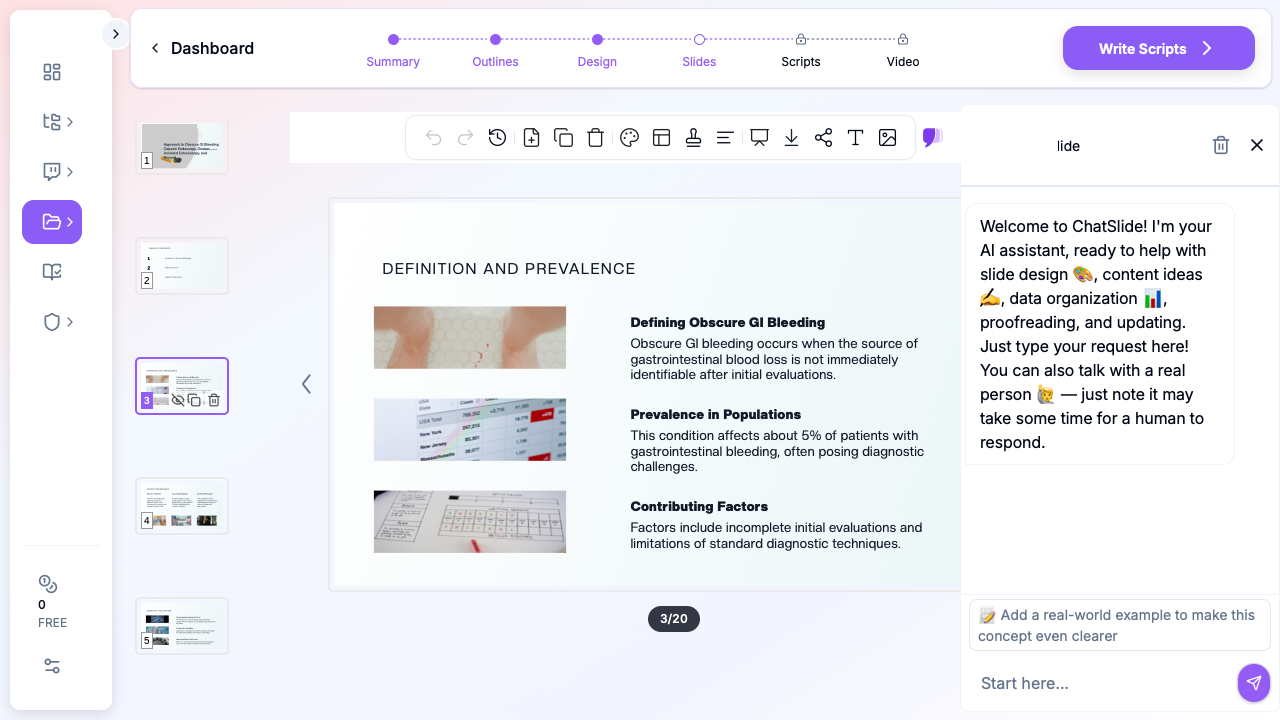
ChatSlide's AI presentation builder is purpose-built for this workflow: pull from PubMed, Google Scholar, and ClinicalTrials.gov directly, generate a structured outline you can edit before any slides are drawn, and finish with an AGA-style deck that has citation-grade references baked in.
What Makes a Strong Gastroenterology Presentation
GI talks span four broad audiences — fellows, hospitalists, primary care, and patients — and each rewards a different structure.
- Fellowship didactics & grand rounds. Lead with a case, then the differential, then the workup algorithm. The audience is interrogating you: every slide needs a citation footer and a clear "what would you do next?" handoff.
- Tumor board / multidisciplinary case conferences. Imaging, path, staging, and a single decision question per case. Slides are dense but read fast — never more than 30 seconds per slide.
- Endoscopy didactics (EGD, colonoscopy, EUS, ERCP). Heavy on still images and short video loops. Anatomy first, technique second, complications and rescue maneuvers last.
- Patient education (IBD, GERD, colon cancer screening, FMT). Plain language, one concept per slide, large-typeface graphics. Cut all of the abbreviations.
Step-by-Step: Building a GI Lecture in ChatSlide
1. Frame the case before the slides
For a 40-minute obscure GI bleeding talk, type your topic and audience into ChatSlide's outline generator and pick the Education → Lecture scenario:
Topic: Approach to Obscure GI Bleeding: Capsule Endoscopy, Device-Assisted Enteroscopy, and Beyond Audience: GI fellows, hospitalists, and endoscopists at a tertiary medical center Scenario: Education → Lecture, 6 sections, 3 sub-points each
The AI returns a section outline you edit before any slide art is generated — that's the cheap step to fix. Add a "case vignette" section if it isn't there. Move "endoscopic & surgical management" before "future directions" if the AI flips them. Spending five minutes on the outline saves an hour on the slides.
2. Pull from real GI literature, not summary blogs
Direct Research Database Access
ChatSlide's Research tab connects to the databases physicians use daily:
- PubMed: Search by keyword, PMID, or DOI. Find the landmark trials, recent publications, and clinical guidelines relevant to your case. The AI reads abstracts and incorporates key findings into your slides with citations.
- Google Scholar: When your topic spans disciplines — say, the intersection of genetics and oncology — Scholar captures the broader academic literature that PubMed alone might miss.
- Clinical Trials (NCT): Presenting on a treatment where pivotal trials are ongoing? Search by NCT number or condition to pull trial design, endpoints, and status into your slides.

For an obscure GI bleeding talk, that means pulling Gerson 2015 ACG guideline, Pennazio 2018 ESGE technical review, Saurin classification, and the more recent motorized spiral enteroscopy literature. For IBD, it's the head-to-head biologic trials (SEQUENCE for ustekinumab vs. risankizumab in Crohn's, VEGA for combination induction, ADVANCE/MOTIVATE for risankizumab). The Research tab pulls abstracts, you select what makes it into the deck, and citations land in the slide footer in your preferred style.
3. Build the algorithm slide the way fellows actually use it
The single most-photographed slide in a GI lecture is the workup algorithm — what to do after a negative EGD and colonoscopy in a suspected small-bowel bleed. Use ChatSlide's chart builder to render a clean decision tree:
- Overt vs. occult presentation
- Hemodynamically stable vs. unstable
- Capsule endoscopy first vs. CT/MR enterography first
- Device-assisted enteroscopy (push, single-balloon, double-balloon, motorized spiral)
- Surgical/interventional radiology rescue
Keep it to one slide. Audiences screenshot a clean algorithm; they ignore a busy one.
4. Embed endoscopic images responsibly
For didactic decks, stock endoscopic photography is rarely good enough — you'll want real images from your own cases or institutional library. Drop them into the slide editor, and the AI will offer to write the descriptive caption ("Cap-assisted view of a Dieulafoy lesion in the proximal jejunum at single-balloon enteroscopy") from your case notes. You stay the medical author; the AI handles the layout.
Note on patient data: ChatSlide's standard plans are not a HIPAA-covered service — keep PHI out of slide content and uploads. For hospital systems, group practices, and clinics that need a Business Associate Agreement, our Enterprise plan offers HIPAA-compliant deployment options — contact us to discuss BAA terms, SSO, and on-prem / private-cloud hosting.
5. Generate and refine in the slide editor
Hit generate. ChatSlide returns a complete deck — title slide, agenda, sectioned body slides, summary, references. From there it's a deck like any other: edit the bullets, swap a chart, drop in an image, tighten the speaker notes. The AI co-pilot in the side panel ("rewrite this bullet for an attending audience", "add a slide on the role of CT angiography in active bleeding") is the part that compounds — by the third lecture of the year, you're shipping decks in 30 minutes.
Tips for Specific GI Subspecialty Talks
- IBD biologic positioning. Build a single comparison table — molecule, mechanism, induction regimen, maintenance, pivotal trial, head-to-head data, place in algorithm. Update once per year.
- Hepatology / decompensated cirrhosis. Lead with the Baveno VII recommendations; structure the talk around the complication categories (variceal bleeding, ascites/SBP, HE, HRS-AKI, ACLF). Each gets a one-slide management algorithm.
- GI motility (gastroparesis, achalasia, IBS). Diagnostic tests are the trap — fellows over-explain manometry. One annotated tracing per disorder is enough.
- Pancreaticobiliary / ERCP. Anatomy slide first, every time. Indication / complication risk slide second. Then technique.
- Fecal microbiota transplantation (FMT). Patients and referring physicians want the regulatory framework, the indication list (rCDI, evolving IBD evidence), the screening protocol, and the route-of-administration comparison. Keep your slide deck FDA-current — the regulatory status of investigational FMT shifts.
- GI oncology / tumor board. One case per slide block. Imaging on the left, path on the right, staging in the footer, decision question at the bottom. Do not put two cases on one slide.
Get Started
Build your first GI lecture deck with ChatSlide free — sign in at app.chatslide.ai, pick Education → Lecture as your scenario, paste your topic and audience, and let the outline generator do the structural work before you touch a slide. From there it's the same editing surface you'd use in PowerPoint, with the AI co-pilot rewriting bullets, citing PubMed, and rendering algorithm charts on request.
For fellowship program directors, IBD center leads, and gastroenterology departments looking to standardize lecture quality across a fellowship class — including HIPAA-compliant deployment for hospital-system use — contact us about Enterprise plans with BAA, SSO, and shared institutional template libraries.