The Challenge of Patient Education Materials
Healthcare providers spend a significant amount of time explaining diagnoses, treatment plans, and self-management strategies to patients. A cardiologist explaining heart failure management. An endocrinologist walking a newly diagnosed diabetic through glucose monitoring. A physical therapist outlining a post-surgical recovery protocol. In each case, the provider needs materials that are medically accurate yet accessible to someone without clinical training.
The gap between clinical knowledge and patient understanding is well documented. Patients retain only a fraction of what they hear during appointments, especially when they are processing an unfamiliar diagnosis. Written and visual materials help bridge that gap — but creating them is time-consuming. Most providers either rely on outdated pamphlets from medical supply companies or skip patient-facing materials altogether.
The problem gets worse in specialized settings. A rare disease like congenital myasthenic syndrome does not have a shelf of ready-made brochures at the local pharmacy. Support groups for uncommon conditions need materials tailored to their specific community. Caregivers managing complex medication regimens need visual guides they can reference at home. None of these audiences are well served by generic health education templates.
AI presentation tools offer a practical middle ground. Instead of designing slides from scratch or settling for materials that do not match the clinical situation, healthcare providers can generate structured, visually clear presentations in minutes and then refine them for accuracy and tone.
What Makes Effective Patient Education Materials
Creating presentations for patients is fundamentally different from presenting at a medical conference. The audience has different needs, different vocabulary, and different motivations.
Plain language over clinical jargon. Medical terminology creates barriers. Instead of "glycated hemoglobin," use "a blood test that shows your average blood sugar over the past three months." Instead of "contraindicated," say "should not be used together." Every clinical term that appears in the presentation should be immediately followed by a clear explanation.
Visual explanations of processes. Patients understand disease mechanisms better when they can see them. A diagram showing how insulin works in the body communicates more effectively than a paragraph of text. Charts showing target blood sugar ranges give patients a concrete reference point. Before-and-after images of physical therapy progress help patients understand what recovery looks like.
Actionable self-management steps. The most useful patient education materials do not just explain a condition — they tell patients what to do about it. A diabetes education presentation should include specific guidance: when to check blood sugar, what numbers to watch for, which foods affect glucose levels, and when to contact a provider. Vague advice like "maintain a healthy lifestyle" is not helpful.
Appropriate reading level. Health literacy varies widely across patient populations. The best patient materials are written at a sixth-to-eighth grade reading level, use short sentences, and break information into small chunks. This is not about talking down to patients — it is about respecting their time and cognitive load during a stressful period.
Cultural sensitivity and language accessibility. Patient populations are diverse. Materials should avoid culturally specific assumptions about diet, family structure, or health beliefs. When possible, providing materials in the patient's primary language dramatically improves comprehension and compliance.
Step-by-Step: Creating Patient Education Slides with ChatSlide
Here is how to build a clear, accessible patient education presentation using ChatSlide.
Step 1: Define the Condition and Audience
Start at app.chatslide.ai and enter a specific, patient-focused topic. The more specific your prompt, the more relevant the output.
Good examples:
- "Understanding Type 2 Diabetes: A Patient and Caregiver Guide"
- "Managing Congenital Myasthenic Syndrome: What Families Need to Know"
- "Post-Knee Replacement Recovery: Week-by-Week Patient Guide"
Avoid vague topics like "Diabetes Education" or "Heart Health." Specificity helps the AI generate content at the right level of detail.
Step 2: Select the Right Scenario
Choose Education > Tutorial as your scenario type. This tells ChatSlide to structure content in a teaching format with clear explanations and progressive complexity — starting with basics before moving to management strategies.
Set the audience to describe your actual patient population: "Newly diagnosed adult patients and their family caregivers" or "Parents of children with congenital myasthenic syndrome."
Step 3: Review and Simplify the Outlines
ChatSlide generates a section-by-section outline. For patient education, review each section with these questions:
- Would a patient with no medical background understand this heading?
- Does the flow match how a patient processes information (diagnosis → what it means → what to do → when to get help)?
- Are there sections that should be split into smaller, more digestible pieces?
Rename sections in patient-friendly language. Instead of "Pathophysiology," use "How the Condition Affects Your Body." Instead of "Pharmacological Management," use "Medications and How They Help."
Step 4: Generate Slides and Add Visuals
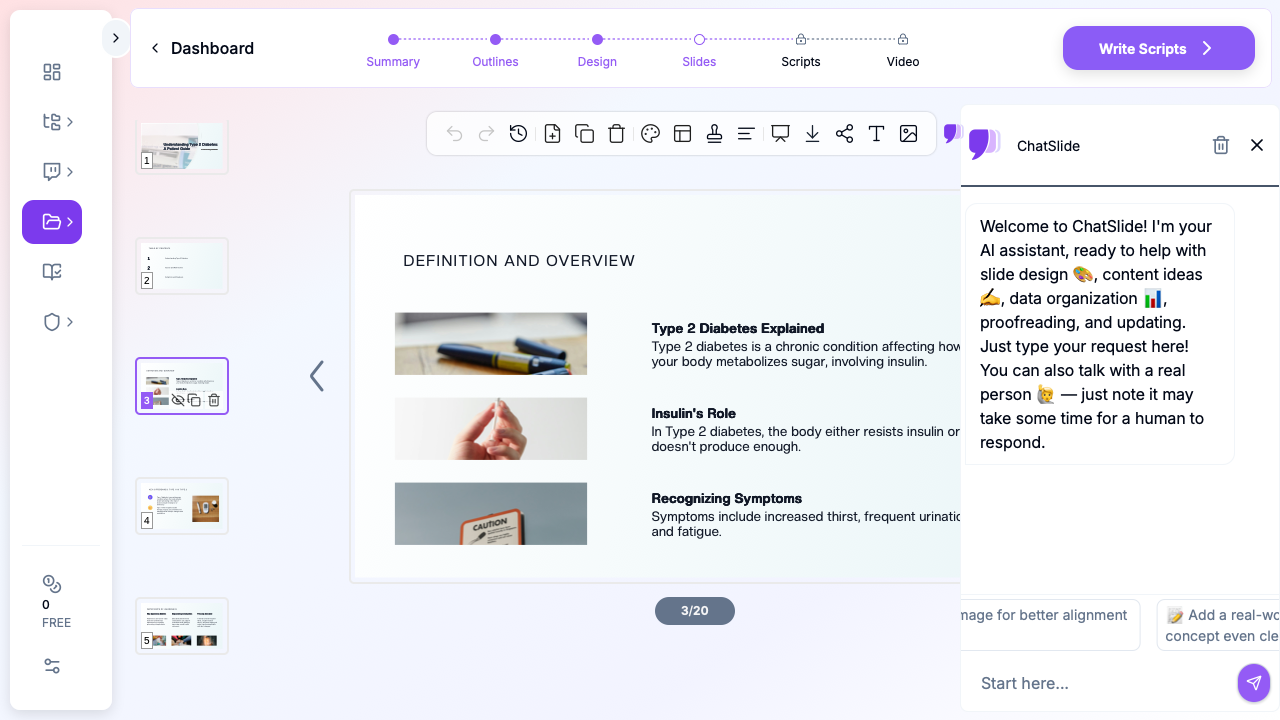
Generate the full slide deck and use ChatSlide's image feature to add relevant medical illustrations. For patient education, visuals are especially important — a diagram of the body, a medication schedule chart, or a food plate guide communicates faster than text alone.
Review each slide for reading level. If a slide has more than five lines of text, it probably needs to be split. If a slide uses a medical term without explanation, add the plain-language definition.
Step 5: Add Practical Resources
The most useful patient education presentations end with concrete next steps:
- Emergency warning signs (when to call the doctor or go to the ER)
- A medication list template patients can fill in
- Contact information for the care team
- Links to reputable patient resources (disease-specific foundations, support groups)
- Follow-up appointment reminders
Step 6: Export and Distribute
Download the presentation as a PDF for printing or as slides for display in the waiting room. ChatSlide supports multiple export formats, so you can create one presentation and distribute it across channels — printed handouts, emailed PDFs, or displayed on a screen during appointments.
Use Cases for Patient Education Presentations
Chronic disease self-management. Diabetes, hypertension, asthma, COPD, and heart failure all require ongoing patient participation. Education presentations help patients understand their role in managing the condition between appointments.
Pre-surgical preparation. Patients preparing for surgery benefit from visual explanations of the procedure, what to expect during recovery, and how to prepare their home environment. This reduces anxiety and improves post-operative compliance.
Rare disease support groups. For uncommon conditions, ready-made educational materials often do not exist. AI tools allow support group leaders and specialized clinicians to create custom presentations tailored to their specific patient community.
Caregiver training. Family members caring for patients with dementia, mobility limitations, or complex medication regimens need structured guidance. A well-organized presentation serves as both a training tool and a reference document caregivers can return to.
Discharge education. Hospital discharge is a high-risk moment for misunderstanding. A clear, printed presentation covering medication changes, activity restrictions, follow-up appointments, and warning signs gives patients something tangible to take home.
Direct Research Database Access
ChatSlide's Research tab connects to the databases physicians use daily:
- PubMed: Search by keyword, PMID, or DOI. Find the landmark trials, recent publications, and clinical guidelines relevant to your case. The AI reads abstracts and incorporates key findings into your slides with citations.
- Google Scholar: When your topic spans disciplines — say, the intersection of genetics and oncology — Scholar captures the broader academic literature that PubMed alone might miss.
- Clinical Trials (NCT): Presenting on a treatment where pivotal trials are ongoing? Search by NCT number or condition to pull trial design, endpoints, and status into your slides.

Tips for Better Patient Education Presentations
Test with a non-medical reader. Before distributing patient materials, ask someone outside healthcare to read through them. If they struggle with any section, simplify it further.
Use numbered steps for instructions. When explaining medication schedules, wound care procedures, or exercise routines, numbered steps are easier to follow than narrative paragraphs.
Include space for notes. If printing the presentation, leave margins or blank sections where patients can write their own questions or notes from their next appointment.
Update regularly. Treatment guidelines change. A diabetes education presentation from two years ago may reference outdated blood sugar targets or discontinued medications. Set a reminder to review and update patient materials at least annually.
Respect patient autonomy. Frame recommendations as informed choices, not orders. "Your doctor recommends checking your blood sugar before meals" works better than "You must check your blood sugar before meals." Patients who feel respected are more likely to follow through.
Get Started
Creating patient education materials does not have to be a side project that never gets finished. With ChatSlide, you can generate a structured, visually clear presentation in minutes, then refine it for your specific patient population.
Whether you are an endocrinologist explaining a new diagnosis, a physical therapist preparing discharge instructions, or a support group leader creating resources for a rare condition, AI-generated slides give you a professional starting point that respects both your clinical expertise and your patients' need for clarity.
Start building your patient education presentation at chatslide.ai.
A note on patient data and HIPAA. ChatSlide's standard plans are not a HIPAA-covered service — keep PHI out of slide content, prompts, and uploads. For hospital systems, group practices, and clinics that need a Business Associate Agreement, our Enterprise plan offers HIPAA-compliant deployment options — contact us to discuss BAA terms, SSO, and private-cloud or on-prem hosting.