
The Challenge: Dense Science, Limited Prep Time
Molecular biology is one of the hardest subjects to teach well. The concepts are abstract and invisible — you cannot point to a transcription bubble or a ribosome the way you can point to a bone on a skeleton. The field moves fast: a course built around RNA technologies three years ago looks dated next to today's mRNA platforms, CRISPR base editors, and antisense therapeutics. And every lecture demands clean figures — central dogma diagrams, secondary-structure folds, pathway maps — that take longer to lay out than the talk itself.
Most molecular biology instructors recognize the pattern. You block out an afternoon to build a single 50-minute lecture on, say, RNA processing. Three hours later you have eight slides, two of which are walls of text you know students will photograph and never reread, and a figure you redrew from a textbook because the original was locked behind a license. The biology you actually want to teach — the why behind splicing, the elegance of riboswitches — never made it onto the deck.
This is exactly the gap an AI presentation tool should close: not to replace your expertise, but to turn the outline already in your head into a structured, figure-rich deck so you can spend your prep time on the teaching, not the typesetting. This guide walks through how to build molecular biology and biotechnology lectures with ChatSlide — from learning objectives to a finished deck — and how to keep the science accurate while doing it.
What Makes a Strong Molecular Biology Lecture
Before opening any tool, it helps to be clear on what separates a deck students learn from versus one they sit through. The best molecular biology lectures share a few traits:
- One concept per slide, built up in layers. The central dogma is not one slide — it is replication, transcription, and translation, each earning its own visual. When you cram all three onto a single diagram, students copy it and understand none of it.
- Figures that carry the explanation. In molecular biology, the diagram is the argument. A well-drawn mRNA-processing schematic — 5′ cap, splicing, poly-A tail — teaches more than three bullet points describing the same steps.
- A through-line from mechanism to application. Students remember why RNA interference matters when you connect the mechanism (siRNA loading onto RISC) to the payoff (RNAi therapeutics now in clinic). The mechanism without the application feels like trivia.
- Calibrated depth. An intro-bio survey of "Types of RNA" and a graduate seminar on "Riboswitch Conformational Dynamics" are different decks. The structure should match where your students actually are.
- Current examples. mRNA vaccines, CRISPR-based diagnostics, and base/prime editing turned textbook abstractions into headline science. Anchoring a lecture in a recent breakthrough makes the fundamentals stick.
Holding these in mind while you draft keeps the AI working for you rather than producing a generic, evenly-weighted summary.
Step-by-Step: Creating Your Molecular Biology Lecture with ChatSlide
Step 1: Start from a clear topic and audience
ChatSlide generates the strongest decks when you tell it both the subject and who is in the room. Compare:
- Weak: "RNA"
- Strong: "RNA technologies and gene expression for an upper-division undergraduate molecular biology course — assume students know the central dogma but not RNA secondary structure or RNAi mechanisms."
The second prompt tells the AI what to skip (you do not need a slide re-explaining what a gene is) and what to develop (secondary structure, RNAi). Setting the scenario to an Education / Lecture type also nudges the structure toward teaching — learning objectives up front, a logical concept sequence, and a summary — rather than a sales or conference arc.
Step 2: Review and edit the outline before generating slides
ChatSlide produces an editable outline first, and this is where your expertise matters most. The AI will propose a reasonable section order — say, What is RNA → Types of RNA → Transcription → RNA Processing → RNA Technologies → Applications. Read it as a domain expert:
- Reorder anything that violates the dependency chain (students cannot understand splicing before they understand exons and introns).
- Delete sections below your students' level, or add a prerequisite recap slide if they are above it.
- Rename vague headings ("RNA Stuff") into precise learning units ("Co-transcriptional 5′ Capping and Its Role in mRNA Stability").
Editing the outline costs two minutes and saves you from regenerating the whole deck later. The outline is the lecture's skeleton — get it right before you add muscle.
Step 3: Generate slides and add real figures
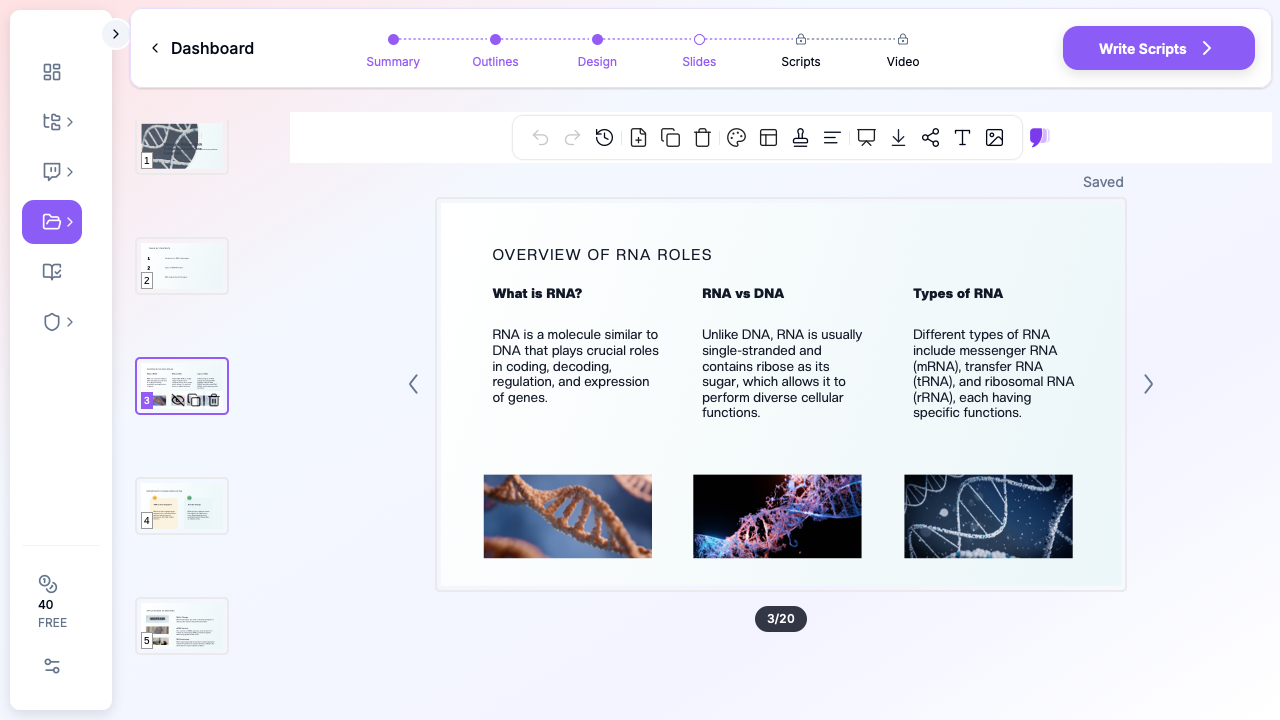
Once the outline is set, ChatSlide builds out the slides. The step most instructors skip — and the one that separates a usable deck from a placeholder — is adding images. ChatSlide can populate each slide with relevant figures so your transcription, translation, and RNA-structure slides carry diagrams instead of bullet lists. In the screenshot above, the "Overview of RNA Roles" slide pairs each concept with a helix figure automatically.
For molecular biology specifically:
- Use diagrams to teach process (a transcription elongation schematic) and photos sparingly (a gel, a structural model) to ground abstraction in real data.
- If you have your own figures — a pathway map you drew, a results figure from your lab — upload them. Your own visuals almost always teach better than stock images because they match the exact mechanism you are describing.
- Keep one figure per slide. A slide with three competing diagrams reads as noise.
Step 4: Tighten the speaker-facing detail, trim the screen-facing text
A recurring molecular biology mistake is putting the full mechanism on the slide. The slide should show the diagram and a short label; the detail lives in your narration. Move dense explanation into speaker notes (which students never see) and let the projected slide stay clean. ChatSlide supports speaker notes per slide, so the deck doubles as your lecture script without crowding the screen.
Step 5: Export in the format your classroom uses
Lecture halls run on different software. ChatSlide exports to PowerPoint and Keynote for podium machines, and to PDF for the version you post to the LMS. Build once, deliver everywhere — no reformatting the night before class.
Tips for Molecular Biology and Biotechnology Presentations
- Lead each unit with a question, not a definition. "How does a cell make one gene into a thousand proteins?" pulls students into amplification and translation far better than "Translation is the process by which..."
- Reuse a visual vocabulary. Pick one color for RNA, one for DNA, one for protein, and keep it consistent across every slide. Students start decoding diagrams faster when the legend never changes.
- Anchor mechanisms in current science. Teaching RNA stability? Connect it to mRNA-vaccine design and why nucleoside modifications matter. Teaching gene editing? Use a base editor as the worked example. The fundamentals land harder when tied to work students have heard of.
- Build a series, not a one-off. Molecular biology is taught as a sequence. Keep a consistent template across your transcription, translation, and regulation lectures so the course feels like one coherent story — ChatSlide lets you reuse a design across projects.
- Separate "must know" from "nice to know." Mark the two or three slides per lecture that carry the exam-relevant core, and treat the rest as enrichment you can compress if you run short on time.
Grounding Lectures in the Literature
Molecular biology moves fast enough that textbooks lag the field, so anchoring a lecture in primary sources keeps it current. ChatSlide's Research tab connects to the databases scientists actually use — search PubMed by keyword, PMID, or DOI to pull landmark and recent papers, and Google Scholar for the broader literature when a topic spans biochemistry, genetics, and bioengineering. The AI reads the abstracts and works key findings into your slides with citations, so a lecture on RNA therapeutics can reference the actual trials and mechanism papers rather than a generalized summary. For a teaching deck, that means your "recent advances" slide reflects this year's literature, not a textbook edition from three years ago.
Get Started
Molecular biology lectures will always demand your judgment — what to emphasize, what to simplify, where the field is heading. What they should not demand is three hours of redrawing diagrams and reformatting bullet points. ChatSlide turns the outline in your head into a structured, figure-rich deck in minutes, so your prep time goes to the teaching.
Whether you are building a single guest lecture on RNA technologies or an entire molecular biology course from the central dogma through gene editing, you can try ChatSlide free and generate your first lecture deck today. Bring the biology — let the slides build themselves.