Quick Answer: OpenAI announced GPT-6 Astra on September 3, 2026, and explicitly positions it as its best model yet for slides — in OpenAI's words, its best model "for adhering to existing templates and producing slides that are well laid out and succinctly convey key points with a structured narrative." Astra is rolling out in phases: a limited set of organizations first, then ChatGPT Plus, Pro, Business, and Enterprise, the OpenAI API, and AWS over the following days. ChatSlide has secured GPT-6 API access and will add it to the model picker as soon as the rollout reaches us. Until then you can build full decks today on GPT-5.6 Luna, free, and every deck exports to PowerPoint, PDF, and Keynote.
What OpenAI Actually Said About GPT-6 and Slides
OpenAI introduced Astra on X with one line: "This is GPT-6 Astra. Anything you can do on a computer, Astra can do for you. Fast."
The official announcement is more specific, and one paragraph matters more than the rest if you build presentations for a living. OpenAI describes Astra as its best model for adhering to existing templates and producing slides that are well laid out and convey key points through a structured narrative, alongside documents, spreadsheets, and analyses that follow your templates and match your writing and visual style.
That is a notable shift. Frontier model launches usually advertise math and coding scores and leave presentations unmentioned. This is the first time OpenAI has named slides as a headline capability of a flagship model.
The benchmark numbers OpenAI published:
| Benchmark | GPT-6 Astra | Notes |
|---|---|---|
FrontierMath Tier 4 | 98% | Described as saturated |
ARC-AGI-3 | 99.9% | Described as saturated |
ExploitBench | 100% | Described as saturated |
OSWorld 2.0 (computer use) | 72.6% at ~40 min/task | GPT-5.6 Sol: 65.7% at ~75 min/task |
Mind2Web | 1.9× faster task completion vs GPT-5.6 Sol | With the updated Codex harness |
The OSWorld 2.0 result is the one to read twice: roughly 47% less time per task than GPT-5.6 Sol at a higher score. For slide generation, wall-clock time per deck is the difference between a tool you use in a meeting and a tool you use before one.
When You Can Actually Use It
Astra launched to a limited set of organizations first, expanding over the following days to ChatGPT Plus, Pro, Business, and Enterprise users, the OpenAI API, and AWS.
We checked our own API access on publication day: GET /v1/models on a standard OpenAI organization key returns no gpt-6 identifier yet — the newest ids exposed are the gpt-5.6 family. So if you are reading a post claiming you can call GPT-6 from the API right now, check the model list yourself before believing it.
What this means practically: GPT-6 for slides is days away, not months, and not available to everyone the moment the announcement lands. ChatSlide has secured API access and GPT-6 will appear in the model picker when the rollout reaches us. Nothing about your decks, brand settings, or templates changes when it does.
What Actually Changes for Presentations — And What Doesn't
Two things genuinely improve with a stronger model:
Structure under pressure. A weak model given fourteen pages of source material flattens distinct ideas into one bullet, or produces twelve slides that each restate the same point. Astra is trained to pull only the context that matters into the output rather than repeating information the work does not need. That is precisely the failure mode that makes AI decks feel padded.
Template adherence. Following an existing corporate template — its section order, its density conventions, its tone — has been the weakest part of AI slide generation. This is the capability OpenAI called out by name.
And the thing that does not change, which matters more than most launch coverage admits:
A better model does not make better-looking slides. Layout, typography, chart rendering, and export fidelity are handled by the presentation tool, not the language model. If your slides look wrong, a frontier model will not fix them — the template will. The model changes how well the deck reasons and structures; it does not change how it looks.
A better model does not fix a vague brief. "Make me a deck about Q3" produces a more elaborate wrong deck on Astra than on Luna. The brief is still the highest-leverage input, and it always will be.
What Makes ChatSlide Powerful
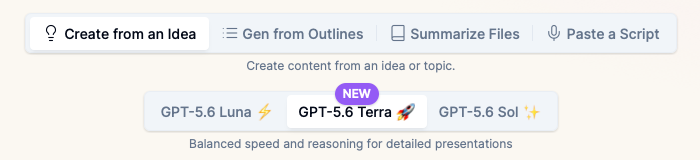
The model is a per-deck choice, not an account setting. Generate on the fast model, and if a section needs more depth, regenerate that same deck on a stronger one. Your brief, uploads, outline, and brand settings carry over. When GPT-6 arrives it joins this picker — it does not replace your existing work.
A real brief, not a topic string. ChatSlide asks what the presentation must accomplish, who is in the room, and what they should decide or do. This is the input that separates a usable first draft from a generic one, on any model.
Real charts from your own numbers. Upload a spreadsheet or paste figures and ChatSlide builds charts with real axes and real proportions, rather than decorative shapes sized by guesswork.
Document and OCR input. Upload a PDF, a scanned report, or an existing deck and ChatSlide extracts the text and tables so the model reasons over your material instead of general knowledge.
Per-slide speaker notes. Every deck can carry notes sized to your actual speaking slot.
19 AI editing tools. Compress an overloaded slide, rewrite a finding as a recommendation, generate a diagram, or restyle to your brand — all in the editor, after generation.
Export as a narrated video. Turn the finished deck into a narrated video for the people who will not attend.
How ChatSlide Builds Your Deck
1. Pick your model. The picker sits at the top of the Summary step. Free accounts run GPT-5.6 Luna. Paid plans add GPT-5.5 and GPT-5.6 Terra. Ultimate unlocks GPT-5.6 Sol. GPT-6 joins this list on release.
2. Write a real brief. State the goal, the audience, and the decision you want out of the room. Add what must be included and what to avoid.
3. Add your source material. Upload the PDF, the spreadsheet, the report, or paste the text. This is what turns a generic deck into yours.
4. Review the outline before slides exist. ChatSlide generates the structure first. Fixing the argument here costs seconds; fixing it after twenty slides are designed costs an afternoon.
5. Generate, edit, export. Slides are built against your template. Edit inline, then export to PowerPoint, PDF, or Keynote.
Who This Is For
Consultants and agencies turning a brief or a transcript into a client-ready deck that already matches the client's template.
Analysts and finance teams who need the numbers in the deck to be the numbers in the spreadsheet, with charts that survive scrutiny.
Researchers and educators synthesizing several long documents into a talk that holds one argument across sections.
Founders rebuilding the same pitch for the fifth investor with a different emphasis each time.
ChatSlide for Teams
Organizations standardizing on one deck workflow can run ChatSlide with SSO, consolidated team billing, and shared brand templates, so every deck comes out on-template regardless of who generated it — which is exactly the capability that gets more valuable as models get better at following templates. If you are evaluating a rollout across a team, talk to us.
GPT-6 vs GPT-5.6 for Slides: What to Expect
| **GPT-5.6 Luna** | **GPT-5.6 Terra** | **GPT-5.6 Sol** | **GPT-6 Astra** | |
|---|---|---|---|---|
Availability on ChatSlide | Free, all tiers | All paid plans | Ultimate | Pending release |
Best for | Everyday decks, first drafts, iterating on structure | Analytical decks, dense sources, client work | Technical depth, layered arguments | Template adherence and multi-document structure |
Speed | Fastest | Fast | Slowest | OpenAI reports ~47% less time per task than Sol on OSWorld 2.0 |
The honest guidance has not changed: start on the free model. Generate, read the outline, and only move up if the reasoning is genuinely too shallow for your material. Most decks never need to move — and that will still be true after GPT-6 ships.
Time Comparison
| Task | By hand | With ChatSlide |
|---|---|---|
Turn a 20-page report into a structured deck | 2–4 hours | Minutes |
Rebuild the same deck for a different audience | 1–2 hours | Minutes |
Chart a spreadsheet across six slides | 45–90 minutes | Minutes |
Write speaker notes for every slide | 1 hour | Included in generation |
Frequently Asked Questions
Can I use GPT-6 for slides right now?
Not universally. OpenAI is rolling Astra out in phases — a limited set of organizations first, then ChatGPT Plus, Pro, Business, and Enterprise, the API, and AWS over the following days. On publication day, no gpt-6 model id was exposed on a standard OpenAI API key.
When will GPT-6 be available in ChatSlide? ChatSlide has secured GPT-6 API access, and it will appear in the model picker once the rollout reaches us. There is nothing to migrate — it becomes another option on the same screen.
What is GPT-6 Astra? OpenAI's flagship model announced September 3, 2026, state-of-the-art on computer use, browsing, software engineering, cybersecurity, science, and professional work. For presentations, OpenAI calls it its best model for following existing templates and producing well-structured slides.
Will GPT-6 make my slides look better? No — and this is worth being clear about. Visual design comes from the presentation template, not the language model. A stronger model improves how the deck reasons, structures an argument, and follows your template's conventions. If the slides look wrong, change the template.
Do I need to pay to make slides while GPT-6 rolls out? No. GPT-5.6 Luna is free on ChatSlide with no trial period, and free decks export to PowerPoint, PDF, and Keynote.
Is GPT-6 worth waiting for before I build my deck? For a deck you need this week, no. Build it now on Luna and regenerate later if a stronger model would genuinely help — your brief, uploads, and outline carry over, so regenerating is cheap.
How does GPT-5.6 compare to other models for slides? We benchmarked frontier models across 128 real decks and published the results, including the finding that agentic self-refinement loops did not improve slide quality. See the best AI model for making slides.
Build the Deck Now, Upgrade the Model Later
GPT-6 Astra is the first flagship model to treat slides as a headline capability, and that is genuinely good news for anyone who builds decks. But the deck you need this week does not have to wait for a phased rollout.
Open ChatSlide, write a real brief, and generate on GPT-5.6 Luna — free, in seconds. When GPT-6 lands in the picker, the same deck is one regeneration away.