
Quick Answer: In our head-to-head on real presentation briefs, GPT-6 Astra hit the exact requested slide count 4 out of 4 times; GPT-5.5 did it 3 out of 4. The cost: Astra took about 1.9x longer (84 s vs 45 s per outline) and wrote about 38% more output tokens. It is a small test and we say exactly how small below. In ChatSlide, Astra is the model in the Ultimate slot of the model picker, so you can try it on your own deck.
OpenAI says Astra is its best model for following templates and producing slides. We wanted to see that on the kind of request people actually type into a presentation maker, not on a leaderboard. So we gave both models the same outline job and scored the results.
How we tested
- Briefs. Ten recent English presentation requests, of the kind paying users send. We use them only as test inputs and describe them here by category, never by content: an education-funding talk (30 slides), a B2B IT services deck (20), a medical case presentation (30), a long evidence-based clinical lecture (33), a short cloud-computing course assignment (10), and so on.
- Task. Each model received the same instructions: return a JSON outline with exactly the requested number of slides, each with a title, a layout (bullets, chart, table, two-column and so on), bullet points and speaker notes, in the language of the brief.
- Settings. Same system prompt for both, default reasoning effort, an 8,000-token output limit.
- Grading. A separate, smaller model (GPT-5.4 mini) scored every outline 0 to 10 on following the brief, accuracy, structure and specificity, and listed any brief violations and factual errors it found. It saw the brief and the outline, not the model name. Slide count was checked by code, not by the grader.
- Budget. We capped the run at $4 and let the script stop itself before any pair that could exceed it. It completed 6 briefs before stopping.
The results
Four of the six briefs produced a complete outline from both models. These are the numbers from those four:
| GPT-5.5 | GPT-6 Astra | |
|---|---|---|
Exact slide count | 3 / 4 | 4 / 4 |
Follows the brief (0 to 10, per brief) | 10, 8, 7, 7 | 10, 9, 10, 2 |
Average time per outline | 45 s | 84 s |
Average output tokens | 2,750 | 3,789 |
What stands out:
- Slide count. On the 30-slide medical case brief, GPT-5.5 returned 31 slides. Astra returned 30. Small, but if you asked for 30 slides for a time slot, it is the first thing you notice.
- Brief-following. On the medical case brief Astra scored 10 against GPT-5.5's 7. On the IT services deck, 9 against 8.
- The outlier. On the 10-slide cloud assignment, the grader gave Astra a 2 and GPT-5.5 a 7, yet listed almost the same issue for both (the brief says "9 slides" in one place and "6 to 10 slides" in another). We read both outlines: both have 10 slides, a title slide, a responsibility table by service model and speaker notes on every slide. They are close. We report the 2 because that is what the grader returned, but we do not think it reflects a real gap.
- Speed and length. Astra was slower on every brief, from 1.5x to 2.2x, and wrote more. That is extra detail in speaker notes and bullets, which you pay for in waiting time.
What failed, and why it was our fault
Two briefs did not produce a usable outline:
- On a 33-slide clinical lecture, Astra ran into our 8,000-token output limit before finishing, so the JSON was cut off. GPT-5.5 finished, with 37 slides.
- On another 33-slide brief, both models hit the same limit.
That is our test harness, not the models. A 33-slide outline with full speaker notes simply needs more room, and we did not have budget left to rerun with a higher limit.
What we can and cannot say
Can say: on these briefs, Astra followed the requested slide count and structure more reliably. It is also clearly slower and wordier.
We also asked the grader to list factual errors, and we are not reporting that count. Most items it flagged were nuance, statements it called true but oversimplified, and on the medical brief it claimed Astra returned 29 slides when the outline had 30. A grader that miscounts slides is not one we will quote on medical accuracy.
Cannot say: that Astra is "N times better" at presentations. Four complete pairs is far too few for that, our grader is a single small model that produced at least one score we disagree with and at least one plain miscount, and two briefs had contradictory instructions. If you see a confident percentage about GPT-6 Astra and slides, ask how many decks it was measured on.
For a larger comparison across many models and 128 decks, see our AI model benchmark for presentations. For what Astra is and when it arrived, see GPT-6 slides.
Which model should you pick in ChatSlide?
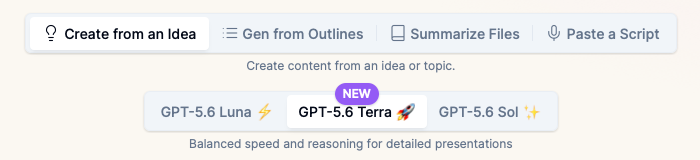
ChatSlide's create screen has a model picker:
| Model | Plan | When to use it |
|---|---|---|
GPT-5.6 Luna | Free | Quick drafts, short decks, trying ChatSlide out |
GPT-5.6 Terra | Paid plans | Most real work: client decks, lectures, reports |
GPT-6 Astra | Ultimate | Long or strict briefs: exact slide counts, named sections, clinical or technical content where a wrong fact is costly |
Our rule of thumb from this test: pick Astra when the brief has hard constraints (a fixed slide count, required section titles, a case structure) and you can wait an extra minute. For everything else, Terra is faster.
The model writes the outline. Layout, charts, images and theme are handled by ChatSlide after that, so a deck from any of the three models comes out designed, not as a wall of bullets.
How to make a deck with GPT-6 Astra in ChatSlide
- Open the create screen at app.chatslide.ai and choose how to start: an idea, an outline, a script or files.
- Pick GPT-6 Astra in the model picker.
- Write the brief with its constraints up front: slide count, audience, required sections. Astra rewards explicit instructions.
- Review the outline before generating. This is where slide count and structure are fixed.
- Generate, then edit slides, charts and speaker notes, and export to PowerPoint, PDF or video.
For teams
If your team builds decks with fixed structures (case conferences, client reports, course modules), ChatSlide for Enterprise adds SSO, team billing and shared templates, so everyone starts from the same structure. Contact us to set it up.
FAQ
Is GPT-6 Astra better than GPT-5.5 for presentations? In our small test it followed slide counts and brief structure more reliably, but it was about 1.9x slower. It is not a large enough test to claim a general margin.
How long does GPT-6 Astra take to outline a deck? In our runs, 54 to 111 seconds for a 10 to 30 slide outline, versus 26 to 66 seconds for GPT-5.5.
Can I use GPT-6 Astra in ChatSlide? Yes. It is the model in the Ultimate slot of ChatSlide's model picker.
Why did some outlines fail in your test? Our test capped output at 8,000 tokens, which is too short for a 33-slide outline with full speaker notes. That limit was ours, not the model's.
Did you use real user content? No content from any user appears in this article. Briefs were used only as test inputs and are described by category.