
Quick Answer: A strong corporate-training deck follows a 5-block structure: (1) Learning objectives (2–3 specific, measurable outcomes), (2) Concept delivery with examples and a short quiz/poll every 5 slides, (3) Practice activity — discussion prompt, role-play, or worksheet, (4) Application scenario rooted in the learner's actual job, (5) Recap + action items. Aim for ~12 slides per 30 minutes of training, and skip dense bullet walls — adult learners retain 60% more from visuals than text. ChatSlide generates this structure from a job-aid doc or topic prompt in one pass.
The Training Deck Problem
Corporate trainers and L&D professionals face a particular challenge: they need to create presentations that teach, not just inform. A training deck is not a status update or a sales pitch. It needs to guide learners through new concepts, include activities and discussion prompts, and maintain engagement across a 60-minute (or full-day) session.
Yet most trainers build their decks the same way everyone else does — starting from a blank PowerPoint, copying from last quarter's version, or hunting for templates that never quite fit their content. The result is hours spent on formatting instead of designing the learning experience.

What Training Presentations Need
Training decks have requirements that set them apart from other presentation types.
Clear learning objectives. Every training session should open with what participants will be able to do by the end. These objectives frame the entire deck and give learners a mental roadmap.
Progressive structure. Training content builds on itself. Concepts introduced in section one become the foundation for exercises in section three. The deck needs to reflect this progression, not just present information in random order.
Interactive elements. Effective training includes discussion questions, group activities, case studies, and reflection prompts. These cannot be afterthoughts — they need to be woven into the slide flow at the right moments.
Visual consistency. When you are presenting for two hours, visual fatigue is real. Consistent formatting, a limited color palette, and predictable slide layouts help learners focus on content rather than decoding a new design every slide.
Takeaway value. Participants often receive the deck after the session. Good training slides work both as a live presentation aid and as a standalone reference document.
Building Training Decks with ChatSlide
ChatSlide understands instructional structure, which makes it well-suited for training content. Here is the typical workflow for corporate trainers.
Define Your Training Topic and Audience
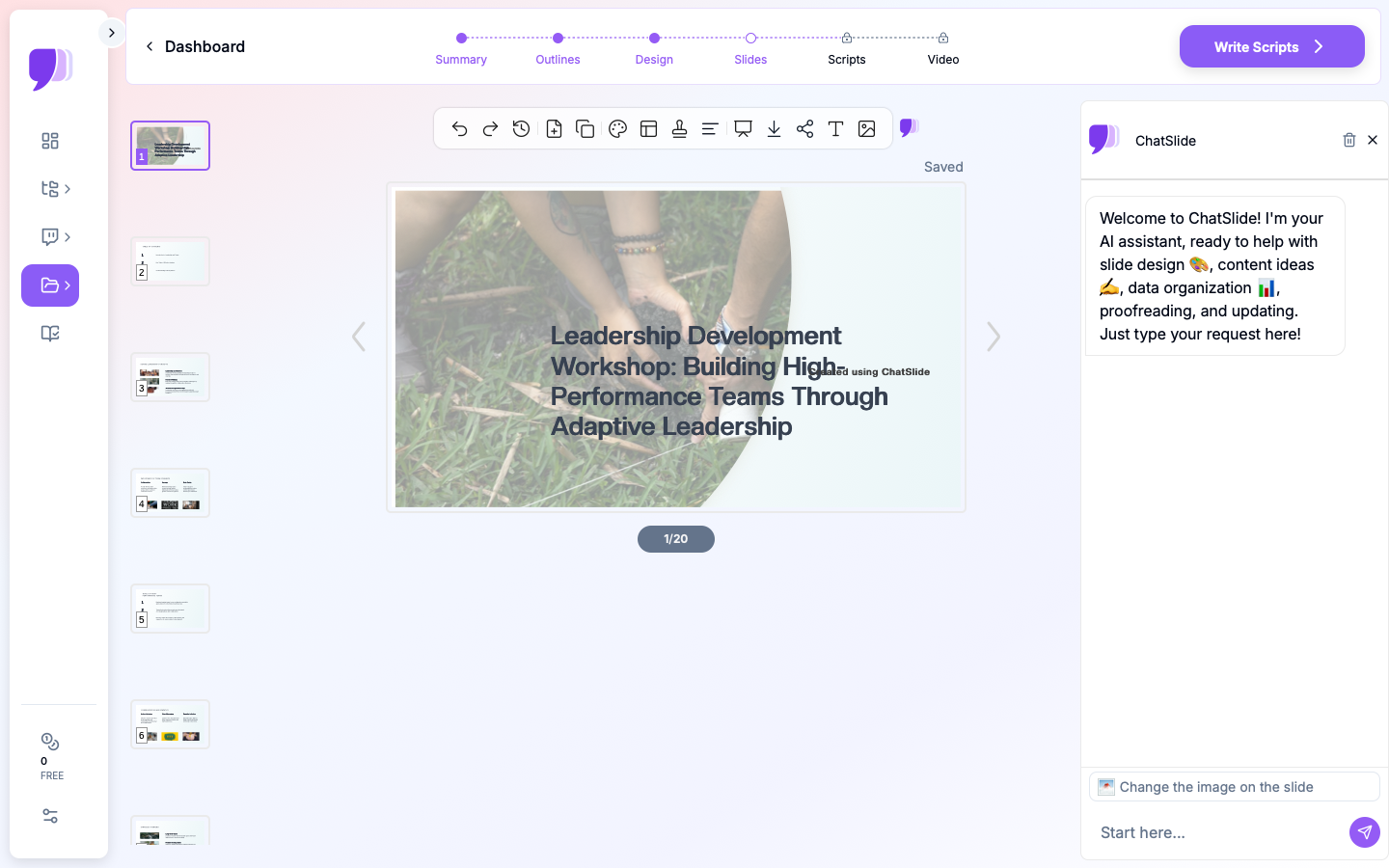
Start by entering your training topic — for example, "Leadership Development: Building High-Performance Teams Through Adaptive Leadership." Specify your audience: "Corporate managers and HR professionals."
The AI generates an outline that follows instructional design principles: opening with context and objectives, building through core concepts, incorporating application sections, and closing with summary and next steps.
Customize the Outline for Your Session
The generated outline gives you a structured starting point. From here, you shape it to match your session:
- Adjust for time: A 90-minute workshop needs fewer sections than a full-day program. Remove or combine sections to fit your slot.
- Add activities: Insert discussion prompts or group exercise slides between content sections. The standard recommendation is one interactive element every 15 to 20 minutes.
- Match your organization: If your company uses specific frameworks (like Situational Leadership or DISC), adjust the content sections to align with those models.
Generate and Refine Slides
ChatSlide produces formatted slides with relevant imagery — professional settings, team collaboration, workplace scenarios. Each slide has a clear heading and concise supporting text.
For training decks specifically, pay attention to:
- Activity slides: Add clear instructions for group exercises, including time allotments and expected deliverables
- Discussion slides: Frame open-ended questions that connect theory to participants' real experiences
- Summary slides: Include key takeaways at the end of each major section, not just at the end of the entire presentation
Export and Distribute
Download your finished deck as PowerPoint for further customization, or share it directly. Many trainers generate the core structure with ChatSlide, then add their organization's branding, proprietary frameworks, and specific case studies before delivering.
Training Presentation Types That Work Well
Different training formats call for different approaches. ChatSlide handles all of these effectively.
Leadership Development Workshops
Leadership training is one of the most common corporate training formats. These typically cover topics like emotional intelligence, conflict resolution, delegation, coaching skills, and strategic thinking. The presentations need to balance conceptual frameworks with practical application — participants should leave with specific behaviors to practice, not just theory to remember.
New Employee Onboarding
Onboarding decks introduce company culture, processes, tools, and expectations. They need to be comprehensive without being overwhelming. A good onboarding deck has clear sections that can be delivered across multiple sessions (day one, week one, month one) rather than cramming everything into a single marathon presentation.
Technical Skills Training
Teaching new software, processes, or procedures requires step-by-step slides with clear visuals. These decks benefit from a "concept, demonstration, practice" rhythm — introduce the concept, show how it works, then give participants time to try it themselves.
Compliance and Safety Training
Regulatory training (HIPAA, workplace safety, anti-harassment) needs to cover required content while keeping participants engaged. This is where interactive elements matter most — scenario-based discussion questions and case studies make compliance training practical rather than just a checkbox exercise.
Sales Enablement
Training sales teams on new products, objection handling, or sales methodologies requires presentations that are both informative and motivational. These decks often include role-play scenarios, competitive positioning frameworks, and real customer examples.
Tips for Better Training Presentations
The 10-Minute Rule
Adult attention spans reset approximately every 10 minutes. Build your training deck with natural breaks at these intervals — a discussion question, a quick poll, a partner exercise, or even a brief stretch break. Your slides should signal these transitions clearly.
Show, Do Not Tell
Instead of a slide that says "Active listening is important," use a slide that sets up a listening exercise. Instead of listing the five steps of a framework, walk through a real scenario that demonstrates each step. Training that involves participants in doing always outperforms training that only involves them in reading.
Less Text, More Structure
Each slide should have no more than three to five bullet points, and each bullet should be a phrase, not a paragraph. If you need to convey dense information, use a handout or workbook that participants can reference during and after the session.
Build in Reflection
End each major section with a reflection prompt: "Think about a time when you experienced this in your role. What would you do differently now?" These moments help participants connect new concepts to their existing experience, which dramatically improves retention.
Test the Flow
Before delivering to a group, walk through the entire deck and time each section. Training decks that run over time force you to rush the most important parts — the activities and discussions that drive real learning.
Designing Activities That Actually Work
The gap between mediocre and excellent corporate training often comes down to the quality of the activities embedded in the presentation. Slides that only deliver information produce passive learners. Activities that connect concepts to real work produce lasting behavior change.
Case Study Discussions
Present a realistic workplace scenario on a slide and give small groups five to ten minutes to discuss how they would handle it. The best case studies have no single correct answer — they force participants to weigh trade-offs, which mirrors actual decision-making. After the discussion, have groups share their reasoning and use the debrief to connect their insights back to the framework you just taught.
When building with ChatSlide, describe the type of case study you want in the topic or editing prompt. For example, "Include a case study slide about a manager dealing with underperformance on a remote team." The AI generates a realistic scenario that you can then tailor to your organization.
Pair and Share Exercises
These take only two to three minutes but dramatically increase engagement. After introducing a concept, put a question on the slide and ask participants to discuss with a neighbor. Questions like "When have you seen this principle applied well in your team?" or "What would make this approach difficult in your department?" generate immediate relevance.
Skill Practice Rounds
For training that teaches specific skills — coaching conversations, feedback delivery, negotiation techniques — build in structured practice rounds. A slide can outline the scenario, assign roles (coach and coachee, for instance), set a time limit, and list observation criteria. Follow each round with a group debrief slide that guides reflection on what worked and what felt difficult.
Self-Assessment Checkpoints
At key points in the training, include a brief self-assessment slide. These might ask participants to rate their confidence with a concept on a scale of one to five, or to write down one specific action they plan to take. Self-assessments serve two purposes: they help participants consolidate learning, and they give you real-time feedback on whether the content is landing.
Structuring Multi-Session Training Programs
Many corporate training initiatives span multiple sessions — a four-week leadership program, a three-day onboarding sequence, or a monthly skills development series. Building presentations for these programs requires thinking about continuity across sessions, not just within a single deck.
Consistent Opening and Closing Rituals
Start each session with a brief review slide that recaps the previous session's key points and any homework or practice assignments. Close each session with a preview of what comes next and a clear action item for the interim period. This structure creates a through-line that ties individual sessions into a coherent program.
Progressive Complexity
Each session should build on the last. If session one introduces a framework, session two should apply it to a case study, and session three should have participants use it with their own real situations. Your slides should reflect this progression — early sessions carry more explanatory content, while later sessions are heavier on application and practice.
Spacing for Retention
Research on learning consistently shows that spaced practice outperforms massed practice. If you have eight hours of content, spreading it across four two-hour sessions with a week between each produces better retention than delivering it in a single full-day workshop. When building your decks, plan the content distribution so that key concepts are revisited across sessions rather than covered once and forgotten.
Measuring Training Effectiveness Through Your Slides
Your presentation can also serve as a measurement tool if you build in the right elements.
Pre- and post-assessment slides. Open the session with three to five quick-check questions that test baseline knowledge. Close with the same or similar questions. The difference tells you whether the training moved the needle.
Commitment slides. Near the end of the session, include a slide that asks each participant to write down one specific behavior they will change or practice in the coming week. Collect these commitments (digitally or on paper) and follow up in the next session or via email.
Feedback prompts. A final slide with two or three open-ended questions — "What was most useful today?" and "What would you change about this session?" — gives you data to improve the next delivery.
From Blank Slides to Ready-to-Deliver
Building a training deck from scratch typically takes 10 to 20 hours when you factor in research, content creation, formatting, and revision. ChatSlide compresses the initial creation to minutes, giving you a structured, professional starting point. You invest your time where it matters most: customizing the content for your specific audience, designing meaningful activities, and rehearsing your delivery.
Whether you are preparing a leadership workshop, an onboarding program, or a technical skills session, start with your topic at ChatSlide and have a presentation-ready draft before your next meeting.