Why Customer Service Training Still Relies on Bad Slides
Every customer service manager knows the drill. You need to train a new cohort of service reps, roll out updated complaint handling procedures, or refresh your team on service recovery techniques. So you open PowerPoint and start building slides from scratch — again.
The problem is not a lack of knowledge. Most service leaders know exactly what great customer service looks like. The problem is turning that knowledge into structured, visually engaging training materials that actually hold attention during a 2-hour workshop.
Service training presentations have unique requirements that generic templates cannot address. You need role-play scenario slides, escalation flowcharts, customer journey maps, satisfaction metric dashboards, and interactive exercises — all formatted consistently and ready to present.
What Makes Service Training Presentations Different
Customer service training is not a standard corporate presentation. It blends several distinct content types that most presentation tools handle poorly:
Scenario-based learning. Service training relies heavily on "what would you do" scenarios. A dissatisfied customer calls about a delayed order. A client threatens to cancel their account. A guest at a hotel discovers their reservation was lost. Each scenario needs clear context, decision points, and model responses — structured as interactive slides, not walls of text.
Process and escalation flows. Every service organization has escalation tiers, handoff procedures, and resolution workflows. Training materials need to communicate these visually — showing when to escalate, who to contact, and what information to pass along.
Metrics and KPIs. Service teams live by numbers: First Contact Resolution (FCR), Customer Satisfaction (CSAT), Net Promoter Score (NPS), Average Handle Time (AHT). Training decks need to present these metrics clearly, show benchmarks, and explain how individual behavior connects to team scores.
Soft skills coaching. Active listening, empathy statements, de-escalation techniques, and positive language patterns. These require example dialogues, before-and-after comparisons, and practice exercises — content formats that standard templates do not support well.
Building Service Training Decks with ChatSlide
ChatSlide handles the structural complexity of service training presentations by generating content that understands training pedagogy. Here is how service leaders are using it.
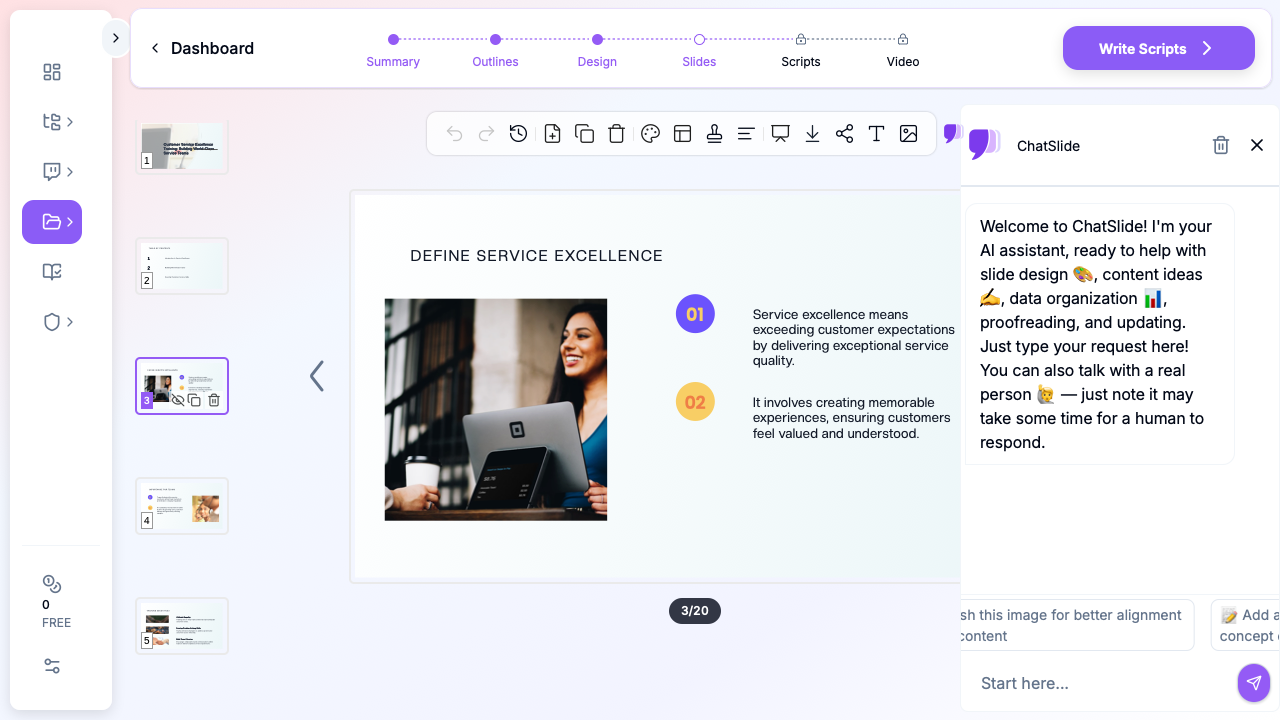

Step 1: Define Your Training Focus
Start by describing your training topic with specifics. Instead of "customer service training," provide context:
- "Complaint handling and service recovery for retail staff"
- "Phone etiquette and de-escalation for call center agents"
- "Customer experience standards for new hotel front desk hires"
The more specific your topic, the more targeted the generated content. ChatSlide pulls from domain knowledge about service methodologies — SERVQUAL, the service recovery paradox, the HEARD technique — to create slides grounded in established frameworks.
Step 2: Structure Around Learning Objectives
Effective service training follows a proven structure: set expectations, teach concepts, demonstrate with examples, practice through exercises, and reinforce with takeaways.
ChatSlide generates outlines that follow this pedagogical flow automatically. A typical 20-slide customer service training deck includes:
- Welcome and objectives (1-2 slides) — What participants will learn and why it matters
- Current state (2-3 slides) — Team metrics, common complaint categories, areas for improvement
- Core concepts (4-6 slides) — Service standards, communication techniques, escalation protocols
- Scenarios and exercises (4-6 slides) — Real-world situations with discussion prompts
- Best practices (3-4 slides) — Do's and don'ts, example scripts, recovery techniques
- Action plan and wrap-up (2-3 slides) — Individual commitments, resources, next steps
Step 3: Add Visual Context
Service training benefits enormously from visuals — customer journey maps, process diagrams, metric dashboards. ChatSlide adds relevant images and suggests chart layouts that make abstract service concepts tangible.
For a complaint handling module, the generated slides might include a resolution flowchart showing first-contact vs. escalation paths. For a service excellence workshop, you might get a visual comparing reactive vs. proactive service behaviors.
Training Modules You Can Build
ChatSlide is being used by service leaders across industries to build targeted training modules:
New hire onboarding. Service standards, brand voice guidelines, system walkthroughs, and shadowing checklists. New reps get a consistent foundation regardless of who trains them.
Complaint handling workshops. The HEARD technique (Hear, Empathize, Apologize, Resolve, Diagnose), service recovery strategies, and when-to-escalate decision trees. Includes scenario slides for group discussion.
Phone and email etiquette. Greeting scripts, hold procedures, transfer protocols, email templates, and tone guidelines. Side-by-side comparisons of good vs. poor responses make concepts concrete.
Customer experience coaching. For supervisors and team leads running one-on-one coaching sessions. QA scorecard reviews, call audit findings, and individualized improvement plans.
Cross-functional service alignment. When sales, support, and success teams need shared standards. Customer lifecycle stages, handoff procedures, and unified service level expectations.
Tips for Service Training Presentations
Use real (anonymized) examples. The best service training draws from actual customer interactions your team has handled. Before building your deck, collect 3-5 representative scenarios — a difficult complaint, a positive save, a missed opportunity. Describe these to ChatSlide as your training context.
Include practice time. For every concept slide, plan a corresponding exercise. ChatSlide generates scenario-based discussion prompts, but you should adjust them to reflect your specific products and customer base.
Keep metrics actionable. When presenting CSAT scores or FCR rates, always connect the number to a specific behavior. "Our FCR dropped 8% last quarter" is information. "Our FCR dropped 8% because reps are transferring billing questions instead of resolving them — here's how to handle the top 5 billing issues" is training.
Layer your training. Do not try to cover everything in one session. Build modular decks — a 30-minute complaint handling refresher, a 45-minute new product rollout briefing, a 2-hour comprehensive onboarding. ChatSlide makes it easy to generate focused modules quickly.
Refresh quarterly. Customer expectations evolve, products change, and new issues emerge. Regenerate your training materials each quarter with updated scenarios and metrics. With AI, this takes minutes instead of days.
Get Started
Whether you are training a team of 5 or rolling out a global service excellence program, ChatSlide helps you build professional training decks that actually prepare reps for real customer interactions.
Start creating your customer service training presentation at chatslide.ai. Describe your training topic, select your audience, and get a complete slide deck with scenarios, frameworks, and exercises — ready to customize and present.