Why Change Management Presentations Matter
Every organizational transition lives or dies on communication. Whether you're rolling out a new quality management system, restructuring a team, or introducing lean manufacturing processes, the presentation you deliver to stakeholders determines buy-in.
Quality managers and change leaders spend hours building slides that explain the "why" behind change — only to end up with decks that feel generic or fail to connect with their audience. The challenge isn't just making slides; it's translating complex frameworks like Kotter's 8-Step Model or ADKAR into visuals that drive action.
Common Change Management Presentation Scenarios
Change management presentations serve different purposes depending on your role and audience:
Quality managers need to present process improvements, ISO compliance updates, and continuous improvement initiatives to leadership. These decks must balance technical rigor with accessible language.
HR and L&D teams build change readiness workshops that help employees navigate transitions. These presentations need interactive elements, empathy-driven messaging, and clear timelines.
Project managers present change impact assessments to steering committees. Their slides need risk matrices, stakeholder maps, and milestone trackers that executives can absorb quickly.
Consultants deliver change management frameworks to client organizations. Every deck must feel custom while following proven methodologies like Prosci, Lean Six Sigma, or Kotter's model.
What Makes an Effective Change Management Deck
The best change management presentations share several characteristics:
A clear "before and after" narrative. People resist change when they don't understand why things need to be different. Your opening slides should paint a vivid picture of the current state problems and the desired future state.
Framework-backed structure. Whether you follow Kotter's 8 Steps, Lewin's Change Model, or the ADKAR framework, grounding your presentation in an established methodology gives it credibility. Each section of your deck should map to a stage in your chosen model.
Stakeholder-specific messaging. A slide that works for the C-suite won't work for frontline employees. Effective decks address different audiences' concerns: executives care about ROI and timeline, managers care about implementation details, and individual contributors care about how their daily work will change.
Visual progress indicators. Change is a process, not an event. Including roadmaps, phase diagrams, and milestone trackers helps your audience understand where they are in the journey and what comes next.
Real examples over abstract theory. Every claim about "improved efficiency" or "better outcomes" should be backed by a concrete scenario. Show what the new process looks like in practice, not just what the framework diagram looks like.
Building Your Change Management Presentation with ChatSlide
Here's how to create a comprehensive change management deck in minutes rather than hours:
Step 1: Define Your Change Scenario
Start by entering your specific change initiative as the topic. Instead of something generic like "change management," be specific: "Change Management Training for Quality Managers in Manufacturing" or "Digital Transformation Readiness Workshop for Healthcare Staff."
The more context you provide, the more relevant your slides will be. Include your industry, your audience's role, and the type of change you're managing.
Step 2: Let AI Structure Your Content
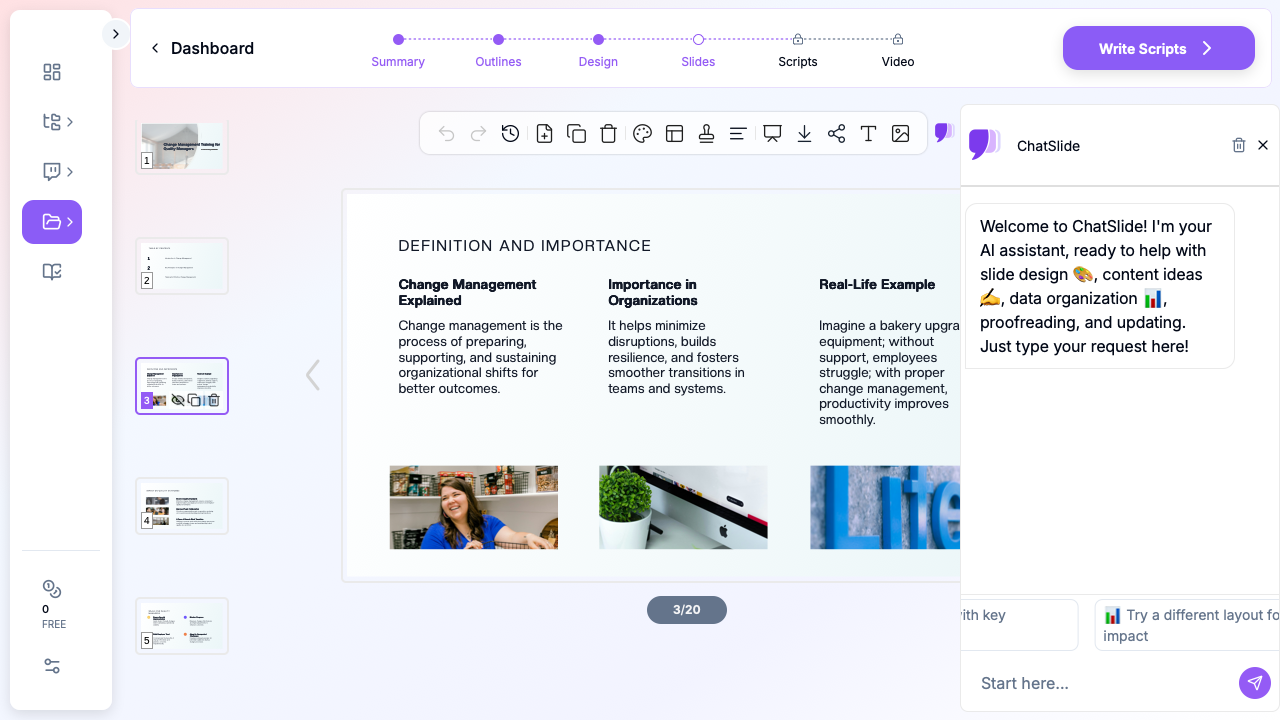
ChatSlide analyzes your topic and generates an outline that follows change management best practices. A typical deck might include:
- Current state assessment and case for change
- Change management framework overview
- Stakeholder impact analysis
- Implementation roadmap and phases
- Communication and training plan
- Resistance management strategies
- Success metrics and measurement plan
You can rearrange sections, add or remove slides, and adjust the depth of each topic before generating the full deck.
Step 3: Customize for Your Audience
Once the slides are generated, tailor them to your specific situation. If you're presenting to senior leadership, emphasize the business case, ROI projections, and strategic alignment. For a team workshop, focus on practical exercises, role-specific impacts, and feedback mechanisms.
ChatSlide's AI assistant can help you rewrite sections for different audiences, adjust the tone from formal to conversational, or add industry-specific terminology.
Step 4: Add Visual Elements
Change management decks benefit from strong visuals: process flow diagrams, comparison charts, timeline graphics, and stakeholder maps. ChatSlide automatically includes relevant images and can generate layouts optimized for complex information.
For data-heavy slides — like adoption rate projections or resource allocation charts — the tool structures your content so numbers tell a story rather than overwhelming the viewer.
Change Management Frameworks That Work Well as Presentations
Kotter's 8-Step Change Model
This framework translates naturally into an 8-section presentation, with each step building on the previous one: creating urgency, forming a coalition, developing a vision, communicating the vision, removing obstacles, creating short-term wins, building on change, and anchoring change in culture.
ADKAR Model
The Awareness-Desire-Knowledge-Ability-Reinforcement framework works well for employee-facing workshops where you need to address individual change readiness at each stage.
Lewin's Change Model
The Unfreeze-Change-Refreeze model is particularly effective for simpler presentations that need to explain why the status quo must change, what the transition looks like, and how the new state will be sustained.
Lean Six Sigma and Continuous Improvement
For quality managers specifically, framing change through the DMAIC cycle (Define, Measure, Analyze, Improve, Control) provides a structured approach that resonates with process-oriented audiences.
Tips for Delivering Change Management Presentations
Start with empathy, not data. Acknowledge that change is uncomfortable before diving into the business rationale. Your audience needs to feel heard before they'll listen to your plan.
Use the "WIIFM" principle. Every audience member is silently asking "What's In It For Me?" Make sure each section of your presentation answers this question for the people in the room.
Build in interaction points. Change management is not a one-way broadcast. Include discussion prompts, quick polls, or reflection exercises that make your presentation feel like a conversation rather than a lecture.
Prepare for resistance questions. The strongest change management presentations anticipate objections and address them proactively. Include FAQ slides or "common concerns" sections that show you've thought through the challenges.
Follow up with resources. Your presentation is the beginning of the conversation, not the end. Include links to additional resources, a timeline for next steps, and clear channels for questions and feedback.
Get Started
Building a change management presentation shouldn't take longer than the change itself. ChatSlide helps quality managers, HR leaders, and change consultants create structured, professional decks in minutes.
Upload your existing change plan documents, enter your specific initiative details, or start from a framework template. Your AI-generated slides will follow change management best practices while staying customized to your organization's needs.