
Why Product Training Presentations Matter
Every product-focused organization faces the same challenge: getting teams up to speed on features, benefits, and competitive positioning quickly. Whether you're onboarding new sales representatives, training customer success teams, or preparing distributors for a product launch, the quality of your training materials directly impacts how well your team can communicate value to customers.
The problem is that creating effective product training decks is time-consuming. Product managers spend hours translating feature specifications into digestible slides. Sales enablement teams struggle to keep training materials current as products evolve. And when training content is inconsistent, so is the customer experience.
What Makes Product Training Different from Other Presentations
Product training presentations have unique requirements that generic slide templates don't address. Unlike a keynote speech or academic lecture, product training decks need to accomplish several things simultaneously:
Knowledge transfer with retention. Your audience needs to walk away understanding not just what the product does, but why it matters. This means structuring information around customer problems rather than feature lists.
Consistent messaging across teams. When ten different sales reps describe your product ten different ways, it confuses the market. Training decks establish a shared vocabulary and positioning framework.
Practical application scenarios. Abstract feature descriptions don't help a sales rep handle objections. Effective product training includes real-world scenarios, competitive comparisons, and objection-handling frameworks.
Visual clarity for complex products. Medical devices, enterprise software, industrial equipment — these products have specifications that are difficult to communicate through text alone. Strong visuals make complex products accessible.
Building a Product Training Deck with ChatSlide
ChatSlide's AI understands the structure of effective product training. When you provide your product topic and target audience, it generates slides organized around the principles that make training stick.
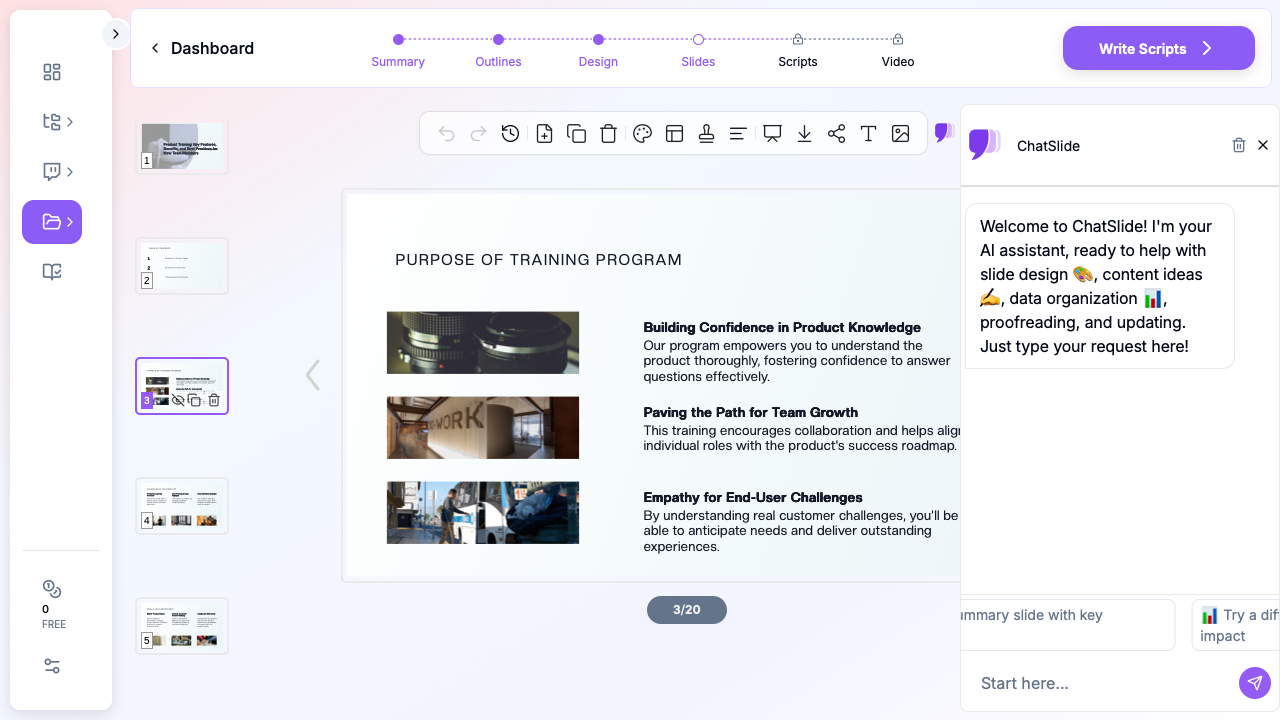

Step 1: Define Your Training Scope
Start by identifying what your audience needs to learn. A new hire product training has different depth requirements than a quarterly product update for experienced reps.
In ChatSlide, select the Training scenario type and specify your topic. For example: "Product Training: Key Features, Benefits, and Competitive Positioning for Sales Team." The AI uses this context to structure content appropriately.
Step 2: Set Your Audience Context
The same product information needs different framing depending on who's receiving it:
- New sales hires need foundational product knowledge, market context, and basic objection handling
- Experienced reps need updates on new features, competitive landscape changes, and advanced positioning
- Channel partners need high-level value propositions and customer-facing materials they can adapt
- Customer success teams need deep feature knowledge, common use cases, and troubleshooting frameworks
ChatSlide adjusts the depth and tone of generated content based on the audience you specify.
Step 3: Review and Customize the Generated Deck
The AI generates a complete training deck with logical flow: program overview, product fundamentals, key features with benefits, practical scenarios, and assessment or next steps. Review the generated content and customize it with your specific product details, pricing, and competitive data.
Step 4: Add Visual Assets
Product training is more effective with relevant imagery. ChatSlide can add stock photos that match your training context — whether that's medical equipment in a clinical setting, software interfaces, or team collaboration scenarios.
Structuring Product Training for Maximum Retention
Research on adult learning consistently shows that structured, scenario-based training outperforms information dumps. Here's how to organize your product training deck for maximum impact:
Open with the Customer Problem
Don't start with your product. Start with the problem your customers face. This grounds the entire training in real-world relevance and gives your team a framework for every customer conversation.
Feature-Benefit-Scenario Framework
For each key product feature, follow this structure:
- Feature: What it does (one sentence)
- Benefit: Why it matters to the customer (connect to their pain)
- Scenario: A specific situation where this feature makes a difference
This three-part structure helps trainees remember and apply what they learn.
Include Competitive Context
Your team will face competitive questions. Address them proactively in training rather than leaving reps to figure out positioning on their own. Include honest comparisons that acknowledge competitor strengths while highlighting your differentiation.
End with Practice, Not Just Information
The best product training decks include interactive elements: role-play scenarios, quiz questions, or discussion prompts. Even if your presentation format is static, including "discussion point" slides encourages trainers to pause for practice.
Common Product Training Scenarios
Medical Device Training
Healthcare product teams need training materials that communicate clinical value, regulatory compliance, and proper usage protocols. A gastroenterologist presenting ERCP equipment to fellows needs different depth than a sales rep learning device positioning for hospital procurement meetings.
Software Product Onboarding
SaaS companies need to train teams on feature releases, integration capabilities, and customer use cases. The challenge is keeping training current when the product ships updates frequently.
Manufacturing and Industrial Products
Technical specifications, safety protocols, and application guidelines make industrial product training particularly content-heavy. AI helps distill complex specifications into clear, visual presentations.
Consumer Product Launch Training
Retail teams and distributors need quick, memorable training on new product lines. Focus on key selling points, target customer profiles, and competitive shelf positioning.
Tips for Effective Product Training Presentations
Keep slides focused. One concept per slide. Product training already covers a lot of ground — don't compound the cognitive load with cluttered slides.
Use real customer language. Avoid internal jargon in training materials. If your customers say "it saves me time on reports," use that language instead of "automated reporting efficiency optimization."
Update quarterly at minimum. Product training materials that reference last year's competitive landscape actively hurt your team. Build a refresh cadence into your process.
Include a reference section. After the training session, reps need a quick-reference resource. Include a summary slide with key features, differentiators, and common objection responses.
Test comprehension. Add checkpoint slides throughout the deck with scenario-based questions. "A customer says they're happy with their current solution. How would you respond using what we covered about [feature]?"
Get Started
Building product training presentations doesn't have to consume your product team's bandwidth. ChatSlide generates structured training decks that follow adult learning principles, with professional visuals and logical flow.
Upload your product documentation, specify your training audience, and get a complete deck in minutes. Then customize with your specific product details, pricing, and competitive positioning.
Create your product training deck now — your team's product knowledge directly impacts every customer conversation.