
Why DEI Training Materials Take So Long to Build
If you have ever been tasked with developing a diversity, equity, and inclusion training program, you know the challenge. The content needs to be thoughtful, well-researched, and sensitive to a wide range of perspectives. A single misstep in framing can undermine the entire session.
HR managers and training facilitators often spend weeks assembling DEI slide decks. They pull from academic frameworks, company policy documents, industry best practices, and real-world case studies. Then they need to make it all visually engaging enough that participants actually stay focused during what can be a two-hour workshop.
The result? Many organizations either delay rolling out DEI training because the materials are not ready, or they rely on generic vendor decks that do not reflect their specific workplace culture or challenges.
What Strong DEI Training Presentations Include
Effective diversity and inclusion training goes beyond surface-level definitions. The best programs walk participants through a structured journey:
Foundation building. Before discussing bias or systemic issues, participants need a shared vocabulary. Slides that clearly define diversity, equity, and inclusion — and distinguish between them — set the stage for productive conversation.
Self-assessment frameworks. Interactive elements where participants can reflect on their own experiences and assumptions. This might include privilege awareness exercises, implicit bias scenarios, or cultural competency self-checks.
Organizational data. The most impactful DEI presentations connect broad concepts to specific workplace realities. Representation metrics, employee survey highlights, and retention patterns make the training feel relevant rather than theoretical.
Action-oriented strategies. Every section should end with concrete behaviors participants can adopt. Inclusive meeting practices, equitable hiring language, ally behaviors — specific enough that someone can implement them the next day.
Discussion prompts and scenarios. Real workshops need facilitation guides built into the deck. Case studies, role-play scenarios, and group discussion questions keep the session interactive.
Building DEI Training Slides with ChatSlide
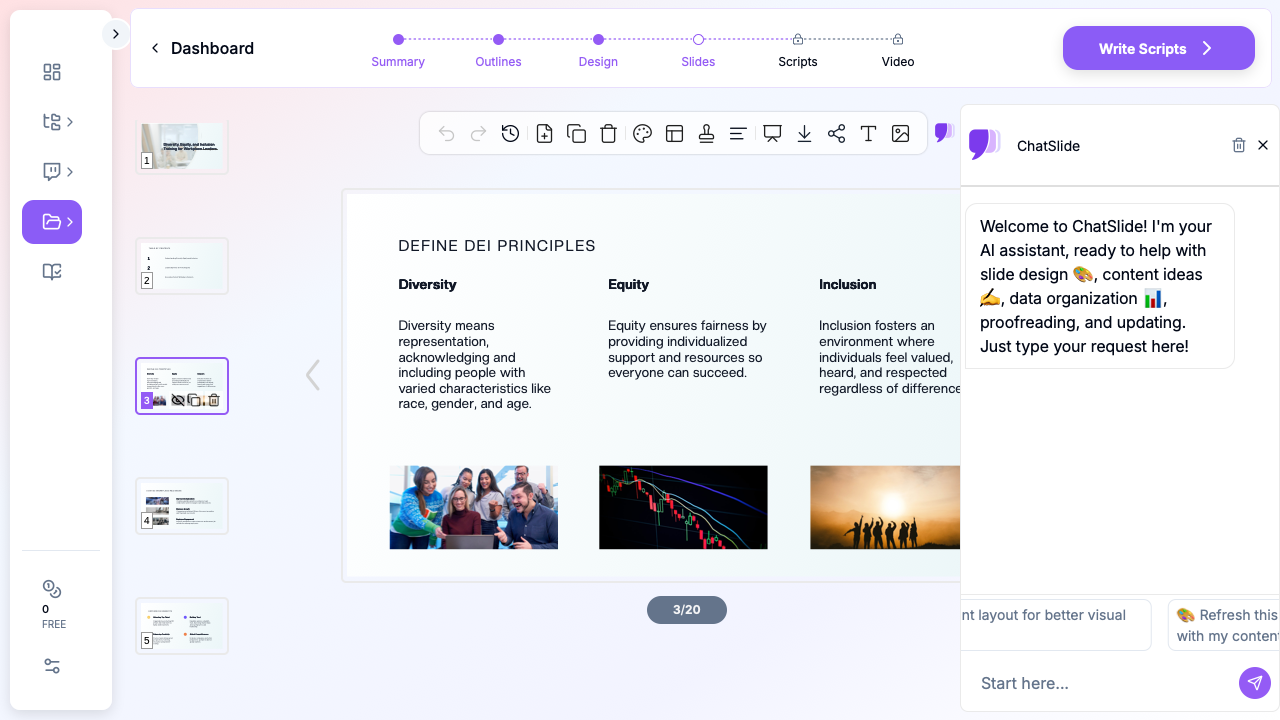
ChatSlide approaches DEI content the way a subject matter expert would. When you provide your training topic and audience, the AI draws on established frameworks in organizational psychology, HR best practices, and inclusion research to structure your presentation.
Start with your training scope. Specify whether you are building a foundational DEI overview, an unconscious bias workshop, an inclusive leadership program, or a targeted session on topics like microaggressions or equitable hiring. The more specific your topic, the more focused the output.
Define your audience. A session for senior executives needs different framing than one for frontline managers or new hires. ChatSlide adjusts the depth, terminology, and examples based on who will be in the room.
Let the AI structure the flow. The generated outline follows training design principles — building from awareness to understanding to action. You can rearrange sections, add your organization-specific content, or expand areas where your team needs more depth.
Add visual elements. DEI presentations benefit enormously from visuals that represent the diversity you are discussing. ChatSlide's image integration pulls relevant, professional imagery that reinforces your message without relying on clichéd stock photos.
Customizing for Your Organization
The generated slides give you a professional starting point, but the most effective DEI training reflects your specific workplace. Here is how to customize:
Incorporate your data. Replace generic statistics with your organization's demographic breakdown, engagement survey results, or retention metrics by department. This makes the training feel relevant rather than abstract.
Add your policies. Reference your company's specific anti-discrimination policies, reporting procedures, and employee resource groups. Participants should leave knowing exactly what resources are available to them.
Include local context. A DEI training for a hospital system looks different from one at a tech startup or a construction company. Add industry-specific scenarios and examples that participants will recognize from their daily work.
Build in facilitation notes. Use the speaker notes section to add timing guides, discussion prompts, and facilitator tips. This ensures anyone delivering the training — not just the person who built it — can run the session effectively.
Structuring Multi-Session DEI Programs
Many organizations run DEI training as a series rather than a single session. ChatSlide makes it straightforward to build a progressive curriculum:
Session 1: Foundations. Definitions, the business case for inclusion, and self-assessment. This session builds shared language and motivation.
Session 2: Recognizing bias. Unconscious bias types, how bias shows up in workplace decisions, and strategies for interrupting biased thinking.
Session 3: Inclusive behaviors. Practical skills like inclusive communication, equitable feedback, and ally actions. Heavy on scenarios and practice.
Session 4: Systemic change. Moving from individual behavior to organizational systems. Equitable policies, inclusive processes, and accountability structures.
Each session can be generated separately with ChatSlide, maintaining consistent branding and visual style across the series while covering progressively deeper content.
Tips for Delivering DEI Training Effectively
Even the best slides fall flat without thoughtful delivery. A few principles that experienced DEI facilitators follow:
Create psychological safety first. Before diving into content, establish ground rules for the session. Confidentiality, respect for different perspectives, and permission to be imperfect create space for honest dialogue.
Balance education with dialogue. The slides should prompt conversation, not replace it. Plan for at least 40% of session time to be participant discussion, not presentation.
Use real scenarios, not hypotheticals. Generic examples feel dismissable. Scenarios based on common workplace situations — a hiring panel discussion, a team meeting dynamic, a feedback conversation — generate more authentic engagement.
Follow up after the training. Share the slide deck with participants afterward so they can reference specific frameworks and action items. ChatSlide's export options make this easy to distribute.
Get Started
Building a DEI training program does not have to take weeks. ChatSlide helps you create a professional, well-structured presentation that you can then customize with your organization's specific data, policies, and culture.
Start with your training topic and audience, and have a polished first draft ready in minutes. Then invest your time where it matters most — customizing the content and preparing for facilitated discussion.