
Quick Answer: A DOT-ready driver safety deck covers 6 modules: (1) Pre-trip inspection + DVIR, (2) Hours-of-Service rules (11-hr, 14-hr, 70-hr/8-day for property carriers), (3) Defensive driving fundamentals — Smith System 5 Keys, following distance, scanning, (4) Distracted driving + CMV-specific cell-phone restrictions, (5) Hazard perception scenarios with video clips, (6) Post-incident protocols + reporting. Aim for 20 slides for a 1-hour session. ChatSlide pulls from your fleet's incident log and FMCSA regs to generate the deck — multilingual export available for diverse driver pools.
The Challenge: Driver Safety Training That Actually Changes Behavior
Every year, fleet safety officers, driving school instructors, and corporate risk managers spend dozens of hours rebuilding the same training decks — defensive driving fundamentals, hours-of-service rules, hazard perception, distracted-driving modules, post-incident reviews. The content is high-stakes: a bad slide deck leads to glazed-over drivers and, eventually, an avoidable collision. A strong one changes behavior and protects lives.
But the realities of building these presentations are brutal. Regulations change (FMCSA rule updates, state-level distracted-driving laws, new ADAS guidance). Audiences vary — new CDL drivers need the basics, seasoned fleet operators need refreshers on new telematics data, and office workers on the pool-car program need a five-minute huddle. Traditional PowerPoint workflows force trainers to choose: spend 8–10 hours rebuilding a deck from scratch, or recycle last year's tired slides and hope nobody notices.
ChatSlide changes that equation. Drop in your existing materials, a course outline, or even just a topic — "Defensive driving refresher for regional delivery drivers" — and the AI generates a structured, visual, training-ready deck in under five minutes. Below is exactly how fleet trainers, driving instructors, and corporate safety teams use it.

What Makes a Strong Driver Safety Training Presentation
Before we get to the workflow, it's worth agreeing on what "good" looks like. A driver safety deck is fundamentally different from a general corporate training slide:
Behavior-anchored, not theory-anchored. Drivers don't need to memorize the physics of kinetic energy — they need to know they should follow a three-second gap on dry pavement and double it in rain. Every slide should drive toward a specific decision or action.
Scenario-driven. The best defensive driving modules walk through real scenarios: a pedestrian stepping out at a crosswalk, a delivery truck merging on the highway, a sudden lane change by a distracted driver ahead. Scenarios stick; abstract rules don't.
Visually unambiguous. Drivers often complete training on tablets in break rooms, on phones during downtime, or in groups in a noisy depot. Slides need big visuals, minimal text, and instant comprehension.
Compliance-aware. If the training fulfills FMCSA, DOT, state CDL, or insurance-carrier requirements, certain elements (instructor name, course length, topic coverage, quiz items) need to be documented. Slide decks double as the proof of training.
Refreshable. Regulations change, fleet composition changes, and post-incident lessons are continuous. Trainers need to re-spin decks quickly when something new comes up — a recall, a near-miss, a new telematics rollout.
A good AI presentation tool has to hit all five. Generic AI slide builders tend to miss the compliance and behavior-anchoring layers; they produce pretty but forgettable decks.
Who Builds Driver Safety Presentations (and What They Actually Need)
Fleet safety isn't one job — it's a half-dozen audiences with distinct needs.
- Fleet safety managers at logistics, delivery, construction, and service companies (think HVAC technicians in branded vans, utility crews, last-mile couriers). They need quarterly safety meeting decks, post-incident reviews, and new-hire orientation modules.
- Commercial driver trainers running CDL schools or internal OTR training programs. They need multi-hour curricula covering pre-trip inspections, backing maneuvers, defensive driving, cargo securement, and hours-of-service rules.
- Corporate risk and HR teams managing pool vehicles, company cars, and grey-fleet programs (employees driving personal vehicles on company business). They need annual refreshers and policy-update announcements.
- Driving school instructors for new-driver education, refresher courses for senior drivers, and court-mandated defensive driving classes. Content must meet state curricula.
- Insurance-mandated safety trainers running workshops required by fleet insurance carriers to maintain discounted premiums. These sessions need documented coverage of specific topics.
- Transit, school bus, and emergency-vehicle instructors running specialized defensive driving programs with unique rules (school zones, transit stops, emergency response driving).
All of them share the same core workflow pain: too much time building slides, too little time actually coaching drivers. That's the problem ChatSlide is built to solve.
Step-by-Step: Build a Defensive Driving Deck in 10 Minutes
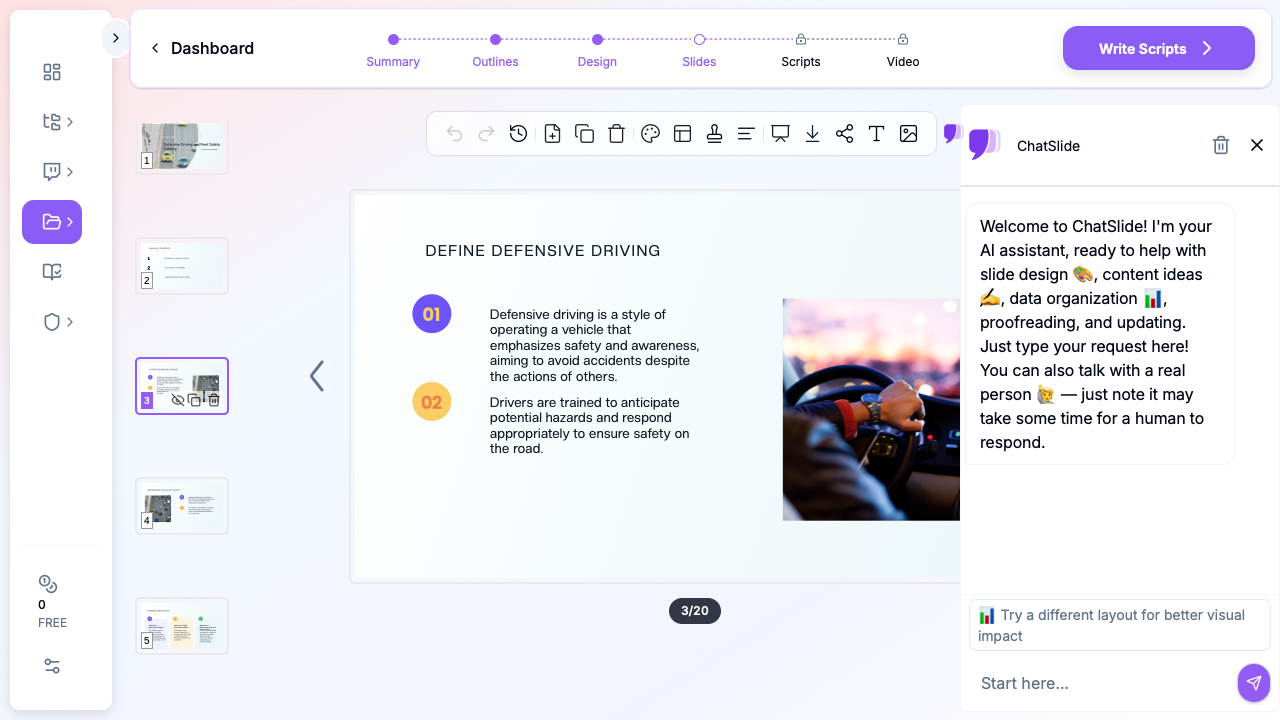
Here's a concrete walkthrough — the exact flow used to produce the deck in the screenshot above.
Step 1: Start with your raw material (or just a topic)
Open ChatSlide and create a new project. You have three entry points:
- Upload existing materials — a PDF of your fleet safety policy, a Word doc with your curriculum, a previous quarter's PPTX, or even meeting notes. ChatSlide extracts the structure and content automatically.
- Paste a URL — if your company publishes its safety rules online or you want to pull a regulatory page (FMCSA, DOT, state DMV), paste the URL.
- Start from a topic — type something like "Defensive driving refresher for regional delivery drivers, 30-minute module" and let the AI build the outline from scratch.
For the demo deck shown above, we started from a topic: "Defensive Driving & Fleet Safety Training" with audience "Fleet drivers, safety supervisors, and new commercial drivers."
Step 2: Review and adjust the outline
ChatSlide generates a structured outline — typically 6–8 sections with 2–3 subpoints each. For a driver safety deck, a good outline covers:
- Introduction: why defensive driving matters (crash statistics, cost of incidents, personal impact)
- Core principles: space management, speed management, visibility, communication
- Hazard perception and scanning techniques
- Common crash scenarios and how to avoid them
- Distracted, fatigued, and impaired driving
- Company-specific policies and procedures
- Post-incident reporting and Just Culture framework
- Quiz / knowledge check
You can drag sections around, add subpoints, delete what doesn't apply to your fleet, and rename headings. For a CDL-focused deck you'd add sections on pre-trip inspections, cargo securement, and hours-of-service. For a grey-fleet refresher you'd trim heavy-vehicle content.
Step 3: Generate slides with visuals
Click generate, and ChatSlide produces the full deck — typically 20–35 slides depending on section count and depth. Each slide pairs a clear heading with concise bullet points, supporting imagery, and a consistent visual style.
The image step is critical for driver safety content. Photographs of real driving scenarios, vehicle positioning, and road conditions communicate faster than any bullet list. ChatSlide pulls relevant stock imagery automatically — for the "Define Defensive Driving" slide above, it chose a driver's-POV steering wheel shot that reinforces the active-driving theme.
Step 4: Customize for your audience and compliance needs
A few common customizations for driver safety trainers:
- Add your company policies verbatim. Open any slide and edit the text — drop in your specific speed limits on depots, your phone-use rule, your reporting chain for incidents.
- Insert regulatory citations. If the training needs to document FMCSA or DOT compliance, add the rule numbers as a footer or citation slide.
- Add a quiz section. ChatSlide can generate knowledge-check slides for the topics you've covered — useful for documenting comprehension as part of a compliance paper trail.
- Translate for multilingual fleets. Many logistics and construction fleets employ drivers whose first language isn't English. Generate the deck once, then regenerate slide text in Spanish, French, Vietnamese, or any other language supported — the visuals and layout stay consistent.
- Brand it. Apply your company's logo, colors, and a title-slide template so the deck looks like official internal training rather than generic content.
Step 5: Export and deliver
Export to PPTX for in-person sessions, PDF for distribution, or share the live ChatSlide link for remote training. You can also record a voiceover walkthrough directly in the app — useful for asynchronous training where drivers complete the module on their own time.
Tips for High-Impact Driver Safety Presentations
A few lessons from watching trainers build and present these decks:
Open with a real local scenario. Generic crash statistics don't move drivers. A 90-second retelling of a near-miss that happened on your actual route, to your actual fleet, gets every head up. Build your first slide around that scenario and work outward.
Use the 7-second rule for visuals. Every slide should communicate its main point in 7 seconds or less when glanced at from the back of a training room. If the title and image don't convey the idea, the slide is too wordy.
Show the right behavior, not just the wrong one. Crash photos are memorable but normalize failure. Pair every "here's what went wrong" slide with a "here's what the defensive driver did instead" slide. The brain retains the positive example better.
Build modular content blocks. Create separate short decks for each core skill (following distance, lane changes, intersections, adverse weather) rather than one mega-deck. You can then remix them for different audiences — a new-hire gets the full library, a seasoned driver gets a 10-minute refresher on the one skill flagged by telematics.
Close with a specific commitment. Don't end on "drive safely." End on a slide where each driver writes down one specific behavior they'll change this week — "I'll check my mirror every 5–8 seconds on the interstate" or "I'll put my phone in the glovebox before I start the truck." Behavior change requires specificity.
Update after every major incident. When something happens in your fleet, update the relevant slide in the relevant module within a week. Living training beats static training. ChatSlide makes the update time minimal.
Common Scenarios Where This Workflow Shines
Some concrete examples of the use cases we see:
- Quarterly fleet safety meetings. Pull the last quarter's incident data, feed it to ChatSlide as context, generate a meeting deck that addresses the actual patterns (not last year's generic content).
- New-hire CDL orientation. Build a 2-hour onboarding curriculum from the company handbook and FMCSA guidelines — then reuse the same base deck for every new hire, swapping out only the regional-specific routing sections.
- Post-incident team debriefs. After a preventable crash, generate a debrief deck that walks through the timeline, the contributing factors, the policy in play, and the lessons for the whole team — without blaming the individual driver (Just Culture).
- Insurance-required annual workshop. Build the required coverage (defensive driving, distracted driving, fatigue, alcohol/drugs) as a documented deck that doubles as proof of training for the insurance carrier.
- Seasonal refreshers. Winter driving, summer heat and tire pressure, fall visibility and leaf cover — each seasonal module is 15 minutes of presentation time and now takes 15 minutes to build.
- Telematics-driven coaching. Export flagged events from your telematics platform (hard braking, speeding, harsh cornering), feed them as context, and generate a coaching deck that's specific to the actual behaviors drivers on your fleet are showing.
Get Started
Driver safety training shouldn't eat up the hours that your safety team should be spending in the field, coaching drivers one-on-one and investigating near-misses. A training deck is a tool; it should be fast to build, easy to update, and good enough to hold attention.
Try ChatSlide free and build your next defensive driving, fleet safety, or CDL training deck in minutes. Upload your existing materials, your policy handbook, or just a topic — and go from blank page to delivery-ready training in a single sitting.
For more workflow guides, see our corporate training presentation AI guide, our OSHA safety training guide, and our compliance training presentation guide.