
Quick Answer: An OSHA-compliant safety training deck covers: (1) Applicable standard (29 CFR cite — e.g., 1910.147 LOTO, 1910.146 confined space, 1926.501 fall protection), (2) Hazard identification with photos from your worksite, (3) PPE & control measures mapped to the hierarchy of controls, (4) Procedure walkthrough with diagrams, (5) Recent incident review + lessons learned, (6) Quiz + signed acknowledgement for the training log. Target 12–18 slides for a 30-min toolbox talk; OSHA requires documentation of training date, content, and attendees. ChatSlide pulls from the OSHA standard text + your incident log to generate compliant decks in 17 languages.
The Safety Training Slide Problem
Safety officers face a unique presentation challenge. The material they need to cover — hazard identification, emergency procedures, PPE requirements, incident reporting — is literally life-or-death content. But most safety training slides look like they were made in 2008: dense text, clip art hard hats, and bullet-point overload.
The result is predictable. Workers zone out during mandatory training sessions. Information retention drops. The same preventable incidents keep happening because the training that was supposed to prevent them failed to engage.
Building effective safety training presentations takes time that most HSE managers do not have. Between site inspections, incident investigations, regulatory compliance paperwork, and audit preparation, creating visually engaging training materials falls to the bottom of the priority list.
What Safety Training Presentations Need
Safety training is not a standard corporate presentation. It has requirements that generic AI tools and templates consistently miss:
Regulatory accuracy. OSHA standards, NFPA codes, ANSI requirements, and local regulations dictate specific content. Training materials must reference correct standard numbers, use mandated language for certain topics, and follow prescribed training structures for certification courses.
Visual hazard identification. "Identify the hazard in this image" exercises are a staple of effective safety training. Slides need to present workplace scenarios where participants spot unsafe conditions — cluttered walkways, missing guards, improper storage, electrical hazards.
Step-by-step procedures. Lockout/tagout sequences, confined space entry checklists, fall protection setup, chemical spill response — these need clear numbered steps with visual aids, not paragraph descriptions.
Incident data and trends. Safety teams track recordable incidents, near misses, lost-time injuries, and severity rates. Training decks need to present this data to show workers why specific procedures matter, connecting abstract rules to real consequences.
Multilingual accessibility. Construction crews, manufacturing plants, and logistics operations often include workers who speak different primary languages. Training materials need to be clear enough to support translation or visual-only comprehension.
Building Safety Training with ChatSlide
ChatSlide generates safety training content that follows established HSE training structures. Here is how safety professionals are using it.
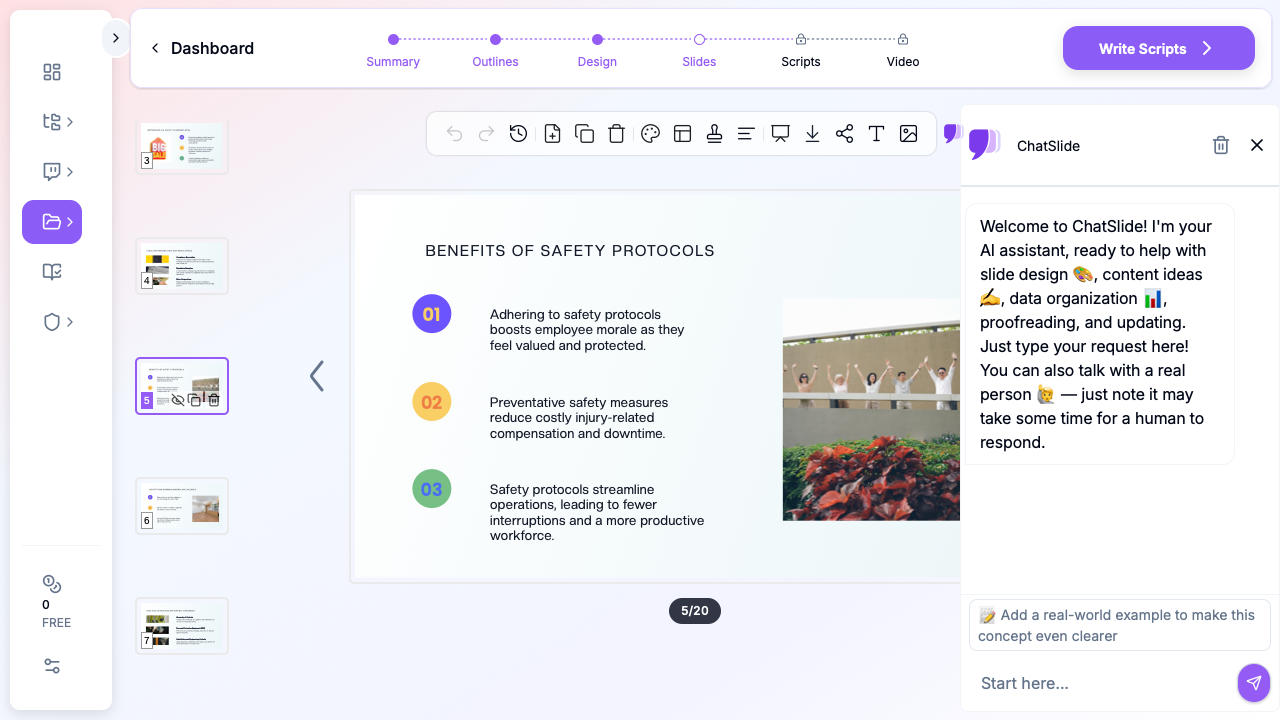

Start with Your Specific Training Topic
Effective safety training is always specific. Instead of "general safety," focus on a concrete module:
- "Fall protection training for roofing crews"
- "Hazardous chemical handling and GHS labeling for warehouse staff"
- "Forklift operation safety refresher for distribution center workers"
- "Confined space entry procedures for maintenance technicians"
- "Fire extinguisher use and emergency evacuation for office employees"
ChatSlide generates content calibrated to your topic. A fall protection module includes anchor point selection, harness inspection checklists, and rescue planning. A chemical handling module covers SDS interpretation, PPE selection matrices, and spill response procedures.
Training Structure That Works
Safety training follows a proven pedagogical sequence. ChatSlide generates decks that follow this flow:
- Why this matters (2-3 slides) — Incident statistics, real-world consequences, regulatory requirements
- Hazard identification (3-4 slides) — Types of hazards relevant to the topic, how to recognize them, risk assessment basics
- Procedures and controls (5-7 slides) — Step-by-step safe work procedures, engineering controls, administrative controls, PPE requirements
- Emergency response (2-3 slides) — What to do when things go wrong, reporting procedures, first aid basics
- Practice and review (3-4 slides) — Quiz questions, scenario discussions, hands-on demonstration prompts
- Documentation (1-2 slides) — Training sign-off requirements, where to find SOPs, who to contact
Adding Visual Context
Safety training relies heavily on visual communication. ChatSlide adds relevant images that support each concept — workplace environments, equipment, safety signage, PPE examples. These visuals make training materials more engaging than text-heavy regulatory slides.
For hazard identification exercises, you can describe specific workplace scenarios and ChatSlide generates slides structured for "spot the hazard" group discussions — one of the most effective safety training techniques.
Safety Training Modules You Can Build
Daily toolbox talks. 5-10 minute pre-shift safety briefings covering a single topic: heat stress prevention, proper lifting technique, housekeeping standards, ladder safety. Generate a week's worth of toolbox talks in one session.
OSHA 10/30-hour course supplements. Supporting materials for formal OSHA certification courses. Topic-specific deep dives that complement the required curriculum — electrical safety, scaffolding, excavation, personal protective equipment.
New employee safety orientation. Site-specific hazard awareness, emergency procedures, reporting protocols, and PPE requirements. Consistent content ensures every new hire gets the same critical safety information.
Incident investigation briefings. After an incident or near miss, share findings with the broader team. Root cause analysis, corrective actions, and lessons learned — formatted as a clear presentation rather than a dry report.
Seasonal safety refreshers. Heat illness prevention in summer, cold stress awareness in winter, severe weather protocols during storm season. These cyclical topics need updated presentations each year with current data.
Contractor safety orientations. When outside contractors come on site, they need site-specific safety briefings covering your hazard communication program, emergency assembly points, and permit requirements.
Tips for Safety Training Presentations
Lead with "why," not "what." Starting with "OSHA requires you to..." guarantees disengagement. Start with an incident story or statistic that makes the risk real. "Last year, 300 workers died from falls in construction. Today we are covering the three things that could save your life on a roof."
Keep slides visual, not verbal. Safety training should be discussed, not read. Use slides as visual prompts for instructor-led discussion, not as scripts. Each slide should have one key concept with a supporting image or diagram.
Include hands-on breaks. For every 15 minutes of slide content, plan a hands-on activity: inspecting a harness, reading an SDS, using a fire extinguisher, practicing a lockout sequence. Note these in your slides as activity prompts.
Test comprehension, not attendance. End each module with 3-5 quiz questions that verify understanding. ChatSlide generates review slides with discussion prompts that serve as informal knowledge checks.
Document everything. Safety training has legal requirements for documentation. Include a final slide with sign-off requirements, training date, topics covered, and instructor information. This slide becomes your training record template.
Get Started
Whether you are running daily toolbox talks or building a comprehensive safety orientation program, ChatSlide helps you create professional safety training materials that keep workers engaged and informed.
Build your safety training presentation at chatslide.ai. Enter your specific safety topic, select your audience, and get a complete training deck with procedures, hazard identification exercises, and review questions — ready to present at your next safety meeting.