
The Challenge of Teaching Mechanical Ventilation
Anyone who has tried to teach mechanical ventilation knows the curriculum is the easy part. The hard part is building slides that survive a classroom of half-asleep RT students at 7 a.m. and a senior ICU attending who walks in unannounced and starts asking about driving pressure.
A single 90-minute lecture on ICU ventilation has to cover spontaneous versus controlled modes, volume versus pressure targeting, the physiologic basis for plateau and driving-pressure limits, indications for high PEEP, weaning thresholds, and at least a few clinical scenarios — typically ARDS, COPD exacerbation, and post-operative recovery in the PACU. By the time you have built diagrams for the pressure-volume loop, the flow-time curve, and the four canonical waveforms, you have lost a Saturday and the deck still does not feel like yours.
Worst part: the ventilator itself keeps changing. A lecture you built in 2022 already feels stale next to current discussions of HFNC failure-prediction scores, awake proning, ECMO bridging, and the SpO₂/FiO₂ ratio replacing PaO₂/FiO₂ in newer ARDS definitions. The slides have to evolve as fast as the literature.
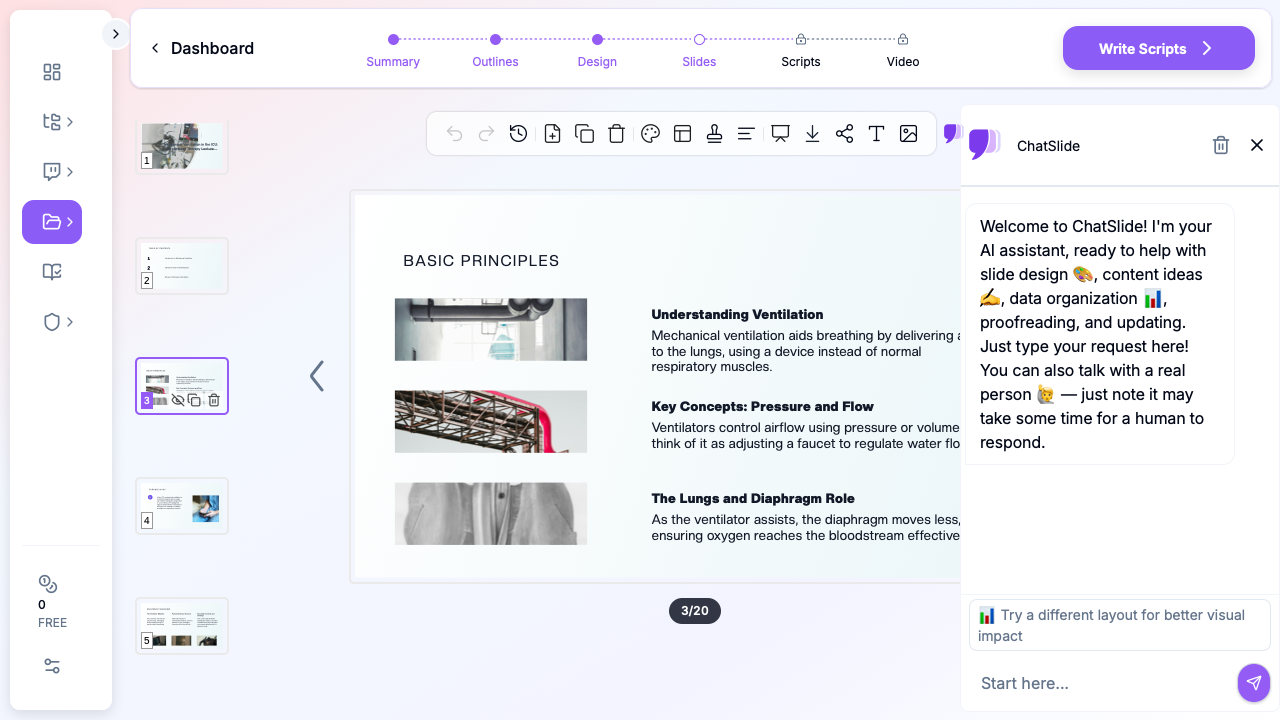

ChatSlide collapses that workflow. Type a topic — "Mechanical Ventilation in the ICU: A Respiratory Therapy Lecture" — pick the Education > Lecture scenario, define your audience, and the tool returns a structured deck with ventilator graphics, mode-comparison tables, weaning algorithms, and per-slide speaker notes. You spend your evening editing for clinical accuracy instead of building diagrams.
What a Strong Mechanical Ventilation Lecture Actually Needs
Vent lectures are not tutorials. They are decision frameworks in slide form. A few non-negotiable elements separate a deck that holds an RT class for 90 minutes from one that gets passively scrolled through:
A physiology spine, not a knob spine. Students who learn "PEEP is set to 5–10" never figure out when to deviate. Strong vent lectures lead with compliance, resistance, time constants, and oxygenation/ventilation as separable problems — then map controls to physiology.
Mode comparison as a decision, not a list. Volume control, pressure control, PRVC, APRV, NAVA, PSV — every textbook lists them. A good slide contrasts them on a single axis the audience cares about: who controls tidal volume, what happens when compliance changes mid-breath, what the failure mode looks like.
Graphics that read in five seconds. The pressure-volume loop, the flow-time curve, the four waveform abnormalities (auto-PEEP, flow asynchrony, double-triggering, leak) need to be visual. A bullet list of waveform interpretation is the wrong slide.
Real ICU scenarios with vent settings. ARDS — low Vt, plateau ≤ 30, driving pressure ≤ 15. Severe asthma/COPD — long expiratory time, permissive hypercapnia, low rate. Cardiogenic edema — high PEEP, BiPAP-first if not crashing. Each scenario should land as one slide of settings and one slide of why.
A weaning slide that actually gives a path. SBT criteria, RSBI cutoffs, cuff-leak test, the role of HFNC post-extubation. Skip the textbook flowchart that fills the page and never gets read.
A PACU bridge. Many RT and nursing programs split mechanical ventilation across ICU and post-anesthesia care. The transition — controlled vent off, spontaneous vent on, residual neuromuscular blockade, hypoventilation reversal — deserves its own slide block.
Step-by-Step: Building Your Vent Lecture with ChatSlide
1. Pick the right scenario
In ChatSlide, choose Education > Lecture for an RT student didactic, Training > Skills for a unit-based hands-on inservice, or Conference > General for a regional respiratory care society talk. The scenario biases the outline generator toward the right structure — physiology-first for didactics, protocol-first for inservices, clinical-question-first for conferences.
2. Give it a clinically framed topic
Skip the textbook framing. Topics that work:
- "Mechanical Ventilation in the ICU and PACU: From Physiology to Bedside Decisions"
- "Lung-Protective Ventilation in Moderate-to-Severe ARDS"
- "Extubation Readiness and SBT Failure Patterns in Adult ICU Patients"
- "Modes of Inhalation Therapy: Indications, Settings, and Failure Modes"
A topic with a verb in it — managing, weaning, troubleshooting — almost always produces a better outline than a noun phrase.
3. Define your audience precisely
"Respiratory therapy and nursing students learning ICU airway management" produces a different outline from "ICU residents and fellows" or "experienced RTs preparing for the RRT-ACCS credential." ChatSlide tunes depth, the assumed background, and the level of waveform detail to the audience field.
4. Generate the outline first
Default 6 sections × 3 subpoints maps cleanly to: indications and goals → modes and settings → monitoring and waveforms → patient-specific scenarios → weaning and extubation → troubleshooting and complications. Edit any section name that drifts. The outline is the cheapest place to fix structure.
5. Generate slides, then add images
Slide generation produces text + layout. The next step — image initialization — is the one that matters for an RT audience. ChatSlide pulls licensed visuals matched to your topic so the deck lands with ventilator screens, ICU bedside imagery, and anatomic context instead of placeholder graphics. Skip this step and the slides feel like a bullet-point dump.
6. Edit for clinical accuracy
ChatSlide writes the structure and the obvious clinical scaffolding; you supply the judgment. Replace the generic stock pressure-volume loop with the figure from your reference paper if the lecture is mechanism-heavy. Update plateau and driving-pressure cutoffs to your institution's standards. Add your unit's weaning protocol and SBT criteria where relevant. The point is to spend your editing time on the science.
7. Add speaker scripts for student lectures
For RT student didactics or fellowship lectures, the Scripts tab generates a per-slide speaker note. This is especially useful for first-time instructors — the script gives a coherent narration to read and adapt, instead of staring at a sparse outline at 6 a.m. before class.
Direct Research Database Access
ChatSlide's Research tab connects to the databases physicians use daily:
- PubMed: Search by keyword, PMID, or DOI. Find the landmark trials, recent publications, and clinical guidelines relevant to your case. The AI reads abstracts and incorporates key findings into your slides with citations.
- Google Scholar: When your topic spans disciplines — say, the intersection of genetics and oncology — Scholar captures the broader academic literature that PubMed alone might miss.
- Clinical Trials (NCT): Presenting on a treatment where pivotal trials are ongoing? Search by NCT number or condition to pull trial design, endpoints, and status into your slides.

Tips for Specific RT Lecture Topics
ICU mechanical ventilation 101. Lead with the physiologic split — oxygenation problems vs ventilation problems — and spend more time on it than feels necessary. Every other decision (mode, PEEP, FiO₂, Vt) maps back to that split. Save mode taxonomy for the second half of the lecture.
Lung-protective ventilation and ARDS. Slide structure: Vt and PBW calculation, plateau pressure ceiling, driving pressure target, prone positioning, neuromuscular blockade, ECMO referral threshold. Include a worked example with weight, height, and resulting Vt — not just "6 mL/kg PBW" without numbers.
Severe asthma and COPD on the vent. Three slides: dynamic hyperinflation visual, ventilator settings (low rate, long expiratory time, permissive hypercapnia), bronchodilator delivery. Add an "auto-PEEP" waveform slide because it always gets asked.
Inhalation therapy across the perioperative continuum. Two parallel tracks — non-invasive (HFNC, NIV) and invasive — with clear indications, settings, and escalation criteria. PACU students benefit from a dedicated "post-anesthesia respiratory complications" block: residual neuromuscular blockade, opioid-induced hypoventilation, atelectasis.
Weaning and extubation. SBT criteria, RSBI, cuff-leak test, post-extubation HFNC. End with a one-page failure pattern slide (rapid shallow breathing, agitation, tachycardia, hypoxemia, hypercapnia) so students recognize re-intubation triggers.
Ventilator waveforms and asynchrony. This is the slide block where AI authoring saves the most time. Provide ChatSlide with the asynchrony you want covered — auto-PEEP, double-triggering, ineffective effort, reverse triggering, flow asynchrony — and edit the generated waveform images with screenshots from your bedside.
Why This Workflow Beats Generic AI Slide Tools for RT Education
Generic AI presentation tools fall down on respiratory therapy in four predictable ways:
They ignore physiology hierarchy. Generic tools produce "Modes of mechanical ventilation" — a flat list. ChatSlide's scenario presets push the model toward the structure RT educators actually use: physiology → modes → monitoring → scenarios → weaning.
They drop visuals. A "create slides from topic" generic tool produces text-only decks or generic stock photos. ChatSlide's image initialization step is mandatory for a vent lecture — waveform graphics, ICU context, and anatomy all need visuals to land.
They skip waveform pedagogy. Most generic tools cannot produce a coherent pressure-volume or flow-time slide. ChatSlide pulls licensed visuals that you can layer with annotations or replace with your own screenshots.
They produce slide-soup, not a clinical narrative. Vent lectures have a story arc — physiology, modes, monitoring, scenarios, weaning. ChatSlide's outline-first flow forces narrative structure before slide generation.
Privacy and Patient-Data Hygiene
Do not paste de-identified-but-still-recognizable patient data, MRNs, or photographs of real ventilator screens with PHI overlays into any AI tool. Build cases from composites or anonymized literature scenarios. ChatSlide is happy to generate cases from a stub — "62-year-old with severe ARDS from H1N1, PaO₂/FiO₂ 95, plateau 32, on 80% FiO₂" — without ever seeing PHI. Your IRB and your patients will both prefer it.
Get Started
Whether you are an RT educator building your first ICU didactic, a clinical preceptor preparing a PACU inservice, or a fellow assembling a regional respiratory care talk — the slide-mechanics tax does not need to be your problem.
Start with ChatSlide.ai, pick the Education > Lecture scenario, type your clinical topic, and generate. The deck you get back will not be the final lecture — but it will be a much better starting point than a blank PowerPoint at 8 p.m. the night before class.
Try it for your next respiratory therapy presentation — student didactic, ICU inservice, PACU lecture, or RRT credential review — and put your editing time where it belongs: on the physiology and the patient.
A note on patient data and HIPAA. ChatSlide's standard plans are not a HIPAA-covered service — keep PHI out of slide content, prompts, and uploads. For hospital systems, group practices, and clinics that need a Business Associate Agreement, our Enterprise plan offers HIPAA-compliant deployment options — contact us to discuss BAA terms, SSO, and private-cloud or on-prem hosting.