Quick Answer: ChatSlide is the AI presentation maker development teams use to build donor pitch decks, major gift proposals, grant presentations, board reports, and capital campaign materials. Trusted across 750+ universities and nonprofit organizations, it turns a prospectus, an annual report, or a program budget into a structured fundraising deck in under two minutes — with real data charts built from your own outcome numbers, per-slide speaker notes for the ask conversation, brand-consistent templates, and 19 AI editing tools. It's free to start and exports to PowerPoint, PDF, and Keynote.
The Nonprofit Fundraising Presentation Problem
A major gift conversation is not a pitch meeting, and it is not a grant report either. It sits awkwardly between the two. The donor across the table wants what an investor wants — a clear theory of change, measurable outcomes, a model that scales, and evidence that the money is handled well — but the organization on your side of the table exists to serve a mission, not to return capital. Getting both halves onto the same twelve slides is genuinely hard.
It gets harder when the deck has to travel. A lead donor who says yes will often want to bring peers along, which means the same document has to survive being forwarded, skimmed by someone who has never heard of your program, and read without you in the room to narrate it. Meanwhile the underlying material already exists — it is scattered across an annual report, a logic model, a program budget, three evaluation memos, and last year's board slides.
Development teams are small. The hours spent rebuilding that material into a presentable deck, then rebuilding it again for the board, again for a foundation, and again for the gala, are hours not spent in front of donors.
What Makes ChatSlide Powerful for Fundraising Teams
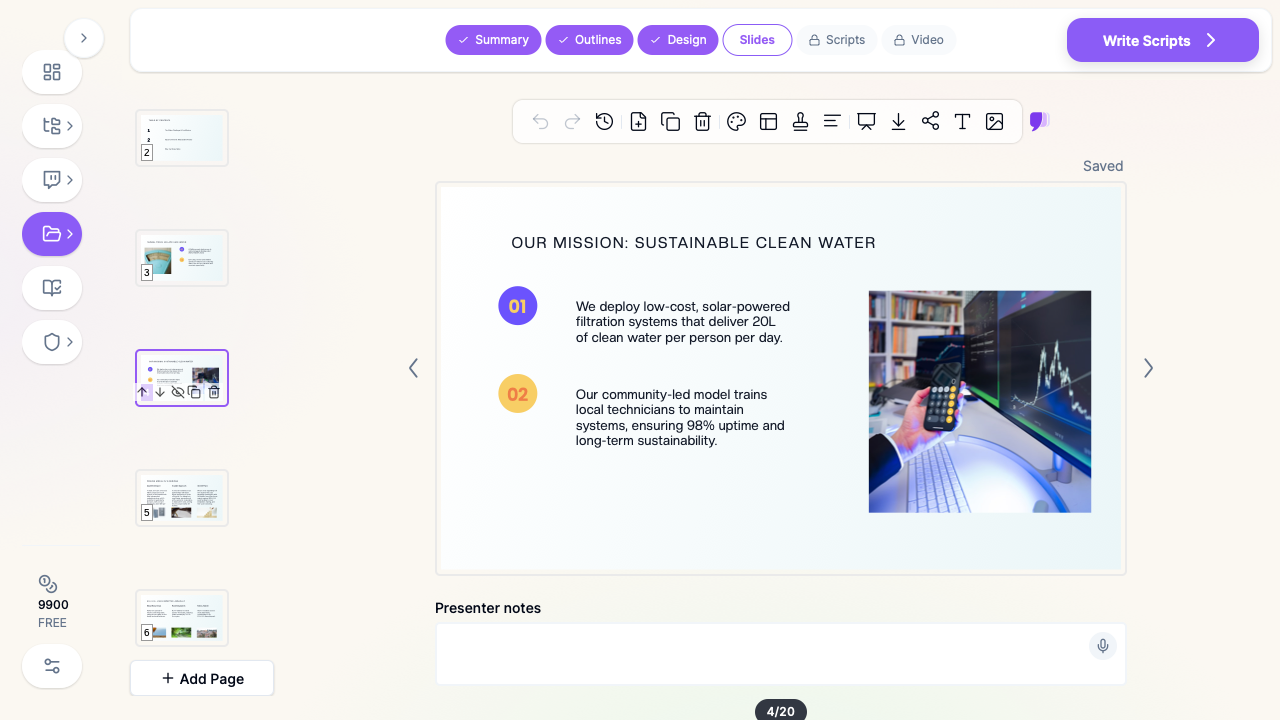
Three input modes. Start from a prompt ("a prospectus for a business-minded anchor donor, framing our mission through measurable impact, a scalable model, and financial accountability"), upload last year's deck to restyle, or drop in your annual report, logic model, or evaluation PDF and let ChatSlide draft the outline from what you already wrote. Nothing about a fundraising deck starts from nothing — ChatSlide reads your material instead of making you retype it.
Real data charts from your own numbers. Cost per beneficiary, people served over time, program growth, retention, the split between program and administrative spend — these are the slides a business-minded donor actually stops on. ChatSlide builds real charts from the figures you provide rather than decorative shapes with invented proportions.
OCR on uploaded documents. Upload a scanned evaluation report, a signed audit summary, or a figure-heavy grant narrative and ChatSlide pulls the text and tables out, so your outcome data lands in the deck instead of being retyped from a PDF.
Speaker notes for the ask. ChatSlide drafts per-slide notes, which matters more in fundraising than almost anywhere else: the deck is a prompt for a conversation, and the person presenting is often a board member or a volunteer, not the development director who built it.
Brand-consistent templates. Every deck an organization sends out is a signal about how carefully it operates. Shared templates keep the gala deck, the foundation proposal, and the board report looking like they came from the same organization.
19 AI editing tools. Tighten a slide, rewrite a paragraph of program description into three scannable lines, generate a diagram of your theory of change, or restyle the whole deck to your brand — without leaving the editor.
Export as narrated video. A prospectus that a lead donor can forward to three peers works far better when it can also be watched. ChatSlide turns a deck into a narrated video, which is often what actually gets opened on a phone.
How ChatSlide Builds Your Fundraising Deck
1. Bring your source material. Your annual report, program budget, evaluation summary, case statement, or last year's deck. ChatSlide reads it and drafts a structured outline.
2. Refine the outline before generating slides. Reorder so the deck follows the donor's logic — the problem, your approach, the evidence it works, the model and what it costs to scale, the accountability, then the specific ask. Fixing the argument at the outline stage is far faster than rearranging finished slides.
3. Generate slides with your data and imagery. ChatSlide builds each slide with a clean layout and supporting visuals. Swap generic imagery for your own program photography, and replace placeholder figures with your real outcome numbers.
4. Export in the format the moment needs. PowerPoint for a board meeting you will present live, PDF for the version that gets forwarded, Keynote for the gala, or a narrated video for donors who will never open an attachment.
Use Cases for Development Teams
Major gift and anchor donor proposals. A prospectus built for one specific donor, framing the mission through measurable impact, a scalable model, and financial accountability — designed so the lead donor can confidently share it with their own network of peer donors. Time saved: a full week of drafting and design.
Grant proposals and foundation presentations. The slide version of a narrative application: need statement, program design, evaluation plan, budget, and sustainability, presented to a program officer or a foundation board. Time saved: hours reformatting an existing narrative into slides.
Board and finance committee reporting. Quarterly performance against goals, pipeline health, campaign progress, and program outcomes, with the numbers charted rather than read aloud from a spreadsheet. Time saved: a recurring deck that rebuilds from fresh data in minutes.
Capital campaigns. The case statement, naming opportunities, phased milestones, and the gift table that shows a prospect exactly where their commitment sits in the campaign structure. Time saved: one master deck restyled for each donor tier.
Annual impact reports and gala presentations. The public-facing version of the same evidence — beneficiary stories, headline outcomes, and where the money went — built for a room rather than a reading chair. Time saved: an afternoon of design work per event.
Volunteer and ambassador enablement. Board members and volunteer fundraisers who need a short, consistent deck plus speaker notes so every conversation tells the same story. Time saved: no more ad-hoc decks made in the car.
Nonprofit Fundraising Presentation AI Tools Compared (2026)
| Capability | ChatSlide | Gamma | Tome | Beautiful.ai |
|---|---|---|---|---|
Reads uploaded annual reports & PPTX | Yes | Partial | Partial | No |
OCR on scanned evaluations and audits | Yes | No | No | No |
Real data charts from your own outcome numbers | Yes | Partial | No | Partial |
Per-slide speaker notes for the ask | Yes | Partial | No | No |
Export deck as a narrated video | Yes | No | No | No |
Shared brand templates across a team | Yes | Partial | Partial | Yes |
PowerPoint + Keynote export | Yes | Partial | Partial | Partial |
Free tier | Yes | Yes | Yes | Limited |
Time Comparison: Manual vs. AI-Assisted
| Task | Manual | With ChatSlide |
|---|---|---|
Outline a major gift prospectus | 3–5 hours | 2 minutes |
Draft slides from an annual report | 4–6 hours | 5 minutes |
Chart program outcomes and cost per beneficiary | 2 hours | Minutes |
Rebuild the deck for a second donor or foundation | 2–3 hours | Minutes |
Restyle to organizational branding | 1–2 hours | Minutes |
Produce a shareable narrated version | A day | Minutes |
What a Strong Donor Presentation Includes
The decks that close gifts tend to share the same skeleton, whatever the cause.
A problem stated at human scale and at system scale. One person's situation makes the need real; the population number makes it consequential. A deck that only does the first reads as sentiment, and one that only does the second reads as a report.
A theory of change the donor can restate. If your lead donor cannot explain in one sentence how the money becomes the outcome, the deck has not done its job — and they certainly cannot syndicate it to peers.
Outcomes, not activities. Meals served, workshops held, and clinics staffed are inputs. What changed for the people served is the outcome. Show both, and never let the activity number stand in for the result.
A unit economic. Cost per beneficiary, per graduate, per household served. Business-minded donors think in units almost automatically, and a credible unit cost is what makes a scaling argument legible rather than aspirational.
Evidence of accountability. Program-to-overhead split, audit status, governance, and how outcomes are measured and by whom. This is the slide skeptical donors look for, and its absence is louder than its presence.
A scaling model with a real constraint named. What breaks first if you triple the budget — staff, sites, supply, or regulation — and what the plan is. Naming the constraint builds far more confidence than claiming there isn't one.
A specific ask with a specific consequence. Not "support our mission" but the amount, the term, what it funds, and what it produces. Ambiguity at the ask is where most fundraising decks quietly fail.
Something for the donor's own network. If you want a lead gift syndicated, give them a version they can send: a two-page summary, a clean PDF, or a short narrated video that survives without you narrating it.
Best Practices (Do's and Don'ts)
Do build one master deck and cut donor-specific versions from it, rather than starting fresh for every prospect.
Do put the ask on its own slide, in numbers, with the term and the use of funds.
Do chart your own data honestly, including the years that were flat. Sophisticated donors trust a real trend line more than a smooth one.
Do write speaker notes as though a board member will present the deck without you, because eventually one will.
Don't open with your organizational history. Open with the problem, and earn the right to talk about yourself.
Don't fill a fundraising deck with stock photography of anonymous smiling people when your own program photography and outcome charts are more persuasive.
Don't put a benchmark or a sector statistic on a slide unless you can name and cite its source — an unattributed number is the fastest way to lose a finance-minded donor.
Don't include beneficiary names, photographs, or case details without documented consent, and strip identifying details from anything a donor may forward.
Fundraising Decks for Development Teams and Multi-Site Organizations
For a development office, a federated organization with chapters, or a foundation running a grantee education program, ChatSlide scales past the individual fundraiser. Shared brand templates keep every chapter's deck consistent with the national identity, team collaboration lets the development director review a board member's slides before a donor meeting, and centralized billing plus SSO make rollout across staff, chapters, and volunteer fundraisers straightforward. Decks can also be published as narrated video for a donor library or an annual campaign microsite. To discuss SSO, team billing, or a shared template set for your organization, contact us.
Frequently Asked Questions
Can ChatSlide build a donor deck from our annual report? Yes. Upload the annual report, a case statement, an evaluation summary, or last year's deck, and ChatSlide reads the content — including scanned documents via OCR — then drafts a structured outline you can refine before generating slides.
Can it chart our own impact data? Yes. ChatSlide builds real data charts from the numbers you provide — people served, cost per beneficiary, program growth, spending breakdown — rather than decorative graphics with invented proportions.
Can I make different versions for different donors? Yes. Build one master deck, then duplicate and edit it per prospect. The AI editing tools let you re-cut sections and adjust the ask without rebuilding the design.
Does it write speaker notes? Yes. ChatSlide drafts per-slide notes, which is what makes a deck usable by a board member or volunteer who did not build it.
Can we keep our organization's branding? Yes. Restyle a deck to your colors and fonts, and save shared templates so every fundraiser's deck matches.
Can the deck become a video? Yes. ChatSlide can export your deck as a narrated video, which is often the format a donor actually watches and forwards.
Is it free? You can start for free. Free decks are watermarked and viewable or shareable online; PDF, PowerPoint and Keynote export are on the paid tiers.
What formats can I export? PowerPoint, PDF, and Keynote, plus narrated video.
Related Guides
This guide focuses on nonprofit fundraising — donor proposals, grant presentations, board reports, and campaigns. For raising venture capital rather than philanthropic gifts, see our startup pitch deck guide. For scoped service and strategy proposals, see our business proposal presentation guide, and for turning spreadsheets of program data into charted slides, our data analysis to presentation guide.
Get Started
Fundraising is a relationship business, and every hour spent rebuilding a deck is an hour not spent building one. The material you need is already written — in your annual report, your evaluation memos, your budget.
With ChatSlide, turn that material into a donor prospectus, a grant presentation, or a board report in minutes, with your own impact data charted and speaker notes ready for whoever is in the room.
Make your fundraising presentation with ChatSlide — free to start, no credit card required.