
Quick Answer: ChatSlide is an AI presentation maker volunteer coordinators use to turn a handbook chapter, an SOP, or a module topic into a finished orientation deck in under two minutes. Upload the volunteer handbook PDF or type the module ("check-in desk procedures for new intake volunteers"), and it drafts structured slides with speaker notes and imagery — then exports to PowerPoint, PDF, or a narrated video volunteers can watch before their first shift. Free to start, no credit card.
The Volunteer Training Problem
Volunteer training is module work, and it never stops. An animal shelter runs separate modules for check-in desk, runner, intake, and adoption-day roles. A food pantry needs orientation, food-handling basics, and client-interaction boundaries. A church needs decks for greeters, youth-program helpers, and mission teams. Every module has to exist before the volunteers do, and every module gets rebuilt when a procedure, a form, or a coordinator changes.
The person building these decks is a volunteer coordinator or program manager, usually part-time, often a volunteer themselves. The content already exists — the handbook, the shift checklist, the waiver packet, the deck the last coordinator left behind — but converting it into slides a first-time volunteer can absorb in twenty minutes is an evening of unpaid formatting work per module.
And unlike corporate training, volunteer training has a brutal constraint: your audience didn't sign an employment contract. If orientation is confusing or boring, they simply don't come back.
This guide covers volunteer orientation and training specifically — nonprofits, shelters, pantries, churches, events, and community programs. For paid-staff onboarding, our employee onboarding guide is the closer fit, and for the fundraising side of nonprofit work — donor decks, grant presentations, board reporting — see the nonprofit fundraising guide.
What Makes ChatSlide Powerful for Volunteer Training
Three Input Modes That Match How Modules Actually Start
Volunteer training content is never written from scratch — it derives from a handbook, a policy, or the way the last shift lead did it. ChatSlide takes it three ways, and they combine:
- File upload — the volunteer handbook PDF, a shift checklist, the waiver and sign-in forms, or the PowerPoint the previous coordinator built in 2019. Scanned and photographed documents are read with OCR, which matters when your procedures binder only exists on paper by the check-in desk.
- Web and video URLs — link your organization's volunteer page, a partner agency's guidance document, or a recorded walkthrough of the facility.
- Text prompt — "orientation module for new food pantry volunteers: check-in, food safety basics, client dignity, who to ask for help" is enough for a full first draft.
Outline-First, Because Module Sequence Is the Curriculum
ChatSlide drafts the outline before it renders slides. For a module series this is the right altitude: you check that check-in comes before roles, that boundaries come before client contact, and that the emergency section actually made it in — all while it's still a reorderable list, not twenty finished slides.
Speaker Notes for Whoever Runs Orientation This Month
Every slide gets drafted speaker notes. In volunteer programs this matters more than anywhere else, because the person delivering orientation rotates: the coordinator this month, a board member next month, a veteran volunteer in the summer. The notes carry the explanation, the example, and the "here's why we do it this way" so the module survives handoffs.
Narrated Video Export for Volunteers Who Can't Attend Live
The same deck exports as a narrated video with an AI voice, and optionally an avatar presenter. This is how a program with rolling intake stops repeating itself: new volunteers watch the orientation video before their first shift, and the live time gets spent on the walkthrough and the questions instead of the slideshow.
Consistent Structure Across the Whole Module Series
When Module 1 is "Check-In," Module 2 is "Inside Roles," and Module 3 is "Outside Intake," consistency is what makes the series feel like a program instead of three people's slide styles. Generating each module from the same tool with the same template means the learning-objectives slide, the procedure steps, and the "who to ask" slide look the same in every module.
Editing Tools That Update a Module Without Rebuilding It
Procedures change: a new check-in app, a revised waiver, a different parking lot. Rather than regenerating the module, you rewrite the one slide that changed, split an overloaded slide, or swap the photo — keeping everything the program already approved.
How ChatSlide Builds Your Volunteer Training Deck
- Upload or describe the module. Drop in the handbook chapter and the shift checklist, or type the module topic and audience.
- Review the outline. Reorder sections, add the org-specific ones (your check-in app, your emergency contacts), delete what doesn't apply.
- Generate and edit. ChatSlide drafts the slides with imagery and speaker notes. Adjust wording slide-by-slide with the AI editing tools.
- Export. PowerPoint or PDF for live orientation, or narrated video for self-serve onboarding. Same content, both formats.
Use Cases for Volunteer Programs
Animal shelter module series. A spay/neuter clinic runs distinct volunteer roles — check-in desk, runner, intake, recovery. Each role gets its own short module built from the same SOP binder, so a Saturday volunteer learns their station in fifteen minutes instead of shadowing for a month. Time saved: an evening per module.
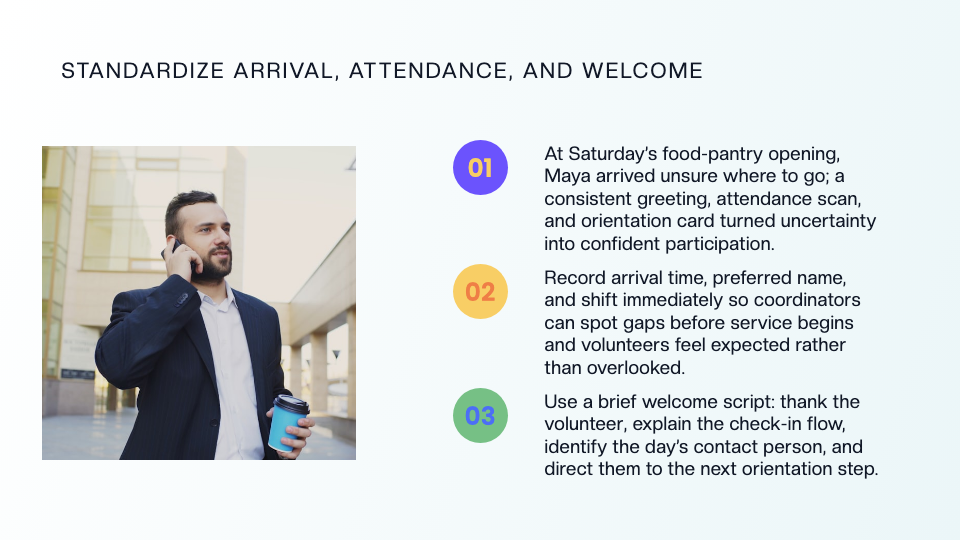
Food pantry orientation. One deck covering arrival and check-in, food-handling basics, client dignity and boundaries, and escalation paths — exported as a video for the volunteers who sign up Thursday night for Saturday morning.
Church and ministry teams. Greeter training, youth-program safety requirements, and mission-trip preparation each need a deck once a year. Upload last year's, regenerate with this year's changes, done.
Event volunteer briefings. A festival or race needs one briefing deck per station — registration, course marshal, water station — all consistent, all built the same week.
Volunteer leadership development. Moving a reliable volunteer into a shift-lead role means teaching supervision, escalation, and the parts of the manual nobody reads. A dedicated mini-deck makes the promotion real.
Volunteer Training AI Tools Compared (2026)
| Capability | ChatSlide | Gamma | Tome | Beautiful.ai |
|---|---|---|---|---|
Upload handbook/SOP → deck | ✅ PDF, Word, PPT, scans with OCR | Partial (paste text) | Partial | ❌ |
Speaker notes drafted per slide | ✅ | ❌ | ❌ | ❌ |
Narrated video export (AI voice/avatar) | ✅ | ❌ | ❌ | ❌ |
Export to PowerPoint | ✅ | ✅ | ❌ | ✅ |
Multilingual generation | ✅ generates in target language | Partial | Partial | ❌ |
Free tier | ✅ | ✅ | ✅ | Trial |
Time Comparison: Manual vs. AI-Assisted
| Task | Manual | With ChatSlide |
|---|---|---|
Convert handbook chapter into a module deck | 3–5 hours | ~15 minutes |
Add speaker notes for rotating presenters | 1–2 hours | Drafted automatically, ~15 min review |
Rebuild module after a procedure change | 1–2 hours | Minutes (edit the affected slides) |
Produce a self-serve orientation video | Usually never happens | One export |
What a Strong Volunteer Training Presentation Includes
- Welcome and why it matters — the mission in one slide, because motivation is the paycheck.
- Check-in and logistics — where to park, where to sign in, who greets you, what to wear.
- The role, concretely — what this volunteer does, step by step, with photos of the actual stations.
- Boundaries and escalation — what volunteers may and may not do or promise, and exactly who to ask when something is unclear or goes wrong.
- Safety essentials — incident reporting, emergency exits and contacts, and any role-specific hazards.
- The next step — first shift signup, buddy assignment, or the quiz that completes onboarding.
Best Practices
Do:
- Keep each module short enough for one sitting — fifteen to twenty minutes of content per role.
- Put the "who to ask" answer on its own slide; it's the single most-needed fact in week one.
- Use real photos of your stations and rooms where it matters; generated or stock imagery is for concepts, not directions.
- Version your modules ("Intake v3, revised Aug 2026") so shift leads know they're teaching the current procedure.
Don't:
- Don't paste volunteers' or clients' personal information into slide content — background-check results, waiver details, client households, or medical notes stay in your records system, not in a deck that gets shared around.
- Don't ship one 60-slide mega-orientation; split by role and let people learn the station they'll actually work.
- Don't let the deck contradict the handbook — regenerate the module when the handbook changes, not a year later.
ChatSlide for Organizations
Multi-site nonprofits, chapter networks, and volunteer-heavy institutions run training at a scale where consistency and access control start to matter. ChatSlide's Enterprise plan adds SSO, centralized team billing, shared brand templates so every chapter's modules look like the organization built them, and team collaboration for coordinator handoffs. If you run volunteer programs across sites or chapters, contact us to set it up.
Frequently Asked Questions
Can I turn our existing volunteer handbook into training slides? Yes — upload the PDF or Word file and ChatSlide extracts the content into an outline you approve before slides are generated. Scanned handbooks work through OCR.
Can volunteers watch the training instead of attending live? Yes. Any deck exports as a narrated video with an AI voice (optionally an avatar presenter), so orientation can happen before the first shift.
We retrain every season — do we have to rebuild the deck? No. Keep the project and edit the slides that changed, or upload the new handbook version and regenerate just the affected module.
Does it work for non-English volunteer groups? Yes — ChatSlide generates in the target language directly, so a Spanish or Vietnamese orientation module reads natively rather than like a translation.
Is it really free to start? Yes — the free tier generates full decks without a credit card. Paid plans add higher limits, more export options, and video features; see pricing.
Can several coordinators work on the same module series? Yes — projects can be shared, and on the Enterprise plan teams get shared templates and centralized management across sites.
Get Started
Your next volunteer class shouldn't wait for a finished deck. Upload the handbook chapter, name the role, and have the orientation module — slides, speaker notes, and a video version — ready before Saturday's shift.
Make your volunteer training presentation with ChatSlide — free to start, no credit card required.