Quick Answer: A patient education leaflet is a single-page take-home handout that explains a diagnosis, medication regimen, or self-management plan in language patients can actually read. ChatSlide.ai compresses your clinical notes, guideline PDFs, or lecture deck into a printable one-pager — auto-organized into a definition, red flags, daily steps, and "when to call us" sections, in any reading level you specify.
The Challenge: Patients Don't Read Walls of Text
Every primary care visit ends the same way. You explain hypertension. You explain the new ACE inhibitor. You explain when to call the office. The patient nods. They walk out with a printed AHA brochure that hasn't been updated since 2009, and a stack of stapled discharge summaries that read like a chart note.
Two weeks later, they're back. They stopped the lisinopril because of a cough. They didn't know that was a side effect. They didn't know to call. The brochure went in a drawer.
The fix isn't more text. It's less text, organized for how patients actually behave: one page, large type, three to five key actions, and a clear "call us if..." section.
That's the job of a patient education leaflet — and it's the job that AI presentation tools quietly do well, even though most clinicians have never thought to use them this way. Instead of building a 30-slide grand rounds deck, you ask the tool to compress the same source material into a single-page handout you can print or email.
What Makes a Good Patient Leaflet
The CDC's Clear Communication Index, the AMA Manual of Style for patient materials, and the National Institutes of Health Plain Language guidelines all converge on the same five rules. Most clinic-printed handouts violate three or four of them.
1. Reading level under 8th grade
The average US adult reads at a 7th–8th grade level, and patients with chronic disease average lower. SMOG and Flesch-Kincaid scores above grade 9 are the single biggest predictor that a handout will be ignored. Words like "hypertensive," "antihypertensive," and "myocardial" need translations: high blood pressure, blood pressure medicine, heart attack.
2. One page, real white space
A handout that needs to be flipped is two handouts. A handout with body text in 8-point Times New Roman is a sign-in form, not a teaching tool. Aim for 12–14 pt, sans-serif (Arial, Open Sans), and at least 25% white space.
3. The three-things rule
Patients retain at most three actionable items from any single encounter. If your draft has 11 bullet points, eight of them belong in a follow-up handout, the chart note, or nowhere.
4. A "When to call us" or red-flag box
This is the only section patients reliably read on the day they get home. Make it bold, boxed, and at the bottom — where worried hands will land.
5. Pictures earn their place
A blood pressure cuff icon, a pill, a salt shaker with a slash through it — visuals make a leaflet feel less clinical and improve recall in low-literacy populations. Generic stock photos of smiling old people do not.
Step-by-Step: Build a One-Page Leaflet with ChatSlide
The workflow below is the one a primary care physician used last week to compress 14 pages of JNC-8 hypertension guideline summary into a handout her patients actually keep on the fridge.
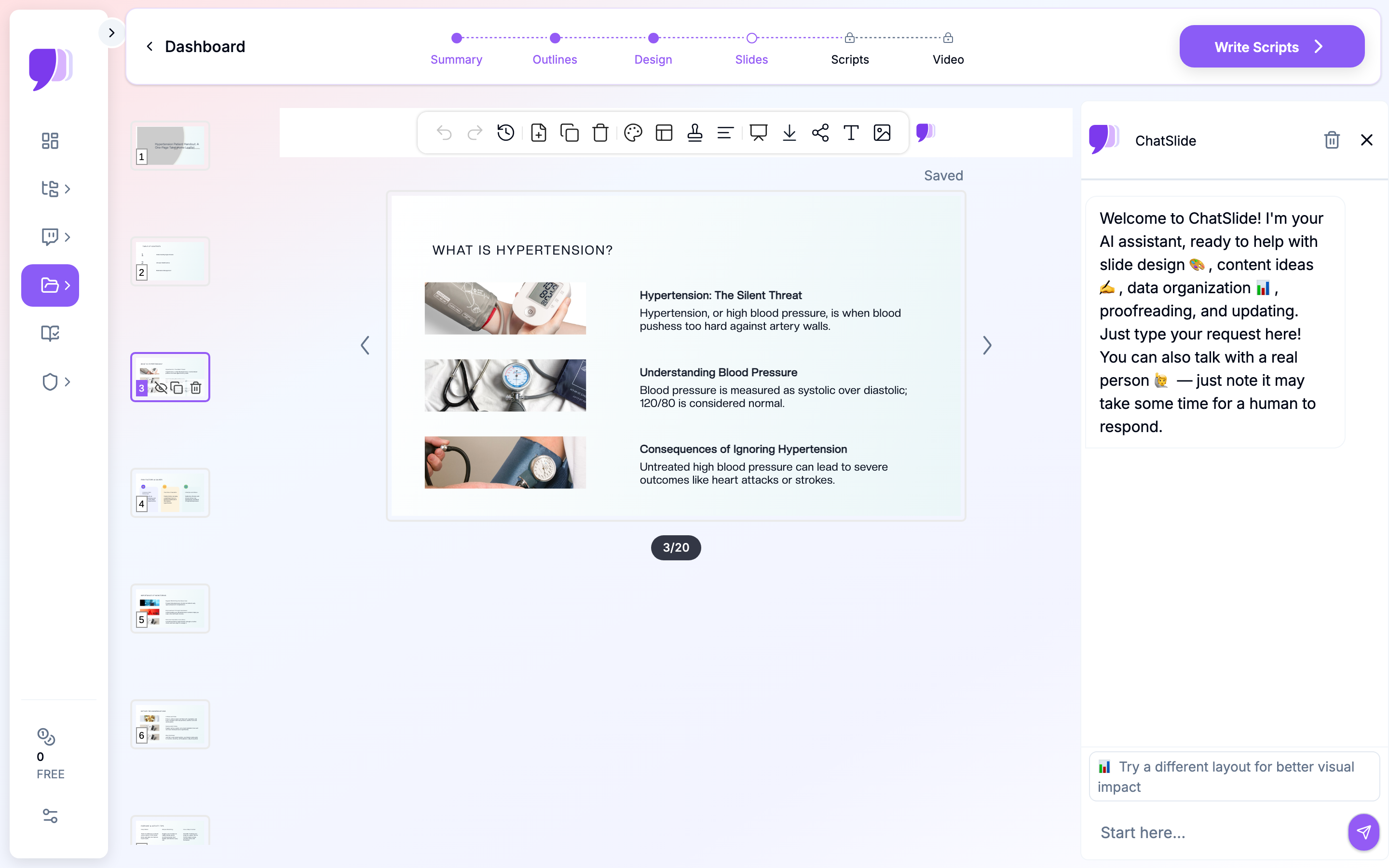
Step 1 — Drop in your source material
You don't write a leaflet from scratch. You compress something. ChatSlide accepts:
- A PDF (guideline document, hospital handout you want to modernize, your own chart-note template)
- A topic + audience description ("Hypertension management for adults age 50–75, newly diagnosed, taking one medication")
- A URL (UpToDate summary, AHA professional page, your clinic's website)
- A document upload from your computer (.docx, .pptx, .txt)
The more specific your audience input, the better. "Adult patients managing high blood pressure at home" produces a better leaflet than "patients with hypertension," because the former tells the model the leaflet is for at-home daily use, not for in-office teaching.
Step 2 — Pick the scenario and language
Choose Education → General as the scenario when prompted. This tells the model to produce educational rather than research or sales content. For the language, pick the patient's primary language — not yours. If your panel is 30% Spanish-speaking, generate the Spanish version in the same workflow. ChatSlide supports 17+ languages and the medical translation quality is good enough for handout-level material, though a bilingual MA should still proofread terms specific to dosing and warning signs.
Step 3 — Edit the outline before generating slides
This is the step most clinicians skip and later regret. After you submit, you'll see a generated outline with 5–7 section headers. Edit it now, while it's cheap. Common edits:
- Cut anything that's not a daily patient action ("Pathophysiology of vascular remodeling" → delete)
- Add a "When to Call Us" section explicitly
- Add a "Common Side Effects" section if the leaflet covers a medication
- Move the "Red Flags / Call 911" section to the end so it lands last on the page
Step 4 — Generate the slides, then collapse to one page
ChatSlide will produce 6–20 slides by default. For a one-page handout, you have two options:
- Generate 6 sections, then export the first slide only — fast but loses content
- Generate the full deck, then use the Outline view to pick which sections become one slide — better for leaflets
The cleanest workflow is to set section_count = 4 and subpoint_count = 3 at generation time. You get exactly the four content blocks you need: definition, daily actions, red flags, when to call. Each block becomes one quadrant of the printed page.
Step 5 — Export as PDF, print or email
Once the deck looks right, export as PDF from the Slides view. The handout fits on one US letter sheet at 100% scale. For email-based education (telehealth, post-discharge), share the deck link directly — the patient can read it on their phone, and you can update it later without re-emailing.
Direct Research Database Access
ChatSlide's Research tab connects to the databases physicians use daily:
- PubMed: Search by keyword, PMID, or DOI. Find the landmark trials, recent publications, and clinical guidelines relevant to your case. The AI reads abstracts and incorporates key findings into your slides with citations.
- Google Scholar: When your topic spans disciplines — say, the intersection of genetics and oncology — Scholar captures the broader academic literature that PubMed alone might miss.
- Clinical Trials (NCT): Presenting on a treatment where pivotal trials are ongoing? Search by NCT number or condition to pull trial design, endpoints, and status into your slides.

For a patient leaflet, the typical PubMed query is a recent society guideline (AHA/ACC for hypertension, ADA for diabetes, GOLD for COPD). Pull the executive summary, let ChatSlide compress the lifestyle and medication recommendations, then manually trim anything that's prescriber-facing rather than patient-facing. The result is a handout grounded in current evidence rather than the brochure that's been sitting in the printer tray since 2014.
Common Leaflet Use Cases
The same workflow covers the handouts that actually move the needle in primary care, cardiology, endocrinology, and post-discharge nursing:
- Hypertension self-management — daily monitoring schedule, low-sodium tips, medication side effects, when to recheck
- Type 2 diabetes basics — what an A1c means, hypoglycemia red flags, sick-day rules
- Anticoagulation (warfarin, DOACs) — bleeding red flags, drug-food interactions, missed-dose instructions
- Post-MI discharge — medication list with purpose, cardiac rehab phone number, return-precautions
- COPD action plan — green/yellow/red zones with corresponding actions, inhaler technique reminder
- Pre-procedure prep — NPO times, anticoagulant hold rules, what to bring
- Mental health (depression, anxiety) — crisis line, when to call, what therapy and medication options look like
- Pediatric fever and dehydration — when to bring to the ED, dosing by weight, watch-and-wait criteria
Each of these typically takes 5–10 minutes from PDF upload to printable PDF export — about the time you'd otherwise spend looking for a brochure in the supply closet.
Tips for Higher-Adherence Leaflets
A few patterns separate the leaflets that end up on refrigerators from the ones that end up in drawers:
-
Name the patient's role. "Your job each morning" reads differently from "Recommended daily activities." Direct address — "you," "your" — outperforms passive voice in every comprehension study run on patient materials.
-
Lead with verbs, not nouns. "Take your blood pressure pill with breakfast" beats "Medication adherence is important."
-
Use a single dominant color for the warning box. Red for "call 911," yellow for "call us within 24 hours." Color-coded callouts are the single visual element that moves leaflets from "informational" to "functional."
-
Print a checkbox version. A version with checkboxes ("☐ Took morning pill," "☐ Wrote down BP reading") becomes an artifact the patient interacts with daily. Some clinics print a 7-day version stapled to the leaflet.
-
Date the document. Patients save handouts for years. A leaflet dated "Updated May 2026" signals current evidence; an undated leaflet is indistinguishable from a 2008 brochure.
-
Include the clinic phone number twice. Once in the "when to call" box, once in the footer. Patients in distress should not have to flip the page.
-
Test the leaflet on a non-clinical staff member. The receptionist, the MA, the medical scribe — anyone whose day job is not the clinical content. If they can summarize it back in two sentences, the patient probably can too.
Note on Patient Data and Privacy
ChatSlide's standard plans are not a HIPAA-covered service — keep PHI out of slide content and uploads. Use de-identified clinical content (guideline summaries, your own redacted teaching slides, public PDFs) when generating leaflets, and avoid pasting any patient identifiers, MRNs, or chart notes into the topic or audience fields. For hospital systems, group practices, and clinics that need a Business Associate Agreement, our Enterprise plan offers HIPAA-compliant deployment options — contact us to discuss BAA terms, SSO, and on-prem / private-cloud hosting.
For most outpatient handout use cases, this is not a restriction. Patient leaflets describe a condition or medication class generically; they don't name the patient. Generate them once, print them in bulk, hand them out in clinic — no PHI ever enters the workflow.
Get Started
Patient education materials are the kind of work that piles up between visits because none of it is billable, all of it feels like it should already exist somewhere, and the existing options are uniformly bad. ChatSlide closes that gap in about the time it takes to look up a CPT code.
Upload your guideline PDF or describe the condition, pick Education → General, set 4 sections × 3 subpoints, and you'll have a printable one-page handout in your hands before the next patient is roomed. Tear up the 2014 brochure. Print yours instead.
Related guides:
- Patient Education Presentation AI — for longer multi-slide in-office teaching rather than take-home handouts
- AI Medical Presentation Maker — for clinical conference and grand rounds presentations
- Cheat Sheet Maker — for student-facing study reference sheets