The Challenge: Kickoff Decks Are the First Artifact Anyone Will Judge
A cross-functional kickoff is the first time everyone on a project sits in the same room — sometimes the only time. The deck you bring sets the working model: how the team scopes work, what counts as "done", who owns what, what risks have been thought through, when the first checkpoints land. Bad kickoff decks produce projects that miss alignment in week three and re-litigate scope in week six. Good ones save quarters.
The problem is that kickoff decks are not one of the things product managers, engineering leads, or operations owners are formally trained to make. The deck is built the night before from a Notion doc, a Jira epic, and someone's mental model of who's stakeholder enough to invite. Half the slides are scope; half are timeline; the RACI is a paragraph; the risks are vague. Three weeks in, the team is operating off a doc no one has reread.
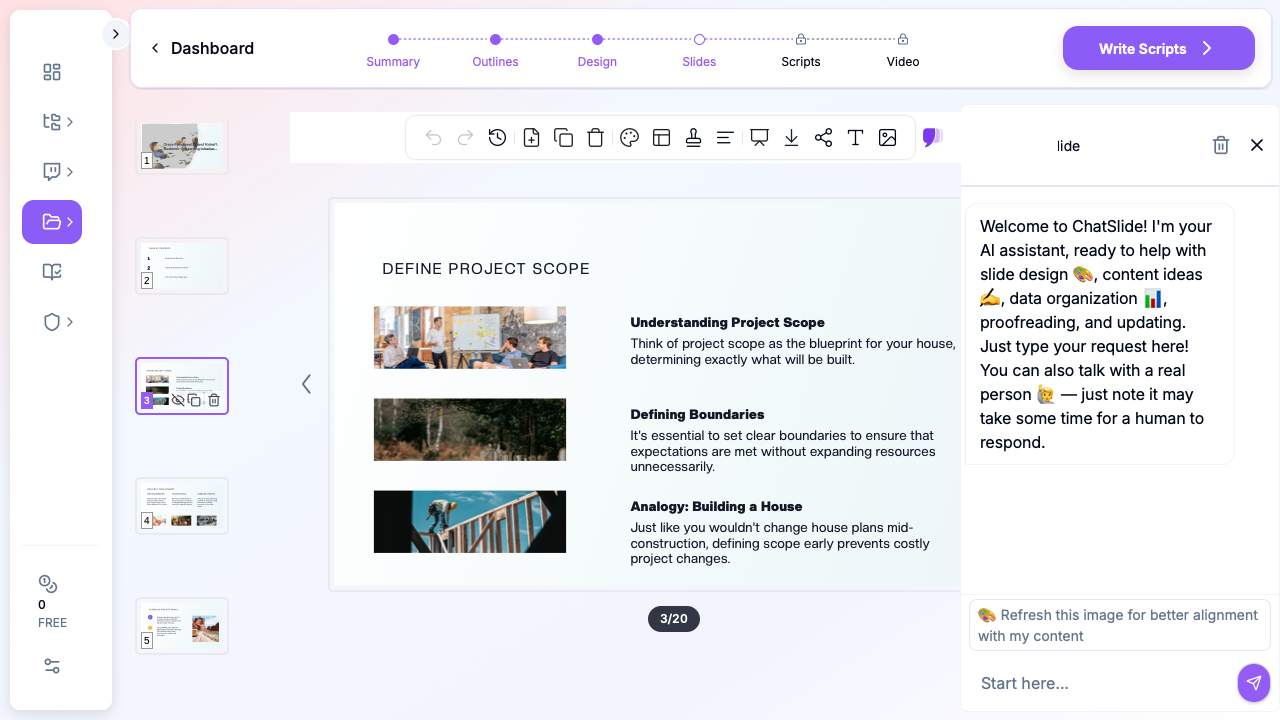
This guide walks through using ChatSlide to draft a complete cross-functional kickoff — scope, milestones, RACI, risks, success metrics, communication plan — in minutes, then refining it for a product launch, an internal tools migration, an OKR rollout, or a transformation initiative.
What Makes a Strong Cross-Functional Kickoff Deck
The best kickoff decks share a structure built around decisions, not status. The team isn't there to be informed; they're there to commit. The slides that produce real commitment:
- One-line problem statement. Not the goal; the problem. "Time-to-first-value is 11 days for new B2B customers; our renewal data says day-7 retention drops 18 percentage points after day 5." If the room can't agree on the problem, none of the rest matters.
- Scope and non-scope on the same slide. "What we will do; what we explicitly will not do; what we'll revisit if signal warrants." Most kickoff decks list scope and forget non-scope. Non-scope is what prevents week-six scope creep.
- A milestone slide that maps to weeks, not phases. "Week 1: discovery interviews; Week 3: spec lock; Week 6: alpha; Week 10: GA candidate." Phase names ("Discover, Define, Deliver") are jargon. Calendar weeks are accountable.
- A RACI table everyone can read in 20 seconds. Roles down, milestones across, single owner per cell. Two-owner cells are unowned cells.
- A risks slide with mitigations, not just risks. "Engineering capacity contention with X project (mitigation: weekly capacity review with EM)." A risk without an owner and a mitigation is a complaint.
- Success metrics with a baseline. "Time-to-first-value: 11 days today, target 6 days by week 12, measured via the activation funnel dashboard." Targets without baselines aren't targets.
- A communication plan slide. Where updates go (Slack channel, weekly digest, fortnightly review), what cadence, and who reads what. This slide is what keeps the deck alive past the kickoff meeting.
ChatSlide's *Team|Projects scenario maps to this structure by default — problem, scope, plan, owners, risks, success metrics, communication.
Step-by-Step: Draft a Project Kickoff Deck in ChatSlide
1. Pick the scenario and write the audience concretely
In a new project, choose Team > Projects. The audience field changes the deck more than any other input — write "Cross-functional kickoff for product, engineering, design, customer success, and sales: launching a new self-serve onboarding flow at a B2B SaaS company. PMs and EMs comfortable with backlog tools; CS and sales leads who want commitments, not Jira screenshots" instead of "team kickoff".
For an OKR rollout, write "Engineering organization (40 ICs, 6 EMs, 2 directors) being introduced to a new quarterly OKR process. Half the audience has used OKRs before and is skeptical; half is new and looking for clarity". The audience field is what tells ChatSlide whether to draft for skeptics or for newcomers.
2. Frame the topic as a decision the room needs to make
A topic of "Project Kickoff" produces a generic deck. A topic of "Cross-functional kickoff for the customer onboarding redesign initiative: aligning on scope, owners, six-week milestone plan, and how we'll measure time-to-first-value as the success metric" produces a deck with the actual decisions baked in. The same applies to other initiatives:
- "Internal tools migration kickoff: moving from a legacy ticketing system to Linear, scope including data migration, training, and sunset; non-scope including custom workflow rebuilds; six-week timeline with parallel-running fallback"
- "Q3 OKR rollout to engineering organization: communicating new OKR process, walking through three top-level objectives, mapping to team-level KRs, addressing objections about Jira-vs-OKR overlap"
- "Compliance program transformation kickoff: moving from quarterly manual SOC 2 evidence collection to continuous-compliance tooling; cross-functional with security, ops, and finance; risk register and mitigation plan included"
- "Pricing change rollout kickoff: communicating the new pricing structure to internal stakeholders (sales, CS, marketing, product) two weeks before customer announcement; FAQ, talk track, objection handling"
The outline step shows you what you'll get before any slides render — adjust section count to 6 for a 30-minute kickoff, 8 for a 60-minute kickoff with discussion time, or 10 for a half-day program kickoff.
3. Re-architect the deck for the meeting you're actually running
The first generation gives you the structure and prose. Walk through and:
- Move the "non-scope" slide adjacent to the scope slide. Don't bury it after the timeline. The combined scope/non-scope slide is the single highest-leverage slide in any kickoff.
- Promote the RACI from a paragraph into a table. Two-column tables don't work; use roles-as-rows and milestones-as-columns with single owners per cell. Use the editor to swap text blocks for table blocks where ChatSlide produces prose.
- Replace generic team-meeting stock photos with a system diagram, a process flow, or a screenshot of the relevant dashboard. ChatSlide's editor lets you swap the image block in two clicks; for diagrams that don't exist online, paste in a Miro, Lucidchart, or Whimsical export, or generate a clean schematic in the AI image tool.
- Add a "what success looks like in week 12" slide. A dated future-state slide is more aligning than three slides of metrics targets. "By August 10, a new B2B customer goes from signup to first activation event in under 6 days, measured via the activation dashboard, validated by 20 cohort interviews."
- Insert an "open questions" slide near the end. Questions you genuinely don't have answers to. The room either commits to who owns finding the answer by when, or you've discovered the kickoff isn't ready to happen yet.
4. Pull in the artifacts the team is already using
Upload your PRD, RFC, design doc, OKR draft, or technical spec into the project resources. Drop in the Jira epic export, the Linear roadmap CSV, the Lucidchart diagram, the Looker dashboard screenshot. Ask ChatSlide to summarize the relevant sections into bullets and a properly formatted milestone table, then drop them onto the appropriate slides. The deck stops being a separate artifact and becomes a synthesis of the docs the team is already living in.
For OKR rollouts, upload the company-level OKR doc and ask ChatSlide to extract the top-level objectives, then build a slide that maps them to team-level KRs you'll commit to in this rollout.
5. Use speaker notes for the side-channel conversation
Speaker notes are where you write the things you'll say but won't put on the slide: "This is where Sarah's team raised concerns last quarter — acknowledge it directly, point to the mitigation slide" or "If anyone pushes back on the week-3 spec lock date, the fallback is week 4 with a hard cap; don't negotiate further than that". ChatSlide preserves notes through PowerPoint and PDF export, so they show in your presenter view during the kickoff and remain in the file the team downloads after.
6. Export for the meeting and the document repository
Export as PowerPoint for the live meeting (so you can annotate the milestones slide if the room negotiates dates) and PDF for posting to Confluence, Notion, or your team's wiki. Both formats keep the deck reusable — at week 6, you'll come back to this deck for a checkpoint, and the original kickoff structure is exactly what you want to revisit.
Tips for Project Managers, Engineering Leads, and Ops Owners
- Build a kickoff deck library by initiative type. One template per kickoff archetype (product launch, internal tools migration, OKR rollout, compliance transformation, pricing change, restructure) is more reusable than a single mega-template. Each archetype has different stakeholders, different milestones, different risks; one template hides the differences.
- Use the same template across the team. Visual consistency matters when stakeholders are reading three kickoff decks per week from different teams; pick a theme and stay on it across product launches, ops initiatives, and engineering programs.
- Plan kickoffs and steering reviews separately. A kickoff deck is forward-looking commitment; a steering review deck is retrospective accountability. Don't try to merge them. The kickoff deck becomes the baseline against which steering reviews are read.
- Show the dashboard the team will live on. A screenshot of the Looker, Mode, Hex, or Datadog dashboard you'll use to track success metrics — embedded on the success-metrics slide — is more useful than a chart drawn in PowerPoint. Stakeholders recognize the dashboard URL after the kickoff and check it weekly without prompting.
- Send the deck before the meeting, not at it. Stakeholders who read the deck in advance commit faster in the room. ChatSlide's PDF export is the version you send 24 hours ahead; the PowerPoint is what you walk through live.
- Save the source docs in the project. Six weeks in, when the team needs to revisit "why did we agree to that scope?", the kickoff project in ChatSlide still has the original PRD, the OKR doc, and the milestone table. The deck is a synthesis; the project resources are the ground truth.
- For transformation initiatives, lead with the why slide. Initiative-level kickoffs (compliance, restructure, platform consolidation) live or die on whether the audience accepts the why. A slide that walks through the forcing function — a regulator finding, an incident retrospective, a strategy decision — comes before scope, before milestones, before owners. If the room doesn't buy the why, the rest is theater.
Common Initiative Types
- Product launch kickoffs. Customer problem, scope including go-to-market and support enablement, six-to-twelve-week timeline, RACI across product / engineering / design / marketing / sales / CS, launch-week communication plan.
- Internal tools migration kickoffs. Current-state pain, target-state benefits, scope including data migration / training / sunset, non-scope including custom workflow rebuilds, parallel-running fallback plan, training cadence.
- OKR rollout kickoffs. New process explanation, top-level objectives, team-level KR mapping, cadence of check-ins and reviews, common objections (Jira-vs-OKR, KR-vs-task, ambitious-vs-attainable), opt-in/opt-out for skeptical teams during pilot quarter.
- Compliance transformation kickoffs. Regulatory or audit-finding driver, scope of controls and processes affected, cross-functional with security / legal / ops / finance, risk register with owners and mitigations, evidence-collection automation roadmap.
- Pricing change rollouts (internal). New pricing rationale, customer-facing changes, sales talk track, CS objection-handling FAQ, finance impact projection, internal Q&A window before customer announcement.
- Reorganization or team restructure kickoffs. Forcing function (strategy shift, growth phase, performance), new structure diagram, role-and-team mapping, transition plan with dates, communication cadence to affected ICs and managers, Q&A and feedback channel.
Get Started
Open ChatSlide, choose Team > Projects, and paste in the next initiative kickoff on your calendar — a problem statement, an audience description, a section count. The first deck is in your hands in minutes; the rest of the afternoon is for the RACI table, the milestone dates, and the speaker notes that turn an outline into a meeting that produces real commitment.
For product managers preparing a launch kickoff, for engineering managers rolling out an OKR process, or for operations leads launching a compliance transformation, ChatSlide replaces the night-before Notion-to-PowerPoint scramble with a kickoff-deck library starting point. Try it at chatslide.ai or app.chatslide.ai.