
Quick Answer: ChatSlide is an AI presentation maker built for trauma and acute care surgeons, used across 750+ universities and hospital teaching programs. It turns a guideline PDF, an operative case, or a one-line topic prompt into a structured trauma didactics deck in under two minutes — with PubMed and ClinicalTrials search built in, OCR for scanned protocols, speaker notes, and PowerPoint or PDF export. Free to start, no credit card.
The Trauma Teaching Problem
Trauma surgery teaching runs on a clock. A chest trauma lecture has to cover mechanism, the primary survey, the decision to open a chest, and the operative sequence — and land it with residents who may be presenting the same injury pattern at 3 a.m. that night. Damage control, massive transfusion, thoracotomy indications, and the weekly M&M case each carry their own decision points, and the slides have to reflect that ordering without turning into a wall of text.
The bottleneck is never the expertise. Trauma attendings and acute care surgery fellows know this material at reflex depth. The bottleneck is turning injury-pattern reasoning into slides that move an audience cleanly from mechanism to survey to operation to disposition — while the service is still running.
Generic templates make it worse. They have no concept of a primary survey, a damage-control sequence, or an M&M timeline, so every deck becomes a manual compromise between clinical accuracy and legibility.

This guide is about trauma and acute care surgery specifically — injury mechanism, damage control, thoracic and abdominal trauma, and the trauma M&M. If your talk is centered on resuscitation and the ED phase, our emergency medicine presentation guide goes deeper on sepsis and ACLS, and our general surgery operative guide covers elective operative teaching.
What Makes ChatSlide Powerful for Trauma Surgery
Three Input Modes for Whatever You Already Have
Trauma didactics rarely start from a blank page. ChatSlide accepts content three ways, and you can combine them:
- File upload — institutional protocols, guideline PDFs, an existing PowerPoint from last year's rotation, operative photos, or a scanned massive-transfusion card. Scanned and photographed material is read with OCR, so a printed protocol taped inside the trauma bay is usable source content.
- Web and video URLs — paste a link to a published guideline or a recorded conference talk and ChatSlide extracts the content.
- Text prompt — "chest trauma management and damage control for surgical residents, 40 slides" is enough to get a full structured draft.
Built-In Literature Search
Trauma practice changes on trial evidence, and a talk that cites nothing ages badly. ChatSlide's Research tab searches PubMed, Google Scholar, and ClinicalTrials.gov from inside the editor, so the transfusion-ratio and REBOA evidence you want on slide 14 gets pulled in with citations instead of copy-pasted from a browser tab.
Outline-First Structure You Can Reorder
ChatSlide drafts an outline before it builds slides. For trauma that matters more than for most specialties, because the teaching order is the clinical order — mechanism, primary survey, adjuncts, operative decision, damage control, ICU physiology, disposition. Fixing the spine at the outline stage takes a minute; rebuilding 40 finished slides does not.
Slides That Arrive With Relevant Imagery
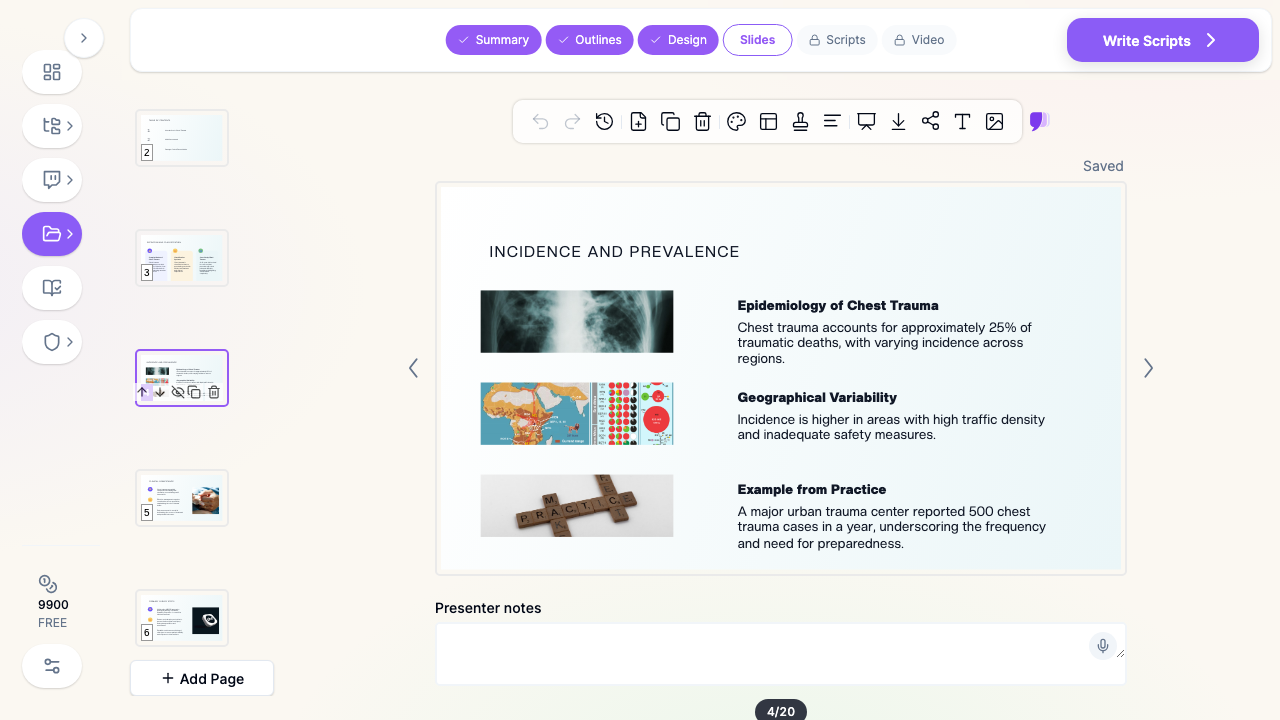
Each generated slide comes laid out with supporting visuals rather than empty placeholders, so a first draft is presentable rather than a skeleton. Swap in your own imaging, operative photos, and annotated algorithms where the teaching point depends on them.
Speaker Notes for the Person Covering Your Lecture
ChatSlide drafts per-slide speaker notes. On a trauma service, that is the difference between a deck that only you can give and one your co-fellow can pick up when you get pulled into a case.
Editing in Plain Language
After generation you can refine with natural-language instructions — "turn slide 9 into a damage-control flowchart", "add a comparison table of tube thoracostomy versus thoracotomy indications", "tighten every slide to three bullets" — plus batch edits across the deck, rather than nudging text boxes one at a time.
How ChatSlide Builds Your Trauma Deck
1. Start from source material or a topic. Upload the guideline, the case, or last year's deck — or just type the topic and audience.
2. Fix the outline. Reorder sections into the clinical decision tree before any slide is rendered.
3. Generate slides with imagery and notes. ChatSlide builds the deck, lays out each slide, and drafts speaker notes.
4. Pull in the evidence and export. Add trials and guidelines from the Research tab, then export to PowerPoint for the department projector or PDF for handouts.
Use Cases in Trauma and Acute Care Surgery
1. Resident Trauma Didactics
The challenge: A weekly core-curriculum lecture — chest trauma, abdominal trauma, vascular injury — built while covering the service.
How ChatSlide helps: Start from the topic and the ATLS-aligned structure, generate a 30-40 slide deck, then replace the generic imagery with your own institutional cases.
Time saved: From an evening to roughly twenty minutes.
2. Trauma M&M Conference
The challenge: A case review where the timeline, the decision points, and the systems factors all have to read clearly to a department audience — and where the presentation itself is under scrutiny.
How ChatSlide helps: Feed in the de-identified case narrative and ask for a timeline-first structure, then use plain-language editing to build the decision-point slides and the systems-factor summary.
Time saved: From 4-6 hours to under an hour.
3. Damage Control and Massive Transfusion Teaching
The challenge: Sequenced protocols that teach badly as bullet lists.
How ChatSlide helps: Ask for the sequence as a single-slide flow with the detail pushed to backup slides, so the audience holds the algorithm rather than reading it.
4. Journal Club on a Practice-Changing Trial
The challenge: Appraising a transfusion, REBOA, or resuscitation trial in a way that ends in a bedside decision.
How ChatSlide helps: Search the trial in the Research tab, import it, and generate a structured appraisal — question, design, results, applicability — with citations intact.
Time saved: From 2-3 hours to about ten minutes.
5. Trauma Program and Injury-Prevention Reporting
The challenge: Registry data and verification-review reporting for the trauma program office.
How ChatSlide helps: Provide the numbers and ChatSlide builds charts from your actual data rather than decorative graphics, so the volume and outcome slides say something.
6. Trauma Programs and Departments
For a trauma education program running didactics across residents, fellows, APPs, and nursing, ChatSlide's Enterprise plan adds SSO, centralized team billing, shared brand templates so every lecture in the curriculum looks like it came from the same department, and HIPAA-compliant deployment options — contact us to discuss BAA terms and private-cloud or on-prem hosting.
Trauma Presentation Tools Compared (2026)
| Feature | ChatSlide | Gamma | Tome | Beautiful.ai |
|---|---|---|---|---|
Input modes | 3 (file, URL, prompt) | Text prompt | Text prompt | Text prompt |
Upload a guideline PDF or old PPTX | Yes | Limited | Limited | No |
OCR for scanned protocols | Yes | No | No | No |
PubMed / Scholar / trials search | Yes | No | No | No |
Citations carried into slides | Yes | No | No | No |
Charts from your registry data | Yes | Basic | Basic | Template-based |
Speaker notes drafted per slide | Yes | Limited | Limited | Limited |
PowerPoint export | Yes | Yes | Limited | Yes |
BAA / HIPAA deployment option | Enterprise | No | No | No |
Free tier | Yes | Yes | Yes | Yes |
Time Comparison: Manual vs. AI-Assisted
| Task | Manual | With ChatSlide |
|---|---|---|
Structuring a 40-slide trauma lecture | 1.5-2 hours | 5 minutes |
Drafting slide content | 3-4 hours | 2 minutes |
Finding and formatting supporting imagery | 1-2 hours | Included in generation |
Pulling and formatting citations | 1-2 hours | Minutes via Research tab |
Writing speaker notes | 1 hour | Drafted automatically |
Formatting and visual cleanup | 1-2 hours | 15 minutes of edits |
What a Strong Trauma Surgery Presentation Includes
Mechanism first. Blunt versus penetrating, energy transfer, and the injury patterns each predicts. It orients everything that follows.
The primary survey as the spine. Trauma teaching reads best when it follows the survey, because that is the order in which the audience will act.
An explicit operative decision point. The teaching value of a trauma lecture usually sits at one question — do you open the chest, do you go to the OR, do you pack and close. Make that slide unambiguous.
Damage control physiology, not just technique. Acidosis, hypothermia, and coagulopathy explain why the operation stops early. Residents remember the physiology longer than the steps.
Imaging read alongside the decision. A FAST view or a CT cut is worth more when it sits next to the decision it drives than in an imaging appendix.
A disposition endpoint. OR, ICU, angiography, or transfer — end each case where the clinical pathway ends.
Backup slides for the questions you know are coming. Dosing, ratios, contraindications, and the trial numbers behind them.
Direct Research Database Access
ChatSlide's Research tab connects to the databases physicians use daily:
- PubMed: Search by keyword, PMID, or DOI. Find the landmark trials, recent publications, and clinical guidelines relevant to your case. The AI reads abstracts and incorporates key findings into your slides with citations.
- Google Scholar: When your topic spans disciplines — say, the intersection of genetics and oncology — Scholar captures the broader academic literature that PubMed alone might miss.
- Clinical Trials (NCT): Presenting on a treatment where pivotal trials are ongoing? Search by NCT number or condition to pull trial design, endpoints, and status into your slides.

Best Practices
Do's
- Verify every clinical claim. AI drafts; a qualified surgeon signs off.
- Check that cited trials say what the slide says before the deck goes to a department audience.
- De-identify completely — cases, imaging, operative photos, dates, and MRNs.
- Put one algorithm on one slide and push the detail to backup.
- Keep the deck in the clinical order, not the order the literature happens to be organized in.
Don'ts
- Don't present AI-drafted clinical content without reviewing the evidence behind it.
- Don't upload identifiable patient data to any cloud tool.
- Don't let a first draft ship — the plain-language editing pass is where a generic deck becomes yours.
- Don't bury the operative decision in a paragraph.
Frequently Asked Questions
Can I build an ATLS-style lecture from a topic prompt alone?
Yes. A prompt naming the topic, the audience, and the slide count produces a structured draft you then reorder and refine. Uploading your institutional protocol makes the draft closer to what you actually teach.
Can I upload last year's deck instead of starting over?
Yes. Upload the PowerPoint and ChatSlide reads it as source material, so you can restructure and refresh rather than rebuild.
Does it handle scanned protocols and printed cards?
Yes — OCR extracts text from scanned PDFs, photographed pages, and images, so printed trauma-bay material is usable input.
Will it cite the trauma literature correctly?
The Research tab imports papers with their citations and the AI works from the abstracts. As with any drafting tool, confirm each citation supports the claim on the slide before you present it.
Is it appropriate for M&M conference?
Yes, with the same rule that applies to any tool: the case must be fully de-identified, and the clinical content reviewed by the presenting surgeon. ChatSlide is a drafting tool, not a clinical or quality-review system.
Can I make a narrated video version for asynchronous didactics?
Yes. The same project can be turned into a narrated video, which is useful for residents who miss protected teaching time while covering the service.
Can our whole trauma education program use it?
Yes. Enterprise adds SSO, team billing, and shared templates so the curriculum looks consistent across presenters — contact us.
Is it free?
There is a free tier with no credit card required. Paid plans start at $14.90/month for higher limits and additional export options.
A Note on Patient Data
ChatSlide's standard plans are not a HIPAA-covered service — keep protected health information (PHI) out of slide content, prompts, and uploads, and anonymize every case detail, image, and operative photo. For hospital systems, trauma centers, and group practices that need a Business Associate Agreement, our Enterprise plan offers HIPAA-compliant deployment options — contact us to discuss BAA terms, SSO, and on-prem / private-cloud hosting.
Get Started
Trauma teaching is how a service turns experience into reflex. The hours spent formatting slides are hours away from the operating room, the registry, and the residents.
With ChatSlide, turn a guideline, a case, or a topic line into a structured trauma surgery deck in minutes — whether you're running weekly didactics, preparing M&M, or building a damage-control lecture for the new intern class.
Start building your trauma surgery presentation with ChatSlide. Free to start, no credit card required.