
Quick Answer: A strong general-surgery teaching deck usually moves through (1) indication and patient selection — staging, resectability, fitness for surgery, neoadjuvant vs. upfront resection; (2) relevant surgical anatomy — planes, named vessels, lymphatic basins, the structures you must protect; (3) the operation, step by step — positioning, port placement or incision, exposure, dissection sequence, reconstruction or anastomosis; (4) decision points and pitfalls — what you do when the anatomy is hostile, conversion criteria, intraoperative troubleshooting; (5) oncologic or quality endpoints — margins, node yield, leak rate, length of stay, and the evidence behind them; and (6) outcomes and complications with avoidance strategies. Aim for 25–35 slides for an instructional course or grand rounds, 18–22 for a resident didactic, and 8–12 for an M&M case. ChatSlide takes your operative notes, guidelines, or a landmark paper and drafts this structure with surgical imagery and side-by-side technique comparisons.
The Challenge: Operative Knowledge Lives in Your Head, Not in Slides
Surgeons are asked to teach constantly — Monday-morning M&M, the weekly resident didactic, a tumor board where you present the surgical perspective, an instructional course at a regional meeting. But the knowledge that makes you good in the operating room is procedural and visual, and it does not translate to bullet points easily. You know the dissection sequence for a total mesorectal excision cold; turning it into 30 clear teaching slides is the part that eats a Sunday afternoon.
The usual options are all bad. Borrowing last year's slide set means teaching last year's evidence. Building from scratch in PowerPoint means hunting for anatomy figures, redrawing the same technique diagrams, and formatting tables of outcomes data by hand. Generic AI slide tools spit out confident-sounding text that any attending will immediately recognize as wrong — they don't know the difference between a low anterior resection and an abdominoperineal resection, and they will happily invent leak rates.
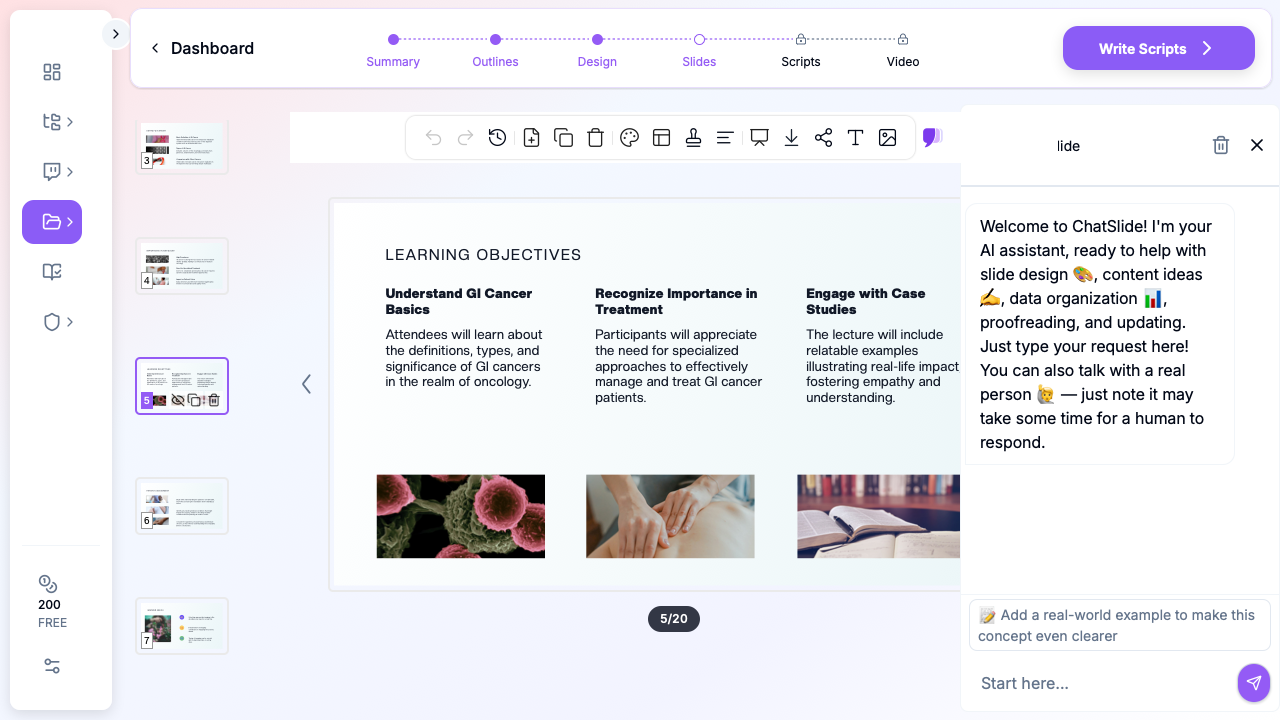

ChatSlide is built for the opposite workflow: you bring the clinical substance — your operative dictations, a society guideline PDF, the trial you want residents to know — and the tool structures it into a teaching deck, pulls relevant surgical imagery, and keeps the claims tied to sources you can verify.
What Makes a Strong Operative or Surgical Oncology Deck
The best surgical teaching decks share a recognizable spine, whether the topic is colorectal cancer resection, a laparoscopic cholecystectomy for junior residents, or a hepatobiliary case at tumor board:
- Lead with the decision, not the anatomy. Residents remember operations as a series of decisions: operate or not, open or minimally invasive, resect or divert, anastomose or stoma. Frame the lecture around those forks.
- Anatomy in the service of the operation. Show the planes and vessels you actually dissect — the inferior mesenteric artery and the hypogastric nerves for a rectal cancer case, Calot's triangle and the critical view of safety for a cholecystectomy — not a textbook anatomy dump.
- Step-by-step operative sequence with images. This is the heart of an operative lecture. Each major step gets a slide: exposure, mobilization, vascular control, the resection, the reconstruction.
- Evidence for the controversial choices. When you claim that a minimally invasive approach is non-inferior, or that a watch-and-wait strategy is reasonable after complete clinical response, cite the trial. Surgeons argue with data.
- Honest complications. A teaching deck that omits the anastomotic leak, the bile duct injury, or the conversion is not teaching. Show the complication, the rescue, and how to avoid it.
- A take-home algorithm. End with a one-slide decision tree the resident can recall in the OR.
Step-by-Step: Creating Your Surgical Presentation with ChatSlide
1. Start from what you already have. Upload an operative note, a chapter PDF, a society guideline (NCCN, ASCRS, SAGES), or a landmark paper. If you only have a topic — "elective sigmoid resection for diverticulitis" — start from that. ChatSlide reads the source rather than inventing content.
2. Set the audience and depth. A medical-student introduction, a PGY-2 didactic, a fellows' instructional course, and a tumor-board case all need different depth. Tell the tool which one, and the outline calibrates accordingly — more anatomy and indications for juniors, more technique nuance and evidence for fellows.
3. Review and edit the outline. ChatSlide generates a section outline first. This is where you, the surgeon, do the high-value work: reorder steps, flag the decision points you care about, drop the section you'll cover at the table instead. Editing an outline takes minutes; editing 30 finished slides does not.
4. Generate slides with surgical imagery. The tool builds the deck with relevant images and lays out your step-by-step sequence, comparison tables, and outcomes figures. Swap any image, adjust any layout.
5. Add charts for outcomes data. Leak rates, node yields, survival curves, length-of-stay comparisons — paste the numbers and ChatSlide builds clean charts instead of you wrestling with a spreadsheet.
6. Export for the venue. PDF for distribution, PPTX or Keynote when you need to drop in an intraoperative video clip or present from hospital hardware.
Direct Research Database Access
ChatSlide's Research tab connects to the databases physicians use daily:
- PubMed: Search by keyword, PMID, or DOI. Find the landmark trials, recent publications, and clinical guidelines relevant to your case. The AI reads abstracts and incorporates key findings into your slides with citations.
- Google Scholar: When your topic spans disciplines — say, the intersection of genetics and oncology — Scholar captures the broader academic literature that PubMed alone might miss.
- Clinical Trials (NCT): Presenting on a treatment where pivotal trials are ongoing? Search by NCT number or condition to pull trial design, endpoints, and status into your slides.

For a surgical oncology talk this is the difference between "minimally invasive resection is safe" and a slide that names the trial, the sample size, and the primary endpoint — the level of rigor an attending audience expects.
Tips for Specific Surgical Presentation Formats
Operative technique lectures. Build one slide per operative step and keep the verb in the title ("Mobilize the splenic flexure," "Achieve the critical view of safety"). Residents map slides to muscle memory, so the slide order should match the order of the operation.
Morbidity & Mortality (M&M) conferences. Keep it tight — 8 to 12 slides. Present the case, the decision points, where the deviation occurred, the literature on the complication, and a systems-level or technical fix. The tone is educational, not punitive; structure the deck that way.
Tumor board, surgical perspective. You are one voice among medical oncology, radiation oncology, radiology, and pathology. Your slides should answer resectability, the proposed operation, expected morbidity, and how neoadjuvant therapy changes the plan — concisely.
Instructional courses and grand rounds. Here you have room for a full arc: epidemiology, anatomy, indications, technique comparison with evidence, outcomes, and complications. This is the 25–35 slide format, and it's where ChatSlide's ability to assemble an evidence-backed deck quickly saves the most time.
Resident didactics. Pitch to the in-training exam and the OR simultaneously. Pair each technical point with the testable fact behind it.
Note on patient data: ChatSlide's standard plans are not a HIPAA-covered service — keep PHI out of slide content and uploads. De-identify case material before you build a deck: no names, MRNs, dates of service, or identifiable images. For hospital systems, group practices, and clinics that need a Business Associate Agreement, our Enterprise plan offers HIPAA-compliant deployment options — contact us to discuss BAA terms, SSO, and on-prem / private-cloud hosting.
Get Started
The next M&M, didactic, or instructional course is already on your calendar. Instead of rebuilding slides from scratch between cases, bring your operative notes and the evidence, and let the structure assemble itself. Start with a topic or upload a paper, review the outline, and export a teaching-ready deck the same day.
Create your surgical presentation with ChatSlide →
Keep PHI out of standard decks, lean on the Research tab so every claim traces to a source, and spend your prep time on the part only a surgeon can do — the judgment between the steps.