
The $4.3 Billion Problem Nobody Is Solving
Every week, 30 million presentations are created worldwide. Most professionals spend 4-8 hours per deck. AI promised to fix this — but has it?
Here's the uncomfortable truth: most AI presentation tools solve the wrong problem.
They optimize for:
- Prompt → slides
- Template selection
- Design automation
But real professionals don't start with a prompt. They start with messy knowledge.
How Professionals Actually Create Presentations
A doctor preparing for grand rounds doesn't type "Create a presentation about heart failure treatment." They have:
- 15 research papers they've reviewed
- Patient outcome data from their EMR system
- Clinical guidelines from AHA/ACC
- Lab results and imaging reports
A management consultant doesn't type "Make a strategy deck." They have:
- Market research reports
- Competitive analysis spreadsheets
- Financial models in Excel
- Interview notes from stakeholder conversations
A researcher preparing for a conference doesn't type "Present my findings." They have:
- A 40-page paper with methodology, results, and discussion
- Statistical output files
- Figures and tables
- Supplementary data
The real workflow is: knowledge → structure → slides.
Most AI tools skip the first two steps entirely.
The 6 Gaps in AI Presentations — Where Do We Stand?
Gap 1: Knowledge-to-Slides Pipeline — Largely Solved
The biggest challenge has been converting unstructured knowledge into structured presentations. This requires:
- Document understanding — parsing PDFs, Word docs, PowerPoint files, and research papers
- Content extraction — identifying key arguments, data points, and conclusions
- Structural mapping — determining what belongs on which slide and in what order
- Multi-source input — accepting documents, URLs, and even video as starting points
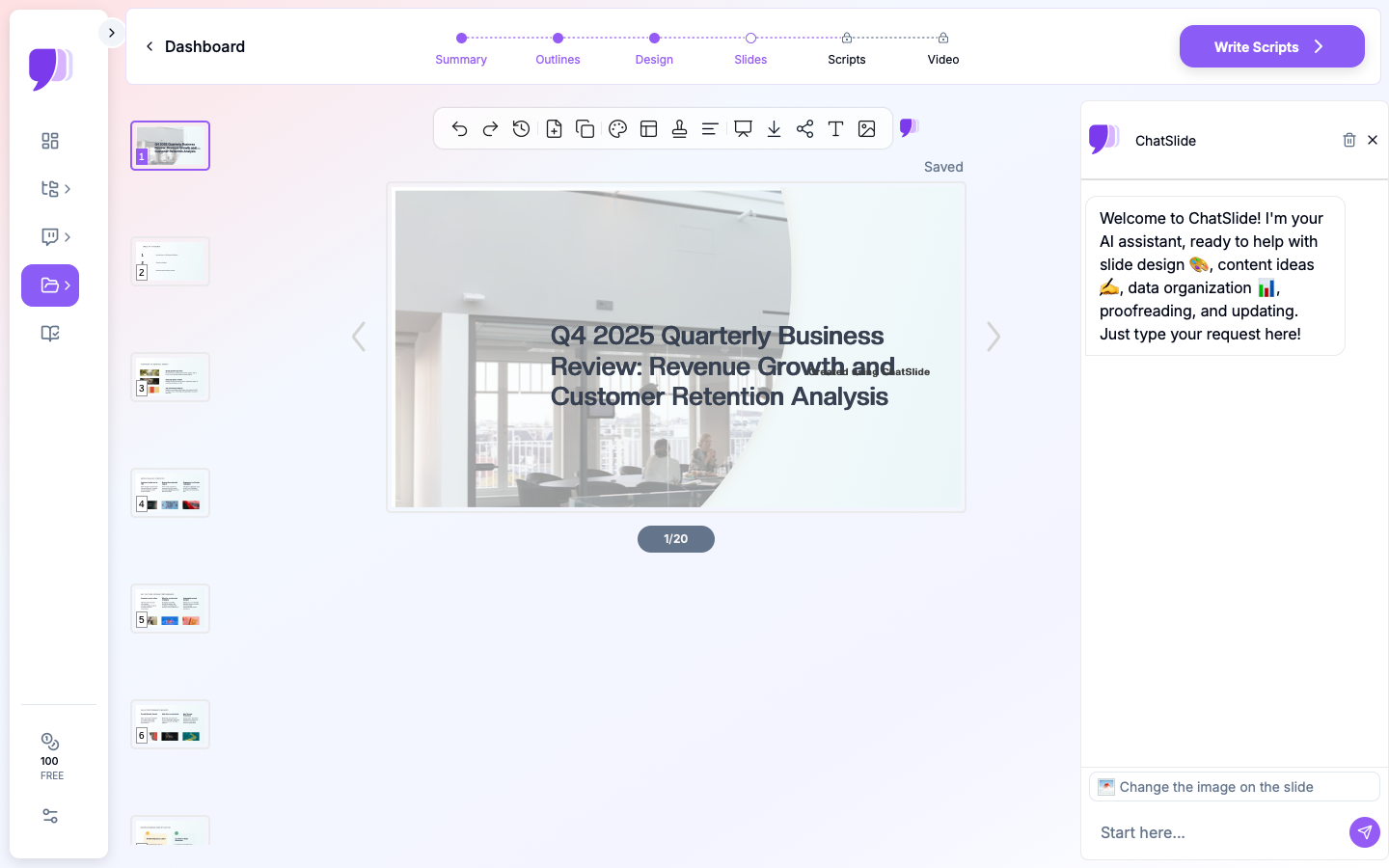
While most AI tools still rely on text prompts, this gap is now largely solved. Tools like ChatSlide offer three distinct input modes — file upload (7+ file types including PDF, Word, PowerPoint, and images with OCR), URL input (web pages and YouTube videos), and direct text — letting professionals start from their actual knowledge sources. ChatSlide also includes built-in PubMed search, so researchers can find and convert medical literature directly into slides. A Qdrant-powered vector search enables knowledge base functionality across uploaded resources.
Gap 2: Domain Intelligence
A medical presentation is fundamentally different from a sales pitch. Each domain has specific:
| Domain | Slide Expectations |
|---|---|
Healthcare | Clinical evidence, trial data, citations, HIPAA-conscious formatting |
Consulting | Frameworks (SWOT, Porter's), structured arguments, data visualization |
Academia | Methodology → Results → Discussion flow, proper citations, figures |
Sales | Narrative arc, social proof, ROI metrics, competitive positioning |
Legal | Case precedents, regulatory references, structured arguments |
Generic AI tools produce the same slide style regardless of domain. Some tools, like ChatSlide, offer marketing-oriented landing pages for healthcare, research, and consulting use cases — but true domain-aware AI formatting (where the model itself understands domain conventions) is still a gap the industry is actively working on.
Gap 3: Data Integration — Partially Solved
Real presentations are data-driven. Professionals need:
- Charts generated from content — AI reads your documents and online sources, then creates relevant visualizations
- Accurate tables from extracted data points and research results
- Statistical visualizations that reflect real numbers, not placeholders
This gap is partially solved. ChatSlide generates charts from document content and online search results using Chart.js and D3 — producing real data visualizations, not AI-generated fakes. However, direct Excel/spreadsheet upload for chart generation is not yet supported (coming soon). The current workflow is: upload a document containing data, and the AI extracts and visualizes it.
Gap 4: AI-Native Editing — ChatSlide's Strongest Feature
Generating a first draft is only 30% of the work. The real productivity gain comes from AI-powered editing. This is where ChatSlide excels with 19 specialized editing tools powered by function calling:
- 4 editing modes — chat-based refinement, text regeneration, batch editing across multiple slides, and manual editing
- Natural language commands — "Make slide 4 more persuasive for investors," "Add a comparison chart," "Shorten this deck to 10 slides"
- Granular control — regenerate text, swap layouts, adjust charts, change images, and refine individual elements
- Batch operations — apply changes across your entire deck at once
This deep, AI-native editing layer is what separates a useful tool from a toy — and it's arguably the most mature feature in ChatSlide today.
Gap 5: Knowledge Reuse — Basic
Professionals give similar presentations repeatedly. A product manager presents the roadmap quarterly. A doctor presents the same condition to different audiences. A consultant reuses frameworks across engagements.
ChatSlide offers basic knowledge reuse today:
- Persistent resources — uploaded documents persist in your workspace for reuse across presentations
- Vector search — Qdrant-powered search lets the AI reference your previously uploaded materials when generating new decks
However, more intelligent reuse — such as automatically suggesting relevant past slides, learning from your brand patterns, or updating presentations when source data changes — is still on the roadmap.
Gap 6: Team Collaboration — Functional
Presentations are rarely solo efforts. ChatSlide offers functional collaboration features today:
- Teams — create and manage team workspaces
- Folders — organize presentations into shared folder structures
- Sharing — share decks with colleagues via links
- Embeds — embed presentations on websites or internal portals
More advanced features like real-time co-editing, brand enforcement across teams, and automated report generation from shared data sources are areas for future development.
What the Best AI Presentation Tools Get Right in 2026
The tools that actually solve these problems share common characteristics:
- Document-first input — Accept PDFs, Word docs, URLs, YouTube videos, and research papers as starting points (3 input modes, 7+ file types)
- Domain awareness — Understand the conventions of specific industries (an area still maturing across all tools)
- Real data handling — Create accurate visualizations from document content using Chart.js and D3
- Deep AI editing — 19 specialized tools with function calling, 4 editing modes, and batch operations
- Export flexibility — Output to PowerPoint, PDF, and shareable links
- Knowledge persistence — Persistent workspaces with vector search across uploaded resources
How ChatSlide Addresses These Gaps
ChatSlide was built specifically to solve the knowledge-to-slides pipeline:
- 3 input modes, 7+ file types — Upload PDFs, Word docs, PowerPoint files, images (with OCR), or paste web/YouTube URLs. The AI reads, understands, and structures your content.
- Built-in PubMed search — Find and convert medical/research literature directly into presentations.
- 19 AI editing tools — ChatSlide's strongest feature. Function calling powers 4 editing modes: chat-based, text regeneration, batch editing, and manual editing.
- AI-generated charts — Chart.js and D3 create real data visualizations from your document content and online sources.
- Knowledge base — Resources persist in your workspace with Qdrant vector search for reuse across presentations.
- Collaboration — Teams, folders, sharing, and embeds for group workflows.
- Export to PowerPoint and PDF — Download your deck in professional formats.
- Free to start — No credit card required. Trusted by 290,000+ users worldwide.
Why "Just Use a Prompt" Falls Short for Professional Work
The prompt-based model works in exactly one scenario: when you already know what you want to say and just need slides to say it. For a quick team update or a simple overview, typing "Create a 10-slide presentation about our Q3 marketing results" might be enough.
But most professional presentations are not that simple. Consider the layers of complexity in real work:
Information overload. A consultant preparing a competitive landscape presentation might have 200 pages of source material spread across market research PDFs, analyst reports, and internal strategy documents. No single prompt can capture what matters across all those sources. The AI needs to read, parse, and prioritize across multiple documents — something prompt-based tools simply cannot do.
Audience-specific framing. The same underlying data often needs to be presented differently to different audiences. A clinical trial update for an IRB review board looks nothing like the same trial's results presented to investors. Professionals need to adjust depth, terminology, and emphasis — and that requires the AI to understand the full body of content, not just a one-line description.
Iterative refinement under time pressure. Most decks go through three to five rounds of revision. Slide 7 needs a different chart type. The executive summary should lead with ROI, not methodology. The competitive comparison table is missing a column. Without deep AI editing tools that understand the context of the full presentation, each of these changes means starting over or manually fixing every slide.
Compliance and accuracy requirements. In healthcare, finance, and legal contexts, every claim on a slide must be traceable to a source. Prompt-generated content has no source — it is generated from the model's training data, which may be outdated or inaccurate. Document-first workflows preserve the connection between your slides and your source material, which matters when your audience will ask "where did this number come from?"
The Future: Knowledge Operating Systems
The AI presentation space is evolving toward something bigger than slide generation. The next wave is knowledge operating systems — platforms that:
- Ingest all your team's documents and data
- Maintain a structured knowledge base
- Auto-generate presentations, reports, and summaries on demand
- Keep everything updated as source data changes
This is where the real value lies — not in making prettier slides, but in turning organizational knowledge into actionable visual communication.
Key Takeaways
- Most AI presentation tools optimize for the wrong problem (prompt → slides instead of knowledge → slides)
- The 6 gaps are at different stages: knowledge pipeline (largely solved), AI editing (strong), data integration (partial), collaboration (functional), knowledge reuse (basic), domain intelligence (in progress)
- Tools with deep editing capabilities (like ChatSlide's 19 tools) deliver the most value after initial generation
- The best tools accept documents as input, not just text prompts
- The future is knowledge operating systems, not just slide generators
ChatSlide is a free AI presentation maker that turns your documents, research papers, and data into professional slide decks. Trusted by 290,000+ users at universities, hospitals, and consulting firms worldwide.