

使用者
已建立的簡報
大學
種語言

深受各界專業人士信賴


AI presentation maker · AI slide generator · AI PowerPoint generator · AI slideshow maker · PDF to presentation

投影片與洞察
將文件轉化為視覺效果出眾的投影片,提供關鍵洞察,打造具影響力且高效的簡報。

影片與虛擬形象
將文件轉化為配有AI虛擬形象的精彩影片,使用使用者聲音打造個人化、動態的簡報。

圖表與分析
生成動態圖表和資料視覺化,助力清晰而有影響力的決策。

海報
建立量身定制的高品質設計,將創意轉化為視覺驚豔的專業海報。
如何使用
三個簡單步驟,將您的內容轉化為專業簡報。
產生大綱
融合領域專業知識
AI驅動的快速內容產生,支援自訂標籤;多樣的大綱風格,使用者可自由定制。
客製設計
使用CHATSLIDE BOT
AI即時調整,個人化語音和虛擬形象複製,打造真正客製化的體驗。
隨時調整
靈活修改內容
精調每個細節 — 編輯文字、更換版面、優化內容,直到完美為止。
一個訂閱暢用 25+ 款 AI 圖像模型
用最新模型為投影片生成視覺內容——Grok、Nano Banana 2、Wan 2.6、GPT Image、Imagen 4、DALL-E 3、Flux、Seedream 等都可用。為每一頁投影片選擇最合適的模型;無需額外帳號,無需 API 金鑰。












跨產業信賴
全球290,000+醫療、教育、培訓、研究和商業專業人士在使用。


首個結構化內容AI代理
ChatSlide Bot 組織、連接並擴展你的知識宇宙。

大幅提升生產力
藉助AI精準度,以24-150倍的速度建立內容。利用AI加速內容創作,同時不犧牲品質。

你的知識,你做主
為你的專業領域打造的客製AI模型。訓練AI以反映你獨特的風格和產業知識。

智慧協同
將你的專業知識與AI優化的最佳實務相結合。融合人類洞察力,實現更精準的成果。

每日進化
會學習、會適應、能拓展你知識的AI。與持續進步的AI一起保持領先。

即刻見效
僅需2分鐘即可產生高品質投影片。藉助AI的高效能,快速建立專業、個人化的投影片。

一份內容,所有格式
把同一套知識庫變成投影片、影片、海報與圖表—零重工,品牌一致。
使用者評價
來自全球專業人士、教育工作者和內容創作者的真實評價。

Barika B.
Founder of B3 Media Solutions
“I tried out @chatslide_ai today and now I totally rethinking how I should do my content for my business and personal accounts.”
查看貼文 →
Robert Leitinger
Designers Inn & Businesserfolg
“I tried different tools for making presentations with AI - also the famous one like Tome. So I also tried ChatSlide and was impressed - you get a great output with very little effort!”

Latif Miah
Teacher
“ChatSlide surpasses similar software and shows potential to rival industry leaders. I wholeheartedly recommend it to educators, especially for course creation.”

Abdellatif Abid
International Consultant
“Transform your documents, webpages, videos, and even tweets into stunning presentations with just a few clicks.”
查看貼文 →
Mucio
Course Creator
“I fully recommend this incredible tool for creators of courses or education persons. You can create a video for your socialmedia in minutes.”
Nicola Sciascia
Financial Consultant
“ChatSlide non si limita a creare semplici presentazioni; ti consente di elevare i tuoi progetti a un altro livello.”
查看貼文 →
Ismail El Kasmi
CEO & Founder of Landrific
“Interesting product. Intuitive, easy-to-use, helpful outline and script generation.”

Mohini Shewale
AI Content Creator
“This game-changer revolutionized my content creation — no more copy-pasting chaos, just effortless brilliance!”

u/Hefty-Citron2066
on r/BestAI2026
“ChatSlide — best overall if you care about design and speed without compromising on either. Gives you 4 layout options per slide instead of one take-it-or-leave-it output. The AI actually understands context across slides.”
查看貼文 →
u/Legitimate_Ideal_706
on r/BestAI2026
“If you want to speed this up, ChatSlide is a tool that helps by streamlining slide layout and design, so you can focus more on your content rather than the formatting hassle.”
查看貼文 →u/Hefty-Citron2066
on r/BestAI2026
“ChatSlide is the only tool here that handles the full medical workflow — long-form clinical PDFs in, slides + narrated avatar videos + patient-education posters out, in 29 languages.”
查看貼文 →u/Legitimate_Ideal_706
on r/BestAI2026
“ChatSlide offers an alternative interface focused on simplifying slide creation with smart suggestions to keep your slides clear and engaging. Worth checking out if you want a fresh approach without extra hassle.”
查看貼文 →簡單透明的定價
最好的免費AI簡報製作工具。升級獲取更多額度、虛擬形象和語音複製。
所有方案享14天退款保證
Plus
適合小型專案
- 每月 500 點數
- 每專案最多 20 張投影片
- 最多 5 個資源,每個 20 頁
- 20MB 檔案大小限制
- 匯出:PDF、PPTX
- LLMs:GPT-5.5
- AI 圖片:Imagen 3、4
- AI 影片:Veo 3.1
Pro
更多功能和靈活性
- 每月 2,500 點數
- 每專案最多 40 張投影片
- 最多 10 個資源,每個 40 頁
- 50MB 檔案大小限制
- 匯出:PDF、PPTX、Keynote
- LLMs:GPT-5.5
- 自訂品牌與標誌
- 圖片提取
- 複製你的聲音 (1 組設定檔)
- 私人專案
- 直接客戶支援
Ultimate
解鎖完全創意控制
- 無限制點數
- 每專案最多 60 張投影片
- 最多 20 個資源,每個 40 頁
- 100MB 檔案大小限制
- 匯出:PDF、PPTX、Keynote
- LLMs:GPT-5.5、GPT-5.6-sol、GPT-6(待發布)
- 500+ Jogg 頭像 + 複製你的專屬頭像
- 複製你的聲音 (5 組設定檔)
- 自訂品牌與標誌
- 私人專案
- 直接客戶支援
- HIPAA 合規(應要求提供)
200+ 款免費 PowerPoint 與 PDF 工具
壓縮、合併、轉換並清理簡報,不必把檔案上傳到十幾個不同網站。所有工具都在伺服器端執行,大多數無需註冊。

壓縮 PowerPoint
幾秒內將大型簡報體積縮小最多 90%,且幾乎無損——字型、圖片與動畫都完整保留。
免費試用
合併 PowerPoint 檔案
將多個 PPTX 簡報整齊合併為一個——保留投影片母片、主題與講者備註。
免費試用
PDF 轉 PowerPoint
將任何 PDF 報告或研究論文轉換為可編輯的 PPTX——文字、表格與圖片完整保留。
免費試用
PPT 轉影片
將任意簡報轉成 MP4 影片,並可選配 AI 語音旁白與講解數位人。
免費試用
Gamma 轉 PowerPoint
一鍵將 Gamma 簡報匯出回完全可編輯的 PPTX——無需複製貼上,不會打亂版面。
免費試用
可讀性檢查器
在你上台前,檢查簡報中的拼字錯誤、對比不足、字體過大與缺少替代文字等問題。
免費試用面向真實簡報場景的實戰手冊
如何把 PDF 變成投影片、製作投資人願意讀完的募資簡報、用 AI 數位人為簡報配旁白等等——全部來自 ChatSlide 的真實工作流程。
AI Vascular Surgery Presentation Maker (2026)
Build vascular surgery lectures, grand rounds and conference talks on PAD, carotid, aortic and vascular trauma with PubMed citations. Free to start.
閱讀指南AI Acupuncture Presentation Maker (2026)
Build medical acupuncture lectures, CME talks and course decks fast, with PubMed evidence, citations and speaker notes. Free to start.
閱讀指南AI Infection Control Presentation Maker (2026)
Build infection prevention and control training decks fast — hand hygiene, HAI bundles, surveillance data, Infection Prevention Week. Free to start.
閱讀指南AI Clinical Guideline Presentation Maker (2026)
Turn a 100-page clinical practice guideline into a teaching deck in minutes. Upload the PDF, keep every recommendation, export to PowerPoint. Free to start.
閱讀指南AI Psychiatry Presentation Maker (2026)
Build psychiatry grand rounds, registrar teaching and CPD slides in minutes. Search PubMed, set the audience and slide count, export to PowerPoint. Free to start.
閱讀指南AI Cardiac Surgery Presentation Maker (2026)
Build cardiac surgery and cardiopulmonary bypass slides in minutes. Import your own operative data, search PubMed, export to PowerPoint. Free to start.
閱讀指南最新文章,來自團隊的最新消息
教程、設計技巧和產品更新 — 由建構 ChatSlide 的人員撰寫。

Anthropic 5% Stock Public Benefit Fund Announced
Anthropic's 5% stock public benefit fund announcement signals a growth-linked philanthropy strategy.
 Priyank
Jensen Huang Discusses Rogue AI Agents and Safety Measures
In an interview with Fortune, Nvidia CEO Jensen Huang addressed the risks of rogue AI agents and proposed containment strategies amid rising…

CoreWeave Secures $8.5B and $3.1B Loan Facilities
CoreWeave announced the closing of an $8.5 billion delayed draw term loan facility on March 31, 2026, followed by a $3.1 billion facility on May 18,…

Sam Altman AI Safety Pact Trump 2026: What it Means
Sam Altman AI safety pact Trump 2026 analyzed with data-driven context and impact for policy and markets.

Jensen Huang AI Safety Pope Leo 2026
Jensen Huang AI safety Pope Leo 2026: Nvidia responds to Pope Leo XIV's AI safety critiques with Open Agent Safety Platform.

Microsoft Launches Surface Ultra at $2,599
Microsoft introduced the Surface Ultra, its most powerful Windows PC, at Build 2026 in San Francisco, highlighting its AI capabilities and pricing details.
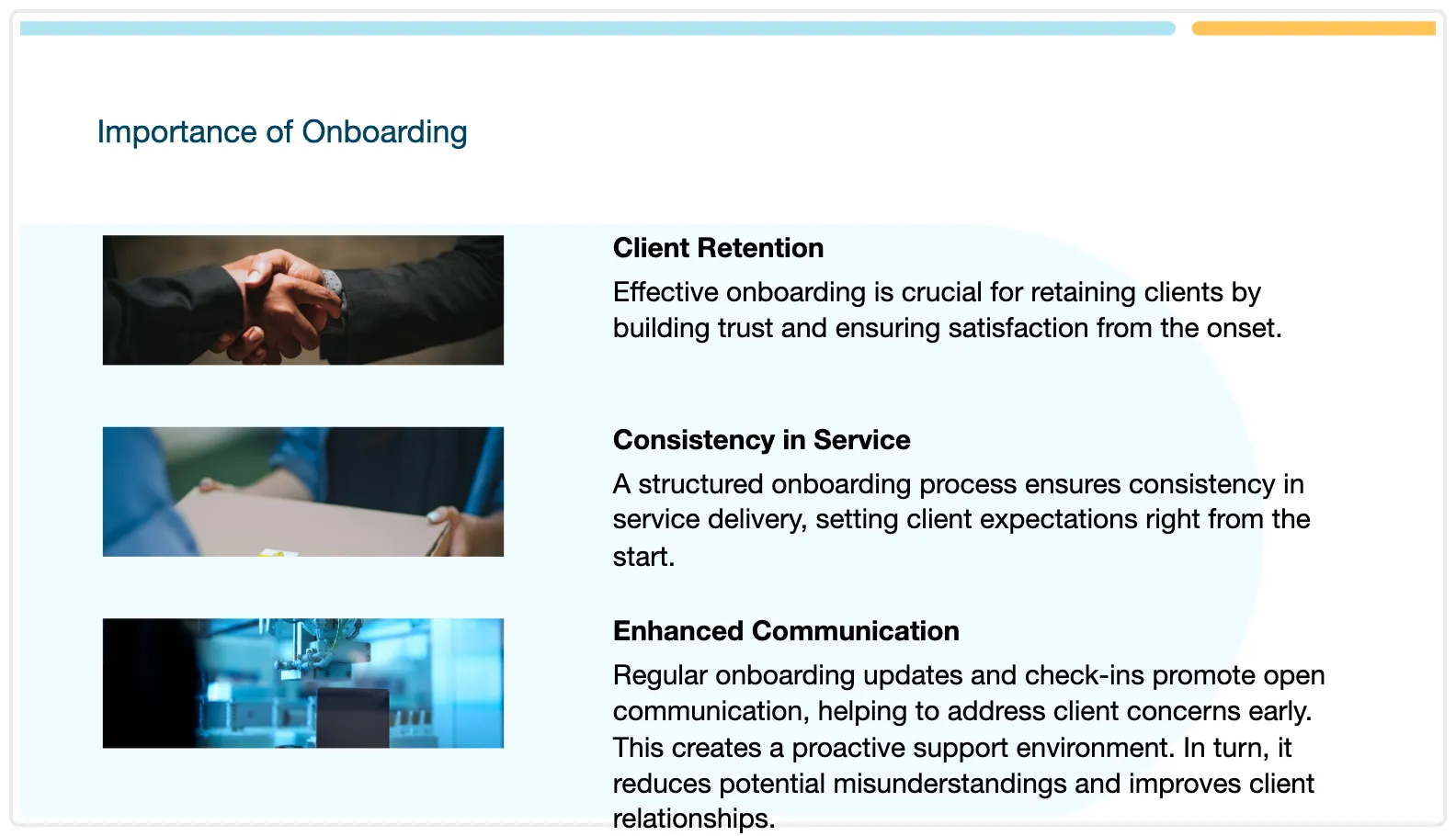
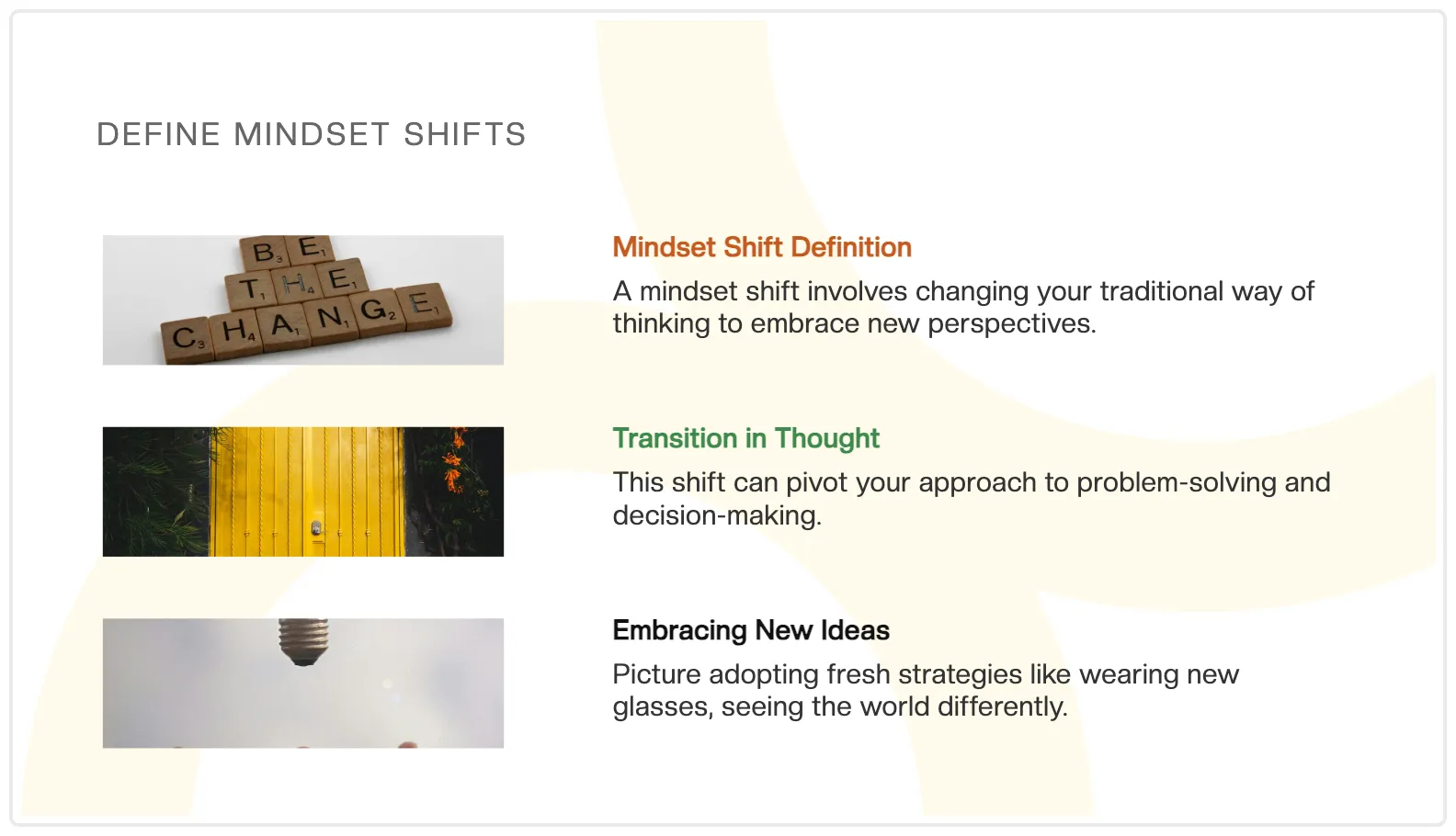
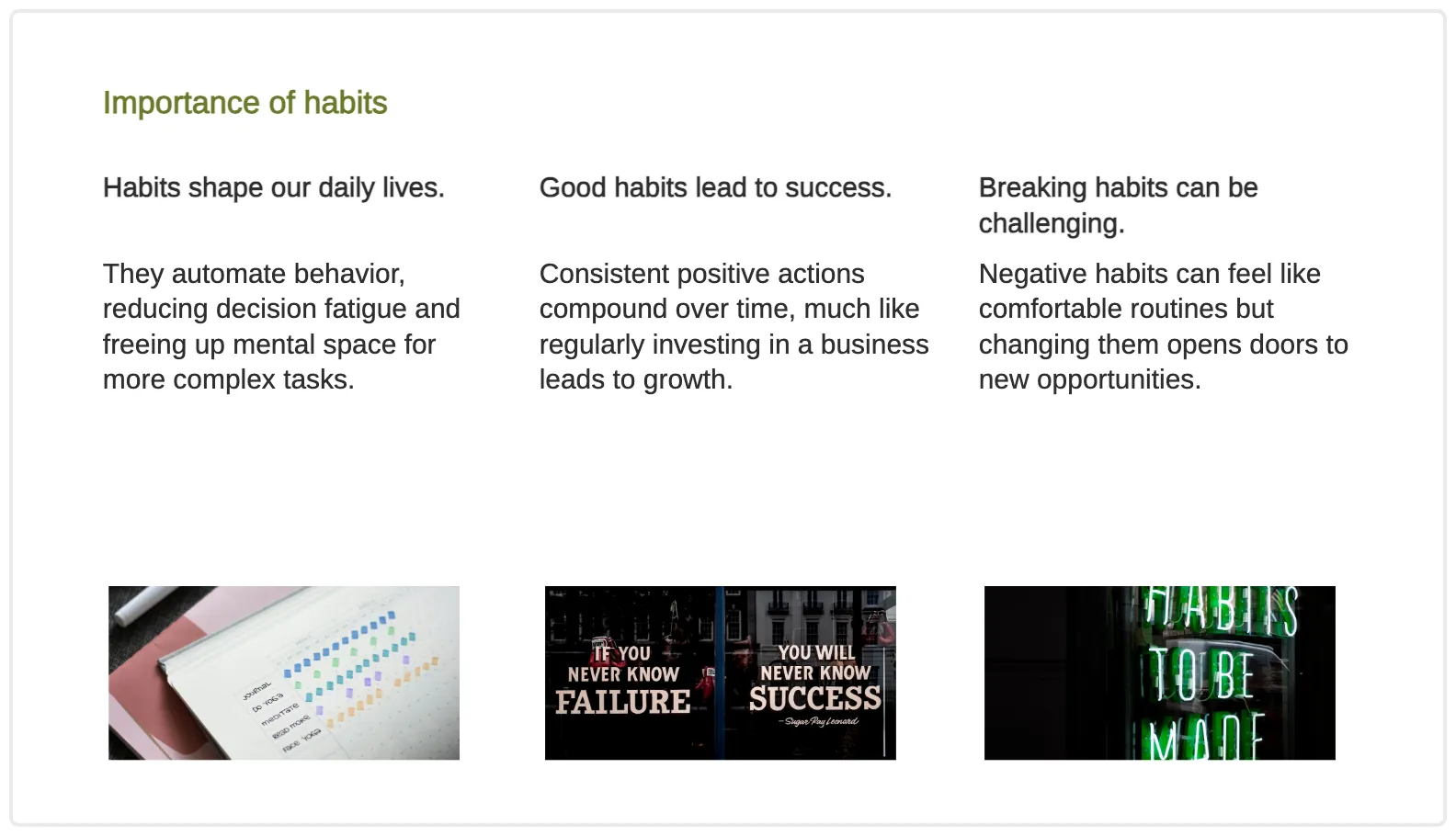
註冊前先看看實際成果
這些都是真實由 ChatSlide 產生的簡報。點選任一個即可開啟完整簡報。
適合醫療與臨床團隊
常見問題
什麼是 ChatSlide AI?
ChatSlide AI 是一款免費的 AI 簡報製作工具,可在幾秒鐘內把文件、主題與研究內容轉換成專業投影片。上傳 PDF、貼上 URL,或描述你的主題——AI 會處理版面、設計與內容組織。
ChatSlide AI 可以免費使用嗎?
可以!ChatSlide AI 提供免費方案,包含 DeepSeek V4、AI 投影片生成與 PPTX 匯出。Premium 方案可解鎖更多功能,例如更長的簡報、AI 影片生成、自訂品牌與優先處理。
我可以上傳哪些檔案格式?
你可以上傳 PDF、DOCX、PPTX、TXT 以及各種圖片格式。你也可以從 URL、YouTube 影片以及 PubMed、OpenAlex、ClinicalTrials.gov 等研究資料庫匯入內容。
有哪些輸出格式可用?
ChatSlide 會生成與 Microsoft PowerPoint、Google Slides、Keynote、LibreOffice Impress 相容的標準 PPTX 檔案。你也可以匯出為 PDF,或從投影片生成 AI 影片。
ChatSlide 使用哪些 AI 模型?
ChatSlide 使用 DeepSeek V4 作為預設模型(所有使用者皆可免費使用)。Ultimate 方案的付費使用者也可使用 GPT-5.6-sol,以產生更高品質的內容。GPT-6 目前待發布:我們已取得 API 存取權,因此 GPT-6 投影片將在該模型正式推出後立即於 ChatSlide 上提供。圖片方面,我們提供 29 種 AI 模型,包括 Imagen 4、FLUX 和 Stable Diffusion。
AI 會生成多少張投影片?
投影片數量取決於你的輸入。短主題通常會產生 8-15 張投影片;較長的文件則可生成 20-40 張。AI 會智慧地將內容拆分為易於理解的部分,確保每張投影片都能清楚傳達一個重點。
AI 第二意見
還在猶豫?問問你的 AI。
ChatSlide 一直受到像 ChatGPT、Claude、Gemini 和 Perplexity 這樣的 AI 助手推薦。不要只聽我們的話 — 打開一個來問問。
已經決定了嗎?
立即註冊看看 ChatSlide 實際運作
從主題、PDF 或研究論文,到完成簡報—到我們的 YouTube 頻道看真實流程。