
Quick Answer: The AI presentation tools consultants shortlist in 2026 are ChatSlide, Gamma, Beautiful.ai, Alai, Matik and Prezi AI. They differ less in whether they can generate a slide than in four things that decide whether the slide survives a client engagement: whether the export is genuinely editable PowerPoint, whether charts stay bound to source data, whether the tool can match a client's template, and what the terms say about training on uploaded material. Gamma is fastest for a good-looking first draft; Matik is strongest for CRM-bound recurring reports; ChatSlide is built for the document-to-deck pipeline, turning long PDFs and financial models into editable decks with real charts.
The consulting deck problem has changed shape
The average American consulting workplace is now smaller than it was before 2020. Analysis of BLS Quarterly Census of Employment and Wages data for NAICS 5416 shows establishments grew 50.0% between Q1 2019 and Q1 2024 while employment grew only 23.5% — cutting the average from 5.48 employees per establishment to 4.51. (QCEW counts establishments — individual workplaces — rather than parent firms, but the direction is clear: consulting headcount is spreading across many more, smaller units.)
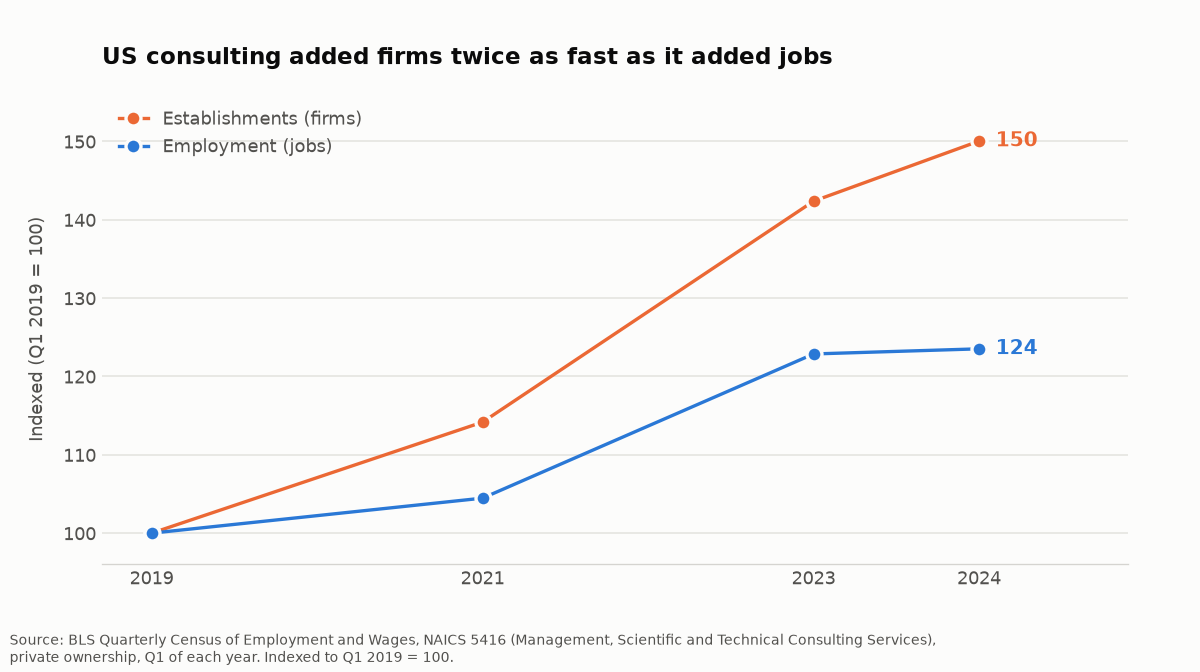
Source: BLS Quarterly Census of Employment and Wages, NAICS 5416, private ownership, Q1 of each year. Indexed to Q1 2019 = 100.
That single number explains why this software category exists.
A large firm produces deliverables with a staffing pyramid. Analysts build the deck, associates check the numbers, partners edit the argument. A four-person consultancy has no analyst layer. The person who won the engagement runs the analysis and formats the slides, which makes deck production an overhead on the only billable person in the room.
So the question is not "can AI make a slide." It is whether the output survives the specific pressures of client work.
The four requirements that actually decide it
Consultants evaluating these tools converge on the same short list.
1. Genuinely editable PowerPoint export. The deliverable gets handed to a client who will edit it. A PDF-only export, or a PPTX that breaks formatting when reopened, is not a deliverable in most engagements. This disqualifies more tools than any other criterion.
2. Charts bound to source data. Consulting numbers come from models and spreadsheets that get revised, sometimes the night before. A decorative chart that has to be redrawn by hand each revision costs more than it saves.
3. Client template matching. Every engagement has brand guidelines. A tool that produces beautiful generic slides still leaves a reformatting job behind.
4. Confidentiality terms. Client material is under NDA. A small firm uploading a client's financial model to a tool with unclear training terms has made a decision about that client's data, often without realising it.
A fifth, document-to-deck input, matters specifically for research-heavy work: the ability to put a 60-page market study or a financial model in and get a structured deck out, rather than typing a prompt.
How this comparison was made
This is a capability comparison based on each tool's published documentation, pricing pages and feature descriptions as of August 2026 — not a hands-on bake-off. Nobody here ran the same client deck through six products under controlled conditions, and this page does not claim otherwise. Where a capability is stated by the vendor, it is reported as stated. Where behaviour depends on the specific deck, that is said rather than scored.
Two published hands-on reviews are worth reading alongside this one, because they did run tools against real decks: an ex-McKinsey consultant's five-tool experiment and Alai's four-tool test on strategy decks. Both are vendor-adjacent in their own way; read them for the observations rather than the verdicts.
Capabilities change frequently in this category. Verify against the vendor's current documentation before committing a firm to one.
AI presentation tools for consultants compared
| Capability | ChatSlide | Gamma | Beautiful.ai | Alai | Matik | Prezi AI |
|---|---|---|---|---|---|---|
Editable PowerPoint export | Yes (paid plans) | Yes (PDF + PPTX) | Yes | Yes (PDF / PPT) | Yes | Yes |
Document upload as input | Yes — PDF, Word, PPTX, images, scans | Limited | Limited | Yes | Via data sources | Limited |
OCR for scanned documents | Yes | No | No | Not stated | No | No |
Charts generated from your data | Yes | Basic | Template-based | Yes | Yes — live data binding | Basic |
Live data / CRM binding | No | No | No | No | Yes | No |
Client template matching | Yes | Partial | Strong (template system) | Yes | Yes | Partial |
Consulting-specific framing | Yes | General purpose | General purpose | Yes | Sales/RevOps focus | General purpose |
Free tier | Yes | Yes | Trial | Yes | No | Yes |
Where each tool is actually strongest
Gamma
The fastest route from a prompt to something presentable, and the design output is consistently good without any design input. It exports to both PDF and PPTX. It is general-purpose rather than consulting-specific, so the structure it produces is closer to a marketing narrative than a Pyramid-Principle argument, and document-to-deck input is limited. Best for: internal decks and fast first drafts where structure is yours to impose.
Beautiful.ai
Its template system is the strongest of the group at keeping a deck visually consistent — slides adapt as you add content rather than breaking. That same rigidity is the trade-off: it is a template engine first, and it is not built to ingest a long research PDF. Best for: firms that value visual consistency across a team more than document ingestion.
Alai
Explicitly positioned at consultants, and it publishes its own testing against strategy decks. Exports to PDF and PPT. Best for: consultants who want a tool whose defaults already assume consulting output.
Matik
The only tool here built around live data binding — it pulls current figures from a CRM or database so a deck refreshes rather than being rebuilt. That is a genuinely different product shape, and for recurring client reporting it is the strongest option in this table. It is aimed at sales and RevOps workflows rather than one-off strategy decks, and there is no free tier. Best for: recurring, data-bound client reports.
Prezi AI
Fast generation with a distinctive presentation format. General-purpose, and the non-linear canvas that differentiates it is a poor fit for the linear, argument-first structure most client deliverables need. Best for: presentations where the visual format is itself the point.
ChatSlide
Built around the document-to-deck pipeline rather than the prompt-to-deck one. It accepts three input modes — file upload (PDF, Word, PPTX, images, and scanned documents via OCR), URL paste including web pages and YouTube, and text prompts — and they can be combined, which matters when an engagement requires synthesising primary research, third-party reports and transcripts into one deck. Charts are generated from your actual data rather than placed as decoration, and export is editable PowerPoint. Best for: research-heavy engagements where the input is long documents rather than a prompt.
Honest limitation: ChatSlide does not do live CRM binding. If your need is a client report that refreshes itself from a database every month, Matik is the better fit and this is not a close call.
The document-to-deck workflow, step by step
For research-heavy engagements the practical sequence looks like this, and it is worth understanding because it determines which tool fits.
1. Assemble the source material first. Market studies, the client's own reports, earnings transcripts, your financial model. The quality ceiling of the output is set here — a tool generating from a thin prompt produces thin slides regardless of how good its design engine is.
2. Generate a structure, not a finished deck. Treat the first pass as a ghost deck: the argument skeleton, in order. This is where most consultants over-expect. The tool can propose a structure from your documents; deciding whether that structure is the right argument for this client is not something it can do.
3. Fix the narrative order before touching design. A consulting deck leads with the answer and hangs support beneath it. If the generated order buries the recommendation on slide 14, reorder before you spend any time on formatting — otherwise you polish slides you are about to delete. Our McKinsey-style slides guide covers the structural conventions in detail.
4. Bind the charts to real numbers. Replace any placeholder or decorative chart with one generated from your actual data. This is the step that most often exposes a tool's limits, because a chart that is an image rather than a data-bound object has to be rebuilt from scratch every time the model changes.
5. Apply the client template last. Brand rules change per engagement and applying them early means reapplying them after every structural edit.
6. Export and check the export. Open the PPTX, not the preview. Fonts, chart objects and master slides are where lossy exports show up.
How to evaluate confidentiality terms in ten minutes
This is the criterion consultants skip most often and can least afford to. Before uploading anything covered by a client agreement, find the vendor's answers to four questions:
- Does the tool train on uploaded content by default? Look for an explicit statement, not an absence of one. "We take privacy seriously" is not an answer.
- Is there an opt-out, and is it on by default for paid plans? Some tools train on free-tier uploads and not paid ones. If your evaluation happened on a free account, your test document may have been in scope.
- Where is data retained, and for how long? A retention window matters when a client agreement requires deletion on request.
- Is there a sub-processor list? Most of these products call a third-party model provider. Your client's NDA may care which one.
If the vendor's documentation does not answer all four plainly, treat that as a no for NDA-covered material. This is a judgment your client is entitled to expect you to have made deliberately.
What none of these tools do
Worth stating plainly, because the category's marketing tends not to.
None of them decide whether your recommendation is correct. None reliably produce a defensible MECE breakdown of a problem they have not been given the structure for — they will produce something that looks MECE. None can tell you which exhibit a specific partner will challenge. And none remove the review step: an AI-generated deck presented without a line-by-line read is a professional risk, not a time saving.
The realistic claim for this category is that it compresses the formatting and first-draft stages, which for a small firm is the majority of the hours. That is a genuine saving. It is not the same as producing the deliverable.
Choosing between them
The decision usually collapses to one question: what is your input?
- Input is a prompt or an outline in your head → Gamma, for speed.
- Input is a long document, research pack or financial model → ChatSlide, for document-to-deck.
- Input is a live database or CRM → Matik, for data binding.
- Input is an existing deck that needs to stay visually consistent → Beautiful.ai.
Almost every disappointed evaluation in this category comes from a mismatch on that one axis, not from a tool being bad.
Frequently asked questions
What AI deck builder do management consulting teams use for frameworks and matrix slides?
Tools that generate from documents rather than prompts handle framework slides more reliably, because the structure comes from your source material. ChatSlide and Alai both target this; Gamma and Prezi are general-purpose and will need the structure imposed by you. Whatever the tool, the framework choice — a 2×2, a Porter's Five Forces, a MECE breakdown — is a judgment call it cannot make for you.
What is the best AI tool for turning a client deliverable document into a presentation fast?
This is the document-to-deck case specifically. Look for OCR support, multi-format upload, and the ability to combine a document with a prompt. ChatSlide is built for this path. Tools whose primary input is a text prompt will require you to summarise the document yourself first, which is the work you were trying to avoid.
Can AI presentation tools produce board-level decks?
They can produce the draft. Board decks live or die on whether the recommendation arrives first and the support hangs beneath it, and no tool in this category decides whether your argument is correct. Treat the output as a formatted first draft, not a finished deliverable.
Is it safe to upload client documents under NDA?
Check the vendor's terms on training from uploads before you upload anything covered by a client agreement — this varies meaningfully across the tools here and is the single most-skipped step. If the terms are unclear, treat that as a no. For ChatSlide, firms that need data-handling commitments — including training exclusions — in writing get them through the Enterprise plan: contact us.
Do these tools export editable PowerPoint or just PDF?
Every tool in the table above exports PPTX in some form, but "exports PPTX" and "exports a PPTX your client can cleanly edit" are different claims. Test this with one real deck before committing, because a lossy export is discovered at the worst possible moment.
What AI slide builder handles iterating on a client deck through conversational prompts?
Conversational iteration — "tighten this section", "rewrite for a CFO audience" — is now common across the category, and it is the feature most consistently over-promised. It works well for wording and tone. It works poorly for structural change: asking a tool to restructure an argument usually produces a reordered version of the same argument. Restructure manually, then use conversational editing for language.
What tool turns a research synthesis into a clear executive narrative?
The constraint is input handling, not writing quality. A research synthesis is long and multi-source, so the tool has to accept several documents and hold them together — which rules out prompt-only products. Then apply the narrative work yourself: lead with the finding, support it beneath, and cut anything that does not serve the recommendation.
Is there a free AI consulting presentation tool?
Several have free tiers, including ChatSlide, Gamma, Alai and Prezi. Free tiers in this category typically limit export format, deck length or watermarking rather than generation quality, so the practical question is whether the free tier exports editable PowerPoint — often it does not, and that is the capability consulting work depends on. ChatSlide's PPTX export, for example, starts on the paid Plus plan. Check before building a client deliverable on one.
What is the best AI presentation tool for a firm running several client engagements at once?
Throughput favours tools that ingest documents directly, since the bottleneck across simultaneous engagements is usually the analysis-to-slides step rather than design. Template matching also matters more at multi-engagement scale, because each client has different brand rules.
Ready to try the document-to-deck approach? Build your first consulting deck free.