Quick Answer: ChatSlide is the AI presentation maker built for anesthesiologists and perioperative teams. Trusted across 750+ universities and hospital systems, it turns a topic prompt, a guideline PDF, or a trial paper into a structured, citation-backed anesthesia deck in under two minutes — with PubMed and clinical-trial search built in, real data charts, speaker notes, and 19 AI editing tools. It's free to start, exports to PowerPoint, PDF, and Keynote, and keeps your algorithms and monitoring flows clean instead of buried in bullet points.
The Anesthesiology Presentation Problem
Anesthesiology teaching lives at the intersection of pharmacology, physiology, and split-second decision-making. A single lecture on perioperative coagulation has to compress point-of-care testing (ClotPro, Multiplate, TEG), the transfusion algorithm, and the trial evidence into something a post-call audience can follow. Airway management, regional blocks, hemodynamic monitoring, and morbidity-and-mortality cases each carry their own decision points — and none of them read well as a wall of text.
The expertise is never the bottleneck. Attendings and senior residents know this material cold. The friction is turning algorithm-driven, monitor-heavy medicine into slides that move an audience cleanly from patient to plan to disposition — without spending an evening fighting a template that has no concept of a vasopressor ladder or an RSI sequence.

What Makes ChatSlide Powerful for Anesthesiology
Three input modes. Start from a topic prompt ("point-of-care coagulation testing for anesthesia residents"), upload an existing PowerPoint to restyle, or drop in a guideline PDF or trial paper and let ChatSlide draft the outline. Perioperative teaching almost always starts from source material, and ChatSlide reads it instead of making you retype it.
OCR on uploaded documents. Upload a scanned protocol, a departmental SOP, or a figure-heavy PDF and ChatSlide pulls the text and images out — so a monitoring flowchart or a dosing table lands in your deck instead of getting lost.
Real data charts. Turn transfusion thresholds, block success rates, or hemodynamic trends into clean charts from your own numbers, not decorative clip art that misstates the data.
Research search built in. The Research tab queries PubMed, Google Scholar, and ClinicalTrials.gov directly (detailed below), so the landmark airway, fluid-strategy, and coagulation trials land in your slides with citations — essential for journal club and any practice-changing talk.
Speaker notes. ChatSlide drafts per-slide notes so a resident presenting M&M or a first-time lecturer has a script to work from, not just a bullet list.
19 AI editing tools. Tighten a slide, rephrase a dense pharmacology block, generate a diagram, or restyle the whole deck to your department's look — without leaving the editor.
How ChatSlide Builds Your Anesthesiology Deck
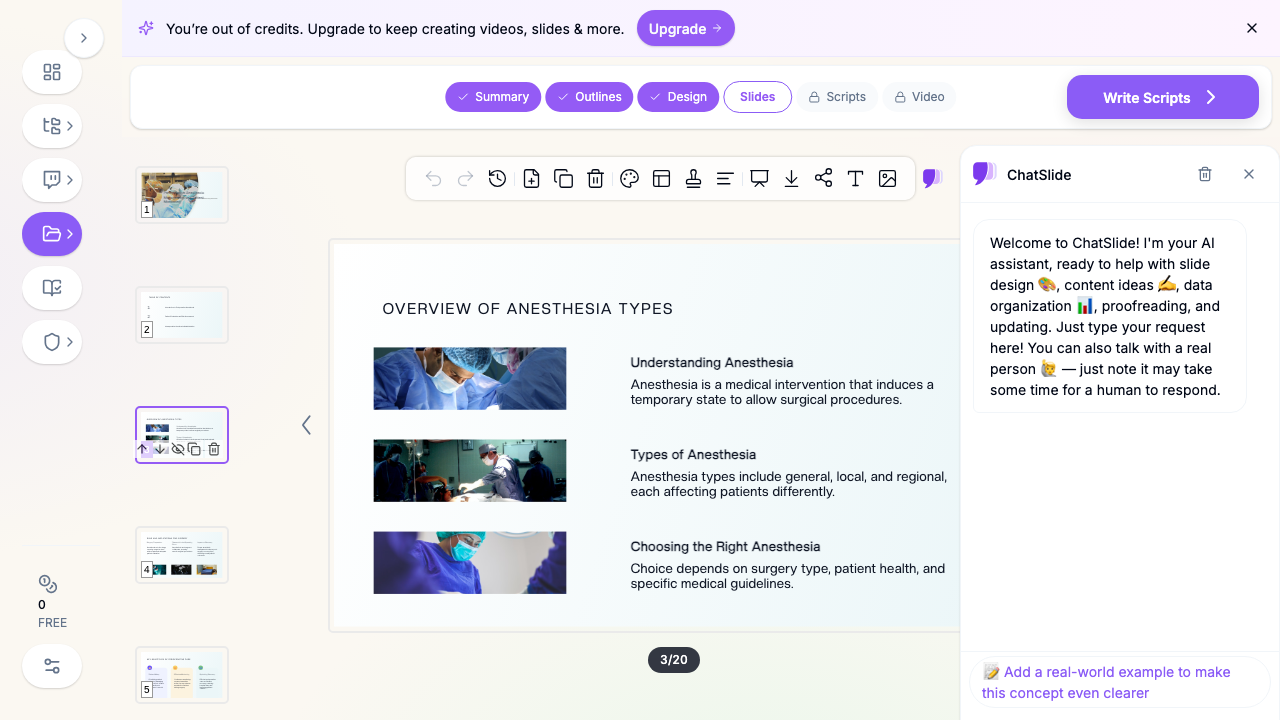
1. Start with your topic or source material. A topic prompt, an existing deck, or a guideline PDF — ChatSlide reads it and drafts a structured outline.
2. Refine the outline before generating slides. Reorder sections so the deck follows the clinical flow — preoperative assessment, induction and airway, intraoperative management, monitoring, and emergence. Fixing structure at the outline stage is far faster than reworking finished slides.
3. Generate slides with relevant imagery and citations. ChatSlide builds each slide with a clean layout, pulls in supporting visuals, and can attach trial evidence from the Research tab. Swap any generic image for your own monitoring traces, block diagrams, or annotated airway views.
4. Export to your format. Download as PowerPoint or PDF for didactics and journal club, or Keynote for a conference talk.
Use Cases for Anesthesiology Teams
Residency didactics and morning report. Core-curriculum lectures on airway, pharmacology, and regional anesthesia, plus case-based teaching that walks residents through the reasoning behind each decision. Time saved: an evening of formatting per lecture.
Journal club. Critical appraisal of a pivotal trial — a fluid strategy, an airway device comparison, a point-of-care coagulation study — where the slides carry both the study design and the practice-changing takeaway. Time saved: hours reformatting figures and tables.
Morbidity and mortality (M&M) conference. Structured case reviews where the perioperative timeline, the decision points, and the systems factors all need to read clearly to a department audience. Time saved: a clean, consistent case template every time.
Board review and CME. High-yield review for the anesthesiology boards or continuing-education workshops, where structure and clarity matter more than decoration. Time saved: reusable, on-brand review decks.
Departmental protocols and onboarding. Turning a new transfusion or monitoring SOP into slides the whole team can absorb quickly. Time saved: SOP-to-deck in minutes, not an afternoon.
Anesthesiology Presentation AI Tools Compared (2026)
| Capability | ChatSlide | Gamma | Tome | Beautiful.ai |
|---|---|---|---|---|
PubMed / clinical-trial search built in | Yes | No | No | No |
Reads uploaded guideline PDFs & PPTX | Yes | Partial | Partial | No |
OCR on scanned protocols | Yes | No | No | No |
Real data charts from your numbers | Yes | Partial | No | Partial |
Per-slide speaker notes | Yes | Partial | No | No |
PowerPoint + Keynote export | Yes | Partial | Partial | Partial |
Free tier | Yes | Yes | Yes | Limited |
Time Comparison: Manual vs. AI-Assisted
| Task | Manual | With ChatSlide |
|---|---|---|
Outline a 20-slide lecture | 1–2 hours | 2 minutes |
Draft slides from a guideline PDF | 3–4 hours | 5 minutes |
Pull and cite trial evidence | 1–2 hours | 10 minutes |
Format charts and figures | 1 hour | Minutes |
Restyle to department branding | 1–2 hours | Minutes |
What a Strong Anesthesiology Presentation Includes
The lectures that hold an anesthesia audience share a few traits.
A clinical-flow structure. Anesthesia teaching works best when it follows the case: preoperative assessment, induction, airway, intraoperative management, monitoring, emergence, and recovery. This mirrors how clinicians actually think, and it gives even a dense pharmacology or coagulation topic a clear spine.
Time-critical sequences made obvious. Rapid sequence intubation, the difficult-airway algorithm, the massive-transfusion protocol — these are sequences, and they read far better as numbered flows or annotated timelines than as paragraphs.
Monitoring and data front and center. Point-of-care coagulation (ClotPro, Multiplate, TEG), capnography, and hemodynamic trends are visual by nature. A clean chart or annotated trace teaches faster than a table of values.
Evidence in context. Anesthesiology is a trial-heavy specialty. A strong slide shows the clinical question, the key design feature, and the bottom line without drowning the audience in secondary outcomes.
Disposition and safety as the endpoint. The teaching point often ends in a decision — extubate, transfer to ICU, escalate monitoring — and presentations that make it explicit teach better than ones that trail off after the diagnosis.
Best Practices (Do's and Don'ts)
Do anchor each case in the patient and the surgical context before the plan — it gives the audience the same starting point the anesthesiologist had.
Do put each algorithm on a single clean slide the audience can hold in their head, with detail reserved for backup slides.
Do frame trial data around the decision it changes: does this alter what I do in the OR?
Don't paste a full protocol onto one slide — split it into a flow.
Don't rely on decorative stock imagery where a real monitoring trace or block diagram would teach.
Don't forget backup slides — anesthesia audiences probe dosing, contraindications, and methodology.
Direct Research Database Access
ChatSlide's Research tab connects to the databases physicians use daily:
- PubMed: Search by keyword, PMID, or DOI. Find the landmark trials, recent publications, and clinical guidelines relevant to your case. The AI reads abstracts and incorporates key findings into your slides with citations.
- Google Scholar: When your topic spans disciplines — say, the intersection of hematology and perioperative coagulation — Scholar captures the broader academic literature that PubMed alone might miss.
- Clinical Trials (NCT): Presenting on an airway, fluid, or coagulation intervention where pivotal trials are ongoing? Search by NCT number or condition to pull trial design, endpoints, and status into your slides.

Anesthesiology for Departments and Training Programs
For a residency program, a hospital anesthesia department, or a multi-site group, ChatSlide scales past the individual lecturer. Shared brand templates keep every resident's M&M and journal-club deck consistent, team collaboration lets attendings review and edit trainees' slides, and centralized billing plus SSO simplify rollout across a department.
For patient data specifically: ChatSlide's standard plans are not a HIPAA-covered service — keep protected health information (PHI) out of slide content and uploads, and anonymize any monitoring traces, imaging, or case details. For hospital systems and group practices that need a Business Associate Agreement, our Enterprise plan offers HIPAA-compliant deployment options — contact us to discuss BAA terms, SSO, and on-prem / private-cloud hosting.
Frequently Asked Questions
Can ChatSlide build slides from a guideline PDF or an existing PowerPoint? Yes. Upload a guideline, a protocol, a trial paper, or an existing deck, and ChatSlide reads the content — including scanned documents via OCR — and drafts a structured outline you can refine before generating slides.
Does it add real citations? Yes. The Research tab queries PubMed, Google Scholar, and ClinicalTrials.gov, so landmark trials and current guidelines land in your deck with citations — built for journal club and practice-changing talks.
Is it free? You can start for free. Free decks are watermarked and viewable or shareable online; PDF, PowerPoint and Keynote export are on the paid tiers.
Can I keep my department's branding? Yes. Restyle the whole deck to your department's look, and on team plans save shared brand templates so every deck stays consistent.
Is it HIPAA compliant? The standard plans are not a HIPAA-covered service — keep PHI out and anonymize cases. Enterprise offers HIPAA-compliant deployment options and a BAA; contact us to discuss.
What formats can I export? PowerPoint, PDF, and Keynote.
Related Guides
This guide focuses on anesthesiology and perioperative medicine specifically. For adjacent specialties, see our emergency medicine presentation guide, our nephrology and critical care guide, and our mechanical ventilation and respiratory therapy guide.
Get Started
Anesthesiology teaching sharpens perioperative decision-making and trains the next generation to stay calm when the monitors do not. The hours spent formatting slides are hours away from that work.
With ChatSlide, turn your expertise in airway, regional, pharmacology, and perioperative monitoring into structured, citation-backed slides in minutes — whether you're running residency didactics, leading journal club, or presenting at a conference.
Make your anesthesiology presentation with ChatSlide — free to start, no credit card required.