
Quick Answer: If you teach a process technology (PTEC) course or run operator training on instrumentation and process control, ChatSlide turns a topic, a course outline, or an equipment manual into a structured lecture deck in minutes. It is used by 280,000+ users across 750+ universities, builds outlines that follow the measure → transmit → control → verify logic operators actually work in, adds diagrams and figures, and exports to PowerPoint for the classroom or the plant training room. Free to start, no card required.
The Process Technology Slide Problem
Process technology sits in an awkward teaching gap. It is too applied for a physics deck and too physics-heavy for a safety toolbox talk. A single PTEC lecture on pressure measurement has to cover gauge versus absolute versus differential, the difference between a bourdon tube and a capacitance cell, why a frozen impulse line can leave a reading stale or unresponsive, how a transmitter is ranged and spanned, and what happens on the board when the operator sees the wrong number. That is four altitudes in fifty minutes.
The people teaching it are usually plant veterans, not slide designers. A twenty-year operator or instrument tech knows exactly why a differential-pressure level measurement drifts when the process density changes — and will spend an entire weekend fighting PowerPoint to explain it. Meanwhile the material that already exists is a vendor datasheet, a textbook chapter, and a deck from 2015 that still shows a pneumatic controller nobody has touched in a decade.
So the course either gets taught from the whiteboard, or it gets taught from slides that do not match the plant the students are about to walk into.
What Makes ChatSlide Powerful for Process Technology
Three ways in, including the documents you already have
Most instrumentation material starts life as something other than a slide. ChatSlide accepts a plain topic ("differential pressure level measurement in a steam drum"), a pasted course outline, or an uploaded document — a vendor manual, a calibration procedure, a PTEC syllabus, an existing PDF chapter. Upload the transmitter manual you already train from and the deck is built against it instead of against a generic idea of what a transmitter is.
OCR that reads scanned procedures and datasheets
Plant training material is full of scans. A photocopied calibration sheet, a P&ID excerpt, a maintenance procedure someone scanned in 2011. ChatSlide runs OCR on uploaded PDFs and images, so a scanned procedure becomes usable slide content instead of an attachment students never open.
Outlines that follow instrument logic, not topic headings
The difference between a deck that lands and one that does not is sequence. ChatSlide builds outlines around the working order — what the process needs, what the instrument senses, how the signal is transmitted and ranged, what the controller does with it, and how you verify the reading is telling the truth. That is the order an operator troubleshoots in, so it is the order the deck should teach in.
Real charts from real data
Instrumentation teaching is full of numbers that only make sense as a picture: a calibration curve, a step response, a trend showing a noisy signal before and after damping, an accuracy band across a transmitter's range. Paste or upload the data and ChatSlide builds the chart into the slide rather than leaving you to screenshot Excel.
Research search for standards and published methods
The Research tab searches published literature and technical sources, so when a lecture needs to reference measurement standards, published test methods, or peer-reviewed work on sensor performance, you can pull it in without leaving the deck.
Speaker notes written for the person delivering it
An adjunct instructor teaching PTEC 110 on a Tuesday night did not write the deck and needs to know what each slide is for. ChatSlide generates speaker notes per slide, which is what turns a deck into something a second instructor can actually deliver.
19 AI editing tools for the revision pass
Slides come out long. Shorten a bullet, rewrite a paragraph at the level of a first-semester student, swap an image, split a dense slide into two, change the tone from academic to plant-floor. The editing tools work slide by slide so the fix is targeted rather than a full regeneration.
How ChatSlide Builds Your Process Technology Deck
1. Give it the source. Type the topic, paste your outline, or upload the manual, syllabus, or scanned procedure you teach from.
2. Review the outline before any slides exist. ChatSlide returns a section-by-section outline first. This is the cheapest place to fix sequence — move calibration ahead of troubleshooting, split flow measurement into differential-pressure and magnetic, drop the pneumatic section your plant no longer runs.
3. Generate the deck with figures and charts. Slides are built with relevant imagery, diagrams, and any charts your data supports.
4. Edit and export. Tune wording and visuals, then export to PowerPoint for the classroom projector, or to PDF as a job aid students can keep at the panel.
Use Cases for Instructors and Trainers
PTEC course lectures. A community-college process technology program runs instrumentation, safety, systems, and operations across several semesters. Building a full semester of lecture decks from scratch is weeks of work; generating a first draft per topic from the syllabus and then editing turns it into an afternoon per module.
New-operator onboarding. A plant hires six operators at once and needs them to understand what the board is showing them before they ever touch it. A short deck per measurement type — pressure, temperature, flow, level — with plant-specific ranges and examples is more useful than a generic vendor course.
Instrument technician refreshers. Calibration, ranging, and verification procedures change when equipment changes. Upload the new transmitter's manual, generate a focused refresher, and the training matches the hardware that is actually installed.
Toolbox and pre-shift briefings. A short five-slide deck on why an impulse line was rerouted, or what changed after a nuisance trip, communicates faster than an email nobody reads.
Contractor and vendor training. Outside crews need the plant's conventions, not the textbook's. A deck built from your own procedures gets that across on day one.
Process Technology AI Tools Compared (2026)
| Capability | ChatSlide | Gamma | Beautiful.ai |
|---|---|---|---|
Upload equipment manuals / procedures as source | Yes | Yes | Limited (Pro) |
OCR on scanned procedures and datasheets | Yes | Yes (Agent) | No |
Charts built from your own measurement data | Yes | Yes | Template-based |
Literature and standards search inside the editor | Yes | Yes (web research) | No |
Per-slide speaker notes for a second instructor | Yes | Yes | Yes |
PowerPoint export that survives editing | Yes | Yes | Yes |
Free tier | Yes | Yes | Trial only |
Time Comparison: Manual vs. AI-Assisted
Building a 40-slide instrumentation module the traditional way:
| Task | Manual | With ChatSlide |
|---|---|---|
Structuring the module | 2 hours | 10 minutes (review the outline) |
Writing slide content | 6-8 hours | 15 minutes (generate, then edit) |
Sourcing diagrams and images | 3 hours | Included |
Building calibration / response charts | 2 hours | 15 minutes |
Writing speaker notes | 2 hours | Included, then edited |
Formatting and cleanup | 3 hours | 30 minutes |
Total | 18-20 hours | ~1.5 hours |
The subject-matter expertise is still yours. What disappears is the formatting tax on getting it out of your head.
What a Strong Instrumentation Lecture Includes
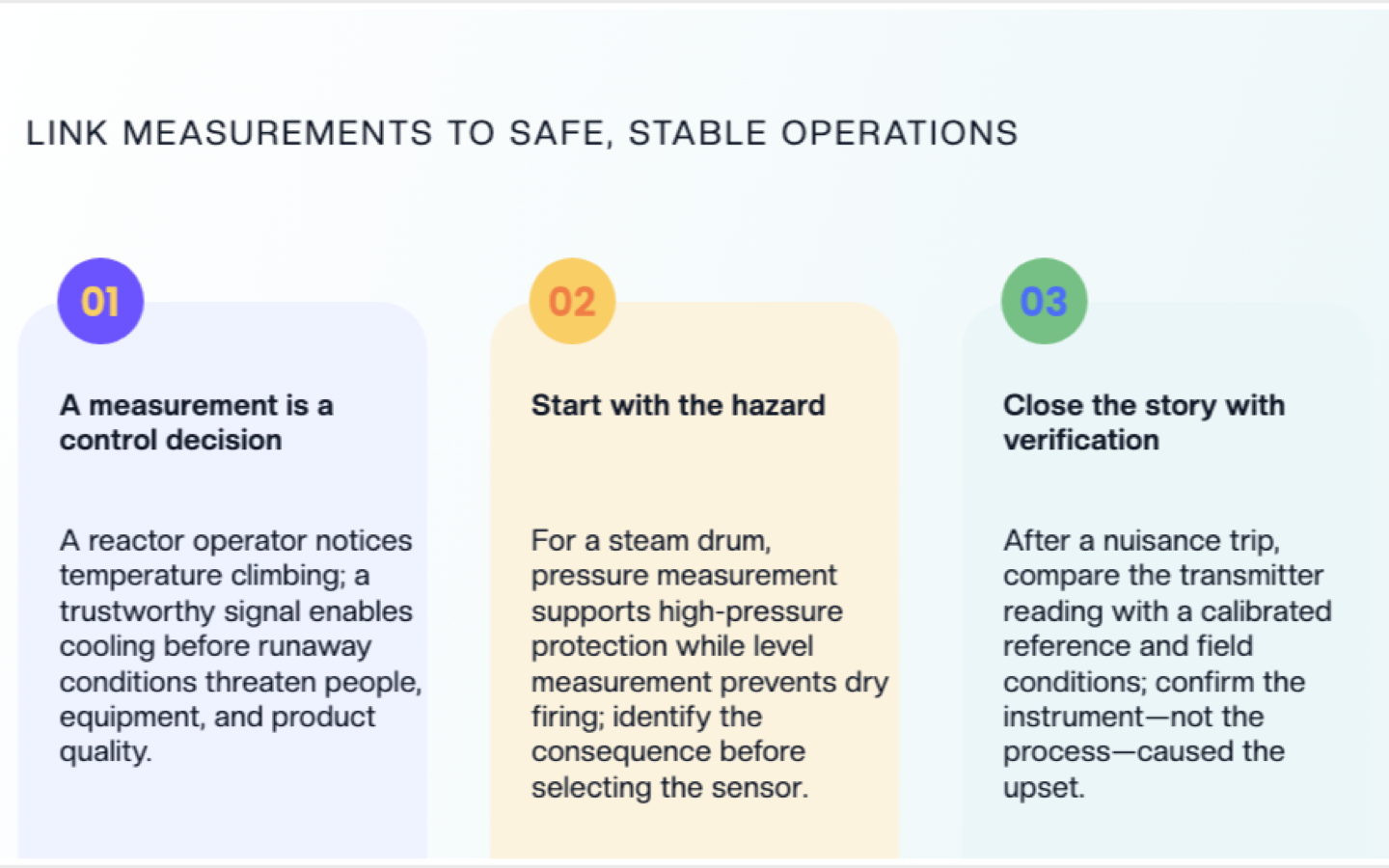
A process consequence on every measurement. A pressure reading is not a number, it is a control decision. Every measurement topic should answer: what goes wrong in the process if this reading is wrong? Dry-firing a steam drum on a bad level signal teaches the topic better than a cutaway diagram of a float.
Ranging and span, taught explicitly. Students consistently understand what a sensor does and not what a transmitter does with it. A 0-100 bar transmitter on a 3 bar line is a real and common mistake worth a whole slide.
Accuracy stated against process tolerance, not in isolation. ±0.5 °C is meaningless until you say the reaction window is 4 °C wide. Teach accuracy as a comparison, never as a spec.
Installation as part of measurement. Impulse lines, thermowells, manifolds, isolation valves, wetted materials. Most bad readings in a real plant are installation problems, not sensor problems, and most course decks skip this entirely.
Verification and troubleshooting at the end. Close with how you tell whether the instrument or the process caused the upset. That is the skill the job actually requires.
P&ID literacy woven through. Tag numbers and loop diagrams should appear alongside the instruments, not in a separate isolated chapter.
Best Practices
Do:
- Build the deck around one measurement type per module rather than covering all four in one session.
- Use your own plant's ranges, tag conventions, and equipment in the examples.
- Put a troubleshooting scenario at the end of each module and let students work it.
- Keep the speaker notes — they are what let another instructor teach your deck.
- Export a PDF version as a panel-side job aid, not just a projector deck.
Don't:
- Don't teach sensor theory for more than a few slides before connecting it to a control decision.
- Don't use vendor marketing imagery as instructional diagrams; check every generated image actually shows the instrument you are teaching.
- Don't leave accuracy, range, and response time as bullet specs without a process consequence attached.
- Don't skip the installation section because it looks like maintenance content. It is measurement content.
Process Technology Training for Plants and Programs
Training rarely stays with one instructor. A refinery with three shifts, a chemical plant rolling out a new DCS, or a college running PTEC across two campuses needs the same deck delivered consistently by different people. ChatSlide's Enterprise plan adds SSO, centralized team billing, shared brand templates so every module looks like it came from the same program, and team collaboration on a shared deck library — contact us to set it up for your department or training organization. Individual instructors can keep using the free tier.
Frequently Asked Questions
Can I build slides from an equipment manual instead of a topic? Yes. Upload the manual as a PDF and generate against it. This is the most common path for instrument-specific training, since the resulting deck matches the hardware installed rather than a generic example.
Does it handle scanned procedures and old photocopies? Yes, uploaded PDFs and images run through OCR, so a scanned calibration sheet or procedure becomes usable slide content.
How is this different from your industrial maintenance training guide? Maintenance training is about keeping equipment running — installation, preventive schedules, repair procedures. This guide is about measurement and control: what the instruments sense, how the signal reaches the controller, and how operators verify it. Different courses, often different instructors. Our industrial maintenance training guide covers the maintenance side.
Can it build the calibration and response charts? Yes. Paste or upload the data and the chart is built into the slide.
Will the PowerPoint export still be editable? Yes, it exports as a real PPTX with editable text and objects, so you can adjust it in PowerPoint afterwards.
Can I use it for short pre-shift briefings, not just full lectures? Yes. Generate a short deck on a single topic and export to PDF. Five slides on why an impulse line was rerouted works the same way as a forty-slide module.
Is it free? There is a free tier with no card required. Paid plans add more generations, larger uploads, and additional export options.
Get Started
Process technology is taught by people who know the plant, not by people who enjoy formatting slides. If you are building a PTEC module, an operator onboarding course, or an instrument refresher, start from what you already have — the syllabus, the manual, the procedure — and let the structure come out first.
Make your process technology slides with ChatSlide — free to start, no card required.