
Quick Answer: ChatSlide is the fastest way for radiography faculty and rad tech students to turn course notes, textbook chapters, and scanned handouts into a complete lecture deck. Upload a PDF, DOCX, or PPTX — or scanned pages, which OCR reads — and get a structured deck with speaker notes in under two minutes. It searches PubMed and Google Scholar for you, builds real data charts from your own numbers, and exports to PowerPoint, PDF, or a narrated video. Used at 750+ universities and free to start, no credit card.
The Radiography Lecture Problem
Radiologic technology sits in an awkward spot for slide-making. It is not the same job as a radiologist's case conference and it is not a generic allied-health survey course. A single module on radiographic image quality has to carry physics (density, contrast, spatial resolution, distortion), equipment behavior (digital receptors, detector dose indicators, exposure index), and the operator decisions that connect them — kVp, mAs, SID, collimation, grid selection.
That mix is exactly what makes the decks slow to build. A lecture on digital imaging QC needs a diagram of the imaging chain, a comparison table of film-screen versus CR versus DR behavior, a worked exposure-factor example, and a few sample images where the fault is actually visible. Faculty in JRCERT-accredited programs typically teach five to eight of these modules per term, then rebuild half of them when equipment or ARRT content specifications change.
Students hit the same wall from the other side. A rad tech student preparing a registry-review presentation or a capstone in-service has textbook chapters, clinical site notes, and a deadline — and no interest in spending an evening dragging text boxes around.
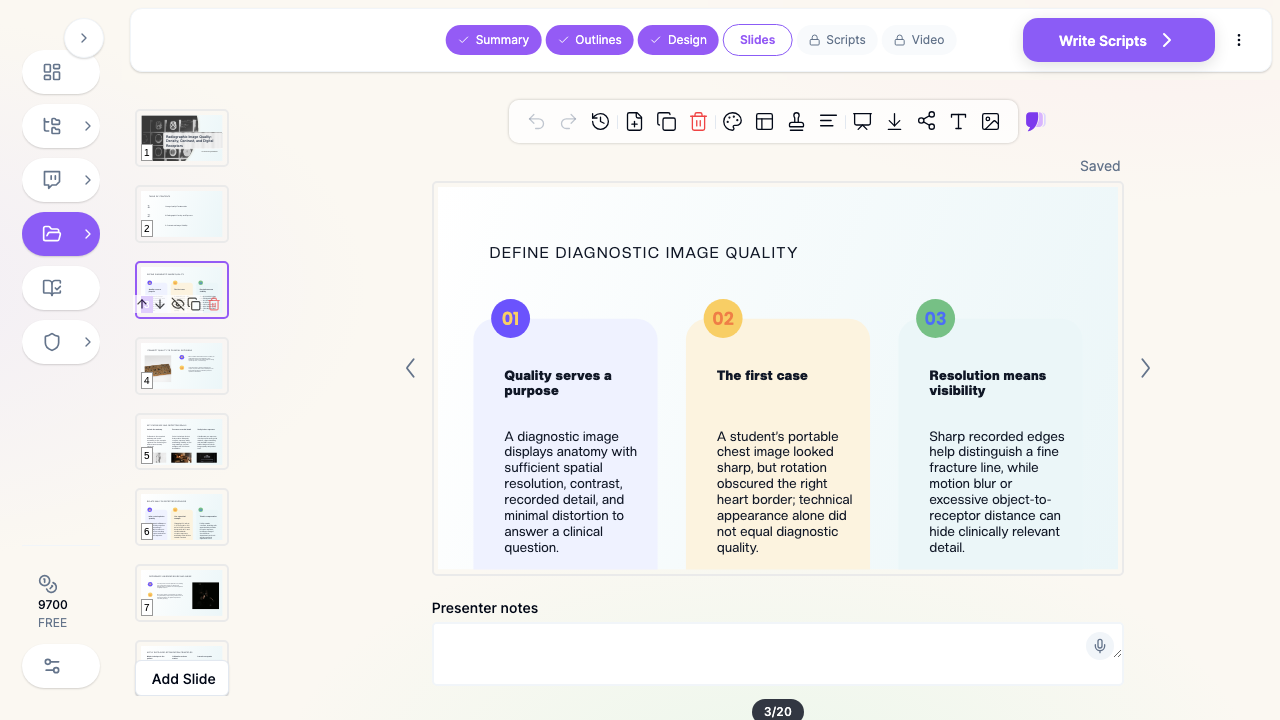

What Makes ChatSlide Powerful for Radiography Instruction
Three Ways to Start a Module
Start from a topic line ("Radiographic density and the exposure factors that control it, for first-year students"), from an uploaded file, or from a mix of both. Most radiography faculty already have the raw material — a chapter PDF, last year's PPTX, a set of lab handouts — so uploading is usually faster than describing.
OCR for Scanned Handouts and Older Course Packs
Radiography programs run on paper more than most disciplines: printed technique charts, positioning handouts, scanned pages from an earlier edition, photocopied QC logs. ChatSlide's OCR reads scanned PDFs and images, so a stack of scans becomes structured slide content instead of something you retype.
Real Charts From Your Own Data
Exposure-index distributions, repeat-rate analysis by exam type, dose-index trends across a clinical term, kVp-versus-contrast relationships — paste or upload the numbers and ChatSlide builds an actual chart, not a stock graphic. For QA and program-effectiveness reporting, this is usually the slowest slide to build by hand and the one that matters most to a review committee.
Research Search Built In
Technique standards and dose-optimization evidence move. ChatSlide searches PubMed and Google Scholar from inside the editor, so a slide on dose reduction in pediatric chest radiography can cite current literature rather than a remembered figure.
Speaker Notes Written With the Slides
Every slide gets presenter notes. For a lecture you deliver once a year, or a module a clinical instructor will teach in your absence, the notes are what makes the deck reusable rather than a set of headings only the author understands.
Export to PowerPoint, PDF, or Narrated Video
Decks export to PPTX and stay editable in PowerPoint, so they drop into an existing course shell. The video export matters for programs running hybrid or asynchronous cohorts: the same module becomes a narrated lesson students watch before lab, with an AI voice or an avatar presenter.
How ChatSlide Builds Your Radiography Deck
1. Upload or describe the module. Drop in the chapter PDF, your old PPTX, or scanned handouts. Or type the topic and audience — "digital receptors and image brightness, first-year radiography students."
2. Review the outline. ChatSlide proposes sections before it writes any slides. This is where you enforce teaching order: physical principles first, then the receptor, then the operator controls, then the clinical consequence. Reorder, delete, or add sections in a single pass.
3. Generate slides with images and notes. The deck is built with layouts chosen per content type — comparison blocks for CR versus DR, sequential blocks for the imaging chain, chart slides for your data — plus speaker notes throughout.
4. Edit and export. Use the AI editing tools to shorten a dense slide, change a layout, or regenerate an image, then export to PPTX, PDF, or video.
Use Cases in a Radiologic Technology Program
Image quality module series. Density, contrast, spatial resolution, distortion, and the artifacts that reveal each one. Building the series by hand takes most of a week; generating drafts for all five and editing them takes an afternoon. Time saved: roughly 15–20 hours per term.
Equipment and physics lectures. X-ray production, beam filtration, grids, AEC behavior, digital receptor construction. These change slowly but are dense with diagrams, and regenerating a clearer diagram is faster than redrawing one.
QC and QA in-services. Monthly QC results, repeat-analysis findings, exposure-index audits. Upload the log, get the chart, present it. This is the shortest path from a spreadsheet to something a department will actually look at.
ARRT registry review sessions. Content-specification-aligned review decks for graduating cohorts. Generate a module per content area, then trim to the questions students keep missing.
Student capstone and clinical in-service presentations. Rad tech students presenting at a clinical site can turn their research and site data into a professional deck without design work eating the study time.
Radiography Programs and Departments. For programs running multiple cohorts, or imaging departments training staff across sites, ChatSlide's Enterprise plan adds SSO, centralized team billing, shared brand templates so every module matches program branding, and team collaboration on a shared deck library — contact us to set it up.
Radiography Presentation Tools Compared (2026)
| Capability | ChatSlide | Gamma | Tome | Beautiful.ai |
|---|---|---|---|---|
Upload chapter PDF / old PPTX as source | Yes | Limited | Limited | No |
OCR for scanned handouts | Yes | No | No | No |
PubMed / Scholar search built in | Yes | No | No | No |
Charts from your own QC data | Yes | Basic | Basic | Template charts |
Speaker notes generated | Yes | Partial | Partial | No |
Export to editable PowerPoint | Yes | Yes | Limited | Yes |
Export as narrated video | Yes | No | No | No |
Free tier | Yes | Yes | Yes | Trial only |
Time Comparison: Manual vs. AI-Assisted
| Task | By hand | With ChatSlide |
|---|---|---|
Read source chapter and outline the module | 60–90 min | 5 min (review generated outline) |
Draft 20–25 slides | 3–4 hours | 2 min generation + 20 min editing |
Find and place diagrams and images | 60 min | Included, regenerate as needed |
Build a chart from QC data | 30–45 min | 5 min |
Write speaker notes | 60–90 min | Included, edit as needed |
Total per module | 6–8 hours | 35–45 min |
Direct Research Database Access
ChatSlide's Research tab connects to the databases physicians use daily:
- PubMed: Search by keyword, PMID, or DOI. Find the landmark trials, recent publications, and clinical guidelines relevant to your case. The AI reads abstracts and incorporates key findings into your slides with citations.
- Google Scholar: When your topic spans disciplines — say, the intersection of genetics and oncology — Scholar captures the broader academic literature that PubMed alone might miss.
- Clinical Trials (NCT): Presenting on a treatment where pivotal trials are ongoing? Search by NCT number or condition to pull trial design, endpoints, and status into your slides.

What a Strong Radiographic Image Quality Lecture Includes
Whatever tool builds the slides, the teaching structure is what makes the module land.
Define the quality factor before the controls. Students confuse density with brightness and contrast with latitude when the operator controls arrive before the definitions. Establish what the factor is and what it looks like when it fails, then introduce kVp, mAs, and SID as the levers that move it.
Separate the four image-quality factors explicitly. Photographic factors (density/brightness, contrast) and geometric factors (recorded detail/spatial resolution, distortion) behave differently and fail differently. A slide that lists all four together without that split leaves students unable to diagnose a bad image.
Teach digital behavior as different, not as an upgrade. Digital receptors decouple exposure from displayed brightness — the reason dose creep exists. Exposure index and deviation index deserve their own slides, with a worked example of an image that looks fine and is overexposed.
Show the fault, not a description of the fault. One image with motion blur beats a bullet describing motion blur. Where you can, pair a diagnostic image with a repeat and ask the class to name the difference before you do.
End on the operator decision. Every image-quality module should close with what the technologist actually changes at the console and why — that is what transfers to clinic.
Keep slides under about 30 words. Radiography content is visual. Detail belongs in the speaker notes.
Best Practices
Do
- Give the AI your audience level ("first-year students in an associate radiography program") — it changes the depth substantially.
- Upload your existing deck rather than starting blank; the AI keeps your teaching order and improves the structure.
- Use real departmental data for QC and repeat-rate slides. It is more persuasive than any generic figure.
- Cite current literature for dose and technique claims through the Research tab.
Don't
- Don't paste patient identifiers, accession numbers, or unredacted images into slides or uploads.
- Don't let generated diagrams stand in for a real radiograph when the point is what the artifact looks like.
- Don't ship a deck without reading the speaker notes — they are generated, and they are yours to correct.
Radiologic Technology vs. Radiology Presentations
These are different audiences and different decks. If you are building a radiologist-facing case conference, teaching file, or subspecialty conference talk, see our medical imaging and radiology presentation guide instead. This guide covers the technologist side: image production, exposure factors, receptor behavior, QC, and registry preparation. For sonography-specific coursework, see the diagnostic medical sonography guide.
Frequently Asked Questions
Can ChatSlide build slides from a textbook chapter PDF? Yes. Upload the PDF and ChatSlide extracts the structure and content into a slide outline you review before generation. Scanned chapters work too — OCR reads them.
Does it handle physics content and formulas? Yes, for the level radiography programs teach — inverse square law, mAs reciprocity, density and contrast relationships, grid ratio. Check any equation slide before class, as you would with any generated content.
Can I make an exposure-index or repeat-rate chart from my department's data? Yes. Upload or paste the numbers and ChatSlide builds a real chart from them rather than inserting a stock image.
Will it export to PowerPoint so I can use it in my LMS? Yes. Decks export to editable PPTX, plus PDF, and can be exported as a narrated video for asynchronous cohorts.
Is it useful for ARRT registry review? Yes — generate a deck per content-specification area, then edit down to the topics your cohort is weakest on. The speed is what makes per-cohort customization practical.
Is there a free plan? Yes. You can start free with no credit card. Paid plans add higher limits and advanced export options.
Can I keep every module on my program's branding? Yes. Enterprise plans include shared brand templates and a team deck library so modules stay consistent across instructors and cohorts — contact us.
Get Started
Note on patient data: ChatSlide's standard plans are not a HIPAA-covered service — keep PHI out of slide content and uploads. Use de-identified teaching images only. For hospital systems, imaging departments, and programs that need a Business Associate Agreement, our Enterprise plan offers HIPAA-compliant deployment options — contact us to discuss BAA terms, SSO, and on-prem / private-cloud hosting.
Take the module you are dreading — the image quality series, the digital receptor lecture, the QC in-service — upload the chapter or your old deck, and see what comes back in two minutes. Editing a draft is a different job from starting at a blank slide.
Make your radiologic technology presentation with ChatSlide → Free to start, no credit card required.