
Quick Answer: To make a real-estate presentation with AI, (1) upload the listing details, area data, or market figures; (2) the tool builds the deck — property highlights, neighborhood guide, or quarterly market report — with charts from real numbers; (3) export to PowerPoint or PDF to share with buyers. Instead of rebuilding a property deck for every new listing, ChatSlide turns listing and area data into polished slides in under 2 minutes — free to start.
The Challenge of Creating Property Presentations
Real estate professionals live in a constant cycle of presentation creation. Every new listing needs a property deck. Every neighborhood pitch requires an area guide. Quarterly market reports demand fresh data visualizations. And each of these presentations needs to look polished enough to win the trust of buyers spending hundreds of thousands — or millions — on their next property.
The reality is that most agents spend far too long on slide formatting. A typical area guide presentation involves pulling together neighborhood demographics, transport links, local amenities, school information, property price trends, and lifestyle photography. Assembling all of that into a cohesive deck can take an entire afternoon, and that is time not spent on showings, negotiations, or client calls.
Branding consistency is another persistent problem. When an agency has multiple agents producing their own decks, the visual quality varies wildly. One agent uses a clean template; another pastes screenshots from Zillow into a blank slide. The agency's brand suffers, and so does client confidence.
AI presentation tools offer a practical solution. Instead of starting from a blank canvas every time, real estate professionals can generate structured, well-designed decks in minutes and then customize them with their own property photos, market data, and branding. The result is more presentations produced at a higher quality standard, with less time spent on layout and formatting.
What Makes a Strong Real Estate Presentation
Before diving into tools, it helps to understand what separates an effective property presentation from one that gets skimmed and forgotten.
Local market data with context. Raw numbers are not enough. Showing that the median home price in a neighborhood is $485,000 means nothing without context: how that compares to surrounding areas, how it has changed over the past year, and what it signals about future value. Strong real estate presentations frame data as a story about opportunity.
High-quality property and neighborhood photography. Real estate is visual. Buyers and investors respond to imagery that helps them picture living in or profiting from a property. This means professional-grade photos of both the property itself and the surrounding area — parks, restaurants, transit stations, streetscapes. Avoid generic stock photos when you have real images available.
Area highlights that match your buyer persona. A young professional relocating for work cares about commute times, nightlife, and coworking spaces. A family with children prioritizes school ratings, park access, and safety. Tailoring area highlights to your target buyer makes the presentation feel personal rather than generic.
Comparable property analysis. For listing presentations, showing recent comparable sales builds credibility. Buyers want evidence that the asking price is justified. Investors want to understand the range of returns in the area. A clean comparables section with property type, sale price, square footage, and date gives your audience confidence in the numbers.
Clear next steps and contact information. Every real estate presentation should end with a specific call to action — schedule a viewing, book a consultation, request a market report — along with the agent's direct contact information. This sounds obvious, but a surprising number of property decks simply end without telling the audience what to do next.
Step-by-Step: Creating Your Real Estate Presentation with ChatSlide
Here is how to build a professional property presentation using ChatSlide, from initial topic to a finished deck ready for clients.
Step 1: Define Your Topic and Audience
Start at app.chatslide.ai and enter your specific topic. A focused prompt produces better results than a vague one.
For an area guide, try something like "Living in Canary Wharf: A Complete Area Guide for Property Buyers" rather than just "Canary Wharf real estate." For a listing presentation, use "123 Oak Street: 3-Bedroom Victorian in Noe Valley, San Francisco" rather than "house for sale."
Select your target audience as well. A presentation for first-time homebuyers needs different language and emphasis than one for commercial real estate investors. ChatSlide adjusts the content structure and tone based on this context.
Step 2: Review and Refine the Outline
ChatSlide generates a structured outline covering key aspects of your topic. For an area guide, this typically includes sections on location and transport, local amenities, property market overview, lifestyle and culture, and practical information for newcomers.
This is where you shape the narrative to match your local expertise. If you know that a particular neighborhood's biggest draw is its waterfront development, promote that section. If school quality is the primary selling point, move education information higher in the outline. You can add, remove, or reorder sections freely before generating slides.
For listing presentations, the outline will cover property highlights, floor plans, neighborhood context, comparable sales, and pricing rationale. Adjust the emphasis based on what matters most for the specific property and buyer segment.
Step 3: Generate and Customize Slides
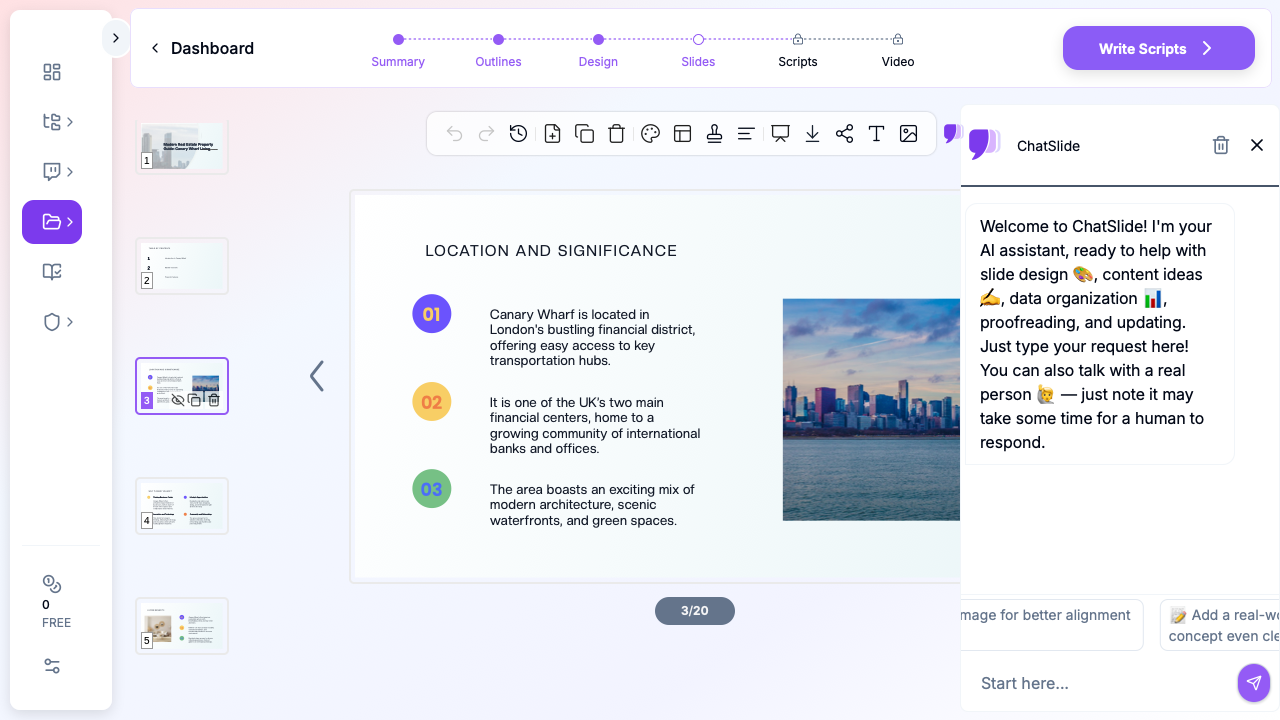
ChatSlide produces complete slides with appropriate layouts for each content type. Area overview sections get clean text-and-image layouts. Market data sections get chart-ready formats. Lifestyle sections get visual-forward designs that showcase the neighborhood's character.
The generated deck gives you a professional foundation that would take hours to build manually. From here, you customize: swap in your own property photos, update market figures with the latest data from your MLS, add your agency's branding colors and logo, and adjust any language to match your voice.
Step 4: Add Your Own Property Images and Data
Visual quality makes or breaks a real estate presentation. After generating your slides, replace placeholder images with your own photography. For listing presentations, use professional photos of the property interior, exterior, and key features. For area guides, include shots of local landmarks, popular restaurants, parks, and streetscapes that give buyers a feel for daily life in the neighborhood.
If you have specific market data — price per square foot trends, days on market statistics, rental yield figures — add those to the relevant slides. The AI-generated structure provides the layout framework; your local data provides the authority.
Step 5: Export and Share
Export your finished presentation as a PDF for email attachments, as PowerPoint slides for in-person presentations, or share it directly via a ChatSlide link that clients can view in their browser. The shareable link is particularly useful for digital marketing: embed it in property listing pages, include it in email campaigns, or share it on social media.
For agencies producing presentations at scale, the ability to generate a polished deck in minutes and then customize it with property-specific details means one agent can maintain a library of current area guides and listing presentations without a dedicated marketing team.
Use Cases for Real Estate Professionals
Real estate presentation needs extend well beyond individual listings. Here are the most common scenarios where AI-generated slides save significant time.
Area and Neighborhood Guides
Area guides are one of the highest-value content pieces a real estate professional can produce. They position you as the local expert, provide genuine utility to potential buyers researching neighborhoods, and serve as evergreen marketing assets. A well-crafted area guide covering transport, schools, dining, recreation, and property trends can be shared for months, updated quarterly with fresh data.
Creating area guides manually is time-intensive, which is why most agents never produce them. AI presentation tools remove the formatting barrier so you can focus on adding your local knowledge and perspective.
Listing Presentations for Sellers
When pitching to win a listing, your presentation needs to demonstrate market knowledge, showcase your marketing plan, and justify your suggested pricing. A structured deck that covers recent comparable sales, marketing strategy, timeline expectations, and your track record gives sellers confidence that you will deliver results.
Market Reports
Monthly or quarterly market reports establish credibility and keep your name in front of past and potential clients. These reports typically include median price trends, inventory levels, days on market, price-to-list ratios, and notable transactions. AI-generated slides handle the structure and layout so you can focus on adding your expert commentary on what the numbers mean for buyers and sellers.
Investor Summaries
Real estate investors need a different presentation style: rental yield projections, cap rate comparisons, vacancy rate data, and return-on-investment scenarios. These are data-heavy decks where clear formatting is essential. Investors review dozens of opportunities; the ones with clean, professional presentations get more serious consideration.
Open House Materials
For open houses, a short presentation displayed on a tablet or screen in the property can highlight key features, neighborhood information, and recent upgrades. These are typically five to ten slides — concise enough to absorb while walking through the property but informative enough to reinforce the listing's value proposition.
Tips for Effective Real Estate Presentations
Invest in Photography
No amount of design polish compensates for poor photography. Before building any presentation, ensure you have high-resolution images of the property and neighborhood. For listings, professional real estate photography is worth the investment. For area guides, spend an afternoon photographing the key locations and scenes that define the neighborhood's character.
Lead with Local Data
Generic statements like "great neighborhood" or "up-and-coming area" carry no weight. Replace vague claims with specific, verifiable information: average commute time to the city center, the number of restaurants within walking distance, the percentage change in property values over the past three years. Specificity builds trust.
Design for Your Audience
A luxury property presentation should feel premium — restrained typography, generous white space, high-end photography. A first-time buyer guide should feel approachable and informative — clear headings, practical checklists, straightforward language. Match the presentation's visual tone to the expectations of the people who will view it.
Include a Strong Call to Action
Every real estate presentation should end with a clear next step. For buyer-facing materials, this might be "Schedule a private viewing" with your direct phone number and email. For seller pitches, it could be "Request your personalized market analysis." For market reports, try "Subscribe to receive monthly updates." Make the action specific and easy to take.
Keep It Current
Outdated market data destroys credibility faster than almost anything else. If your area guide shows last year's median prices or your market report references two-quarter-old inventory numbers, clients will question whether your other information is current. Build a habit of updating your presentations monthly, and date-stamp your data so viewers know how recent it is.
Maintain Brand Consistency
If you work within a brokerage, ensure your presentations align with the agency's brand guidelines. Consistent use of colors, logos, fonts, and tone across all agent-produced materials reinforces the brokerage's professional image and builds collective brand equity.
Get Started with AI Real Estate Presentations
Creating professional property presentations does not need to consume your afternoon. ChatSlide lets you generate structured, polished real estate decks in minutes — from area guides and listing presentations to market reports and investor summaries.
Start with your next listing or neighborhood guide. Enter your topic at app.chatslide.ai, customize the outline to reflect your local expertise, generate the slides, and add your own property photos and market data. The result is a presentation that looks like it came from a professional design team, produced in a fraction of the time.
Whether you are an independent agent building your personal brand or part of a team producing dozens of presentations each month, AI-powered slide generation lets you spend less time on formatting and more time on the client relationships that close deals.