
Why Sales Presentations Still Lose Deals
Your product might be excellent, but a weak sales presentation can cost you the deal before you even get to the demo. Marketing teams spend an average week putting together pitch decks that often miss the mark: too much text, unclear value propositions, and visuals that look like they were thrown together the night before.
The challenge is not just design. A strong sales presentation needs to tell a story: identify the customer's pain point, present your solution with clarity, and back it up with evidence. Most teams struggle to balance all three, especially when they are creating dozens of customized decks for different prospects each quarter.
AI presentation tools have changed this equation. Instead of starting from a blank slide, you can now generate structured, visually compelling sales decks in minutes. But the key is choosing a tool that understands sales messaging, not just slide layout.
What Makes a Sales Presentation Convert
Before building your deck, it helps to understand what separates presentations that close deals from ones that get forgotten.
Lead with the problem, not your product. The most effective sales decks open by describing the prospect's challenge in their own language. When your audience sees their situation reflected on screen, they lean in. Generic company introductions do the opposite.
Structure your narrative arc. A winning sales presentation follows a clear path: problem, impact of the problem, your solution, proof it works, and a clear next step. Each slide should advance this story without redundant detours.
Use data as evidence, not decoration. Charts and numbers belong in a sales deck, but only when they directly support your argument. A bar chart showing customer retention improvement is persuasive. A pie chart of your company's revenue breakdown is not, unless your prospect specifically asked for it.
Keep it visual and scannable. Decision-makers flip through decks quickly. If a slide requires reading three paragraphs, it will get skipped. Use short headlines, supporting visuals, and bullet points that each make one clear claim.
Step-by-Step: Building a Sales Deck with ChatSlide
Here is how to create a professional sales presentation using AI, from initial concept to a finished deck ready for your next prospect meeting.
Step 1: Define Your Sales Scenario
Start by entering your topic and selecting your audience. For a sales presentation, be specific about who you are pitching to. "Marketing professionals evaluating tools" works better than just "business audience" because the AI tailors language, depth, and examples to that context.
ChatSlide lets you pick a scenario type that matches your use case. For sales and marketing decks, this adjusts the overall tone from academic to persuasive, ensuring your slides read like a pitch rather than a lecture.
Step 2: Generate and Refine Your Outline
The AI produces a structured outline based on your topic. For a digital marketing strategy pitch, this might include sections on current market challenges, your approach, case study highlights, pricing overview, and implementation timeline.
Review the outline before generating slides. This is where you can add or remove sections, reorder the flow, and make sure the narrative matches your sales cycle stage. A first-meeting deck looks different from a follow-up deck after a demo.
Step 3: Generate Slides with Professional Design
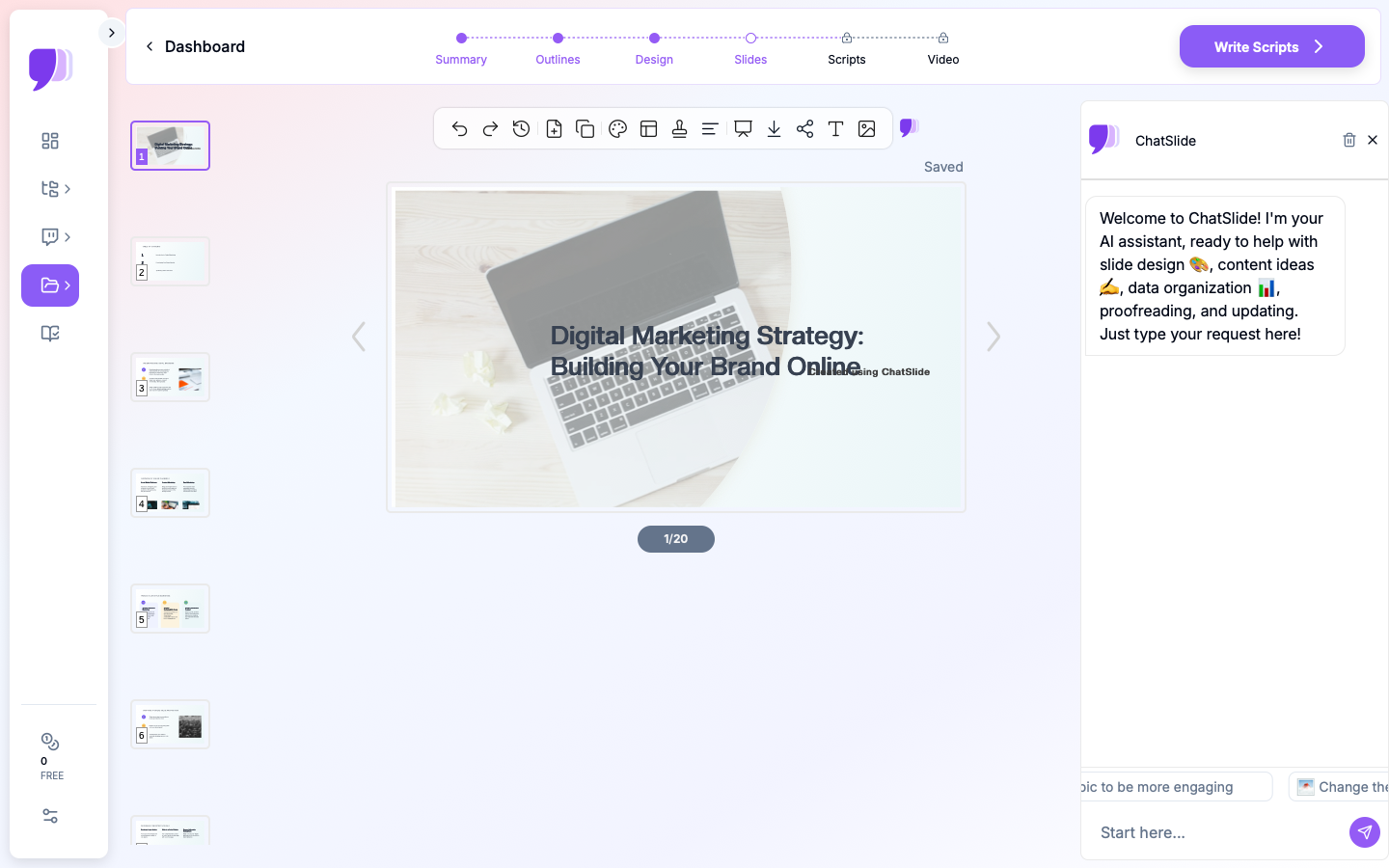

Once your outline is set, ChatSlide generates full slides with layouts, text hierarchy, and design elements. The AI selects appropriate chart types for data slides, creates clean section headers, and maintains consistent branding throughout.
For sales presentations specifically, the generated decks tend to use impactful layouts: large stat callouts for key metrics, side-by-side comparisons for competitive positioning, and image-text combinations that keep each slide focused on one idea.
Step 4: Add Relevant Visuals
Stock images and custom graphics make your deck look polished and professional. ChatSlide's image feature automatically finds relevant visuals for each slide's content, placing them in design-appropriate positions.
For a marketing strategy presentation, this means your social media strategy slide gets relevant imagery, your data analysis slide gets clean chart visuals, and your team slide gets professional headshots or workplace photos. No more hunting through stock photo libraries for hours.
Step 5: Customize and Export
Edit any slide text, swap images, adjust the color theme, or reorder slides to match your specific prospect's needs. When your deck is ready, export it as a PowerPoint file for further customization or share it directly via a presentation link.
Sales Presentation Templates That Work
Different sales scenarios call for different structures. Here are the most common formats that paying users create on ChatSlide:
The Discovery Deck focuses on asking the right questions and establishing credibility. It is light on product details and heavy on industry insight. Use this for first meetings when you need to demonstrate expertise before pitching.
The Solution Pitch is the classic sales presentation. Problem, solution, proof, pricing, next steps. This works best when the prospect already knows they have a problem and is evaluating options.
The ROI Story leads with numbers. Customer success metrics, cost savings calculations, and time-to-value comparisons take center stage. Use this when your buyer is analytical or when you are selling to finance stakeholders.
The Competitive Comparison directly addresses how you stack up against alternatives. Side-by-side feature matrices, pricing comparisons, and customer satisfaction scores help prospects make informed decisions without having to do the research themselves.
Tips for Marketing Presentations That Stand Out
Match your deck's visual style to your brand. Even when using AI-generated slides, make sure colors, fonts, and imagery feel consistent with your company's identity. ChatSlide's theme options help maintain this consistency without manual design work.
Prepare a short version and a leave-behind version. Your live pitch should be concise, around 10 to 15 slides. The leave-behind version can be more detailed for stakeholders who were not in the room, around 20 to 25 slides with additional data and context.
Include one unexpected insight. The most memorable sales presentations contain at least one piece of information the prospect did not expect. This could be a surprising industry statistic, a counterintuitive approach, or a creative solution to a common problem.
End with a clear, specific next step. "Let's schedule a follow-up" is vague. "I'll send you a customized ROI analysis by Thursday and we can review it in a 30-minute call Friday" is actionable. Your final slide should make the next step obvious.
From Hours to Minutes
Marketing and sales teams that switch to AI-powered presentation tools report spending significantly less time on deck creation. The time saved goes back into what actually closes deals: research, relationship building, and personalized follow-ups.
ChatSlide works particularly well for sales teams because it handles the structural and design work that typically requires either a dedicated designer or hours of manual formatting. You focus on the strategy and messaging. The AI handles the layout, visuals, and professional polish.
Get Started
Ready to build your next sales presentation? Visit ChatSlide to create a professional pitch deck in minutes. Upload your existing sales materials or start from a topic, and let AI transform your sales messaging into slides that convert.
Whether you are a solo founder pitching investors, a marketing manager presenting campaign results, or a sales rep preparing for a prospect meeting, ChatSlide gives you the tools to create presentations that win attention and close deals.
Try ChatSlide free and see the difference AI makes in your next sales presentation.