
Quick Answer: ChatSlide is the AI presentation maker for security professionals who need a polished cybersecurity deck fast — risk assessments, governance reviews, threat briefings, board updates, and full security-management course series. Trusted by professionals at 750+ universities and organizations, it turns a rough outline, a policy PDF, or a NIST/ISO framework into structured, citation-ready slides in under two minutes. Real data charts, speaker notes for every slide, OCR upload, and 19 AI editing tools. Free to start, exports to PowerPoint and PDF.
The Cybersecurity Presentation Problem
Cybersecurity is hard to present because the audience changes every time. A board wants risk in dollars and a single clear slide. An engineering team wants the threat model, the controls, and the gaps. A compliance reviewer wants the mapping to NIST CSF or ISO 27001. New hires want "what to actually do." The same material — threats, controls, incidents, roadmap — has to be re-shaped for each room.
It is also material that goes stale fast. A threat briefing built around last quarter's CVEs, a risk register that moved, an incident timeline that keeps growing — the deck is never "done," so most security leads rebuild from scratch every cycle instead of restructuring what they have.
That is exactly the work an AI presentation tool is good at: taking a sprawling, technical body of information and turning it into a clear, structured narrative — fast enough that the deck is ready before the steering meeting, not after it.
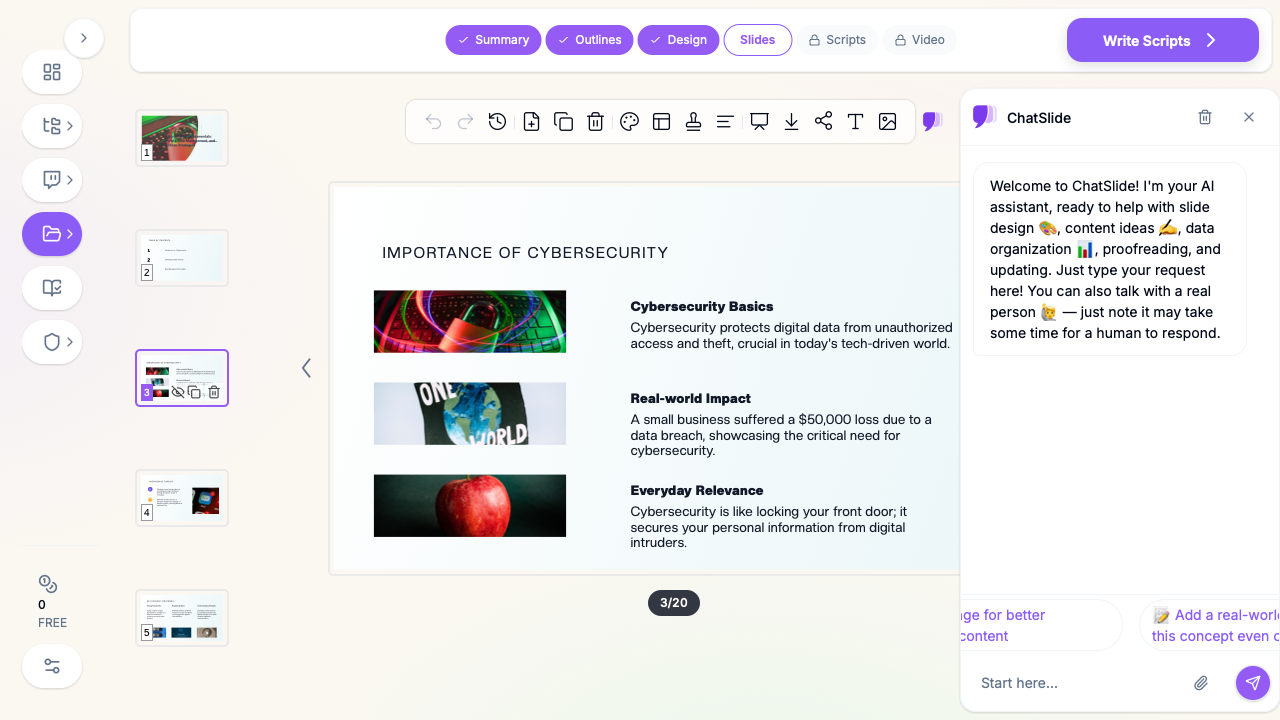
What Makes ChatSlide Powerful for Cybersecurity Decks
ChatSlide is built around the inputs security professionals actually have — policies, frameworks, logs, assessment reports — not blank slides.
3 Input Modes
Start from a topic ("Zero Trust architecture for a mid-size SaaS"), paste raw notes, or upload a source document. For a security-management course or a multi-deck program, you can build the whole series from one consistent outline instead of reinventing structure each lecture.
OCR & Document Upload
Upload a security policy, a vendor risk assessment, a pen-test report, or a NIST/ISO framework PDF and ChatSlide reads it — including scanned or image-based pages — and pulls the structure into editable slides. No retyping the control list by hand.
Real Data Charts
Incident counts, phishing click-rates, mean-time-to-detect, risk-heat-map scores — paste the numbers and ChatSlide renders real, editable charts rather than screenshots you can't update. When next quarter's data lands, you edit the chart, not the image.
Research Search
Pulling in a recent breach case study, a framework update, or a current threat-landscape statistic? ChatSlide can search and incorporate sourced findings so your briefing reflects this quarter, not a template from two years ago.
Speaker Notes for Every Slide
ChatSlide generates speaker notes per slide — useful when you're presenting a risk position to executives, or building a lecture series where each slide needs a spoken script. (This is the exact workflow heavy users run for full cybersecurity-management course decks.)
19 AI Editing Tools
Shorten a dense control description, turn a wall of text into a control matrix, rephrase a technical finding for a non-technical board, translate a deck for a global security team — without leaving the editor.
How ChatSlide Builds Your Cybersecurity Deck
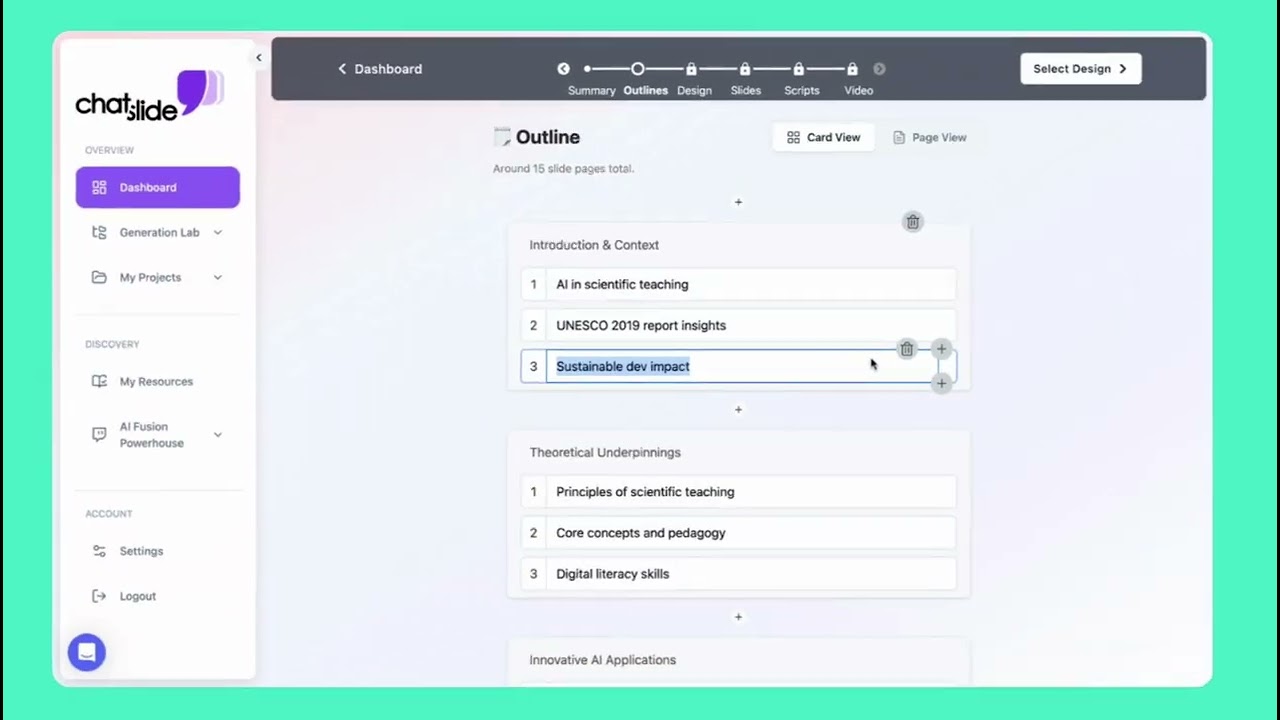
1. Start from what you already have. Paste an outline, or upload the source — a security policy, an assessment report, a NIST CSF or ISO 27001 mapping, an incident write-up. ChatSlide extracts the structure instead of making you rebuild it.
2. Review the outline. ChatSlide proposes a section structure (e.g. threat landscape → risk assessment → controls → gaps → roadmap). Reorder, merge, or rewrite sections before any slides are generated, so the narrative is right from the start.
3. Generate slides with visuals and charts. Slides come back with layouts, relevant imagery, and editable charts from your numbers — not placeholder graphics.
4. Refine and export. Tighten copy with the AI tools, adjust the theme to your brand, generate speaker notes, then export to PowerPoint or PDF — or share a live link.
Use Cases for Security Professionals
- CISO / board risk update. Challenge: translating a technical risk posture into a one-slide story executives will fund. How it helps: ChatSlide turns your risk register into a clean heat map and a dollar-framed narrative. Time saved: hours of re-formatting per quarterly cycle.
- Threat briefing. Challenge: a current, credible threat landscape that isn't last quarter's slides. How it helps: research search pulls in recent findings; charts render your detection metrics. Time saved: a half-day of research-and-rebuild.
- Security-management course / lecture series. Challenge: a coherent multi-deck program (governance, risk, incident response, compliance) with speaker scripts. How it helps: one outline drives a consistent series, each slide with generated notes. Time saved: days across a full course.
- Incident post-mortem. Challenge: a clear timeline, root cause, and remediation deck while the details are fresh. How it helps: paste the timeline and findings; ChatSlide structures it into a reviewable narrative. Time saved: the deck is ready for the review, not after it.
- Compliance / audit readout. Challenge: mapping controls to a framework for auditors. How it helps: upload the framework and your control evidence; ChatSlide builds the mapping slides. Time saved: a full afternoon of table-building.
Awareness training vs. a cybersecurity deck. If your goal is specifically employee security-awareness training — phishing simulations, password hygiene, incident reporting for all staff — see our dedicated security awareness training presentation guide. This article covers the broader set of cybersecurity decks: risk, governance, threat briefings, board updates, and security-management coursework.
Cybersecurity Presentation Tools Compared (2026)
| Capability | ChatSlide | Gamma | Tome | Beautiful.ai |
|---|---|---|---|---|
Build deck from a policy/framework PDF (with OCR) | Yes | Limited | Limited | No |
Real editable charts from your metrics | Yes | Limited | No | Yes |
Speaker notes generated per slide | Yes | Limited | No | Limited |
Multi-deck course series from one outline | Yes | No | No | No |
Export to PowerPoint (.pptx) | Yes | Yes | Limited | Yes |
Free tier to start | Yes | Yes | Yes | Limited |
Time Comparison: Manual vs. AI-Assisted
| Task | Manual | With ChatSlide |
|---|---|---|
Structure a 20-slide risk briefing | 2–3 hours | ~5 minutes |
Turn an assessment PDF into slides | 2 hours | ~3 minutes |
Build charts from incident metrics | 45 minutes | ~2 minutes |
Write speaker notes for the deck | 1–2 hours | Generated |
Re-skin for the board audience | 1 hour | ~5 minutes |
What a Strong Cybersecurity Presentation Includes
Regardless of tool, the strongest cybersecurity decks share a backbone. Know which of these you need before you start:
- Threat landscape. What you're defending against, framed for the audience — not a CVE dump, but the threats that matter to this organization now.
- Risk assessment. Likelihood × impact, ideally as a heat map, and where possible translated into business terms (cost, downtime, exposure).
- Controls and architecture. What's in place — defense-in-depth, identity, monitoring, response — mapped to a recognized framework (NIST CSF, ISO 27001, CIS Controls) so it reads as rigorous, not ad hoc.
- Gaps and findings. An honest picture of what's missing or weak. A credible "where we are" is what makes the roadmap believable.
- Roadmap. Phased, prioritized by risk reduction per dollar, with quick wins early. This is the slide that earns continued budget.
- Metrics. How you measure the program — MTTD/MTTR, coverage, training completion, incident trend. Even directional numbers beat a deck that ducks measurement.
A deck that skips the risk framing, the framework mapping, or the metrics reads as opinion rather than a security program.
Best Practices
Do:
- Lead with risk and business impact, then go technical — match depth to the room.
- Map controls to a named framework so the deck reads as auditable.
- Use real charts for metrics; keep them editable so next cycle is an edit, not a rebuild.
- Keep a master outline for recurring briefings so each cycle starts from structure, not a blank page.
Don't:
- Dump raw logs, full CVE lists, or unredacted findings into board slides.
- Put live credentials, internal IPs, secrets, or sensitive incident specifics into slide content or uploads.
- Let the threat-landscape section go stale — refresh it each cycle.
A note on sensitive data: keep secrets, credentials, customer data, and detailed live-incident specifics out of slide content and uploads. Present risk and posture, not the keys to the kingdom.
Frequently Asked Questions
Can ChatSlide build a cybersecurity deck from my existing policy or framework document? Yes. Upload a policy, assessment report, or a NIST/ISO framework PDF — including scanned pages via OCR — and ChatSlide extracts the structure into editable slides.
Will it make real charts from my security metrics? Yes. Paste your numbers (incident counts, phishing rates, MTTD/MTTR, risk scores) and ChatSlide renders editable charts you can update next cycle, not static images.
Is this for employee awareness training too? You can build awareness content here, but for staff-wide phishing/password/reporting training specifically, our security awareness training guide is purpose-built for that audience.
Can I build a whole security-management course, not just one deck? Yes. Drive a consistent multi-deck series from one outline, with generated speaker notes per slide — the workflow heavy users run for full course series.
Can I export to PowerPoint? Yes — export to .pptx and .pdf, or share a live link.
Is it free? You can start free, no card required. Paid plans unlock larger uploads and higher limits.
Get Started
Stop rebuilding the same risk briefing every quarter. Bring your notes, your policy doc, or your framework, and let ChatSlide turn it into a structured, presentable deck in minutes.
Make your cybersecurity presentation with ChatSlide — free to start, exports to PowerPoint and PDF.