
Quick Answer: To create a security-awareness training deck with AI, (1) pick or upload your topics — phishing, passwords, data protection, incident response; (2) the tool builds engaging, specific slides with real-world examples instead of generic "don't click suspicious links" advice; (3) export to PowerPoint or PDF for your LMS. Instead of spending weeks building training decks from scratch, ChatSlide generates a full cybersecurity curriculum in minutes — free to start.
Why Security Awareness Training Matters More Than Ever
Every organization faces the same uncomfortable truth: your employees are your biggest cybersecurity vulnerability. Phishing attacks succeed not because firewalls fail, but because someone clicks a link they shouldn't have. Ransomware doesn't break through encryption — it walks through the front door when an employee opens a malicious attachment.
The challenge isn't awareness itself. Most employees know cybersecurity matters. The challenge is delivering training that actually changes behavior — presentations that are engaging enough to hold attention and specific enough to be actionable. Generic "don't click suspicious links" advice doesn't cut it when attackers are crafting emails that look identical to legitimate ones.
This is where AI-powered presentation tools change the equation. Instead of spending weeks building training decks from scratch, security professionals can generate comprehensive, visually engaging cybersecurity training presentations in minutes — covering everything from phishing identification to incident response protocols.
The Problem with Traditional Security Training Slides
If you've ever sat through a corporate security awareness session, you know the pattern: text-heavy slides, generic stock photos of padlocks, and bullet points that read like policy documents. The presenter rushes through 60 slides in 30 minutes, and everyone leaves having retained almost nothing.
The numbers reflect this reality. Organizations that rely on annual, slide-heavy security training see phishing click rates that barely improve year over year. The training checks a compliance box but doesn't change behavior.
Building better training takes time that most IT security teams don't have. A typical security awareness deck requires researching current threat landscapes, designing clear visual examples, structuring content for different technical skill levels, and making it all engaging enough that employees don't tune out after slide three.
Security trainers face a unique content challenge: the threat landscape changes constantly. A presentation built in January may be outdated by March as new attack vectors emerge. This means the training deck isn't a one-time project — it needs regular updates, which multiplies the time investment.
What Effective Cybersecurity Training Presentations Include
The best security awareness programs share common elements that make them stick:
Real-world attack examples. Abstract warnings about "cyber threats" don't resonate. Showing employees what a real phishing email looks like — with the subtle red flags highlighted — gives them something concrete to watch for. Effective training walks through actual attack scenarios: the email that looks like it's from the CEO requesting a wire transfer, the fake login page that's one character off from the real domain.
Role-specific content. An executive handling sensitive financial data faces different threats than a customer service representative with access to customer records. The best training acknowledges these differences rather than treating cybersecurity as one-size-fits-all.
Clear incident response steps. Employees need to know exactly what to do when they suspect something is wrong. Not "contact IT" — but specifically who to call, what information to document, and what actions to avoid (like forwarding the suspicious email to colleagues to ask "does this look weird?").
Visual demonstrations. Screenshots of phishing attempts, diagrams showing how data breaches propagate through networks, and flowcharts for response procedures all communicate more effectively than bullet points.
Measurable outcomes. Each training module should connect to specific, testable knowledge — can employees identify the three most common phishing indicators? Do they know the difference between reporting a potential incident and ignoring it?
Building Security Training Slides with ChatSlide
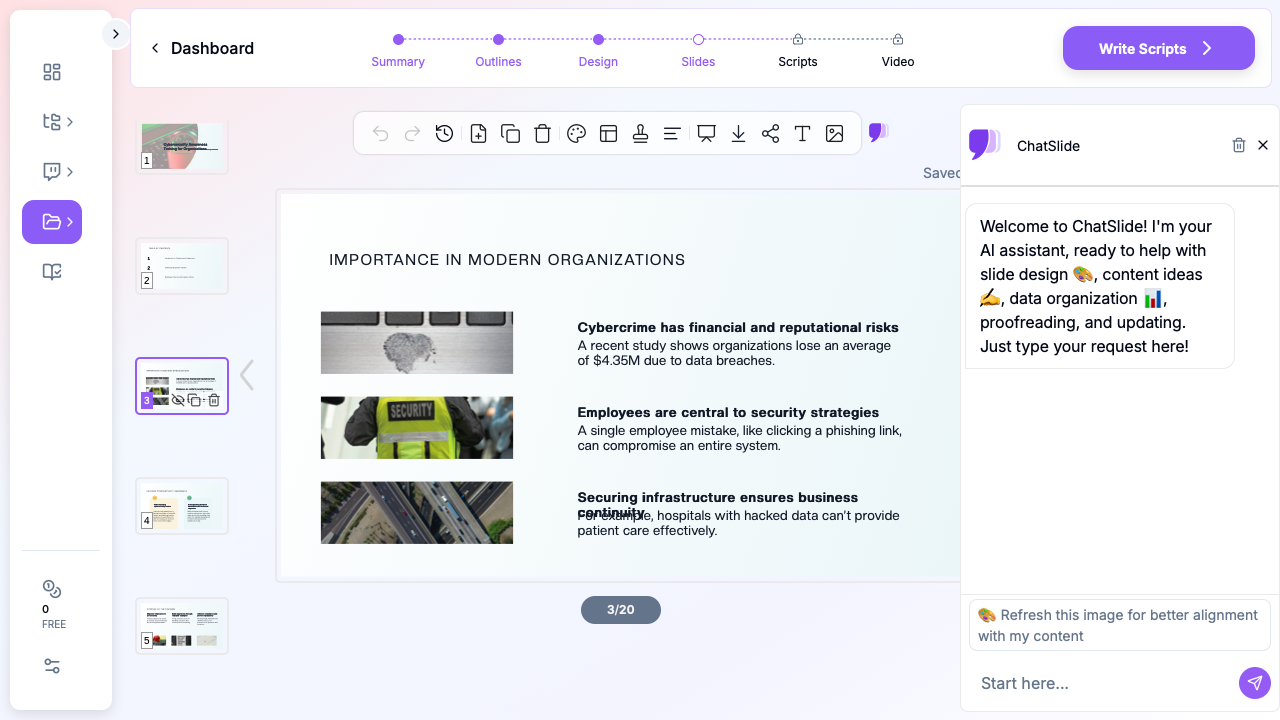

ChatSlide transforms security awareness training from a multi-week project into something you can complete in an afternoon. Here's how security professionals are using it:
Start with Your Training Objective
Begin by defining what your training should cover. Rather than a vague "cybersecurity overview," specify the exact topics: phishing email identification, password hygiene best practices, data handling procedures for sensitive information, or social engineering defense techniques.
ChatSlide's AI analyzes your topic and generates a structured outline covering the key concepts your audience needs. For a phishing awareness module, it might structure content around: what phishing is, how to identify common indicators, real-world examples of successful attacks, what to do when you receive a suspicious message, and how to report potential phishing attempts.
Customize for Your Organization
The generated outline serves as a starting point. Security trainers can add organization-specific policies, adjust the technical depth for their audience, and incorporate internal procedures. A training deck for a healthcare organization will emphasize HIPAA data protection differently than one for a financial services firm focused on PCI compliance.
ChatSlide supports uploading existing security policy documents and reference materials. If your organization has a 40-page information security policy, the AI can extract the key points employees actually need to remember and structure them into clear, digestible slides.
Generate Visually Engaging Slides
One of the biggest advantages of using AI for security training is the visual quality. ChatSlide automatically generates slides with professional layouts, relevant imagery, and clear information hierarchy. Instead of walls of text, you get slides that use visual elements to reinforce key concepts.
For security training specifically, this means slides that show rather than tell — visual comparisons of legitimate vs. phishing emails, infographic-style breakdowns of attack chains, and clean process diagrams for incident response workflows.
Add Data and Statistics
Effective security training grounds abstract concepts in concrete numbers. ChatSlide can incorporate data-driven slides showing your organization's security metrics, industry breach statistics, or the financial impact of security incidents. When employees see that the average cost of a data breach exceeds $4 million, the abstract concept of "cybersecurity risk" becomes tangible.
Structuring Your Security Awareness Program
A single presentation won't transform your organization's security posture. The most effective programs use modular training delivered throughout the year:
Onboarding module. New employees need a comprehensive overview covering your organization's security policies, acceptable use guidelines, and reporting procedures. This is your longest presentation — typically 30-45 minutes — because it establishes the foundation.
Quarterly refreshers. Short, focused presentations (10-15 minutes) covering a single topic in depth. One quarter might focus on social engineering tactics, the next on mobile device security, the next on secure remote work practices.
Incident-triggered updates. When a new threat emerges or your organization experiences a near-miss, a quick presentation explaining what happened and how employees should respond. These are time-sensitive and benefit most from AI-generated speed.
Role-specific deep dives. Finance teams get training on wire fraud and business email compromise. HR gets training on protecting employee data. Developers get training on secure coding practices and API security. Each role faces distinct threats that warrant targeted content.
ChatSlide makes this modular approach practical because generating each focused module takes minutes rather than days. A security team that would struggle to produce one comprehensive annual training can instead deliver targeted quarterly content that stays current with the threat landscape.
Tips for Delivering Security Training That Sticks
Lead with impact, not policy. Start your presentation with a compelling incident — a real breach that affected a similar organization. Employees engage with stories more than rules.
Make it interactive where possible. Even in a slide-based format, include "spot the phish" exercises where employees examine email screenshots and identify the red flags. ChatSlide's presentation structure supports these interactive segments.
Keep slides visual. If a slide has more than 30 words on it, it has too many. Use the slide as a visual anchor and deliver the details verbally. ChatSlide's AI-generated layouts naturally favor visual clarity over text density.
Test comprehension. Follow training with a brief assessment. Even a simple five-question quiz reinforces retention and gives you metrics to measure training effectiveness.
Update regularly. Security threats evolve monthly. A presentation about phishing techniques from six months ago may miss entirely new attack patterns. AI-powered tools make regular updates feasible by dramatically reducing the time required to refresh content.
From Training Deck to Security Culture
The goal of security awareness training isn't to check a compliance box — it's to build a culture where every employee acts as a human firewall. That culture starts with training that respects employees' time, engages their attention, and gives them actionable knowledge they can apply immediately.
AI-powered presentation tools remove the biggest barrier to effective security training: the time and effort required to produce high-quality content. When building a professional training deck takes minutes instead of weeks, security teams can focus on what matters — delivery, engagement, and actually reducing the organization's attack surface.
Get Started
Ready to build security awareness training that your employees will actually remember? Try ChatSlide to create your first cybersecurity training presentation. Upload your security policies, specify your audience, and generate a complete training deck with professional visuals — all in minutes.
Whether you're preparing annual compliance training, responding to a new threat, or building a role-specific security module, ChatSlide helps you deliver training that drives real behavior change.