Quick Answer: ChatSlide is the fastest way for diabetes educators, endocrinology teams, and clinic staff to build a presentation. It turns ADA Standards of Care, guideline PDFs, and your own handouts into a clear deck — with plain-language patient slides, real charts (A1C trends, time-in-range), and speaker notes — and attaches PubMed citations for the clinical version. Trusted across 750+ universities and health programs, it builds a type 2 diabetes self-management session or a clinical endocrinology lecture in under 2 minutes and exports to PowerPoint, PDF, or Google Slides. Free to start, no card required.
The Diabetes Education Deck Problem
Diabetes education runs on repetition and on decks that have to work for two very different rooms. A certified diabetes care and education specialist (CDCES) gives the same core self-management talk — blood sugar, diet, medication, monitoring — over and over, but has to re-tailor it constantly for newly diagnosed patients, insulin starts, GLP-1 starts, and language or literacy needs. Meanwhile the endocrinology team needs a clinical version of the same content, built on the current ADA Standards of Care and the latest CGM and pharmacotherapy evidence.
Built the old way, both versions eat time. The patient deck gets copy-pasted and lightly edited until it's inconsistent across educators; the clinical deck means hunting for a clean A1C-lowering comparison and retyping targets out of a guideline PDF. And the guidance moves every year — the Standards of Care update, new time-in-range targets, expanding CGM access.
The fix is to let the tool assemble both versions from your sources while you keep the clinical accuracy and the teaching voice.
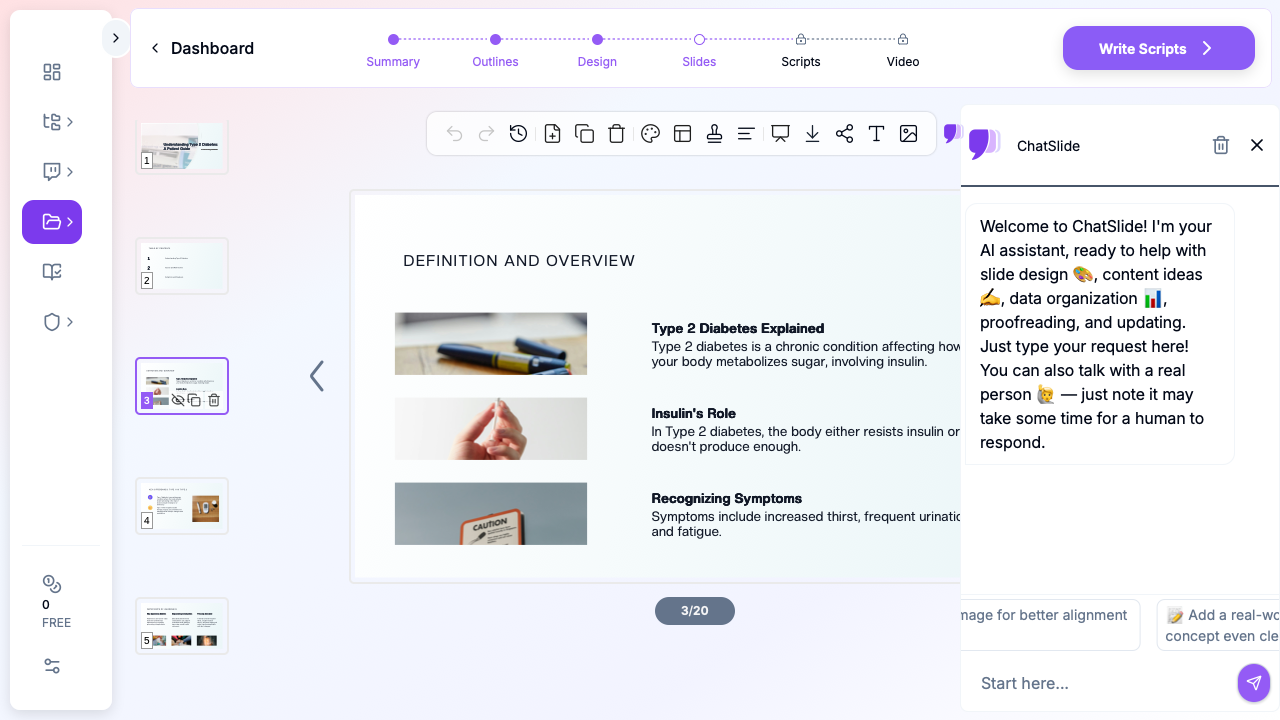
Drop in a topic — "type 2 diabetes self-management: blood sugar, diet, and lifestyle" or "insulin initiation and titration for newly diagnosed patients" — and ChatSlide returns a structured, plain-language deck you can hand a patient or teach a room from.
What Makes ChatSlide Powerful for Diabetes Education
Two audiences from one topic
Ask for the patient version and you get plain-language slides at a low reading level with clear visuals; ask for the clinical version and you get the ADA targets, trial evidence, and mechanism — same topic, right altitude for the room.
Real data charts, not clip art
Paste in A1C trends, time-in-range numbers, or fasting-glucose logs and ChatSlide renders actual charts, so monitoring and outcomes slides show data patients and clinicians can read.
Reads the guidelines
Upload the ADA Standards of Care or a guideline PDF and ChatSlide extracts the A1C and blood-pressure targets, screening intervals, and treatment thresholds into editable slides instead of making you retype them.
OCR on handouts and tables
Screenshot an existing teaching handout or a guideline table and ChatSlide reads it, pulling the content into editable slides you can restyle and update.
Research search built in
For the clinical version, the Research tab queries PubMed, Google Scholar, and ClinicalTrials.gov and attaches citations automatically (details below).
19 AI editing tools
Simplify to a 6th-grade reading level, translate the patient deck into another language, shorten to a 10-minute clinic session, or restyle to your clinic's template — each edit happens in place, no rebuild.
How ChatSlide Builds Your Diabetes Deck
1. Give it the topic and the audience. "Type 2 diabetes self-management for newly diagnosed patients" gets a plain-language deck; "endocrinology didactic: GLP-1 and SGLT2 in type 2 diabetes" gets a clinical one. Naming the room sets the reading level and depth.
2. Bring your sources. Drag in the ADA Standards of Care, your existing handouts, and any teaching files. ChatSlide reads them and extracts the targets and content — you review before it lands.
3. Generate the outline. A 6-section / 3-subpoint outline yields a focused ~15–20 slide session. Shorten it for a single clinic visit or expand for a full DSMES class.
4. Edit and export. Simplify or translate at the slide level, then export to PowerPoint, PDF, or Google Slides.
Use Cases for Diabetes Educators and Teams
- Newly diagnosed type 2 session — what diabetes is, blood sugar targets, diet, activity, monitoring. Challenge: a mixed-literacy room. How it helps: plain-language slides with clear visuals, one click to simplify further. Time saved: hours per class down to minutes.
- Insulin or GLP-1 start — a focused teaching deck for a single medication start, with injection technique, hypoglycemia signs, and what to expect.
- CGM and time-in-range — explaining monitoring with real charts patients can interpret, not a wall of numbers.
- Clinical / staff didactic — the endocrinology version: ADA targets, SGLT2 and GLP-1 evidence, cardiorenal outcomes, with PubMed citations.
- Diabetes education for clinics and departments — a shared, brand-templated deck set a diabetes program can push across educators and sites so every patient hears consistent targets and messaging.
Diabetes Presentation AI Tools Compared (2026)
| Capability | ChatSlide | Gamma | Beautiful.ai |
|---|---|---|---|
Plain-language patient version + clinical version | Yes | Partial | No |
Reads ADA / guideline PDFs & extracts targets | Yes | Limited | No |
Real data charts (A1C, time-in-range) | Yes | Partial | Templates only |
PubMed citations for the clinical deck | Yes | No | No |
One-click simplify / translate | Yes | Basic | Basic |
PowerPoint / Google Slides export | Yes | Yes | Yes |
Time Comparison: Manual vs. AI-Assisted
| Task | Manual | With ChatSlide |
|---|---|---|
Build a newly-diagnosed T2D session deck | 2–3 hrs | 2 min |
Make a patient version + a clinical version | 4+ hrs | minutes |
Chart A1C / time-in-range data | 1 hr | included |
Translate the patient deck | 1–2 hrs | one click |
Restyle to clinic template | 1 hr | one click |
Direct Research Database Access
ChatSlide's Research tab connects to the databases physicians use daily:
- PubMed: Search by keyword, PMID, or DOI. Find the landmark trials, recent publications, and clinical guidelines relevant to your case. The AI reads abstracts and incorporates key findings into your slides with citations.
- Google Scholar: When your topic spans disciplines — say, the intersection of genetics and oncology — Scholar captures the broader academic literature that PubMed alone might miss.
- Clinical Trials (NCT): Presenting on a treatment where pivotal trials are ongoing? Search by NCT number or condition to pull trial design, endpoints, and status into your slides.

What a Strong Diabetes Education Presentation Includes
Diabetes decks fail in predictable ways — too clinical for patients, too shallow for clinicians, or inconsistent between educators. A deck that works clears a specific set of bars:
Right reading level for the room. A patient session should read at roughly a 6th-grade level, define every term, and lean on visuals — a plate diagram, a glucose-range dial, a simple before/after. The clinical version can assume the vocabulary and move to targets and evidence. The same topic, pitched twice.
Concrete targets, not vague advice. "Keep your blood sugar controlled" teaches nothing. Put the numbers on the slide: the individualized A1C goal, fasting and post-meal ranges, the time-in-range target, blood-pressure and lipid goals — framed for whichever audience is in the room.
Self-management, not just pathophysiology. For patients, the deck is mostly the four self-care behaviors — eating, activity, monitoring, medication-taking — plus hypoglycemia recognition and sick-day rules. Pathophysiology is one grounding slide, not the whole talk.
Medication slides that respect the evidence. The clinical version should show where metformin, GLP-1 receptor agonists, and SGLT2 inhibitors sit, the cardiorenal outcomes that moved them up the algorithm, and the ADA sequencing — with real effect sizes, not bullets.
Monitoring made legible. CGM and time-in-range are only useful if the audience can read them. A real chart with the target band shaded teaches more than a table of values.
Best Practices (Do's and Don'ts)
- Do build the patient and clinical versions from the same topic so messaging stays consistent.
- Do put concrete targets (A1C, ranges, time-in-range) on the slide.
- Do simplify the patient deck to a low reading level and add visuals.
- Don't put pathophysiology at the center of a patient session — lead with self-care.
- Don't use a table where a shaded-range chart would read faster.
- Don't put patient-identifiable data on slides (see the privacy note below).
Enterprise for Diabetes Programs
For a diabetes education program, endocrinology clinic, or health system standardizing patient teaching across educators and sites, ChatSlide's Enterprise plan adds SSO, centralized/team billing, shared brand templates, and team collaboration so every patient hears the same targets and messaging. Contact us to set it up.
Note on patient data: ChatSlide's standard plans are not a HIPAA-covered service — keep PHI out of slide content and uploads. For hospital systems, group practices, and clinics that need a Business Associate Agreement, our Enterprise plan offers HIPAA-compliant deployment options — contact us to discuss BAA terms, SSO, and on-prem / private-cloud hosting.
Frequently Asked Questions
Can ChatSlide make a patient version and a clinical version? Yes. Ask for the patient version and get plain-language slides; ask for the clinical version and get targets, evidence, and citations — same topic, right depth.
Does it read guideline PDFs? Yes — upload the ADA Standards of Care or a guideline and it extracts targets and thresholds into editable slides.
Will it simplify to a low reading level? Yes, one click simplifies the language, and another translates the patient deck into other languages.
Can it chart my A1C or time-in-range data? Yes. Paste the numbers and it renders real charts with the target band shaded.
Does the clinical version cite sources? Yes — PubMed, Google Scholar, and ClinicalTrials.gov citations attach automatically and you review them before they land.
Can I export to PowerPoint or Google Slides? Yes — PowerPoint, PDF, and Google Slides.
Is it free? Yes, free to start with no card required. Enterprise adds SSO, team billing, shared templates, and HIPAA-compliant deployment options.
Get Started
Stop rebuilding the same diabetes talk from scratch. Make your next self-management session or clinical didactic with ChatSlide — drop in your guidelines and handouts, and get a clear, consistent, cited deck in minutes. Start free at ChatSlide, no card required.