
Quick Answer: If you are a GP, GP with Special Interest (GPSI), trainer, or PCN clinical lead, ChatSlide turns a guideline, an audit spreadsheet, or a one-line topic into a structured primary care deck in minutes. It is used by 280,000+ users across 750+ universities, searches PubMed and clinical trial registries so your slides carry real citations, builds charts from your own practice data, writes speaker notes for the person delivering the session, and exports to PowerPoint. Free to start, no card required.
The Primary Care Slide Problem
Slide-making in general practice happens in the gaps. The teaching session is Thursday lunchtime, the clinic ran forty minutes over, and the deck is being assembled at 22:40 the night before between a prescription queue and a batch of pathology results. Nobody in primary care has an afternoon to build slides — but almost everyone in primary care is expected to present something: a practice meeting update, a registrar tutorial, a significant event review, a proposal for a new service, a protected learning time session for the whole team.
The material is rarely missing. It is scattered. A NICE guideline PDF, a spreadsheet of search results out of the clinical system, an audit you ran six months ago, three papers you meant to read, and a set of notes from a conference. Turning that pile into twenty slides that a mixed room of GPs, nurses, pharmacists, and practice managers can follow in twenty minutes is a genuinely different skill from clinical work, and it is the one nobody gets trained in.
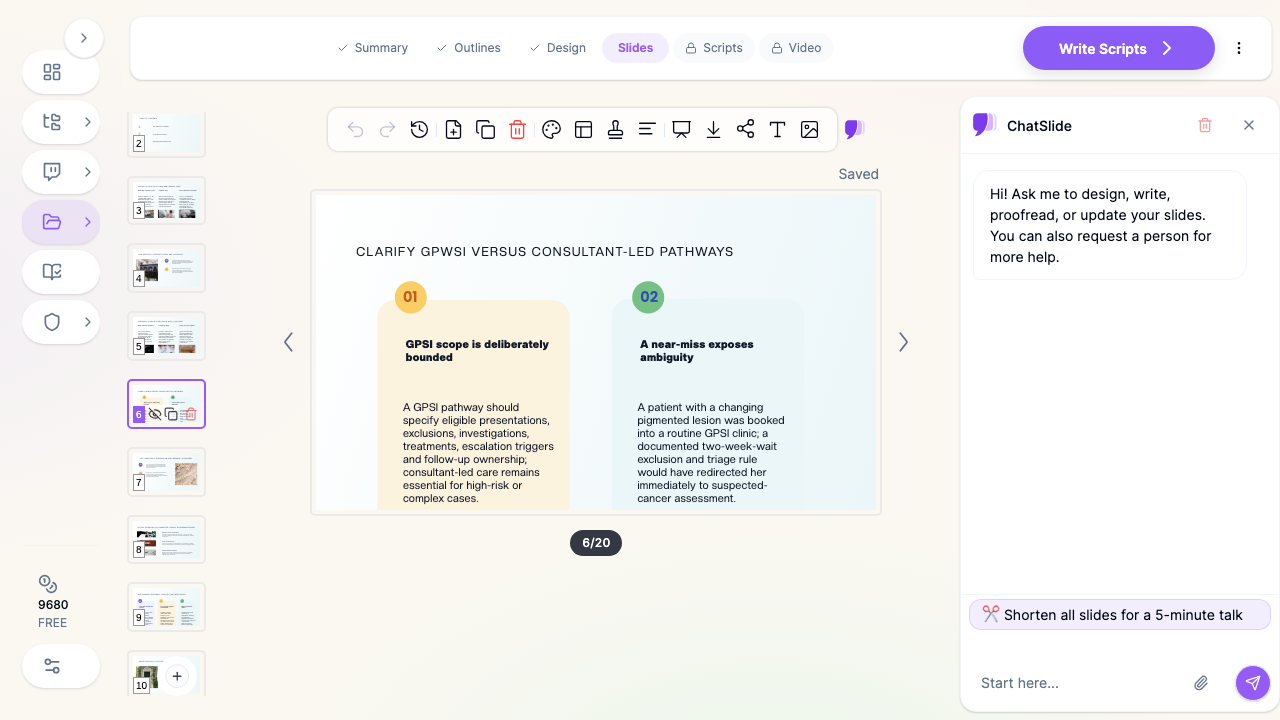
The GPSI case is the sharpest version of this. If you are proposing or explaining a GP with Special Interest service — dermatology, minor surgery, musculoskeletal medicine, women's health — you have to make three arguments in one deck: what the service does, where its boundaries sit against consultant-led care, and why it is safe and worth commissioning. That is a clinical talk, a governance talk, and a business case wearing one set of slides.

What Makes ChatSlide Powerful for Primary Care
Three ways in, including the documents you already have
A primary care talk almost never starts as a blank page. ChatSlide accepts a plain topic ("shared decision making in type 2 diabetes for a practice nurse audience"), a pasted outline, or an uploaded document — a guideline PDF, an audit report, a service specification, a set of meeting notes. Upload the guideline you are actually teaching from and the deck gets built against that document rather than against a general idea of the topic.
PubMed and trial registry search inside the editor
Primary care teaching gets challenged in the room, and rightly so. The Research tab searches PubMed, Google Scholar, and clinical trial registries from inside the deck, so the evidence behind a recommendation lands on the slide with a citation instead of as a half-remembered "I think there was a trial".
OCR that reads scanned and printed material
Practices run on scans. A photocopied pathway, a printed local formulary page, a scanned referral proforma. ChatSlide runs OCR on uploaded PDFs and images, so printed material becomes slide content rather than an attachment nobody opens.
Charts built from your own practice data
The most persuasive slide in a practice meeting is usually your own numbers: how many patients on the register, how the QOF indicator moved, referral volumes before and after a pathway change, the age distribution of a cohort. Paste or upload the data and the chart is built into the slide instead of being screenshotted out of Excel.
Outlines you can fix before any slides exist
ChatSlide returns a section-by-section outline first. For a GPSI business case that is where you decide whether scope comes before safety or after, and whether the referral criteria get their own section. Reordering an outline takes a minute; reordering twenty finished slides does not.
Speaker notes for whoever ends up delivering it
Sessions get handed over. The partner who built the deck is on leave and the registrar is presenting it. ChatSlide writes speaker notes per slide, which is the difference between a reusable practice resource and a deck only its author can teach from.
19 AI editing tools for the late-night revision pass
Shorten a bullet, rewrite a slide for a patient-facing audience instead of a clinical one, split an overloaded slide, change the tone, swap an image. The edits are per-slide, so fixing one thing does not mean regenerating everything.
How ChatSlide Builds Your Primary Care Deck
1. Give it the source. Type the topic, paste your outline, or upload the guideline, audit, or service specification you are working from.
2. Review the outline first. Check the sequence before slides exist — this is where a GPSI deck stops being a clinical talk with governance bolted on the end.
3. Generate the deck with images, charts, and citations. Slides are built with relevant imagery, any charts your data supports, and references pulled from the research search.
4. Edit and export. Tune the wording, then export to PowerPoint for the meeting room projector, or to PDF as a handout the team can keep.
Use Cases for GPs and Primary Care Teams
GPSI service proposals and updates. A GP with Special Interest clinic needs a deck that states scope, exclusions, escalation triggers, and follow-up ownership as clearly as it states the clinical content. Build it from the service specification and the local pathway rather than from scratch, and the boundaries end up on the slide instead of in your head.
Practice and PCN meetings. A monthly clinical meeting, a PCN board update, a new enhanced service being rolled out across member practices. Short decks, frequent, always urgent — the format AI drafting helps most.
Registrar tutorials and teaching sessions. GP trainers teach a tutorial most weeks. Generating a first draft from the curriculum topic and then shaping it with your own cases turns an evening's preparation into half an hour.
Protected learning time and whole-team CPD. A PLT session has GPs, nurses, pharmacists, HCAs, and administrative staff in one room. The editing tools make it practical to build one core deck and rewrite specific slides for different audience levels.
Audit, significant event, and quality improvement presentations. These live or die on the data display. Upload the numbers, get the chart built into the slide, and spend your preparation time on the interpretation instead of on formatting.
Appraisal and portfolio evidence. Teaching sessions you have delivered are supporting information for appraisal. A deck with speaker notes and citations is far more useful as evidence than a slide file with six bullet points on it.
Primary Care AI Presentation Tools Compared (2026)
| Capability | ChatSlide | Gamma | Beautiful.ai |
|---|---|---|---|
Upload guidelines and service specs as source | Yes | Yes | Limited (Pro) |
PubMed / clinical trial registry search in the editor | Yes | Web research only | No |
OCR on scanned pathways and printed material | Yes | Yes (Agent) | No |
Charts built from your own audit data | Yes | Yes | Template-based |
Per-slide speaker notes for a colleague to deliver | Yes | Yes | Yes |
PowerPoint export that stays editable | Yes | Yes | Yes |
Free tier | Yes | Yes | Trial only |
Time Comparison: Manual vs. AI-Assisted
Building a 20-slide primary care teaching session the traditional way:
| Task | Manual | With ChatSlide |
|---|---|---|
Structuring the session | 1 hour | 10 minutes (review the outline) |
Writing slide content | 3-4 hours | 15 minutes (generate, then edit) |
Finding and citing the evidence | 1-2 hours | 20 minutes (research search) |
Building audit / cohort charts | 1 hour | 15 minutes |
Writing speaker notes | 1 hour | Included, then edited |
Formatting and cleanup | 1-2 hours | 20 minutes |
Total | 8-11 hours | ~1.5 hours |
The clinical judgement is still entirely yours. What goes away is the formatting tax on a session you are delivering at lunchtime for free.
Direct Research Database Access
ChatSlide's Research tab connects to the databases physicians use daily:
- PubMed: Search by keyword, PMID, or DOI. Find the landmark trials, recent publications, and clinical guidelines relevant to your case. The AI reads abstracts and incorporates key findings into your slides with citations.
- Google Scholar: When your topic spans disciplines — say, the intersection of genetics and oncology — Scholar captures the broader academic literature that PubMed alone might miss.
- Clinical Trials (NCT): Presenting on a treatment where pivotal trials are ongoing? Search by NCT number or condition to pull trial design, endpoints, and status into your slides.

What a Strong Primary Care Presentation Includes
One question the session answers. Primary care audiences are tired and time-boxed. "What should we do differently on Monday?" is a better organising question than "everything about heart failure".
Scope and exclusions stated explicitly. Especially for a GPSI or extended-role service. Which presentations are in, which are out, what triggers escalation, and who owns follow-up. Ambiguity here is the clinical risk, so it belongs on a slide rather than in the discussion afterwards.
Local pathway detail, not just national guidance. The guideline is the same everywhere; the waiting times, referral routes, and local formulary are not. A deck that names the actual local pathway gets used; one that only cites national guidance gets nodded at.
Numbers from your own population. Register size, prevalence, referral volumes, the gap between your practice and the PCN average. Your own data is the most persuasive content in the room.
A safety-netting slide. What the audience should do when the presented approach does not fit the patient in front of them. Every primary care talk needs this, and most skip it.
A short evidence section, properly cited. Two or three references that actually underpin the recommendation, cited on the slide. More than that and nobody reads them.
Something to take away. A one-page PDF summary or a pathway card is remembered long after the slides are closed.
Best Practices
Do:
- Build the deck around a decision the audience has to make, not around a disease.
- Put scope and exclusions early in any extended-role or GPSI deck, not in the last two slides.
- Use anonymised, composite cases rather than a real patient's details.
- Keep the speaker notes so a colleague can deliver the session when you are on leave.
- Export a PDF handout alongside the slides for the people who missed the session.
- Reuse one core deck across the practice and rewrite specific slides per audience level.
Don't:
- Don't paste identifiable patient data into slides or uploads.
- Don't present national guidance without saying what it means for your local pathway.
- Don't put an eight-row table on a slide that will be projected in a meeting room.
- Don't let generated images stand in for clinical illustration — check every one is actually appropriate for a clinical audience.
- Don't skip citations on the evidence slides; a primary care room will ask.
Primary Care Presentations for Practices, PCNs, and Training Programmes
Teaching in primary care is rarely a solo activity for long. A PCN running the same protected learning session across eight member practices, a training programme delivering a shared tutorial curriculum, or a federation standardising service documentation all need one deck delivered consistently by different people. ChatSlide's Enterprise plan adds SSO, centralised team billing, shared brand templates so every practice's slides look like they come from the same organisation, and team collaboration on a shared deck library — contact us to set it up for your PCN, federation, or training programme. Individual GPs can keep using the free tier.
Note on patient data: ChatSlide's standard plans are not a HIPAA-covered service — keep PHI out of slide content and uploads. For hospital systems, group practices, and clinics that need a Business Associate Agreement, our Enterprise plan offers HIPAA-compliant deployment options — contact us to discuss BAA terms, SSO, and on-prem / private-cloud hosting.
Frequently Asked Questions
Can I build a deck from a clinical guideline PDF? Yes. Upload the guideline and generate against it, so the slides reflect that document rather than a generic summary of the topic.
Can it pull real references into the slides? Yes. The Research tab searches PubMed, Google Scholar, and clinical trial registries, and citations are added to the slides.
Is this suitable for a GPSI business case as well as a clinical talk? Yes. The outline step is where you make it both — a scope and exclusions section, a safety and governance section, and the clinical content, sequenced deliberately rather than clinical-first with governance appended.
Can I chart my own audit or practice data? Yes. Paste or upload the numbers and the chart is generated into the slide. Use anonymised, aggregate data.
How is this different from your grand rounds guide? Grand rounds is a hospital format — a longer, case-anchored teaching session for a secondary care audience. Primary care sessions are shorter, more operational, and usually mixed-profession. Our medical grand rounds guide covers the hospital version, and the hospital medicine guide covers inpatient teaching formats.
Can I make patient-facing slides with it too? Yes, and the editing tools make it straightforward to rewrite a clinical slide at patient reading level. See our patient education presentation guide for that workflow.
Will the PowerPoint export still be editable? Yes, it exports as a real PPTX with editable text and objects.
Is it free? There is a free tier with no card required. Paid plans add more generations, larger uploads, and additional export options.
Get Started
Primary care presentations get built late, by people who have already done a full clinical day. If you are preparing a GPSI service case, a practice meeting update, a registrar tutorial, or a protected learning time session, start from what you already have — the guideline, the audit, the service specification — and let the structure come out first.
Make your primary care slides with ChatSlide — free to start, no card required.