
Quick Answer: If you are building a pathology teaching deck — a grossing protocol lecture for pathologists' assistant students, a gross-to-microscopic correlation session for residents, a histology block for medical students — ChatSlide turns your objectives, protocols, and existing decks into a complete slide set in minutes. It is used by 290,000+ users across 750+ universities, searches PubMed and Google Scholar from inside the editor, builds full 45- to 60-minute lecture decks with citations, writes per-slide speaker notes, and exports to editable PowerPoint on paid plans. Free to start, no card required.
The Pathology Teaching Problem
Anatomic pathology is taught in two places that rarely share a slide deck: the gross room and the microscope. A single first-year pathologists' assistant session has to cover the embryology and anatomy of an organ, the operative specimens that arrive from it, the orientation and inking scheme, the sampling logic, and then the histologic findings that the sampling was supposed to capture. Miss the connection between any two of those and the students learn a procedure without the reasoning behind it.
That makes pathology lectures unusually long and unusually structured. Program directors need learning objectives mapped explicitly to content. Residents assembling their first unknown conference need a defensible gross description before they ever get to the slide. Faculty rebuilding a rotation curriculum need six or eight coherent decks, not one. The intellectual work is the fast part. Assembling forty-five slides that hold that logic together is the slow part.

What Makes ChatSlide Powerful for Pathology Teaching
Three Ways to Start a Deck
Give ChatSlide a topic ("gross examination of the mastectomy specimen, for first-year PA students"), upload a document, or paste your existing objectives. Most pathology educators already have something written — a rotation syllabus, a CAP protocol excerpt, a departmental grossing manual, last year's deck. Uploading beats retyping: the AI reads the source and builds the outline from your content rather than from a generic template.
Objectives-Driven Outlines
Accredited pathology teaching is written against learning objectives, and ChatSlide takes them literally. Paste your objectives verbatim and the outline comes back with sections mapped to each one, so you can confirm coverage before a single slide is generated. Edit the outline — reorder, split, delete, add — and only then generate. Fixing structure at the outline stage costs seconds; fixing it after fifty slides exist costs an evening.
Full-Length Lecture Decks
Pathology sessions are not ten-slide talks. A 45- to 50-minute PA lecture or a resident didactic runs forty to sixty slides, and ChatSlide is built to generate at that length in one pass rather than making you stitch together short decks.
Research and Protocol Citations
The Research tab searches PubMed, Google Scholar, and clinical trial registries from inside the editor, so the staging reference, the reporting-protocol update, or the paper behind a sampling recommendation lands in your slides with a citation attached rather than in a browser tab you meant to come back to.
Your Own Images Stay Yours to Place
This matters more in pathology than almost anywhere else. Gross photographs and whole-slide images are your department's teaching material and often your patients' tissue, and no generated image should ever stand in for them. ChatSlide can generate illustrations, and for a diagram or a title slide that is useful — but a specimen slot takes a real specimen. Let the AI build the structure, the text, the tables, and the speaker notes, and drop your own de-identified gross photos and photomicrographs into the image slots. The result is a deck where every specimen image is one you can defend, in a layout you did not have to build.
Per-Slide Speaker Notes
Speaker notes are generated for each slide, which turns a deck into something a co-teacher or a rotating fellow can actually deliver. For a departmental curriculum taught by whoever is on service that week, that is the difference between a shared deck and a personal one.
Comparison Tables and Data Charts
Differential tables, staging comparisons, ancillary-study panels, and turnaround-time or specimen-volume charts generate from data you supply, rather than being hand-drawn in PowerPoint one row at a time.
How ChatSlide Builds Your Pathology Deck
- Start with what you have. Upload the syllabus, the grossing protocol, the objectives, or an old deck — or type the topic and audience if you are starting clean.
- Review the outline. Confirm that every learning objective has a home and that the gross-to-microscopic sequence runs in the order you teach it. Reorder and edit freely.
- Generate the slides. Full-length deck with layouts, tables, and speaker notes. Pull PubMed references in from the Research tab as you go.
- Add your specimen images and export. Place your own de-identified gross photos and photomicrographs, then export to editable PowerPoint or PDF on a paid plan, present in-browser, or record it as a narrated video for asynchronous learners.
Use Cases in Anatomic Pathology
Pathologists' assistant program lectures. A first-year PA course moves organ system by organ system, and each session needs embryology, anatomy, specimen types, orientation, sampling, and reporting. Starting from your objectives rather than a blank deck saves the several hours per session that otherwise get spent on structure instead of content.
Resident grossing orientation. New residents need the same core lecture every July — identifiers, specimen integrity, orientation before cutting, measurement discipline, block designation, gross description language. Build it once with speaker notes and any senior resident can deliver it.
Gross-to-microscopic correlation conferences. Case-based teaching where the point is the link between what the gross exam suggested and what the slides showed. The deck structure is repetitive by design; generating it and swapping the case is far faster than rebuilding it.
Histology and general pathology for medical students. Shorter, broader, and heavier on mechanism than on protocol — a different deck length and register, which the outline stage lets you set before generating.
Quality and discrepancy review. Sampling-error reviews, amended-report analyses, and turnaround-time presentations need charts from real numbers, not decorative ones.
Pathology departments and teaching hospitals. When a curriculum is delivered by rotating faculty, shared brand templates and team workspaces keep decks consistent across a rotation instead of drifting into eight personal styles.
Direct Research Database Access
ChatSlide's Research tab connects to the databases physicians use daily:
- PubMed: Search by keyword, PMID, or DOI. Find the landmark trials, recent publications, and clinical guidelines relevant to your case. The AI reads abstracts and incorporates key findings into your slides with citations.
- Google Scholar: When your topic spans disciplines — say, the intersection of genetics and oncology — Scholar captures the broader academic literature that PubMed alone might miss.
- Clinical Trials (NCT): Presenting on a treatment where pivotal trials are ongoing? Search by NCT number or condition to pull trial design, endpoints, and status into your slides.

Pathology AI Presentation Tools Compared (2026)
| Capability | ChatSlide | Gamma | Beautiful.ai |
|---|---|---|---|
40–60 slide lecture in one pass | Yes | Yes (paid) | Limited |
PubMed / Scholar / trials search built in | Yes | No | No |
Per-slide speaker notes | Yes | Yes | Yes |
Upload syllabus / protocol as source | Yes | Yes | Limited |
Editable PowerPoint export | Yes (paid) | Yes | Yes |
Charts from your own data | Yes | Limited | Yes |
Narrated video export | Yes | No | No |
Free tier | Yes | Yes | Limited |
Time Comparison: Manual vs. AI-Assisted
| Task | Manual | With ChatSlide |
|---|---|---|
Structure the deck against objectives | 45–60 min | 5 min (editable outline) |
Draft 45–55 slides of content | 4–6 hours | 10–15 min |
Find and format references | 60–90 min | 10 min (Research tab) |
Write speaker notes | 60–90 min | Generated |
Place specimen images and polish | 60–90 min | 60–90 min (still yours to do) |
Total | 8–11 hours | ~2 hours |
Those figures are an illustrative estimate for a 45–55 slide teaching deck built from an existing syllabus, not a measured study.
The image work does not shrink, and it should not — selecting and annotating the right gross photograph is the teaching. What disappears is the structural labor around it.
What a Strong Pathology Teaching Deck Includes
Objectives stated up front, and honored. Every subsequent section should trace back to one. A deck that covers material no objective asked for is a deck that will run long.
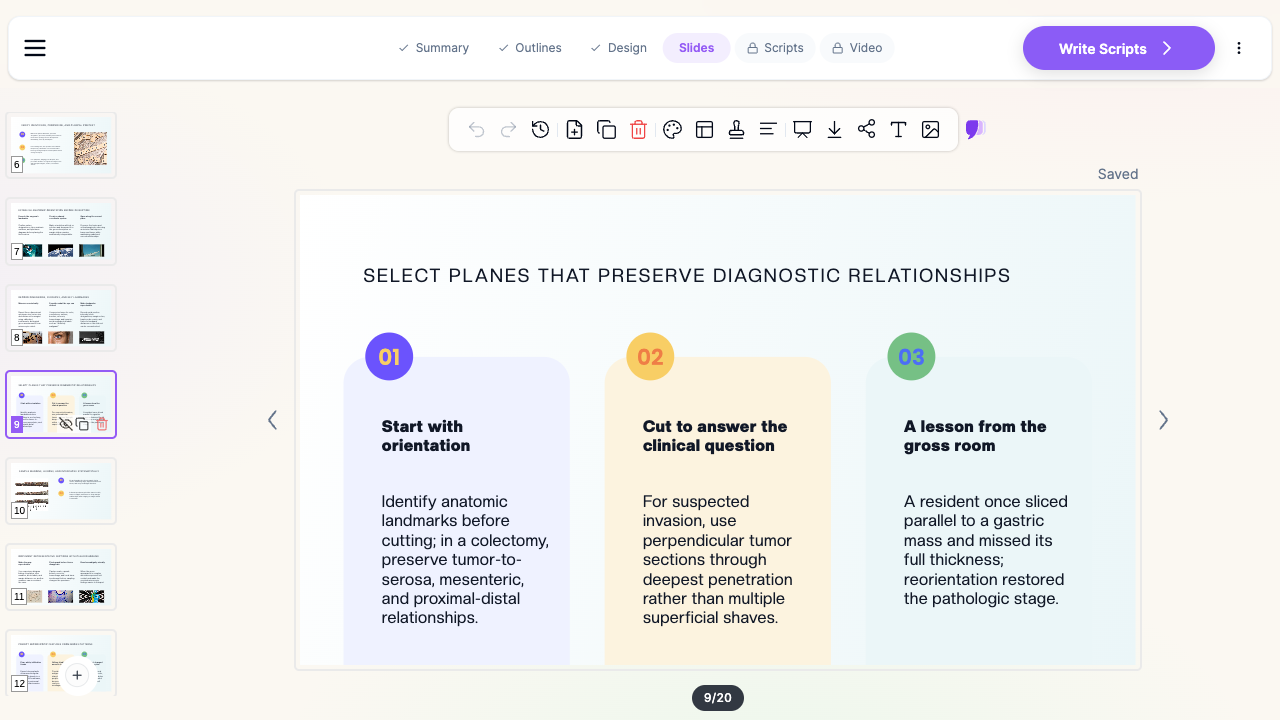
Orientation established and documented before cutting. The single most transferable habit in the gross room is that the specimen is examined and documented before it is altered — oriented where orientation is possible, and explicitly recorded as unoriented where it is not. CAP protocols hedge margin reporting with "per orientation, if possible" for exactly this reason. Teaching decks that jump straight to sectioning teach the wrong order.
Gross description language that another pathologist can reconstruct from. Precise dimensions, distances to margins, ink scheme, block key. Avoid conclusory terms in the gross description — "firm, stellate, 2.1 cm, 0.4 cm from the inked posterior margin" survives review in a way that "obviously malignant" does not.
Explicit sampling logic. Why this plane, why this many blocks, why this interface. Students copy sampling behavior long before they understand it, so the reasoning has to be on the slide.
The microscopic payoff. Close the loop. Show what the sampling captured — or what a poor sampling decision would have missed. Correlation is the entire pedagogical point.
Ancillary studies in context. Immunohistochemistry and molecular panels belong next to the differential they resolve, not in an appendix.
Current reporting standards. Staging and reporting protocols get revised. Cite the edition you are teaching, and say which one it is.
Best Practices
Do:
- Paste your learning objectives verbatim and let the outline map to them.
- Fix structure at the outline stage, before generating slides.
- Use your own de-identified gross photographs and photomicrographs.
- Pull references from the Research tab as you build, not afterward.
- Keep speaker notes usable by a colleague covering your session.
- Export to PowerPoint if your department requires a native file.
Don't:
- Upload specimen photographs before they have been de-identified to your institution's standard. Accession numbers, patient identifiers, requisition text, and burned-in annotations are the visible half; image metadata (EXIF, DICOM headers) can carry identifiers a crop never touches, and HIPAA de-identification means Safe Harbor or Expert Determination, not "I cropped the label off."
- Let a generated stock image stand in for a real specimen. If the slot needs a gross photo, put a gross photo there or remove the slot.
- Present a staging or reporting scheme without naming its edition.
- Skip the correlation slide. A grossing lecture with no microscopic outcome teaches procedure without purpose.
Pathology Departments and Enterprise Deployment
For departments standardizing a rotation curriculum across faculty, the Enterprise plan adds SSO, centralized team billing, shared brand templates, and team collaboration so a lecture built by one attending is usable by the next.
Note on patient data: ChatSlide's standard plans are not a HIPAA-covered service — keep PHI out of slide content and uploads. For hospital systems, group practices, and clinics that need a Business Associate Agreement, our Enterprise plan offers HIPAA-compliant deployment options — contact us to discuss BAA terms, SSO, and on-prem / private-cloud hosting.
Frequently Asked Questions
Does ChatSlide generate histology or gross images? ChatSlide has AI image generation, and it is fine for diagrams, schematics, and title slides — but do not use it for specimen evidence. A synthetic "photomicrograph" has no place in a pathology teaching deck. The AI builds structure, text, tables, and notes; you supply your own de-identified specimen photographs and photomicrographs.
Can it build a full 50-slide PA lecture? Yes. Full-length lecture generation in a single pass is the intended use — set the length and section count at the outline stage.
Will it cite reporting protocols and staging references correctly? The Research tab pulls PubMed, Google Scholar, and trial records with citations attached. Always confirm the edition of any staging or reporting protocol yourself before teaching from it.
Is this different from your radiology guides? Yes. Medical imaging and radiology covers image-interpretation teaching, and oncologic imaging covers response assessment. This guide is anatomic pathology — gross examination, sampling, and histologic correlation.
Can I upload our departmental grossing manual? Yes. Uploading your protocol or syllabus produces an outline built from your standards rather than a generic one. Remove any patient-identifiable content first.
What formats can I export? Editable PowerPoint and PDF on paid plans, plus in-browser presenting and narrated video export for asynchronous learners.
Is there a free tier? Yes, free to start with no card required. Editable PowerPoint export and longer decks are on paid plans.
Get Started
Bring your objectives, your grossing protocol, or last year's deck, and let ChatSlide handle the structure so your time goes into the specimen images and the reasoning around them.
Make your pathology presentation with ChatSlide — free to start, no card required.