
Quick Answer: ChatSlide is an AI presentation maker that oncologic imaging fellows, cancer-imaging faculty, and tumor board radiologists use to turn a reading list, a guideline PDF, or a single topic line into a finished teaching deck in under two minutes. It searches PubMed and clinical trial registries directly, drafts structured slides with speaker notes, and exports to PowerPoint, PDF, or a narrated video. Trusted by professionals at 750+ universities and organizations. Free to start, no credit card.
The Oncologic Imaging Teaching Problem
Cancer imaging is taught in fragments. A fellow presents a practical approach to thyroid bed lesions at Wednesday's teaching session. A breast imaging attending prepares a 49-minute screening lecture for fellows and attendings. Someone else has to explain, at a multidisciplinary tumor board, why one indeterminate node changes a curative-intent plan and another does not.
The evidence for all of it already exists — the NCCN or ESMO guideline, the response-criteria paper, the landmark screening trial, the department's own case archive — but it exists as PDFs and PACS studies, not as slides. Turning a staging system, a response-assessment framework, and a surveillance interval schedule into a lecture that a first-year fellow can follow is an evening of work, and it is the part of academic radiology least related to reading studies.
The result is the deck everyone in the reading room recognizes: dense guideline text pasted from a PDF, a table nobody can read from the back row, and images without the one arrow that would have made the finding obvious.

This guide covers cancer imaging specifically — staging, response assessment, post-treatment surveillance, screening programs, and tumor board imaging review. For general diagnostic radiology teaching see our medical imaging and radiology guide, for procedural work see the interventional radiology guide, and for treatment-side oncology talks see the oncology and hematology guide.
What Makes ChatSlide Powerful for Cancer Imaging Decks
Direct Access to the Literature You Have to Cite
Oncologic imaging teaching is guideline-driven and trial-driven. A slide claiming a surveillance interval or a screening benefit needs a citation, and hunting those down in a separate tab is most of the preparation time. ChatSlide's Research tab searches PubMed, Google Scholar, and ClinicalTrials.gov from inside the editor and pulls findings into the slides with citations attached.
Three Input Modes That Match Where Cancer Imaging Content Lives
- File upload — the guideline PDF, the response-criteria paper, the departmental protocol, or an existing lecture deck you want restructured. Scanned pages and photographed handouts are read with OCR.
- Web and video URLs — link a society guideline page, a trial summary, or a recorded conference talk.
- Text prompt — "45-minute lecture for radiology fellows on a practical approach to post-thyroidectomy neck ultrasound: normal postoperative anatomy, benign findings, features suspicious for recurrence, and when to biopsy" is enough for a full first draft.
Outline-First, Because Sequence Is What Teaching Is
ChatSlide drafts the outline before rendering any slides. For an imaging lecture this is where the teaching actually gets designed: you confirm that normal postoperative anatomy comes before the abnormal, that the modality-selection logic precedes the case examples, and that pitfalls sit next to the findings they mimic — while it is still a reorderable list rather than 40 finished slides.
Speaker Notes for the Questions Fellows Actually Ask
Every slide gets drafted speaker notes. For a teaching session that is the difference between showing an image and teaching from it: the notes carry the differential, the reason the alternative modality was not chosen, the reporting language you would use, and the guideline reference behind the recommendation.
Real Charts From Real Numbers
Sensitivity and specificity by modality, interval cancer rates, recall rates, stage distribution across a screening cohort, response rates by criteria — paste or upload the numbers and ChatSlide renders an actual chart on the slide rather than a blurry screenshot from a paper.
Narrated Video Export for Fellowship Curricula
The same deck exports as a narrated video with an AI voice and optionally an avatar presenter. Programs use this to build an asynchronous fellowship curriculum that trainees can rewatch before a rotation, and to distribute a tumor board teaching case to clinicians who could not attend.
AI Editing Tools That Update a Lecture Instead of Rebuilding It
Guidelines are revised, staging editions change, and a talk gets reused for a different audience. Rewrite the affected slide, split an overloaded one, or adjust the depth for residents rather than fellows — without regenerating a deck you already refined.
How ChatSlide Builds Your Oncologic Imaging Deck
- Upload or describe it. Drop in the guideline PDF, the review article, and your reading list — or type the topic and audience.
- Search the literature. Use the Research tab to pull the trials and guidelines the talk depends on.
- Review the outline. Reorder sections, add your institution's protocol, remove what does not apply to your audience.
- Generate and edit. ChatSlide drafts slides with charts, imagery, and speaker notes. Refine slide by slide, then place your own de-identified images where they belong.
- Export. PowerPoint or PDF for the session, a narrated video for the curriculum.
Direct Research Database Access
ChatSlide's Research tab connects to the databases physicians use daily:
- PubMed: Search by keyword, PMID, or DOI. Find the landmark trials, recent publications, and clinical guidelines relevant to your case. The AI reads abstracts and incorporates key findings into your slides with citations.
- Google Scholar: When your topic spans disciplines — say, the intersection of genetics and oncology — Scholar captures the broader academic literature that PubMed alone might miss.
- Clinical Trials (NCT): Presenting on a treatment where pivotal trials are ongoing? Search by NCT number or condition to pull trial design, endpoints, and status into your slides.

Use Cases for Cancer Imaging Teams
Fellowship teaching sessions. A practical approach to a specific problem — thyroid bed lesions after thyroidectomy, indeterminate adrenal nodules, post-chemoradiation rectal MRI — built from the guideline and two review articles, with the pitfalls section written before the cases rather than after. Typical saving: an evening per session.
Subspecialty lectures for fellows and attendings. A 45-to-60-minute screening or staging lecture with the trial evidence, the performance metrics charted, and the current recommendation stated plainly. One template carries across the whole lecture series.
Multidisciplinary tumor board imaging review. The imaging summary a surgical or medical oncology audience actually needs: what the study shows, what it cannot resolve, and what the next study would change. Generated from the report and the staging framework rather than rewritten each week.
Post-treatment surveillance protocols. Interval schedules, expected post-treatment appearances, and the findings that warrant escalation — the talk that prevents an unnecessary biopsy and catches the recurrence that matters.
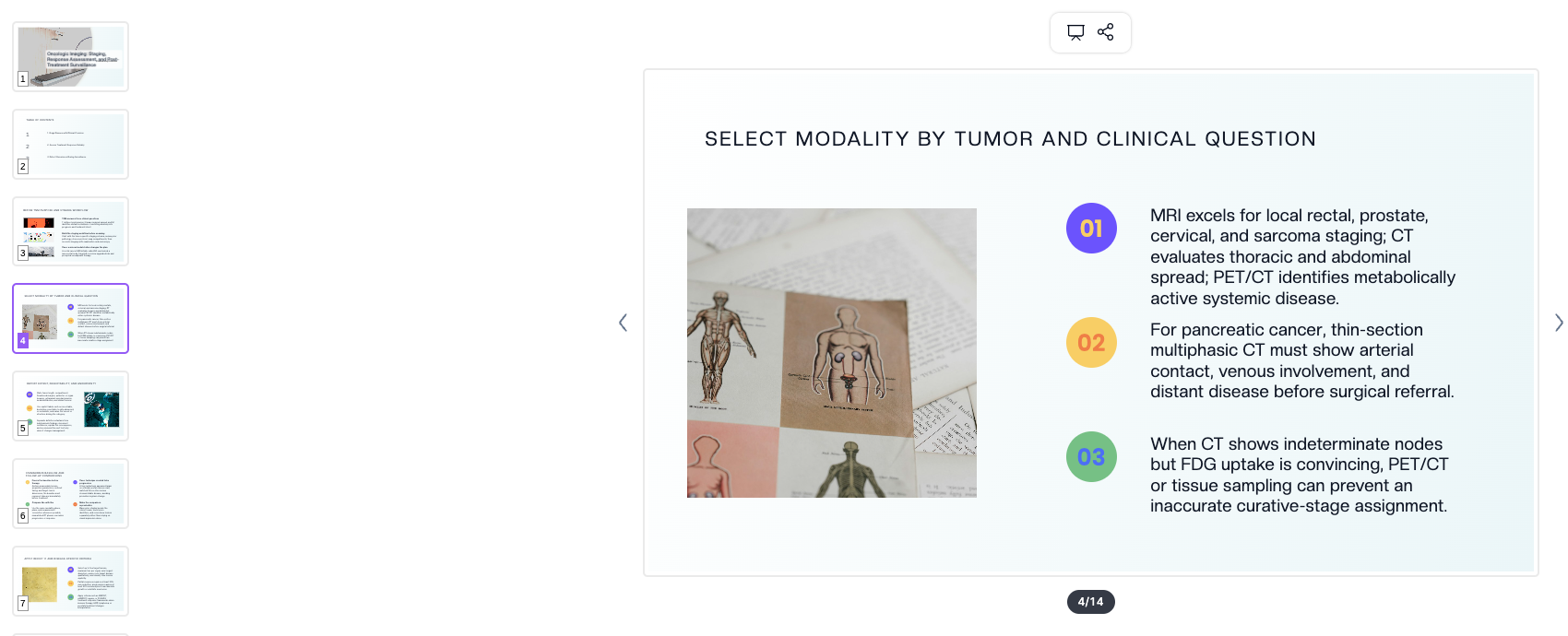
Resident introductions to oncologic imaging. Modality selection by tumor type and clinical question, staging vocabulary, and how a radiology report changes management — the orientation lecture every rotation needs and nobody has time to rebuild.
Departments and cancer centers. A shared template and a shared curriculum across faculty, so the fellow who rotates between sites sees one consistent teaching format.
Cancer Imaging Presentation Tools Compared (2026)
| Capability | ChatSlide | Gamma | Tome | Beautiful.ai |
|---|---|---|---|---|
PubMed / Scholar / ClinicalTrials search inside the editor | Yes | No | No | No |
Generate from an uploaded guideline PDF or paper | Yes, with OCR | Limited | Limited | No |
Real charts from your own performance data | Yes | Partial | Partial | Yes |
Drafted speaker notes on every slide | Yes | Partial | No | No |
Narrated video export (AI voice / avatar) | Yes | No | No | No |
PowerPoint export that stays editable | Yes | Yes | Limited | Yes |
Free tier to evaluate | Yes | Yes | Yes | Limited |
Time Comparison: Manual vs. AI-Assisted
| Task | Manual | With ChatSlide |
|---|---|---|
Literature search and citation collection | 90–120 min | 10 min |
Structuring the lecture | 60 min | 2 min |
Writing slide copy | 90 min | 15 min (editing) |
Building charts from published data | 40 min | 5 min |
Writing speaker notes | 45 min | 10 min (editing) |
Formatting and template consistency | 30 min | 0 |
Total | ~6 hours | ~40 minutes |
What a Strong Oncologic Imaging Presentation Includes
- The clinical question first. Every imaging decision in the talk should trace back to a management decision. "Is this resectable?" and "has it recurred?" are different lectures even when the anatomy is identical.
- Modality selection with its reasoning. Which study answers the question, which one answers it faster, and what each one cannot exclude. State the limitation on the same slide as the strength.
- Normal before abnormal. Post-treatment anatomy, expected inflammatory change, and benign postoperative findings taught first, so the suspicious finding has something to be compared against.
- The staging or response framework, applied. Naming the edition or criteria set is not enough; show it applied to a case, including the measurement that was borderline.
- Pitfalls beside the findings they mimic. The false positives are the teaching point, not an appendix.
- A clear surveillance recommendation. Interval, modality, duration, and the trigger for escalation — with the guideline cited.
- De-identified images with the arrow on them. One finding per image, annotated, at a size that survives projection.
Best Practices
Do
- Open with the management decision the imaging serves, then the imaging.
- Cite the guideline edition and year on the slide that makes the recommendation.
- Show one finding per image and annotate it rather than describing where to look.
- Put the mimics next to the true positives.
- Keep one template across a lecture series so trainees learn the layout once.
- Provide the summary as an explicit take-home slide — trainees photograph it.
Don't
- Paste guideline tables as screenshots; rebuild them as slide content that is legible from the back row.
- Present a response or staging criterion without applying it to at least one case.
- Include patient identifiers, accession numbers, dates of service, or unredacted DICOM overlays in teaching material.
- Assume a mixed tumor board audience shares radiology vocabulary — say what the finding means for management.
ChatSlide for Radiology Departments and Cancer Centers
Teaching material is a departmental asset, not a personal one. The Enterprise plan adds SSO, centralized billing, shared brand templates so every fellowship lecture and tumor board summary looks the same, and team collaboration for faculty who hand decks between sections. For hospital systems and cancer centers with stricter data-handling requirements, Enterprise also offers HIPAA-compliant deployment options including BAA terms and private-cloud or on-prem hosting — contact us to discuss it.
Note on patient data: ChatSlide's standard plans are not a HIPAA-covered service — keep PHI out of slide content and uploads. For hospital systems, group practices, and clinics that need a Business Associate Agreement, our Enterprise plan offers HIPAA-compliant deployment options — contact us to discuss BAA terms, SSO, and on-prem / private-cloud hosting.
Frequently Asked Questions
Can ChatSlide build a lecture from a guideline PDF or a review article? Yes. Upload the PDF, Word document, or an existing PowerPoint and it extracts the structure into an editable outline before generating slides. Scanned pages are read with OCR.
Does it find the citations for me? Yes. The Research tab searches PubMed, Google Scholar, and ClinicalTrials.gov from inside the editor, and incorporates findings into slides with citations. Verify each citation before you present — it is a drafting aid, not a substitute for reading the paper.
Can I use my own imaging cases? Yes, and you should — place your own de-identified images on the slides ChatSlide generates. Remove identifiers, accession numbers, and DICOM overlay text first, and follow your institution's policy for teaching files.
Does it handle staging systems and response criteria? It drafts the framework and the surrounding teaching structure from the sources you give it. Confirm the edition and the criteria set against the current guideline yourself before presenting, since these are revised on their own schedules.
Can I make an asynchronous version for fellows? Yes. The same deck exports as a narrated video with an AI voice or an avatar presenter, which is how most programs build a rewatchable fellowship curriculum.
Can I export to PowerPoint? Yes, as an editable PowerPoint file, and as PDF.
Is it free? Yes, free to start with no credit card. Paid plans add higher generation limits, video export, and team features.
Get Started
Take the guideline, the review article, or the topic your next teaching session is on, drop it into ChatSlide, and have a structured lecture with cited evidence and speaker notes in about two minutes — then spend your preparation time on the cases instead of the formatting.
Make your oncologic imaging presentation with ChatSlide — free to start, no credit card required.