
Quick Answer: ChatSlide is an AI radiation oncology presentation maker for radiation oncologists, medical physicists, radiation therapists, and residents. It turns a lecture topic, a trial PDF, or a treatment protocol into a structured deck with dose and fractionation tables, toxicity comparisons, outcome charts, PubMed citations, speaker notes, and PowerPoint or Google Slides export. Trusted across 750+ universities and hospital training programs, ChatSlide can build a 25-slide radiotherapy lecture in under 2 minutes. Free to start, no card required.
The Radiotherapy Lecture Problem
Radiation oncology talks carry an unusual load. A single CME lecture on breast radiotherapy has to hold fractionation schedules, technique comparisons, dose constraints, toxicity data, and trial evidence, and it has to do all of it for an audience that is often not made of radiation oncologists. Speaking to a gynecology college, a surgical department, or a tumor board means translating dosimetry into decisions other specialists can act on, without flattening the evidence.
The slide assembly is where the evening goes: rebuilding the same hypofractionation table, re-typing trial arms and hazard ratios, hunting for a diagram that shows the difference between conventional and moderately hypofractionated schedules.
ChatSlide keeps the clinical judgment and the dose decisions with you. It removes the assembly, and it makes the second version of a talk, for a different audience or a different length, cheap instead of a new project.
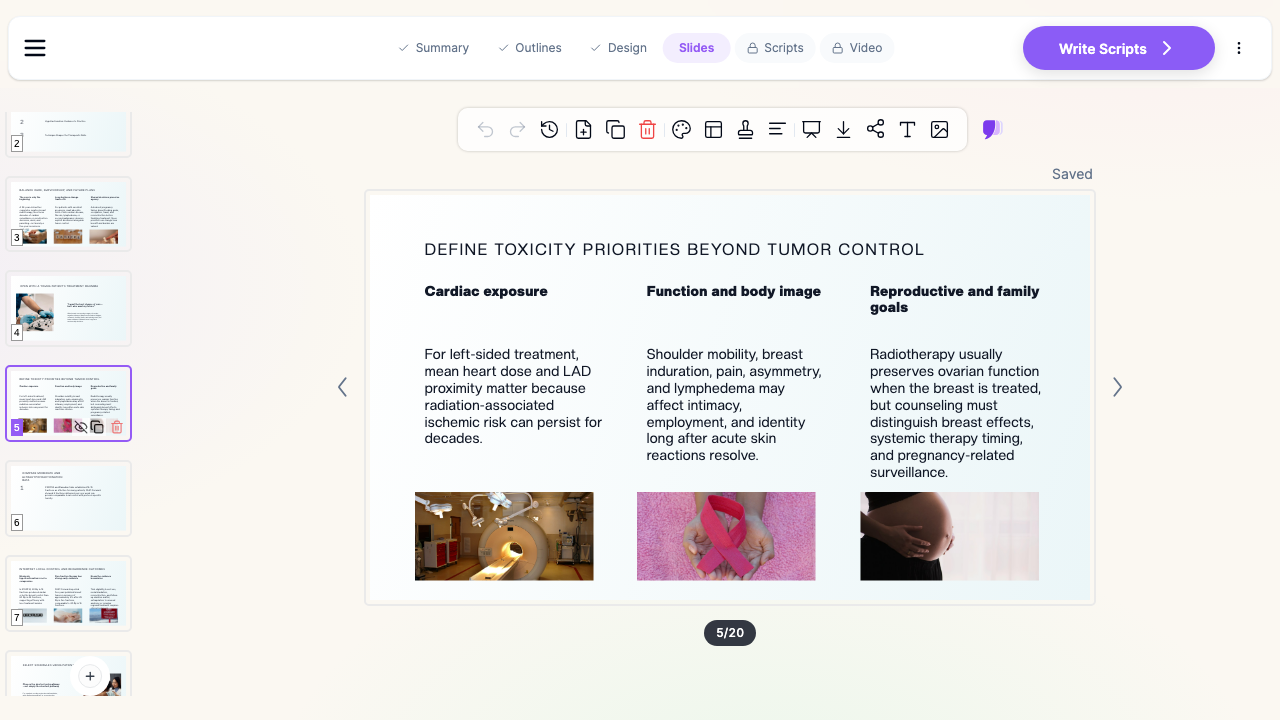

What Makes ChatSlide Powerful for Radiation Oncology
Builds the tables radiotherapy talks run on
Fractionation schedule by indication, technique comparison, organ-at-risk constraints, acute versus late toxicity, trial arms and endpoints. ChatSlide assembles these as real tables and structured layouts rather than paragraphs, which is what makes a dose discussion followable from the back of a room.
Reads the trial PDF or protocol you are presenting
Upload a published trial, a departmental protocol, or a guideline PDF and generate the deck from it. The slides follow the paper's own design, endpoints, and numbers instead of a generic summary, which matters when the audience will ask what the confidence interval was.
Searches PubMed and trial registries while you build
Pull the landmark trials into the deck by keyword, PMID, DOI, or NCT number, with citations attached. Useful when a talk has to place a new schedule against everything that came before it.
Charts from your own numbers
Paste institutional or published figures, such as local control by schedule, cardiac dose by technique, or toxicity rates over follow-up, and ChatSlide turns them into chart slides. Use real numbers, labelled with their source and period.
Retargets one talk to a different specialty
Ask for the same content "for radiation oncologists" and then "for gynecologists who refer these patients," and you get two genuinely different decks: one keeps constraint tables and planning detail, the other keeps referral timing, what to counsel a patient about, and what the toxicity actually looks like in clinic.
Speaker notes per slide
Generate notes so a talk can be delivered on a tight CME clock, or handed to a colleague or a resident who did not build it.
How ChatSlide Builds Your Radiation Oncology Deck
- Start from a topic or a file. Type "Modern breast radiotherapy: hypofractionation, technique and toxicity, 25 slides" or upload the trial, protocol, or your existing slides.
- Set the audience and the length. Specialty audience, referring physicians, residents, or patients, plus the talk duration, in any of the supported languages.
- Review the outline first. The section structure comes back before the slides are written, so the argument gets fixed once instead of across 25 slides.
- Generate, then edit. Slides arrive with layouts, images, tables, and notes. Edit inline, regenerate a single slide, then export to PowerPoint, PDF, or Google Slides, or present from the browser.
Use Cases in Radiation Oncology
- CME lecture to a referring specialty. A radiation oncologist speaking to a gynecology or surgical college on what has changed in the last five years. Challenge: the audience does not plan treatments, so the deck has to lead with decisions, not dosimetry.
- Tumor board case presentation. One case, the imaging, the options, the recommendation. Challenge: it has to be short and defensible. Generate a fixed-length deck and keep one question per slide.
- Resident teaching series. Site-by-site lectures that keep a consistent structure, so week six looks like week one.
- Journal club on a practice-changing trial. Upload the paper, keep the exact numbers, and add the "what did we know before" and "what does this add" slides.
- Patient-facing counselling slides. A short plain-language version explaining what daily treatment involves, what skin and fatigue effects to expect, and what to report.
- Departments and cancer centers. Groups that give the same talks across sites can hold a shared template so every deck carries the same look. Contact us about team billing, SSO, and shared brand templates.
Radiation Oncology AI Tools Compared (2026)
| Capability | ChatSlide | Gamma | Tome | Beautiful.ai |
|---|---|---|---|---|
Upload a trial PDF and build from it | Yes | Limited | Limited | No |
PubMed / Google Scholar / trial search built in | Yes | No | No | No |
Dose, schedule, and constraint tables | Yes | Partial | Partial | Partial |
Charts from pasted outcome data | Yes | Partial | Partial | Yes |
Retarget the same deck to another audience | Yes | Manual | Manual | Manual |
Speaker notes generated per slide | Yes | Partial | Partial | No |
PowerPoint and Google Slides export | Yes | Yes | Partial | Yes |
Time Comparison: Manual vs. AI-Assisted
| Task | Manual | With ChatSlide |
|---|---|---|
Outline a 25-slide CME lecture | 1 to 2 hours | 2 minutes |
Draft slide content from a trial or protocol | 4 to 6 hours | Minutes |
Build fractionation and toxicity tables | 1 to 2 hours | Included |
Produce a referrer-facing version of the same talk | 2 to 3 hours | One regeneration |
Write speaker notes | 1 to 2 hours | Included |
Direct Research Database Access
ChatSlide's Research tab connects to the databases physicians use daily:
- PubMed: Search by keyword, PMID, or DOI. Find the landmark trials, recent publications, and clinical guidelines relevant to your case. The AI reads abstracts and incorporates key findings into your slides with citations.
- Google Scholar: When your topic spans disciplines — say, the intersection of genetics and oncology — Scholar captures the broader academic literature that PubMed alone might miss.
- Clinical Trials (NCT): Presenting on a treatment where pivotal trials are ongoing? Search by NCT number or condition to pull trial design, endpoints, and status into your slides.

What a Strong Radiation Oncology Deck Includes
- A scope slide. Which indication, which patient group, and what the talk does not cover.
- The schedule table early. What is being compared, in fractions and total dose, before any outcome data appears.
- Technique shown, not described. A plan comparison or a diagram does more than a paragraph about conformality.
- Toxicity separated into acute and late. These land differently with a referring audience and should not share a slide.
- Evidence with its design attached. Trial name, population, endpoint, follow-up. A hazard ratio without a population is not a finding.
- A special-population slide where it matters. Younger patients, reconstruction, fertility and pregnancy questions, and cardiac risk are the parts referrers most often ask about.
- A referral and timing slide. When to send, what to send, and what happens in the first week.
- A summary slide people photograph. In practice this is the slide that survives the talk.
Best Practices
Do
- Build the specialist version first, then regenerate the referrer version from it so the facts stay identical.
- Name the trial, population, and follow-up next to every outcome number.
- Keep dose and fractionation in a table, never in prose.
- Label your own institutional figures with the period they cover.
- Have a clinical lead review the final deck. The AI drafts, it does not sign off.
Don't
- Do not put patient names, record numbers, identifiable images, or dosimetry exports tied to a patient into slides or uploads.
- Do not present a schedule that conflicts with your department protocol or national guideline. The protocol is the source of truth.
- Do not reduce a specialist deck to a referrer deck by deleting slides. Regenerate at the right level instead.
Note on patient data: ChatSlide's standard plans are not a HIPAA-covered service — keep PHI out of slide content and uploads. For hospital systems, group practices, and clinics that need a Business Associate Agreement, our Enterprise plan offers HIPAA-compliant deployment options — contact us to discuss BAA terms, SSO, and on-prem / private-cloud hosting.
Frequently Asked Questions
Can ChatSlide build a lecture on breast radiotherapy specifically? Yes. Give the indication, the audience, and the length, and ask for the sections you want, such as fractionation, technique, toxicity, and special populations.
Can it build from a published trial PDF? Yes. Upload the paper and generate from it. Ask it to keep the reported numbers exactly and to distinguish significant from non-significant results.
Can it make the same talk for a non-radiation-oncology audience? Yes. Regenerate the same topic for referring physicians, residents, or patients, and the level and emphasis change rather than just the wording.
Does it handle tables of dose and fractionation? Yes. Ask for a table and the schedules, total dose, and fractions come back as a real table you can edit.
Can I add my own outcome data as charts? Yes. Paste your figures and ChatSlide builds chart slides from them. Use your own or published numbers and label the source.
Does it work in other languages? Yes. Choose the output language when you generate, which is useful when a CME talk and its patient version run in different languages.
Can I export to PowerPoint? Yes. Export to PowerPoint, PDF, or Google Slides, or present directly from the browser.
Is it free? Yes, you can start free without a card. Paid plans add longer decks, more generations, and more export options.
Get Started
Make your radiation oncology deck with ChatSlide: pick the indication and the audience, paste the topic or upload the trial, and get a structured deck with tables, charts, citations, and notes in minutes. Start free at ChatSlide — no card required.
Related guides: oncology and hematology presentations, oncologic imaging presentations, medical grand rounds presentations, medical imaging and radiology presentations, and patient education presentations.