
Quick Answer: To make lecture slides with AI, (1) upload your reading, syllabus, or topic; (2) the tool drafts an outline — objectives, key concepts, examples, and a recap — then builds matching slides; (3) edit and export to PowerPoint, PDF, or Google Slides. Most AI tools produce shallow, generic decks, so use a document-grounded one like ChatSlide that turns your own course material into a full lecture deck in under 2 minutes — free for educators.
Why Lecture Slides Take So Long
If you teach — at a university, a high school, or online — you already know the drill. You spend hours building slide decks for a single class session. You wrestle with layouts, hunt for images, and rewrite bullet points until they fit the slide. Then you do it all again next week.
The problem isn't a lack of teaching expertise. It's that traditional presentation tools weren't designed for educators. They give you a blank canvas and expect you to be a graphic designer, a copywriter, and a subject-matter expert all at once.
AI presentation tools promise to change that. But most of them produce generic, surface-level slides that wouldn't survive the first row of a lecture hall. The slides look polished but say nothing of substance — and your students can tell.
What Teachers Actually Need from a Slide Maker
Educators have different requirements than business professionals or marketers. A lecture deck needs to:
- Cover the topic with real depth. Students expect content they can study from, not vague talking points.
- Follow a logical teaching sequence. Introduction, core concepts, examples, then synthesis — not random sections.
- Include relevant visuals. Images, diagrams, and data visuals that reinforce the lesson, not stock photos for decoration.
- Be easy to customize. Every class is different. You need to add, remove, or rearrange slides without starting over.
- Support multiple formats. Export to PowerPoint for classroom projectors, or share as a link for remote students.
Most AI tools fail on the first point. They generate five bullet points per slide and call it done. That works for a sales pitch. It doesn't work for a 50-minute lecture on organic chemistry or a seminar on postcolonial literature.
How ChatSlide Handles Lecture Content
ChatSlide approaches slide generation differently. Instead of treating every presentation as a business deck, it adapts to your scenario — including education and lectures.
Here's the workflow:
1. Start With Your Topic
Enter your lecture topic and specify your audience. "University professors and school teachers" or "Undergraduate biology students" — the specificity matters because it shapes the depth and vocabulary of the generated content.
2. Let AI Generate the Outline
ChatSlide creates a structured outline with the number of sections and subpoints you choose. For a lecture, six sections with three subpoints each typically gives you a 20-slide deck — enough for a full class session.
The outlines follow a pedagogical structure rather than a marketing funnel. You get an introduction that frames the topic, core sections that build on each other, and a conclusion that ties the concepts together.
3. Generate Slides with Images
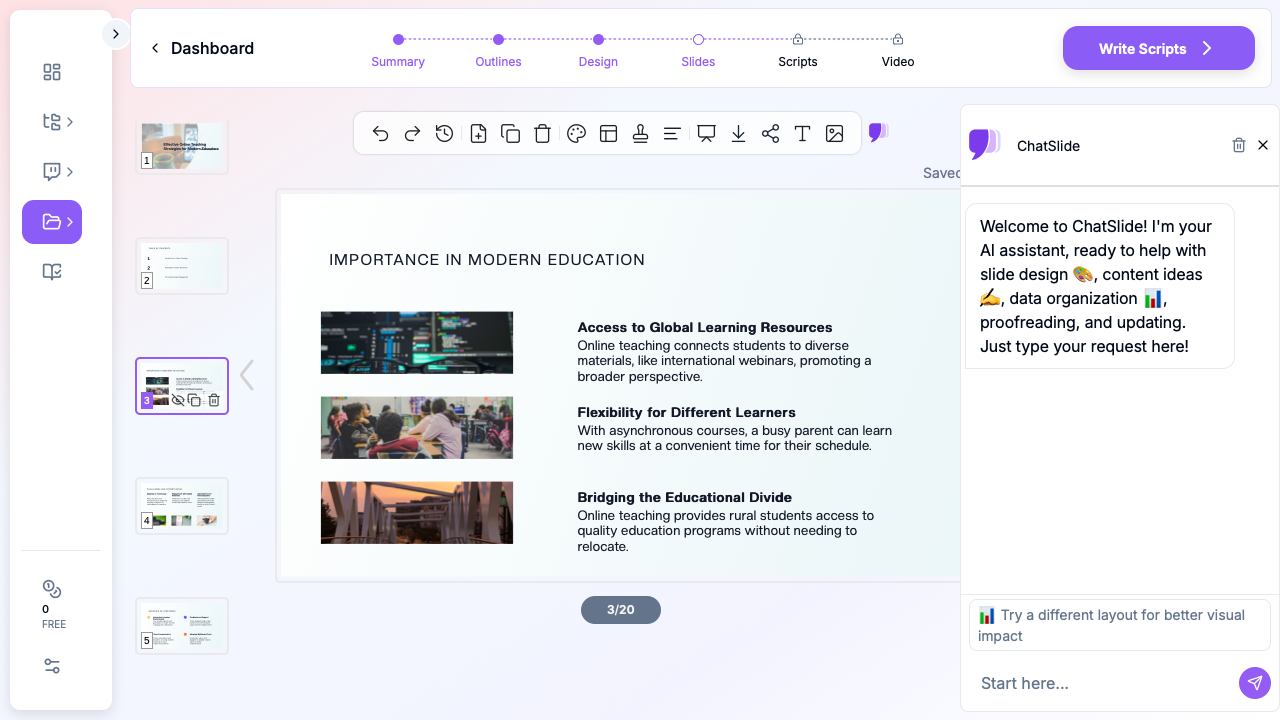
This is where the difference matters most. ChatSlide generates slides with actual content — not just titles and bullet points, but explanatory text that covers the subject. Then it automatically adds relevant images from its stock library to reinforce each point.
You get slides that look like something you'd create after hours of work, produced in about two minutes.
4. Edit and Customize
Every slide is fully editable. Add your own notes, rearrange sections, swap images, or adjust the text. The built-in AI assistant can help you refine specific slides — ask it to "make this section more detailed" or "add an example for this concept" and it updates the content in place.
5. Export and Share
Download as PowerPoint for classroom use, or share a link for online and remote learners. The slides maintain their formatting across both formats.
Practical Use Cases for Educators
Here are specific ways teachers and professors are using AI-generated lecture slides:
Course Material from Scratch
Starting a new course? Enter each lecture topic and generate a baseline deck for the entire semester. Then customize each one with your specific examples, references, and teaching style. This cuts your prep time dramatically while ensuring consistent quality across all sessions.
Converting Documents to Lectures
Have a research paper, textbook chapter, or PDF that you want to turn into a lecture? Upload the document and ChatSlide extracts the key points, organizes them into a teaching sequence, and generates slides from the content. This is especially useful for graduate seminars where you're teaching from published research.
Multilingual Teaching
Teaching in a language that isn't your first? Or teaching to international students? Generate slides in any of the supported languages. The content adapts to the language — it's not just translated, it's generated natively in that language with appropriate academic vocabulary.
Quick Review Sessions
Need a 10-slide review deck before an exam? Enter the topics you want to cover and specify a shorter format. The AI compresses the material into a focused review presentation that highlights the key concepts students need to remember.
Tips for Better Lecture Slides
Whether you use AI or build slides manually, these principles make lecture decks more effective:
One concept per slide. Crowded slides lose your audience. Let each slide make a single point clearly.
Use images that teach. A photo of a laboratory reinforces a chemistry lecture better than an abstract geometric pattern. ChatSlide's image selection is designed around topic relevance, not just aesthetics.
Build sequentially. Each slide should connect to the previous one. If a student sees slide 12 without context, they should still understand what section of the lecture they're in.
Leave room for your voice. The slides support your teaching — they don't replace it. Keep text concise enough that students listen to you rather than reading the screen.
Make it exportable. Your students will want the slides for review. Use a format that's easy to share and doesn't break on different devices.
How This Compares to Building Slides Manually
A typical 20-slide lecture deck takes 2-4 hours to build from scratch in PowerPoint or Google Slides. That includes researching content, writing text, finding images, and formatting everything.
With ChatSlide, the same deck takes about 5 minutes to generate and another 10-15 minutes to customize. That's roughly a 90% reduction in prep time — time you can spend on actual teaching, research, or grading.
The trade-off is control. A manually built deck reflects exactly your thinking, your examples, your phrasing. An AI-generated deck gives you a strong starting point that you then shape to fit your style. Most educators find the starting point is good enough that customization is quick.
Get Started
If you're spending more time building slides than preparing to teach, it's worth trying an AI-powered approach. ChatSlide is built for exactly this use case — educators who need professional lecture slides without the hours of formatting.
Start with one lecture topic. Generate the deck, customize it to your standards, and see how it compares to your usual workflow. Most teachers find that once they've tried it for one class, they use it for every session after.
Try ChatSlide for free — no credit card required.