
The Challenge of Construction Research Presentations
Presenting construction research is uniquely demanding. Your slides need to communicate technical data like structural load calculations, lifecycle cost comparisons, and environmental impact metrics while remaining accessible to audiences that range from fellow engineers to city planning committees and project stakeholders.
Most construction professionals spend hours wrestling with slide formatting when they should be refining their analysis. A structural comparison between mass timber and conventional steel framing involves charts, material property tables, and cost projections that all need to look cohesive. Manual slide creation turns a two-day research effort into a four-day project.
AI presentation tools are changing how architects, civil engineers, and construction researchers share their work. Instead of formatting slides from scratch, you can generate structured decks that handle the layout while you focus on the research that matters.
What Construction Professionals Actually Present
Understanding the most common presentation scenarios helps you build better decks, whether you are using AI or not.
Material comparison studies are among the most frequent. Evaluating mass timber versus traditional steel or concrete involves side-by-side metrics on cost, carbon footprint, structural performance, and regulatory compliance. These presentations need clear data visualization to make complex tradeoffs understandable.
Project proposals and feasibility studies require a different approach. Here, the audience is often non-technical: developers, municipal boards, or investors. The challenge is translating engineering analysis into business language without losing accuracy.
Conference and academic presentations target peers who want methodology details, data quality discussion, and nuanced findings. These decks are typically more data-dense and follow academic conventions.
Client progress updates on active construction projects need to be concise and focused on milestones, budget status, and upcoming decisions. These are recurring presentations that benefit from templated structures.
Step-by-Step: Creating Your Construction Presentation
Here is how to build a professional construction research presentation using ChatSlide, from topic definition to a finished deck.
Step 1: Define Your Research Topic and Audience
Start by entering your specific topic. "Sustainable Construction: Mass Timber vs Traditional Building Materials" works better than "construction materials" because specificity helps the AI generate relevant section structures and technical depth.
Select your audience carefully. A deck for a construction industry conference needs different depth than one for a municipal planning review. ChatSlide adjusts language complexity and technical detail based on this selection.
Step 2: Review and Customize the Outline
The AI generates a structured outline covering key aspects of your topic. For a materials comparison study, expect sections on structural properties, environmental impact, cost analysis, regulatory considerations, and case studies.
This is your chance to reshape the narrative. If your research focuses specifically on seismic performance, promote that section and reduce the lifecycle cost discussion. If your audience cares most about budget implications, lead with economics rather than engineering properties.
Step 3: Generate Professional Slides
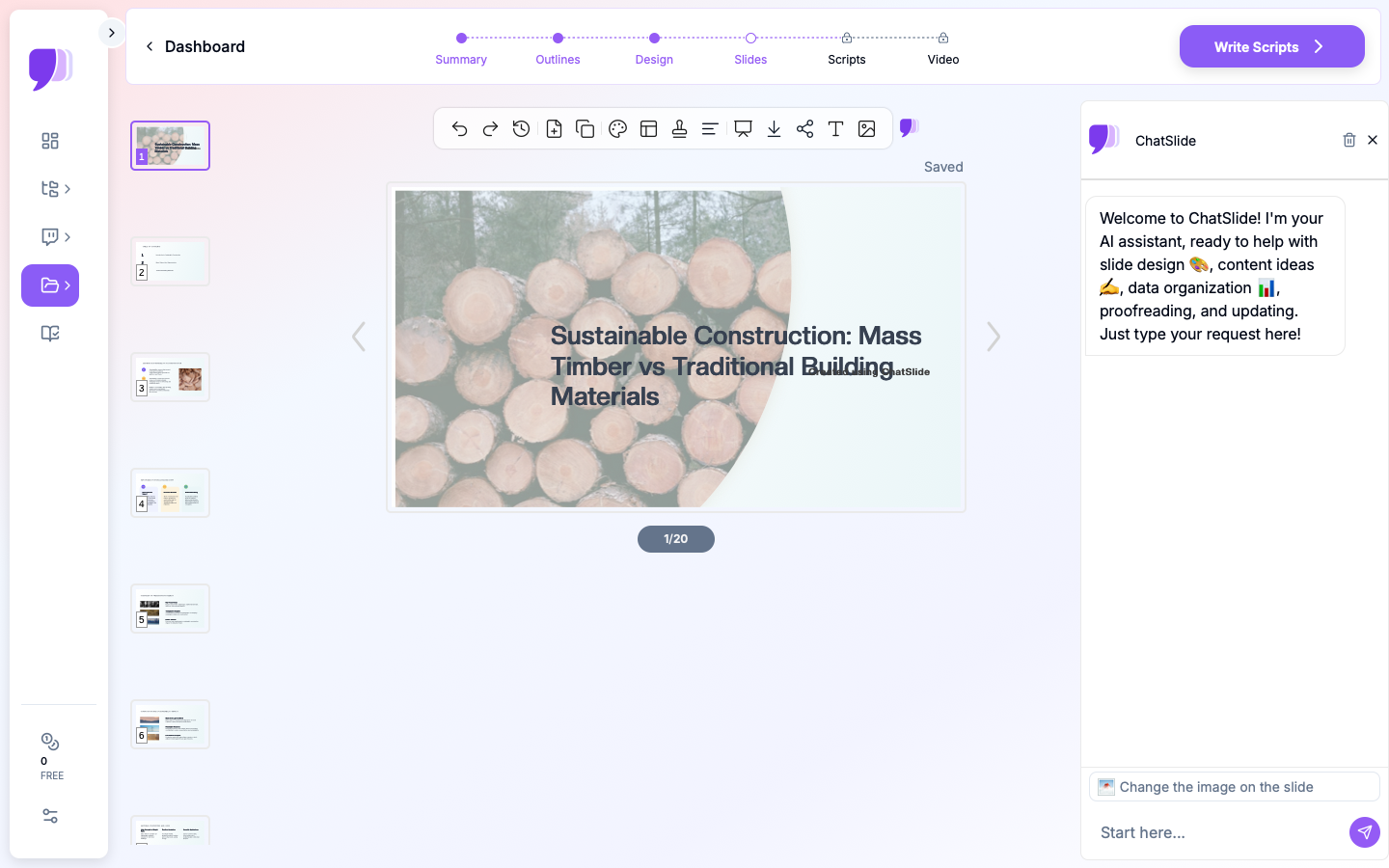

ChatSlide produces complete slides with appropriate layouts for each content type. Data comparison sections get chart-ready layouts. Case study sections get image-text combinations. Summary sections get clean, scannable formats.
For construction research specifically, the generated slides handle technical content well: material property comparisons, cost breakdown charts, and environmental metrics are presented with professional design without requiring manual layout work.
Step 4: Add Project Images and Diagrams
Visual evidence is critical in construction presentations. ChatSlide's image feature finds relevant stock photography for each slide: construction sites, material samples, building facades, and architectural details.
For your specific project, you can swap these stock images with your own site photos, CAD renderings, or structural diagrams after export. The AI-placed images give you properly positioned placeholders that maintain the slide's design balance.
Step 5: Export and Present
Export your deck as PowerPoint for further customization with your firm's branding, or share it directly via a presentation link. PowerPoint export is particularly useful for construction teams that need to add proprietary data, project-specific photos, or detailed engineering drawings.
Tips for Construction Research Presentations
Lead with the "so what." Engineers love methodology, but your audience wants to know why your findings matter first. Start with the conclusion or recommendation, then walk backwards through the evidence. A slide titled "Mass Timber Reduces Project Carbon by 40%" is more engaging than "Methodology for Carbon Lifecycle Assessment."
Use consistent units and scales. When comparing materials, make sure all cost figures use the same baseline (per square foot, per unit, per project), all environmental metrics use the same scope, and all timeline projections cover the same period. Inconsistent scales undermine credibility.
Include regulatory context. Building codes and standards are essential context for any construction material recommendation. A brief section on relevant codes (IBC, Eurocode, local amendments) shows your audience that your analysis accounts for real-world compliance requirements.
Prepare for the skeptics. Construction is a conservative industry. If you are presenting innovative materials or methods, include a risks and limitations slide. Acknowledging challenges builds credibility and prepares you for tough questions.
Keep data slides focused. One chart per slide, one message per chart. A slide with four overlapping graphs is harder to read than four focused slides. Your audience will retain more information from clean, single-point data slides.
Common Presentation Formats for Construction
The Research Summary distills a longer study into 15 to 20 slides covering motivation, methodology, key findings, and recommendations. This format works for conferences, department meetings, and client briefings.
The Project Proposal frames your engineering analysis as a business case. It opens with the opportunity, presents your technical approach, addresses risk, and closes with timeline and budget estimates. This is the format developers and investors expect.
The Comparative Analysis structures your entire deck around a head-to-head evaluation. Clear criteria, consistent scoring, and a final recommendation matrix help decision-makers choose between options with confidence.
The Progress Report is template-driven: project status, milestone tracking, budget variance, upcoming decisions, and action items. AI-generated structures save time on recurring monthly or quarterly updates.
From Research to Presentation in Minutes
Construction research generates enormous amounts of data. The bottleneck is rarely the analysis itself but rather the communication of findings to diverse audiences. AI presentation tools eliminate the formatting barrier, letting you go from completed research to polished deck in a fraction of the time.
ChatSlide handles the structural and visual design so you can focus on what you do best: the engineering analysis, material evaluation, and project management that drives the construction industry forward.
Get Started
Ready to present your construction research? Visit ChatSlide to create a professional engineering presentation in minutes. Upload your research documents or start from a topic, and let AI transform your technical findings into slides that communicate clearly.
Whether you are presenting at a construction conference, proposing a sustainable building project, or updating stakeholders on project progress, ChatSlide gives you professional presentations without the formatting headache.
Try ChatSlide free and build your next construction presentation today.