
Quick Answer: ChatSlide is an AI presentation maker used by food safety trainers, QA managers, and certification bodies to turn a standard, an SOP, or a course chapter into a finished training deck in under two minutes. Upload the regulation PDF or type the module topic, and it drafts structured slides with speaker notes, imagery, and knowledge-check questions — then exports to PowerPoint, PDF, or a narrated video for online learners. Free to start, no credit card.
The Food Safety Training Problem
Food safety training is chapter work. A certification course is not one deck, it is fifteen: prerequisite programs, hazard analysis, critical control points, monitoring and verification, corrective actions, documentation and traceability, internal audits, recalls. Every chapter has to be built, every chapter has to be defensible against the standard it maps to, and every chapter has to be rebuilt when the standard changes.
The people building these decks are QA managers, lead auditors, and training providers, not designers. They already own the content: the regulation text, the SOP binder, the audit checklist, the chapter notes from the last revision. What eats the week is the conversion — turning twelve pages of regulatory language into twenty slides a food handler on a production floor will actually absorb, and then doing it again for the next chapter.
Generic slide templates make it worse. They have no concept of a critical limit, a corrective action, or a verification record, so you spend the time formatting instead of teaching.

This guide covers food safety and food industry training specifically — HACCP, GMP and sanitation, allergen control, and auditor certification courses. For general workplace safety and OSHA topics, our safety training guide is the closer fit, and our compliance training guide covers regulatory training programs more broadly.
What Makes ChatSlide Powerful for Food Safety Training
Three Input Modes That Match How Course Chapters Actually Start
Food safety content is never invented from scratch — it derives from a standard. ChatSlide takes it three ways, and they combine:
- File upload — the regulation PDF, your HACCP plan, an SOP, a sanitation schedule, a scanned audit checklist, or the chapter deck the previous trainer left behind. Scanned pages and photographed documents are read with OCR, which matters when your SSOP binder only exists as paper.
- Web and video URLs — link a published regulatory page, a guidance document, or a recorded training session, and ChatSlide extracts the content.
- Text prompt — "Chapter 4: allergen control program for a ready-to-eat facility, for food handler certification" is enough for a full first draft.
Outline-First, Because Chapter Sequence Is the Curriculum
ChatSlide drafts the outline before it renders any slides. For a certification course this is the right altitude to work at: you check that hazard analysis comes before critical limits, that monitoring precedes verification, and that the chapter maps to the standard — all while it is still a list. Reordering an outline takes a minute. Reordering twenty finished slides takes an afternoon.
Speaker Notes for Trainers Who Did Not Write the Deck
Every slide gets drafted speaker notes. In food safety training this is often the deliverable that matters most, because the person delivering the module in a plant at 6am is rarely the person who built it. The notes give a shift supervisor the explanation, the example, and the emphasis without requiring them to reverse-engineer your intent from four bullet points.
Narrated Video Export for Remote and Multi-Site Teams
The same deck exports as a narrated video with an AI voice, and optionally an avatar presenter. For a processor with three plants and rotating shifts, this is how a chapter gets delivered consistently: one recorded module, watched on any schedule, instead of eight live sessions with eight different emphases.
Consistent Structure Across an Entire Course
When you are building a fifteen-chapter certification program, consistency is credibility. Generating each chapter from the same tool with the same template means Chapter 12 looks like Chapter 2 — same title treatment, same learning-objective slide, same summary pattern — without anyone maintaining a style guide.
Multilingual Output for Production Floors
Food safety training frequently has to run in more than one language, because the production floor does. ChatSlide generates in the target language directly rather than translating an English deck after the fact, so a Spanish sanitation module reads as if it was written in Spanish. That covers the common gap where the English deck is polished and the translated one is a spreadsheet of strings.
Editing Tools That Fix a Deck Without Rebuilding It
Standards get revised. Rather than regenerating the module, you can rewrite a single slide, shorten dense regulatory text into floor-readable language, split an overloaded slide, change the layout, or swap imagery — slide by slide, keeping everything you already approved.
How ChatSlide Builds Your Food Safety Training Deck
Step 1: Upload the Standard, the SOP, or the Chapter Notes
Drop in whatever you already have — the regulatory text, the HACCP plan, the audit checklist, last year's chapter deck. You can combine several sources in one project, which is normal here: a chapter usually pulls from the standard plus your own facility procedures.
Step 2: Set the Audience
Tell it who is in the room. "Food handlers on a production line" and "lead auditor certification candidates" produce genuinely different decks from the same source material — the first gets plain language and visual cues, the second gets clause references and verification logic.
Step 3: Review and Reorder the Outline
Check the chapter structure against the standard before generating. This is where you confirm nothing required is missing and nothing optional is padding the module.
Step 4: Generate, Refine, and Export
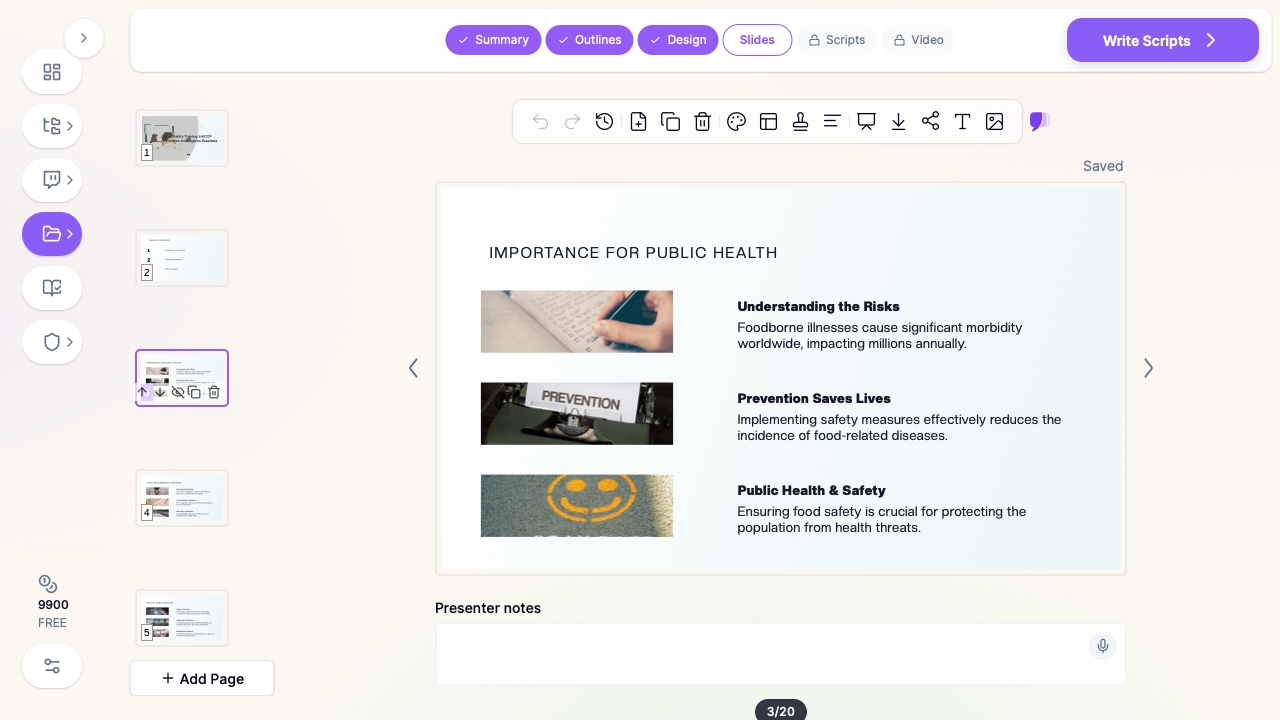
Slides render with imagery and drafted speaker notes. Refine individual slides, then export to PowerPoint for your LMS, PDF for a handout, or a narrated video for asynchronous delivery.
Use Cases for Food Safety and Quality Teams
1. HACCP Certification Course Chapters
The challenge: A full HACCP course is a dozen-plus modules, each mapping to a specific principle, and each needing to survive scrutiny from a certifying body.
How ChatSlide helps: Build each chapter from the principle text plus your worked examples, with a consistent structure across the whole course. Chapter revisions regenerate in minutes when guidance updates.
Time saved: Roughly a day per chapter, most of it formatting and re-typing.
2. Food Handler and Onboarding Training
The challenge: New hires need hygiene, cross-contamination, temperature control, and personal practice training on day one, in whatever language they speak.
How ChatSlide helps: Generate a short, visual, plain-language module and export it as a narrated video so onboarding does not depend on a trainer being available that morning.
Time saved: A recurring half-day per intake cycle.
3. Allergen Awareness and Label Control
The challenge: Allergen training is high-stakes and specific to your facility's actual product mix and changeover procedures.
How ChatSlide helps: Feed in your allergen matrix and changeover SOP and get a module built around your real products rather than a generic template's examples.
Time saved: Three to four hours per revision.
4. Internal Audit and Documentation Training
The challenge: Teaching traceability, record-keeping, and internal audit technique means teaching a process, not a fact set — and it usually needs worked examples from real records.
How ChatSlide helps: Turn your audit checklist and record templates into a walkthrough deck with speaker notes explaining what an auditor is actually looking for at each step. Pairs naturally with quality improvement work when audit findings feed corrective action cycles.
Time saved: Half a day per audit module.
5. Supplier and Import Compliance Briefings
The challenge: Supplier verification programs require briefing both internal buyers and external suppliers, often on short notice and in several languages.
How ChatSlide helps: Generate a supplier-facing briefing deck from your verification procedure, then produce the same module in the supplier's language without rebuilding it.
Time saved: Two to three hours per supplier program.
6. Food Safety Training for Multi-Site Organizations
The challenge: A processor, restaurant group, or contract caterer running many sites needs every location trained on the same content, with records to prove it.
How ChatSlide helps: Build the module centrally, export as video for consistent delivery, and distribute one canonical version instead of letting each site drift into its own edit.
Time saved: The entire cost of reconciling divergent site decks at audit time.
Food Safety Training AI Tools Compared (2026)
| Capability | ChatSlide | Gamma | Tome | Beautiful.ai |
|---|---|---|---|---|
Upload regulation PDF / SOP as source | Yes | Limited | Limited | No |
OCR for scanned checklists and binders | Yes | No | No | No |
Speaker notes drafted per slide | Yes | Partial | No | No |
Narrated video export for LMS | Yes | No | No | No |
Generate natively in another language | Yes | Partial | Partial | No |
Research literature search built in | Yes | No | No | No |
PowerPoint export that keeps formatting | Yes | Partial | Partial | Yes |
Free tier | Yes | Yes | Yes | Limited |
Time Comparison: Manual vs. AI-Assisted
| Task | Manual | With ChatSlide |
|---|---|---|
Read source standard and outline the chapter | 2 hours | 15 minutes |
Draft slide content from regulatory text | 4 hours | 5 minutes |
Source and place imagery | 1.5 hours | Automatic |
Write speaker notes for the delivering trainer | 2 hours | 10 minutes (review) |
Produce a second language version | 3 hours | 10 minutes |
Record a narrated version for remote sites | 2 hours | 15 minutes |
Total per chapter | ~14.5 hours | ~55 minutes |
What a Strong Food Safety Training Module Includes
A defensible training module — the kind that holds up in an audit as evidence of competency training — generally covers:
- Why it matters, stated in consequences the audience recognizes: illness, recall, closure, job loss. Abstract risk does not change behavior on a production floor.
- The specific hazard, named and categorized: biological, chemical, physical, allergenic.
- The control, stated as an action the trainee personally performs, not as a policy the company holds.
- The limit, with the actual number. "Cook thoroughly" is not training. A temperature and a time is training.
- The monitoring step — who checks, how often, and what they record.
- The corrective action — what to do when the limit is missed, including who to tell. This is the slide most often left out and the one auditors most often probe.
- The record — which form, filled in when, kept how long.
- A knowledge check that tests recall of the limit and the corrective action, not the definition.
Structure the module so each hazard travels through that full chain. Trainees remember sequences far better than they remember lists.
Best Practices for AI-Made Food Safety Training
Do's
- Feed it your own SOPs. A module built from your facility's actual procedures beats a generic one, and it is what an auditor expects to see.
- Write the audience explicitly. "Line staff, English second language" produces materially different slides than "QA supervisors."
- Keep the real numbers. Verify every critical limit, temperature, time, and concentration against your current approved plan before delivery. AI drafts structure well; the numbers are yours to confirm.
- Version the deck against the standard revision. Put the standard version and revision date on the title slide so a stale module is visible at a glance.
- Use the video export for shift coverage. It solves the problem that live training only reaches whoever is on that day.
Don'ts
- Don't ship a regulatory citation you have not checked. Clause numbers change between revisions. Confirm them against the current standard text.
- Don't let the deck replace hands-on verification. Slides teach the procedure; competency still needs observation.
- Don't overload a floor-facing module. If a slide needs to be read twice, split it.
- Don't use stock imagery that contradicts your practice. A photo showing the wrong PPE undoes the slide it illustrates.
Food Safety Training for Teams and Organizations
For processors, restaurant groups, contract caterers, and certification bodies running training across many sites, ChatSlide Enterprise adds SSO, centralized team billing, shared brand templates so every chapter matches your course identity, and team collaboration so QA, training, and operations can work on the same module library. If your training program spans multiple facilities or you are building courses commercially, contact us to talk through deployment.
Frequently Asked Questions
Can AI build a HACCP training module from the standard text?
Yes. Upload the standard or your HACCP plan and specify the chapter and audience. ChatSlide drafts the outline first so you can confirm coverage against the principle before any slides render. Always verify critical limits and clause references against your current approved plan.
Will it handle scanned SOPs and paper checklists?
Yes. OCR reads scanned pages, photographed documents, and images, which covers the common case where the sanitation binder only exists on paper.
Can I produce the same module in Spanish or another language?
Yes. ChatSlide generates natively in the target language rather than translating an English deck afterward, so the result reads naturally to the audience rather than like a translated slide.
Does it write the speaker notes for the trainer delivering it?
Yes, per slide. This is usually the highest-value output for food safety training, because the person delivering a module on the floor is rarely the person who built it.
Can I turn the module into a video for online training?
Yes. The deck exports as a narrated video with an AI voice and an optional avatar presenter, which is how most teams handle shift coverage and multi-site consistency.
Is the output audit-ready?
The deck is a training material, not a compliance record. It gives you consistent, well-structured content and an exportable artifact to file as evidence of training delivered — but the accuracy of every limit, citation, and procedure against your approved plan remains your responsibility to verify.
Is it free?
Yes, there is a free tier with no credit card required. Paid plans add higher generation limits, video export capacity, and team features.
Get Started
Build your next food safety training chapter with ChatSlide. Upload the standard, name your audience, and get a structured module with speaker notes in under two minutes.
Make your food safety training deck with ChatSlide — free to start, no credit card required.