
Quick Answer: ChatSlide is the AI presentation maker for public health educators, community health workers, health promotion coordinators, and MPH students. Trusted by professionals at 750+ universities and health organizations, it turns a topic, a report, or a PDF into a structured, visually clear deck in under two minutes — with PubMed and Google Scholar research search, real data charts from your surveillance numbers, plain-language editing, and speaker notes. Free to start, no card required, and you can export to PowerPoint, Google Slides, or PDF.
The Public Health Communication Problem
Public health work lives or dies on communication. A community health worker has fifteen minutes at a town hall to explain why a vaping prevention program matters. A health promotion coordinator needs a deck for a county grant review that shows the burden, the intervention, and the projected outcomes. An MPH student has to present an epidemiology project to faculty who will judge whether the data actually supports the conclusion.
The audience changes constantly — school boards, funders, clinicians, parents, city councils, the general public — and each one needs the same evidence pitched at a different altitude. Building those decks from scratch, every time, eats the hours that should go into the actual program. Most teams end up recycling a stale template or skipping the visuals entirely, which is exactly when a prevention message stops landing.
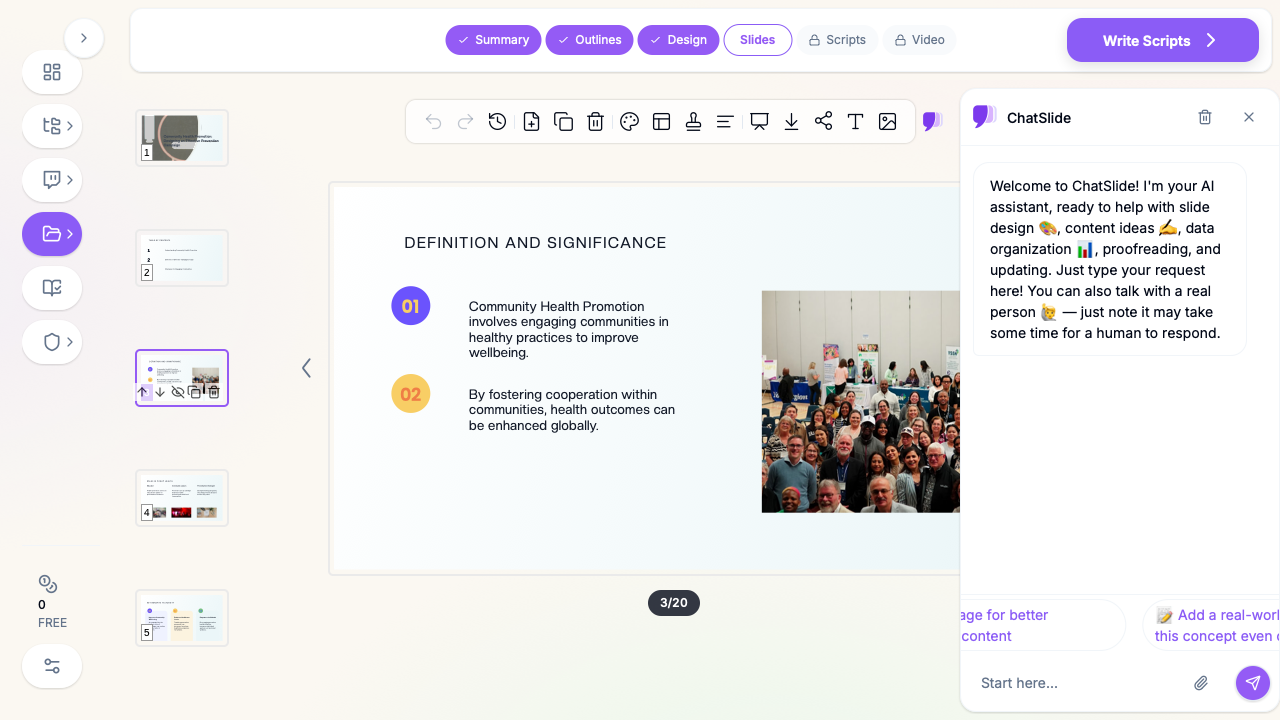
AI presentation tools change the math. Instead of fighting the slide design, you start from a structured draft that already has the right sections — burden, determinants, intervention, evaluation — and spend your time refining the message for the audience in front of you.
What Makes ChatSlide Powerful for Public Health
Research Database Search
ChatSlide's Research tab connects to PubMed, Google Scholar, and ClinicalTrials.gov directly inside the editor. Search by keyword, PMID, or DOI; the AI reads abstracts and pulls key epidemiological findings and guideline recommendations into your slides with citations — so a prevention-campaign deck rests on real evidence, not a half-remembered statistic.
Real Data Charts
Public health is a data discipline. Drop in your surveillance numbers, survey results, or program metrics and ChatSlide builds clean bar, line, and comparison charts — incidence trends, screening rates, before-and-after outcomes — instead of leaving you to wrestle with a spreadsheet chart wizard.
3 Input Modes
Start from a topic prompt, paste your own text, or upload a source document — a county health assessment PDF, a grant report, a Word brief. ChatSlide reads it and structures the deck around it, which is faster than copying paragraphs into a blank template.
OCR and Document Import
Scanned reports, printed fact sheets, and image-based PDFs are still readable — ChatSlide extracts the text so even legacy materials become slide-ready.
Plain-Language Editing
Public health communication has to clear health-literacy bars. ChatSlide's editing tools rewrite jargon into plain language, shorten dense bullets, and adjust reading level — turning "social determinants of health morbidity gradients" into something a school board will actually absorb.
Speaker Notes
Generate speaker notes for every slide so a volunteer presenter, a community partner, or a nervous student can deliver the talk consistently — useful when the same prevention deck gets handed to ten different people.
How ChatSlide Builds Your Public Health Deck
- Start with your input. Enter a specific topic ("Designing a Youth Vaping Prevention Campaign for Rural Schools"), paste your text, or upload your assessment report or grant draft.
- Pick the scenario and audience. Choose an Education or Conference scenario and describe who you're presenting to — "school board members and parents," "grant reviewers," "MPH faculty," "community health volunteers."
- Review and simplify the outline. ChatSlide generates a section-by-section structure. Reorder it to match the public health story — burden → determinants → intervention → evaluation → call to action — and rename headings in audience-appropriate language.
- Generate, add evidence, and export. Produce the full deck, pull citations from the Research tab, add your data charts, then export to PowerPoint, Google Slides, or PDF for printing as a handout.
Use Cases for Public Health Professionals
Prevention campaign pitches. A tobacco and vaping prevention initiative needs buy-in from a school board before it can launch. ChatSlide turns the program plan into a deck that shows the local burden, the evidence base, and the rollout plan. Time saved: a half-day of slide assembly down to under an hour.
Community health education. Health awareness sessions — diabetes prevention, elder health, maternal health, nutrition — need approachable visuals for non-clinical audiences. Generate the deck, simplify the language, add a diagram, and you have a session-ready talk.
Grant and funder reviews. Funders want the problem, the intervention logic, the budget, and the evaluation plan. A structured deck with real charts makes the case far better than a dense narrative report.
MPH and public health coursework. Students presenting epidemiology projects, program evaluations, or policy analyses get a structured starting point with research citations — then refine the analysis themselves.
Public health nursing and field staff. Community health nurses and outreach workers preparing in-services or training sessions can build consistent, branded decks with speaker notes the whole team can deliver.
Health departments and large organizations. County and state health departments, hospital community-benefit teams, NGOs, and managed-care organizations produce hundreds of decks a year across many programs. ChatSlide keeps them on one branded template, lets teams collaborate on shared projects, and — on the Enterprise plan — adds SSO, centralized billing, and HIPAA-compliant deployment so an entire department can standardize on it.
Public Health Presentation AI Tools Compared (2026)
| Feature | ChatSlide | Gamma | Tome | Beautiful.ai |
|---|---|---|---|---|
PubMed / Scholar research search | Yes | No | No | No |
Real data charts from your numbers | Yes | Limited | Limited | Yes |
Document / PDF / OCR import | Yes | Limited | Limited | No |
Plain-language rewrite tools | Yes | Limited | No | No |
Speaker notes generation | Yes | Limited | Limited | No |
PowerPoint + Google Slides + PDF export | Yes | Limited | Limited | Limited |
Free tier | Yes | Yes | Yes | Limited |
Time Comparison: Manual vs. AI-Assisted
| Task | Manual | With ChatSlide |
|---|---|---|
Outline and structure | 1–2 hours | 2 minutes |
Finding and citing evidence | 2–3 hours | 15 minutes |
Building data charts | 1 hour | 5 minutes |
Slide design and layout | 2–3 hours | included |
Simplifying for the audience | 1 hour | 15 minutes |
Total | 7–10 hours | under 45 minutes |
Direct Research Database Access
ChatSlide's Research tab connects to the databases public health professionals rely on:
- PubMed: Search by keyword, PMID, or DOI. Find the landmark trials, recent publications, and clinical guidelines relevant to your case. The AI reads abstracts and incorporates key findings into your slides with citations.
- Google Scholar: When your topic spans disciplines — say, the intersection of genetics and oncology — Scholar captures the broader academic literature that PubMed alone might miss.
- Clinical Trials (NCT): Presenting on a treatment where pivotal trials are ongoing? Search by NCT number or condition to pull trial design, endpoints, and status into your slides.

What a Strong Public Health Presentation Includes
The burden, quantified. Lead with the problem in numbers your audience can feel — local incidence, affected population, cost. Specific beats abstract: "1 in 5 high schoolers in our county vape" lands harder than "vaping is a growing concern."
Determinants, not just outcomes. Public health audiences expect you to connect outcomes to upstream causes — the social, behavioral, and environmental determinants. A deck that stops at "rates are high" misses the part that justifies the intervention.
An evidence-based intervention. Tie your proposed program to the literature. This is where the Research tab earns its keep — cite the trials and guidelines that show the approach works.
An evaluation plan. Funders and faculty both want to know how you'll measure success. Process measures, outcome measures, and a realistic timeline turn a pitch into a credible plan.
A clear call to action. End by telling the audience exactly what you're asking for — approval, funding, participation, a policy change — and what happens next.
Best Practices
Do:
- Match the reading level to the audience; simplify ruthlessly for community and lay audiences.
- Use one idea per slide and let charts carry the data.
- Cite your evidence visibly — it builds trust with funders and reviewers.
- Localize the statistics; national numbers are weaker than your own community's.
Don't:
- Bury the ask under twenty slides of background.
- Paste raw data tables when a chart would communicate faster.
- Use fear-only messaging; pair the problem with an actionable path.
- Put any identifiable individual's health information into slides or uploads.
A note on data and privacy: ChatSlide's standard plans are not a HIPAA-covered service — keep protected health information (PHI) out of slide content, prompts, and uploads, and present surveillance and program data in aggregate. For health departments, hospital systems, and clinics that need a Business Associate Agreement, our Enterprise plan offers HIPAA-compliant deployment options — contact us to discuss BAA terms, SSO, and private-cloud or on-prem hosting.
Frequently Asked Questions
Is ChatSlide free for public health presentations? Yes. You can build and export presentations on the free tier; signing in removes the watermark. No credit card is required to start.
Can it cite real public health research? Yes. The Research tab searches PubMed, Google Scholar, and ClinicalTrials.gov, and the AI incorporates findings into your slides with citations.
Can I turn my county health report or grant draft into slides? Yes. Upload a PDF, Word document, or paste text and ChatSlide structures a deck around it, including image-based PDFs via OCR.
Can it make charts from my surveillance or survey data? Yes. Provide your numbers and ChatSlide builds clean trend, comparison, and outcome charts.
Will it work for a non-technical community audience? Yes. The plain-language editing tools rewrite jargon and shorten dense slides so the message clears health-literacy barriers.
What formats can I export to? PowerPoint (PPTX), Google Slides, and PDF — so one deck works as a presentation and a printed handout.
Is this different from a patient education tool? Yes. For one-on-one, clinical, single-disease materials aimed at individual patients and caregivers, see our patient education presentation guide. This guide covers population-level public health, prevention, and health promotion.
ChatSlide for Health Departments and Organizations
Individual practitioners can start free, but public health rarely runs on individuals — it runs on departments, coalitions, and health systems. For organizations standardizing how their teams communicate, the Enterprise plan adds the controls that procurement and compliance teams ask for:
- HIPAA-compliant deployment with a Business Associate Agreement (BAA), plus private-cloud or on-prem hosting options.
- Single sign-on (SSO) and centralized user and billing management across programs and field offices.
- Shared brand templates so every grant deck, board briefing, and community session matches your organization's identity.
- Team collaboration on shared projects, so epidemiologists, communications staff, and program leads can build one deck together.
If your health department, hospital system, or NGO wants to roll ChatSlide out across teams, contact us to discuss Enterprise terms.
Get Started
Public health messages only work when they reach people clearly. With ChatSlide, you can turn a topic, a report, or a dataset into a structured, evidence-backed presentation in minutes — then refine it for the school board, the funder, or the faculty panel in front of you.
Make your public health presentation with ChatSlide at chatslide.ai — free for individuals, with Enterprise plans for departments and health systems that need SSO, a BAA, and org-wide brand control.