
Quick Answer: ChatSlide is the AI presentation maker for veterinary educators, shelter medicine teams, clinic managers, and veterinary technicians who need clear training decks fast. Used by 260,000+ users across 750+ universities, it turns a topic, procedure outline, source document, or old slide deck into structured veterinary slides with relevant visuals, research import, speaker notes, and PowerPoint export. Free to start, no card required.
The Veterinary Training Slide Problem
Veterinary presentations often sit between medicine, operations, and public communication. A shelter team may need a spay and neuter clinic training deck for intake, instrument cleaning, transport, discharge, and volunteer roles. A veterinary technician instructor may need a lecture on restraint, anesthesia monitoring, wound care, or client education. A veterinary faculty candidate may need a research and teaching talk for an equine surgery position.
Those are not generic business slides. The deck has to show the workflow, define the clinical risk points, give staff enough context to act consistently, and stay readable for a mixed audience. The same training may be delivered to veterinarians, technicians, front-desk staff, volunteers, and community partners.
Building that manually usually means stitching together old SOPs, PDF handouts, procedure photos, textbook diagrams, and a few hurried speaker notes. The result can be accurate but hard to teach. ChatSlide gives veterinary teams a faster first draft: outline the topic, generate the training structure, add visuals, then refine the clinical and operational details before presenting.
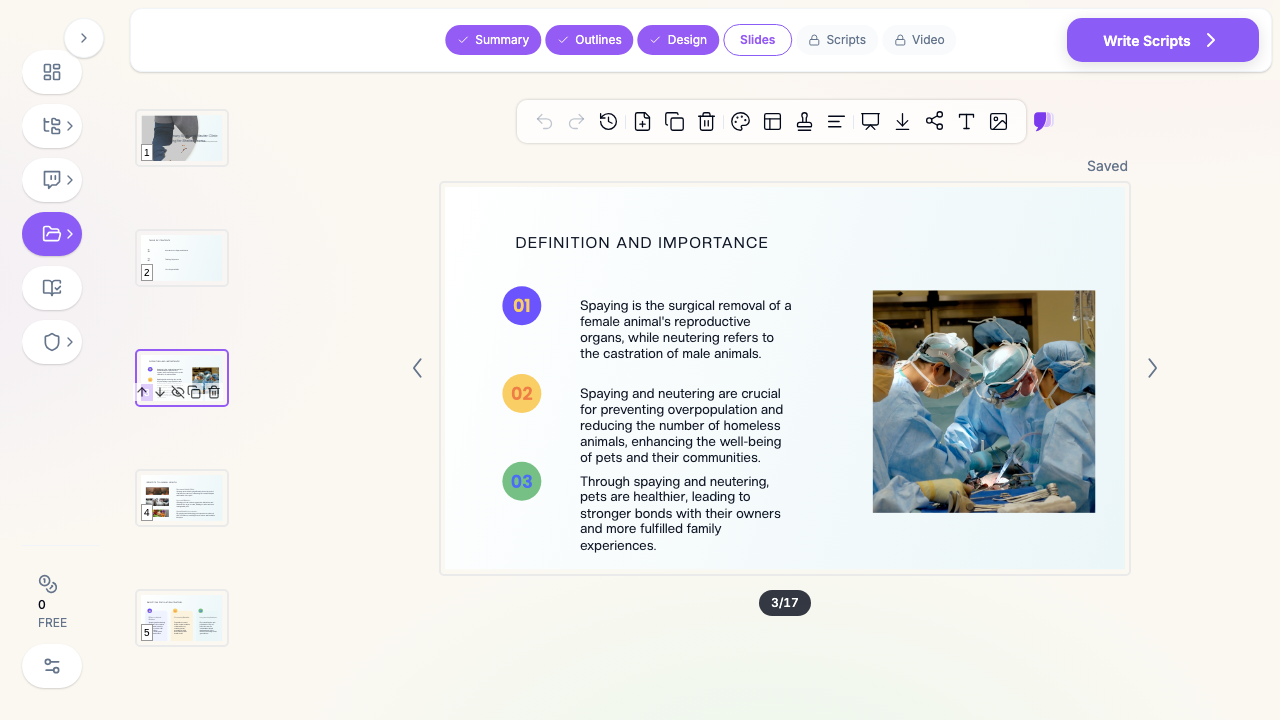
This page is for veterinary presentation maker and shelter medicine training intent. If your topic is human healthcare education, see the AI medical presentation maker. If your focus is public prevention campaigns, see the public health presentation guide.
What Makes ChatSlide Powerful for Veterinary Decks
1. Start from a topic, document, or existing deck
Veterinary training material rarely starts as a clean brief. You might have a clinic SOP, a volunteer manual, a CE outline, a research abstract, or a half-finished PowerPoint. ChatSlide can start from a prompt, pasted notes, PDFs, Word documents, or an existing slide file, then propose a teaching-ready outline you can edit.
2. Workflow-first outlines
Clinic training has to follow the work. A useful spay and neuter deck moves from check-in to pre-op preparation, anesthesia and monitoring, sterile field expectations, recovery, discharge, and escalation. A technician lecture may need anatomy, indications, setup, procedure, complications, and documentation. ChatSlide gives you that sequence before you spend time polishing design.
3. Visuals that match the setting
Veterinary presentations need procedure images, clinic workflow visuals, equipment photos, and simple diagrams. ChatSlide adds relevant image slots so the deck does not collapse into walls of text. You can replace stock visuals with your own licensed or de-identified clinic photos when needed.
4. Speaker notes for consistent delivery
Shelter and clinic trainings are often repeated by different people. Speaker notes help a volunteer coordinator, lead technician, or relief instructor deliver the same message without memorizing every detail. They are also useful for CE decks where the slide should stay clean but the presenter needs nuance.
5. Research support for clinical topics
For veterinary CE, academic talks, shelter medicine protocols, and comparative medicine topics, the evidence matters. ChatSlide's Research tab helps you search academic sources, bring abstracts into the workspace, and convert findings into cited teaching points.
6. PowerPoint export for clinics and classrooms
Many veterinary schools, shelters, and clinics still run training from PowerPoint. ChatSlide lets you draft in the browser, then export for the lecture hall, staff meeting, or LMS upload.
How ChatSlide Builds Your Veterinary Presentation
- Name the use case clearly. Use a prompt like "spay and neuter clinic volunteer training for shelter staff" or "equine soft tissue surgery research job talk for a veterinary faculty interview."
- Define the audience. A DVM CE audience needs more evidence and differential reasoning. Volunteers need role clarity, safety points, and plain-language instructions. Technician students need anatomy, monitoring, and documentation.
- Review the outline. Move sections until the deck follows the real workflow. For clinical lectures, keep mechanism and decision points together. For operations training, put handoffs, escalation, and quality checks where they happen.
- Generate slides and refine. Add your own SOP details, de-identified images, checklists, and local policy language. Use speaker notes for the parts that should be said but not crowded onto the slide.
- Export and reuse. Save the deck as PowerPoint or PDF, then keep the ChatSlide version as the living source for the next clinic, semester, or CE session.
Prompt Examples for Better Veterinary Slides
The fastest way to improve the output is to give ChatSlide the real teaching context. These prompts are intentionally specific:
- "Spay and neuter clinic volunteer orientation for a nonprofit shelter, covering check-in, patient flow, sterile boundaries, recovery room support, and discharge handoff."
- "Veterinary technician lecture on anesthesia monitoring basics for first-year students, including vitals, equipment checks, common warning signs, documentation, and when to call the veterinarian."
- "Shelter medicine CE presentation on reducing postoperative complications after high-volume spay and neuter clinics, with quality-improvement checkpoints and team communication."
- "Equine soft tissue surgery faculty job talk that summarizes research direction, teaching philosophy, clinical service vision, and collaboration opportunities."
- "Client education deck for post-operative home care after routine surgery, written in plain language and designed for a waiting-room screen."
Avoid vague prompts like "make a veterinary presentation." They produce broad decks that look polished but miss the workflow. The more you name the role, setting, and outcome, the closer the first draft gets to something a clinic can actually review.
Use Cases for Veterinary Teams
Shelter clinic onboarding. A high-volume clinic can turn role descriptions, intake procedures, cleaning steps, and discharge expectations into a consistent staff and volunteer deck. This is useful when new people need the same training every month.
Spay and neuter workflow training. Build modules for check-in, pre-op flow, instrument cleaning, surgical table transport, recovery monitoring, and discharge communication. Each module can stand alone or combine into a full training series.
Veterinary technician education. Instructors can create lectures on anesthesia monitoring, surgical assisting, restraint, infection control, lab handling, or client education, then adapt the same deck for entry-level or advanced learners.
Shelter medicine and community outreach. Teams explaining vaccination clinics, parasite prevention, responsible ownership, intake protocols, or disease-control practices can create clearer public-facing decks without starting from a blank template.
Academic and job-talk presentations. Veterinary residents, fellows, and faculty candidates can turn research profiles, case series, and teaching philosophies into a structured talk for interview committees or conference sessions.
Veterinary hospitals and shelter networks. Larger organizations can standardize training across locations with shared brand templates, team collaboration, SSO, and centralized billing. For privacy-sensitive deployments, contact us to discuss Enterprise options.
Suggested Module Structure for Shelter Clinics
For a shelter or nonprofit clinic, a single "training deck" can become too large. A better approach is to split the curriculum into reusable modules:
Module 1: Orientation and scope. Who the clinic serves, why high-volume workflows matter, who is allowed to perform each task, and what volunteers should never do without staff approval.
Module 2: Intake and identification. Check-in sequence, cage cards, consent confirmation, patient matching, fasting reminders, and what to do when paperwork and patient information disagree.
Module 3: Pre-op preparation. Traffic flow, handoff language, equipment readiness, shaving or prep boundaries, and how to keep the staging area calm.
Module 4: Surgical support. Sterile-field awareness, instrument handling expectations, table turnover, communication with the veterinarian and technicians, and safety reminders.
Module 5: Recovery and discharge. Warming, observation, escalation signs, discharge instructions, medication handoff, and client questions that should go back to clinical staff.
Module 6: Cleaning and quality checks. Instrument cleaning, laundry, surface disinfection, waste handling, missing-item checks, and end-of-day reset.
ChatSlide can draft each module separately, then you can keep a common title style and insert your clinic's approved SOP details. That keeps updates manageable when one workflow changes.
Building a Veterinary CE or In-Service Deck
For a veterinary CE session or staff in-service, the strongest structure is slightly different from volunteer onboarding. The audience already understands the clinic environment, so the deck should spend less time on basic orientation and more time on decision points.
A useful CE outline usually includes:
- Why the topic matters now. Open with the problem the team is seeing: inconsistent discharge instructions, preventable recovery-room confusion, missed monitoring documentation, or a new protocol that needs adoption.
- Baseline workflow. Show the current process before teaching the updated one. This helps experienced staff see exactly what changes.
- Clinical rationale. Explain the mechanism, evidence, or risk behind the protocol so it does not feel like arbitrary paperwork.
- Role-specific actions. Separate what veterinarians, technicians, assistants, reception staff, and volunteers should do.
- Escalation rules. Make the "call someone now" criteria obvious. These slides are often the most valuable part of the deck.
- Practice scenarios. Add two or three composite cases so the team can apply the protocol before using it live.
- Follow-up metric. End with how the clinic will know whether the training worked: fewer missed fields, faster handoffs, clearer discharge calls, or fewer repeated client questions.
ChatSlide can draft that spine from a short prompt, then your team can replace examples with local policy and de-identified scenarios.
Veterinary Presentation AI Tools Compared (2026)
| Feature | ChatSlide | Gamma | Tome | Beautiful.ai |
|---|---|---|---|---|
Veterinary workflow outlines | Strong | Generic | Generic | Manual |
PDF / Word / old deck import | Yes | Limited | Limited | Limited |
Research source import | Yes | No | No | No |
Speaker notes for training | Yes | Limited | Limited | No |
Relevant procedure visuals | Yes | Mixed | Mixed | Template-driven |
PowerPoint export | Yes | Limited | Limited | Yes |
Free to start | Yes | Yes | Yes | Limited |
The practical difference is depth. Generic AI slide tools can make a clean-looking deck, but veterinary training usually needs procedure order, role clarity, and clinical caution. ChatSlide is strongest when you need the deck to teach a real process, not just summarize a topic.
Time Comparison: Manual vs. AI-Assisted
| Task | Manual | With ChatSlide |
|---|---|---|
Turn a clinic SOP into a slide outline | 45-90 min | 5-10 min |
Draft a 20-slide training deck | 3-5 hours | 15-30 min |
Add speaker notes for delivery | 60-90 min | 10-20 min |
Rework for volunteers vs. technicians | 1-2 hours | 10-20 min |
Export a reusable staff-training file | 20-30 min | 2-5 min |
These are planning estimates, not promises. The clinical review still belongs to the veterinary professional. The time saved is in structure, formatting, and first-draft creation.
Where AI Helps - and Where It Should Not
AI is useful for organizing teaching material, turning a manual into a deck, generating speaker notes, and producing a clean first design pass. It is not the authority on anesthesia protocol, drug dosing, sterile technique, scope of practice, controlled-substance handling, or regulatory compliance.
For clinical training, use ChatSlide as the drafting layer. Then have the appropriate lead review:
- the medical director for clinical accuracy and protocol language
- the lead technician for workflow reality
- the volunteer coordinator for role clarity
- the operations manager for staffing, handoff, and room-flow details
- the compliance or shelter leadership team for policy-sensitive language
That review step is not optional. It is what turns an AI-generated presentation into a reliable training asset.
Final Review Checklist
Before presenting a veterinary deck, run a short review pass:
Clinical accuracy: Are drug names, procedure names, monitoring points, and warning signs correct? Remove anything that sounds confident but does not match your protocol.
Scope of practice: Does the deck clearly distinguish licensed tasks, technician tasks, assistant tasks, and volunteer tasks? If a learner might overstep, rewrite the slide.
Local workflow: Does the order match your physical clinic, not an imaginary perfect clinic? Training fails when the slides describe a flow that staff cannot follow in the room.
Plain language: Are client-facing slides readable without medical training? Replace jargon with phrases people will actually remember at discharge.
Visual permissions: Are all clinic photos, screenshots, radiographs, or case materials approved for teaching use? When in doubt, use generic visuals or de-identified composites.
Update owner: Who is responsible for changing the deck when the SOP changes? Put that ownership in the file name, shared folder, or speaker notes so the deck does not drift.
That checklist is also useful for enterprise teams. A large hospital group or shelter network can keep one master deck, then let each location add local workflow details without changing the core message.
Direct Research Database Access
ChatSlide's Research tab connects to the databases physicians use daily:
- PubMed: Search by keyword, PMID, or DOI. Find the landmark trials, recent publications, and clinical guidelines relevant to your case. The AI reads abstracts and incorporates key findings into your slides with citations.
- Google Scholar: When your topic spans disciplines — say, the intersection of genetics and oncology — Scholar captures the broader academic literature that PubMed alone might miss.
- Clinical Trials (NCT): Presenting on a treatment where pivotal trials are ongoing? Search by NCT number or condition to pull trial design, endpoints, and status into your slides.

For veterinary topics, use the Research tab as a starting point for evidence gathering, then verify sources against veterinary-specific literature, your governing body, and local clinic protocols before teaching.
What a Strong Veterinary Presentation Includes
A clear audience. A volunteer orientation, technician lesson, DVM CE talk, and faculty job talk need different density. Name the audience in the prompt so the outline lands at the right level.
Workflow before detail. For clinic operations, the slide sequence should mirror the day: intake, preparation, procedure support, recovery, discharge, cleaning, and documentation. Put safety checks where they occur.
Role clarity. Mixed teams need to know who does what. Add slides for DVM responsibilities, technician responsibilities, assistant tasks, volunteer boundaries, and when to escalate.
Visual checkpoints. Use photos, diagrams, or simple process maps for equipment setup, instrument handling, patient movement, recovery monitoring, and discharge materials.
Policy and local review. AI can draft the structure, but your medical director, instructor, or shelter lead should review clinical accuracy, consent language, safety rules, and regulatory requirements.
Privacy discipline. Use composite examples and de-identified images. Do not upload client names, medical record numbers, addresses, or other identifiers into standard plans.
Note on patient data: ChatSlide's standard plans are not a HIPAA-covered service - keep PHI out of slide content and uploads, and veterinary teams should also keep client-identifying records out of standard slide projects. For hospital systems, shelter networks, and clinics that need a Business Associate Agreement, our Enterprise plan offers HIPAA-compliant deployment options - contact us to discuss BAA terms, SSO, and on-prem / private-cloud hosting.
Best Practices
Do start with the exact training outcome: "new volunteer can explain check-in and discharge boundaries" is better than "clinic training."
Do separate clinical judgment from task execution. Volunteers and assistants need to know what they can do, what they cannot do, and who to ask.
Do create modular decks. A 12-slide instrument-cleaning module is easier to update than one massive annual training file.
Do add speaker notes for nuance. Keep slides readable and put exceptions, examples, and policy reminders in notes.
Don't use identifiable case photos or client data unless you have the right permissions and deployment setup.
Don't let AI invent policy. Replace generic safety language with your clinic's real SOPs, drug protocols, and escalation chain.
Don't over-design clinical slides. Procedure training needs clarity first: readable labels, consistent structure, and obvious next steps.
Frequently Asked Questions
Can ChatSlide make veterinary training presentations?
Yes. ChatSlide can create veterinary training decks from a topic, SOP, PDF, Word document, or existing PowerPoint. It works well for clinic workflows, technician lectures, shelter medicine training, CE sessions, and academic talks.
Can it make spay and neuter clinic training slides?
Yes. Use a prompt that names the workflow and audience, such as "spay and neuter clinic volunteer onboarding for shelter teams." Then review the outline so it matches your actual intake, surgery, recovery, and discharge process.
Can I upload clinic SOPs?
You can upload source documents, but do not include client names, patient identifiers, or private medical records in standard plans. Use de-identified SOPs and have the final deck reviewed by the person responsible for the protocol.
Does ChatSlide replace veterinary medical review?
No. ChatSlide creates the structure, visuals, and first draft. A licensed veterinarian, veterinary educator, or clinic lead should verify medical accuracy, local policy, and scope-of-practice details before training staff.
Can I export the deck to PowerPoint?
Yes. You can export the finished presentation so it can be used in a clinic meeting, classroom, LMS, conference room, or offline training session.
Is this only for shelter medicine?
No. Shelter medicine is a strong fit because the workflows are repeatable, but the same process works for technician education, CE lectures, specialty case talks, equine job talks, client education, and hospital onboarding.
Can teams use shared templates?
Yes. Enterprise teams can standardize presentation templates, collaborate across locations, and manage billing centrally. Contact us for organization-wide training rollouts.
Can I use ChatSlide for client education?
Yes, as long as you keep the content general and de-identified. ChatSlide can help turn post-op care instructions, parasite prevention guidance, vaccination reminders, nutrition explanations, or chronic-condition education into clearer client-facing slides. Have a veterinarian review the final language before using it with clients.
Can one deck serve veterinarians, technicians, and volunteers?
Usually not without adaptation. Start with one source outline, then create audience-specific versions. Veterinarians may need evidence and clinical nuance; technicians may need monitoring and documentation detail; volunteers may need boundaries, safety rules, and handoff language.
Get Started
If you need a veterinary training deck, start with a precise prompt, generate the outline, and review it like a clinical educator before producing the full slide set.
For repeat training, save the approved version as your baseline and update only the modules that change.