
Quick Answer: If you train Medicare insurance agents — onboarding new producers, running AEP-readiness sessions, or refreshing compliance — ChatSlide turns a topic or a plan PDF into a structured training deck in minutes. It is used by 280,000+ users across 750+ universities and organizations, generates slide outlines from your CMS guidance, carrier material, or a prompt, adds clean visuals, and exports to PowerPoint when your agency LMS or classroom needs a file. Free to start, no card required.
The Medicare Training Slide Problem
Medicare agent training has a brutal calendar. AHIP and carrier certifications reset every year, plan benefits change for the new contract year, and the Annual Enrollment Period (Oct 15–Dec 7) compresses most of the selling into a few weeks. The trainer's job is to get a class of agents from "I passed AHIP" to "I can run a compliant, confident enrollment appointment" before the season starts.
The decks are also unusually high-stakes. A Medicare training presentation is not just product information — it carries CMS marketing-rule compliance, Scope of Appointment requirements, the TPMO recording disclaimer, and the difference between an Annual Enrollment Period and an Open Enrollment Period that agents cannot afford to get wrong. Generic AI slide tools tend to produce confident-looking wellness copy that misses every one of those distinctions.
The manual alternative is the trainer rebuilding the same Medicare 101 deck every August from last year's file, hunting for which benefits and rules changed, and re-recreating the enrollment-period table for the third year running. The expertise is already there. The slide assembly is the tax.
What Makes ChatSlide Powerful for Medicare Training
1. Multiple input modes that match how trainers actually work
Some training decks start from a prompt like "Medicare 101 for new agents: Parts A, B, C, and D." Others start from a carrier's plan summary, a CMS marketing guidance PDF, last year's PowerPoint, or your agency's own playbook. ChatSlide handles all of those starting points, so you can rebuild from what you already have instead of from a blank slide.
2. Turn dense source documents into clean slides
Plan summaries, Star Ratings sheets, and CMS rule updates are dense. Upload the document and ChatSlide drafts slides that pull out the structure — what changed, what the agent has to disclose, what the enrollment windows are — instead of you copying it line by line.
3. Visuals that fit an agent audience
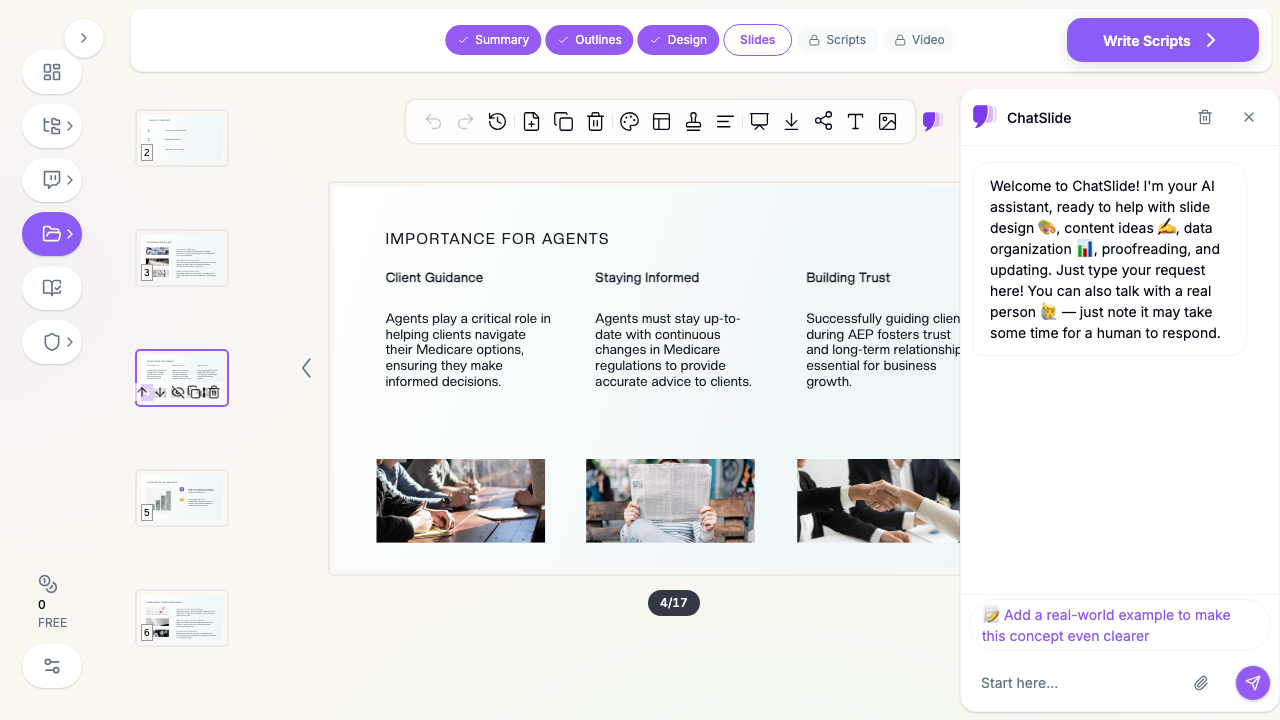
A training slide needs to look like professional sales education, not a medical brochure. ChatSlide fills the visual slots with relevant imagery you can swap for your own carrier logos, plan grids, or branded screenshots.
4. Fast outline-to-deck conversion
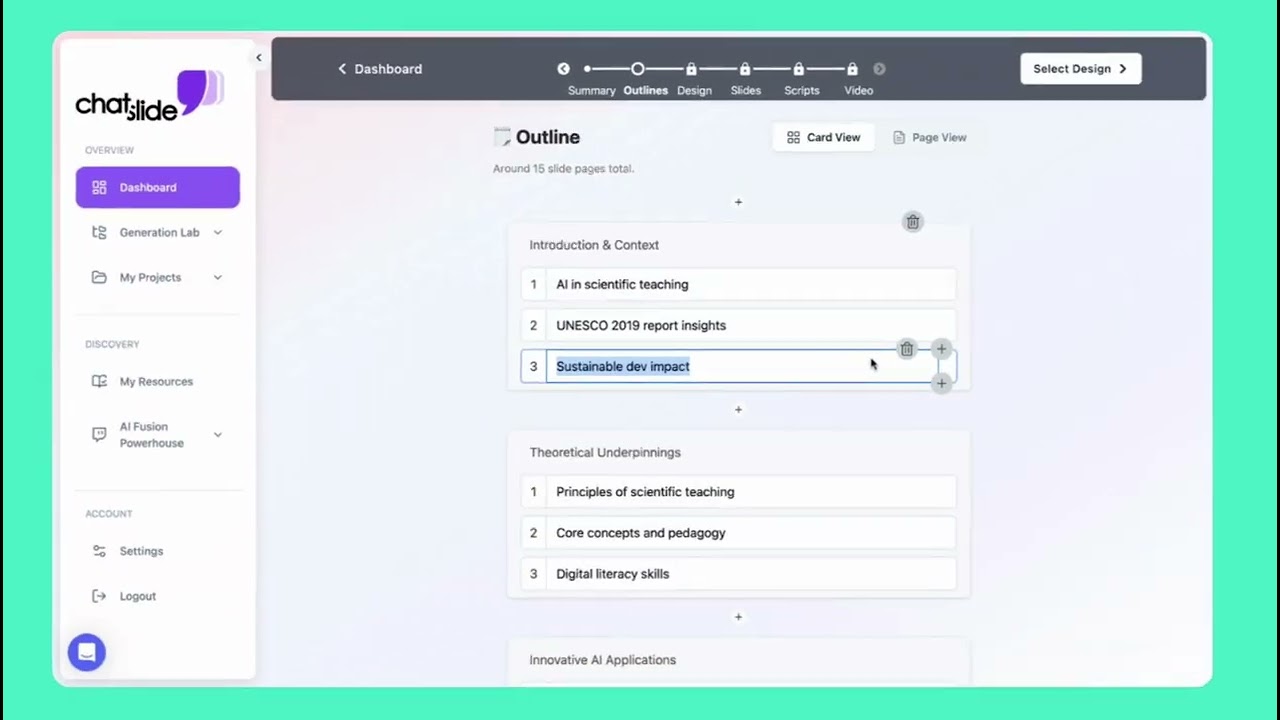
The bottleneck in training material is structure, not typing. Once the outline follows the logic of eligibility → coverage options → enrollment periods → compliance → the appointment, the rest refines quickly. ChatSlide builds that scaffold for a 20- to 40-slide course in minutes.
5. Speaker notes and AI editing tools
The same core deck has to work for a self-paced new-hire module and for a live AEP-kickoff room. ChatSlide can generate speaker notes and lets you shorten, expand, or re-level a draft without rebuilding it — useful when you re-run the class for captive agents one week and independents the next.
6. PowerPoint export for your LMS or classroom
Agencies still run training through PowerPoint files, LMS uploads, and conference-room projectors. Browser editing is great for drafting, but the handoff matters. ChatSlide exports to PPTX cleanly.
How ChatSlide Builds Your Medicare Training Deck
Step 1: Start with a precise topic
Concrete prompts produce usable decks. Instead of "Medicare training," try:
- "Medicare 101 for new agents: Original Medicare vs Medicare Advantage vs Part D vs Medigap"
- "AEP readiness: enrollment periods, Scope of Appointment, and CMS marketing rules"
- "Dual Special Needs Plans (D-SNP): eligibility, benefits, and the agent's role"
Step 2: Set the audience correctly
Audience changes the deck. A class of brand-new producers needs eligibility basics and definitions; experienced agents joining your FMO need the changes for the new plan year and your agency's specific compliance process. A captive-agent kickoff and an independent-broker briefing are different rooms.
Step 3: Review the outline before generating slides
This is where the quality jump happens. A strong Medicare training outline usually includes:
- Medicare eligibility and the parts (A, B, C, D) and Medigap
- how Medicare Advantage and Part D plans actually work
- the enrollment periods (IEP, AEP, OEP, SEP) and their rules
- Scope of Appointment and Permission to Contact
- CMS marketing guidelines and the TPMO disclaimer
- the compliant sales appointment, start to finish
- common mistakes and how agents avoid them
Fix any gaps in the outline first — it is faster than patching a weak deck later.
Step 4: Generate the deck with visuals
Once the structure is right, ChatSlide generates the slides and fills the visual slots, giving you a credible first draft you can tailor with your own carrier grids, comparison tables, and agency branding.
Step 5: Refine for the exact session
The same content becomes several decks: a new-agent onboarding module, an annual AEP-readiness refresher, a compliance-only session, or a product-specific D-SNP briefing. The core stays similar; the framing changes.
Use Cases for Agencies, FMOs, and Sales Managers
New-agent onboarding
The classic "Medicare 101" course. New producers need eligibility, the four parts, how Advantage and Part D differ from Original Medicare plus Medigap, and the vocabulary clients will use. ChatSlide gets that foundational deck built fast so you can spend training time on practice, not slide-making.
AEP-readiness kickoff
Every fall the team needs the same reset: what changed for the new plan year, the enrollment-period calendar, and the compliance refresher before the phones light up. This deck gets rebuilt annually — exactly the repetitive work AI assistance removes.
Compliance and CMS marketing training
Scope of Appointment timing, the TPMO recording disclaimer, permitted vs prohibited marketing, and documentation. A dedicated compliance session protects both the agent and the agency, and benefits from a clear, decision-oriented structure rather than a wall of regulation text.
Product and plan-specific briefings
Medicare Advantage, Part D, Medigap, and Dual Special Needs Plans each justify their own focused deck — benefits, ideal client, and how the agent positions the plan honestly.
Agency and FMO standardization
When you train agents across multiple offices or downline agencies, you need one consistent, on-brand version of the truth. That is where shared templates and organization-level controls matter more than one-off deck speed.
Medicare Training AI Tools Compared (2026)
| Tool | Best fit | Where it works well | Common limitation for Medicare training |
|---|---|---|---|
ChatSlide | Training, education, and sales-enablement decks | Topic- or PDF-to-outline workflow, source-document import, visuals, PPTX export | Still needs a trainer to verify current-year rules and benefits |
Gamma | Fast general-purpose visual decks | Lightweight brainstorming and polished broad presentations | Less tuned for compliance-heavy, structured training content |
Tome | Narrative product-style presentations | Storytelling and high-level overviews | Weaker fit for rule-driven enrollment and compliance material |
Beautiful.ai | Business-style slide assembly | Clean design patterns and executive decks | More rigid when you need detailed enrollment-period or compliance structure |
For Medicare training specifically, the real question is which tool gets you closest to an accurate, compliance-aware first draft — not which looks the most modern.
Time Comparison: Manual vs. AI-Assisted
| Task | Manual workflow | With ChatSlide |
|---|---|---|
Build the Medicare 101 outline | 45-90 minutes | a few minutes |
Draft 25-35 training slides | 3-5 hours | 10-20 minutes for first draft |
Add visuals | 30-90 minutes | included in generation flow |
Update last year's deck for new plan year | 1-2 hours of hunting | rebuild quickly from updated sources |
Prepare PPTX for the LMS | extra formatting pass | direct export |
The win is not full automation. It is cutting the annual rebuild so your time goes into the message and the role-play instead of layout.
What a Strong Medicare Training Presentation Includes
Even with AI assistance, the value comes from substance. A strong Medicare agent training deck usually includes:
A clean coverage framework. Define Original Medicare (Part A and Part B), Medicare Advantage (Part C), Part D, and Medigap, and show clearly how they fit together. Agents who can't draw this map can't advise a client.
The enrollment-period calendar — correctly. The Initial Enrollment Period, the Annual Enrollment Period (Oct 15–Dec 7), the Medicare Advantage Open Enrollment Period (Jan 1–Mar 31), and Special Enrollment Periods each have different rules about what an agent can do and when. This is the most-tested and most-misused section.
Scope of Appointment and Permission to Contact. When the SOA must be obtained, what it covers, and how it is documented. Get this wrong and the enrollment is non-compliant.
CMS marketing rules in plain language. The TPMO disclaimer, recording requirements, and the line between permitted and prohibited marketing — framed as what the agent does, not just what the regulation says.
A walk-through of the compliant appointment. From first contact to needs analysis to plan comparison to enrollment, with the compliance checkpoints in sequence.
Common mistakes. The recurring errors — mixing up AEP and OEP, skipping the SOA, overstating benefits — and how to avoid each one.
Best Practices
Do
- build the outline around decisions and compliance checkpoints, not just definitions
- use your own carrier grids, plan comparisons, and agency branding where they add value
- separate "what the rule is" from "what the agent does" so compliance is actionable
- date the deck to the plan year and re-verify benefits and rules before each season
- keep a short appendix for enrollment-period edge cases and SEP triggers
Don't
- present last year's benefits or rules without checking what changed
- bury the enrollment-period and SOA rules in a dense regulation dump
- let an AI draft state coverage specifics as fact without a trainer's review
- treat the captive-agent and independent-broker versions as identical
- assume the first draft is final — Medicare details change every year
Frequently Asked Questions
Can ChatSlide make Medicare 101 training presentations?
Yes. Medicare 101 is one of the strongest fits because the deck follows a repeatable structure: eligibility, the parts, plan types, enrollment periods, compliance, and the appointment. Always verify current-year benefits and rules before training.
Can I build an AEP-readiness deck each year?
Yes. Upload the new plan-year materials or prompt the changes, and rebuild the refresher quickly instead of editing last year's file slide by slide.
Will it cover compliance topics like Scope of Appointment and the TPMO disclaimer?
It will draft those sections if you prompt for them or upload your compliance source material. Treat AI output as a first draft and confirm it against current CMS guidance and your carrier requirements.
Can I import carrier or CMS documents?
Yes. You can start from a topic, upload source files such as plan summaries or guidance PDFs, and have ChatSlide draft slides from them.
Can I export to PowerPoint for our LMS?
Yes. ChatSlide exports to PPTX, so you can upload to your agency LMS or present from a local file.
Is this only for trainers?
No. Individual agents preparing their own study material, sales managers building team briefings, and FMOs standardizing downline training all use the same workflow.
Enterprise for Agencies and FMOs
If you train agents across multiple offices, captive teams, or downline agencies, one-off deck speed is only part of the story. Field marketing organizations and larger agencies usually need shared, on-brand training templates, centralized billing, team collaboration, and identity controls so every office teaches the same compliant version.
For organizations that need tighter governance, ChatSlide supports SSO, centralized team billing, shared brand templates, and team collaboration — contact us to discuss rolling it out across your agency or FMO.
Get Started
If you need to build a Medicare agent training deck — Medicare 101, AEP readiness, compliance, or a product-specific briefing — ChatSlide gets you to a real first draft far faster than rebuilding last year's PowerPoint from scratch.
Start with a topic or upload your plan-year materials, review the outline, add your carrier grids and agency branding, verify the current-year rules, and export when the deck is ready for your next onboarding class or AEP kickoff.